1. บทนำ
The virtavo VistaFlask 2K Security Camera is a wireless, battery-powered outdoor camera designed to enhance your home security. Featuring 2K QHD imaging, AI motion detection, starlight lens for colorful night vision, and weatherproof construction, it provides reliable surveillance in various conditions. This manual provides detailed instructions for setting up, operating, maintaining, and troubleshooting your camera.

Image: Two virtavo VistaFlask 2K security cameras, designed for outdoor use.
2. ข้อมูลด้านความปลอดภัย
- Ensure the camera is installed securely to prevent falling.
- Use only the specified charging cable and power adapter to charge the battery.
- ห้ามให้กล้องสัมผัสกับอุณหภูมิที่สูงเกินขอบเขตการใช้งาน
- Avoid disassembling or modifying the camera, as this will void the warranty and may cause damage.
- เก็บกล้องและอุปกรณ์เสริมให้พ้นมือเด็ก
3. เนื้อหาบรรจุภัณฑ์
- virtavo VistaFlask 2K Security Camera(s)
- ตัวยึดสำหรับติดตั้ง
- สายชาร์จ USB
- คู่มือการใช้งาน
- สกรูยึดและตัวล็อค
4. สินค้าหมดview
The virtavo VistaFlask camera features a compact design with essential components for optimal performance. Key elements include the lens, IR LEDs for night vision, a microphone for audio input, a speaker for two-way communication, and a motion sensor. The power switch, sync button, and charging port are located at the bottom of the camera, alongside the microSD card slot for local storage.

ภาพ: ภายใน view highlighting the battery and electronic components.

ภาพ: ด้านล่าง view of the camera with power switch, charging port, sync button, and microSD card slot.
5. คู่มือการติดตั้ง
5.1 การตั้งค่าเริ่มต้น
- ชาร์จกล้อง: Before first use, fully charge the camera using the provided USB cable. The battery lasts 1-3 months per charge depending on usage.
- ดาวน์โหลดแอป: ค้นหา 'HOME V' in your smartphone's app store (iOS or Android) and download the application.
- สร้างบัญชี: Open the 'HOME V' app and follow the on-screen instructions to register a new account or log in if you already have one.
5.2 Camera Pairing and Connection
Follow these steps to pair your virtavo VistaFlask camera with the 'HOME V' app. For a visual guide, please refer to the official installation video below.
Video: Official virtavo VistaFlask Installation Guide Setup. This video demonstrates the step-by-step process of binding the camera to the 'HOME V' app using QR codes, including powering on the camera, confirming the red light flashing, connecting to the camera's hotspot, and connecting to your home Wi-Fi network.
- เพิ่มอุปกรณ์: In the 'HOME V' app, tap the '+' icon to add a new device.
- สแกนรหัส QR: Grant camera access to the app. Scan the QR code located on the back of your virtavo VistaFlask camera.
- เปิดเครื่อง: Ensure the camera is powered on. The power switch is located at the bottom.
- Confirm Flashing Light: Confirm that the camera's red indicator light is flashing rapidly. If not, press and hold the 'Sync' button for 5-10 seconds until you hear a 'Du' sound or see rapid flashing.
- Connect to Camera Hotspot: The app will prompt you to connect to the camera's Wi-Fi hotspot (e.g., 'IPC365_AP-XXXX'). Confirm and join this network.
- Select Home Wi-Fi: Choose your home 2.4GHz Wi-Fi network from the list and enter the correct password. Note: This device only supports 2.4GHz Wi-Fi.
- ตั้งชื่อกล้องของคุณ: Once connected, name your camera for easy identification (e.g., 'Front Door', 'Living Room').
5.3 การติดตั้งทางกายภาพ
The virtavo VistaFlask camera is designed for easy installation, both indoors and outdoors. Its weatherproof design ensures durability.

Image: Easy installation on smooth surfaces like glass or tiles, no drilling required.

Image: Wireless connection for remote access.
- เลือกตำแหน่ง: Select a location with good Wi-Fi signal strength and a clear view ของพื้นที่ที่คุณต้องการติดตาม
- การติดตั้ง: Use the provided mounting bracket, screws, and anchors to securely attach the camera to a wall or other suitable surface. Ensure the camera is positioned to capture the desired field of view.
- ทนต่อสภาพอากาศ: The camera is designed to withstand various weather conditions, making it suitable for outdoor use.
6. คู่มือการใช้งาน
6.1 สด View และเสียงสองทาง
Access real-time video feed and communicate through the camera using the 'HOME V' app.
- สด View: เปิดแอปและเลือกกล้องของคุณ view ฟีดสด
- เสียงสองทาง: แตะไอคอนไมโครโฟนในระหว่างการถ่ายทอดสด view to speak through the camera's speaker, and listen through its microphone.
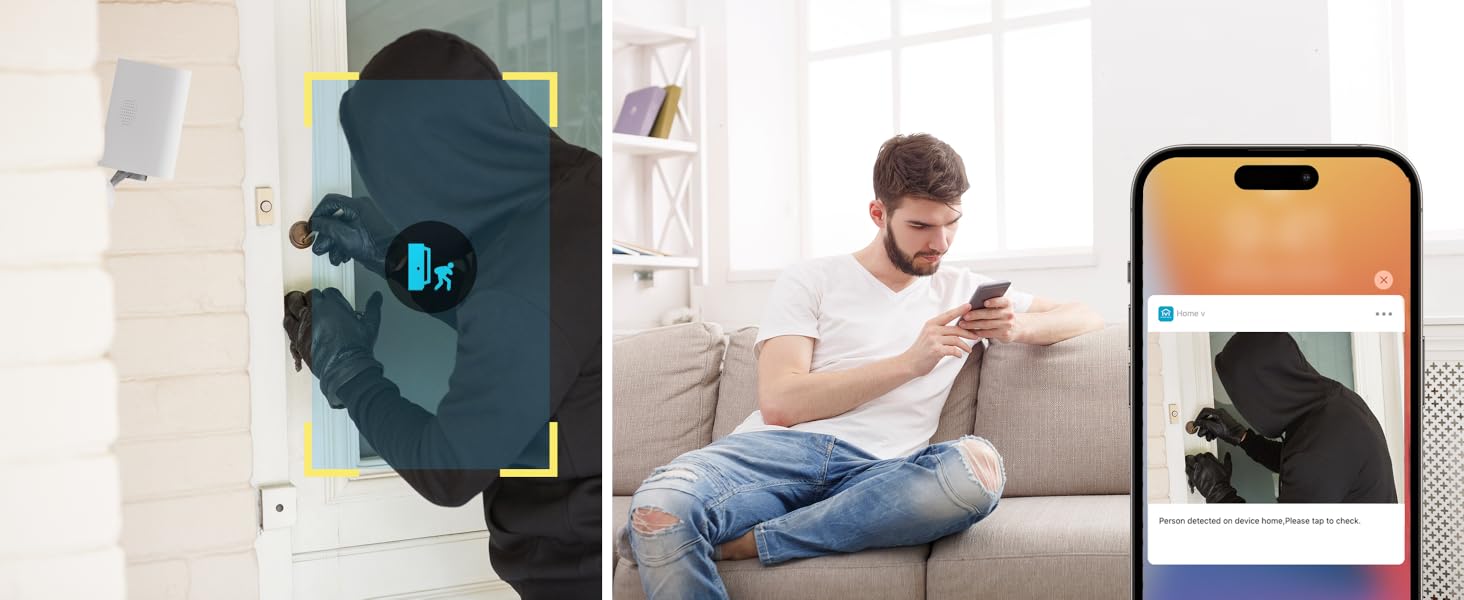
Image: Two-way audio feature for communication.
6.2 การตรวจจับการเคลื่อนไหวและการแจ้งเตือน
The camera features advanced PIR motion detection and AI capabilities to minimize false alarms.
- การตรวจจับการเคลื่อนไหว PIR: Detects motion up to 30 feet.
- การแจ้งเตือนอัจฉริยะ: รับการแจ้งเตือนทันทีบนสมาร์ทโฟนของคุณเมื่อตรวจพบการเคลื่อนไหว
- AI Detection (Cloud Subscription): With an optional cloud subscription, the camera can differentiate between humans, vehicles, and animals, reducing irrelevant alerts.
- โซนการตรวจจับที่ปรับแต่งได้: Set specific areas for motion detection to focus on critical zones and ignore others.
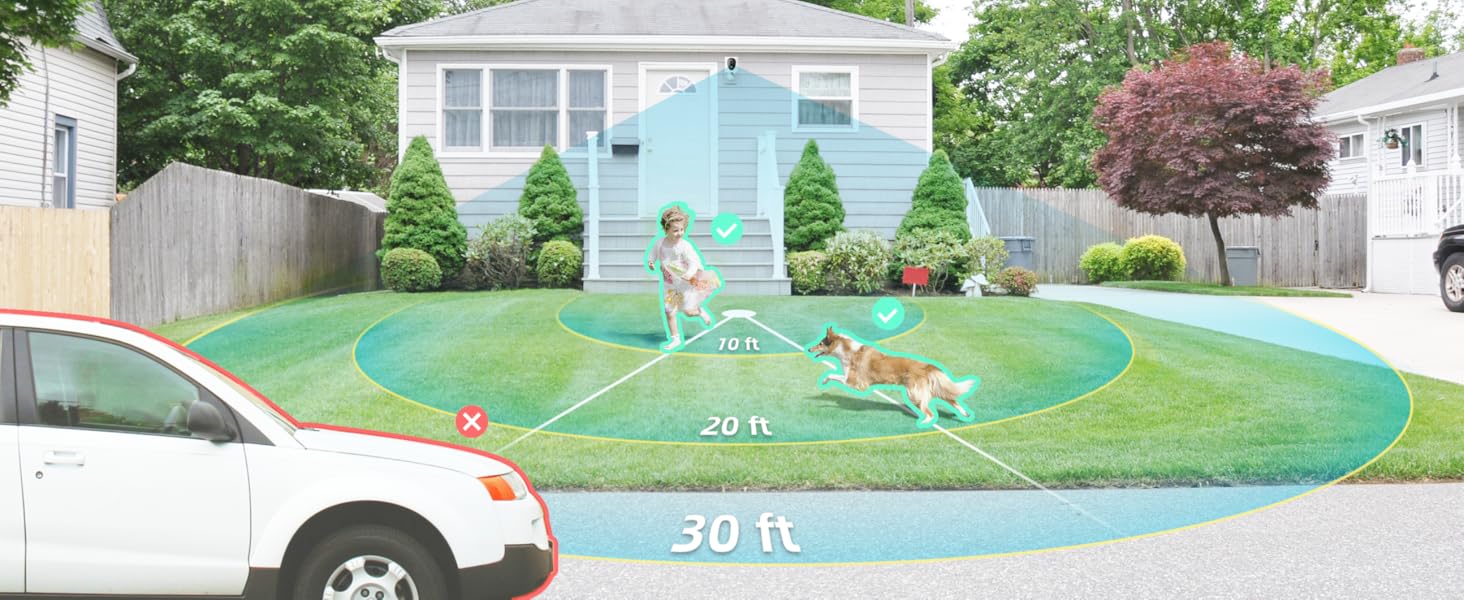
Image: Smart detection distinguishing between people, vehicles, and animals.
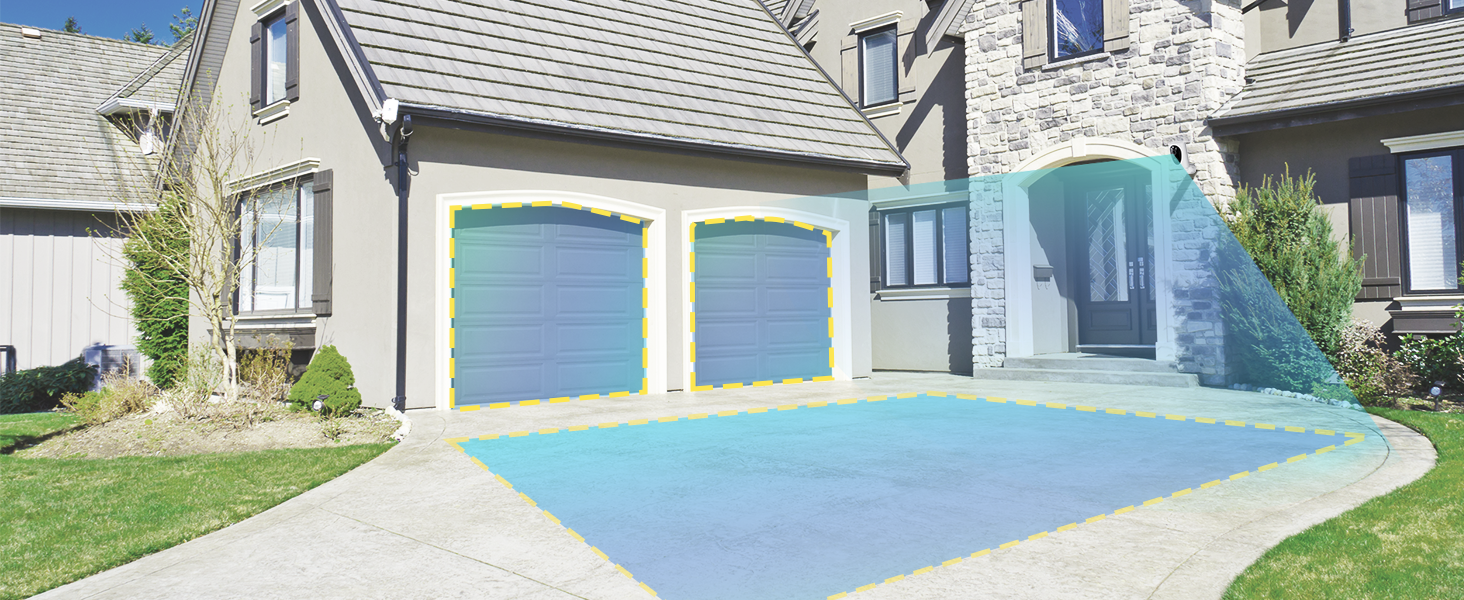
Image: Customizable motion detection zones.

Image: Instant alerts with image previews.
6.3 การมองเห็นตอนกลางคืน
The camera provides clear vision even in low-light conditions.
- การมองเห็นสีกลางคืน: Utilizes Starlight technology and a wide F1.6 aperture for vivid, color-rich images in low light.
- IR ไนท์วิชั่น: Equipped with 2 high-intensity IR LEDs for clear black-and-white viewing in complete darkness.

Image: Superior 2K QHD imaging and color-rich night vision.
6.4 การบันทึกและการเก็บรักษา
Your data is secured with flexible storage options.
- การจัดเก็บข้อมูลภายในเครื่อง: Supports microSD cards from 32GB to 256GB for continuous recording, even without network access. (MicroSD card not included).
- การเก็บข้อมูลบนคลาวด์: Optional cloud storage plans offer additional features like snapshot alerts and advanced AI capabilities. Video encryption ensures privacy.

Image: Comparison of no-fee basic storage (SD card) and cloud storage options.
6.5 App Features and Remote Access
Manage and control your security remotely via the 'HOME V' app.
- การตรวจสอบระยะไกล: Monitor your home from anywhere with an internet connection.
- การเข้าถึงหลายผู้ใช้: Share camera access with family members.
- การกำหนดตารางเวลา: Set schedules for recording or alerts.

Image: Remote access and multi-user monitoring via the 'HOME V' app.
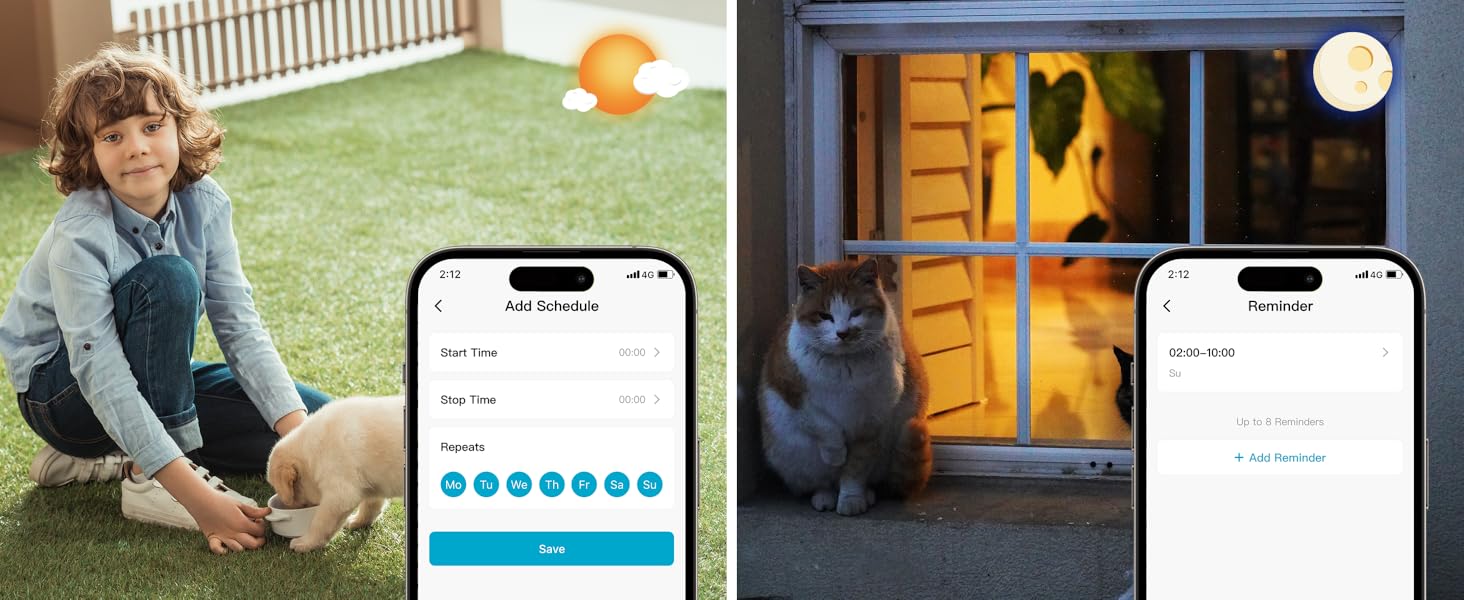
Image: App features including scheduling and reminders.
7. การบำรุงรักษา
- การชาร์จแบตเตอรี่: Recharge the camera battery when prompted by the app. A full charge can last 1-3 months depending on activity.
- การทำความสะอาด: ค่อยๆ เช็ดเลนส์และตัวกล้องด้วยผ้าเนื้อนุ่มและแห้งamp ผ้า. หลีกเลี่ยงน้ำยาทำความสะอาดที่มีฤทธิ์กัดกร่อน
- อัพเดตเฟิร์มแวร์: Regularly check the 'HOME V' app for firmware updates to ensure optimal performance and security.
8 การแก้ไขปัญหา
| ปัญหา | สาเหตุที่เป็นไปได้ | สารละลาย |
|---|---|---|
| Camera won't power on | Battery depleted; Power switch off | Charge the camera fully; Ensure power switch is in the 'ON' position. |
| ไม่สามารถเชื่อมต่อ Wi-Fi ได้ | Incorrect Wi-Fi password; 5GHz Wi-Fi network; Weak Wi-Fi signal | Verify password; Ensure you are connecting to a 2.4GHz network; Move camera closer to router or use a Wi-Fi extender. |
| การแจ้งเตือนที่ผิดพลาดบ่อยครั้ง | High motion sensitivity; Unfiltered motion sources (e.g., trees, animals) | Adjust motion sensitivity in app; Set up detection zones to exclude irrelevant areas; Consider cloud subscription for AI detection. |
| Poor night vision clarity | Dirty lens; Obstruction in front of camera; Insufficient ambient light for color night vision | Clean the lens; Remove obstructions; Ensure adequate ambient light for color mode or switch to IR night vision. |
| แบตเตอรี่หมดเร็ว | High activity/recordings; Frequent live view access; Weak Wi-Fi signal | Reduce motion detection sensitivity; Limit live view sessions; Improve Wi-Fi signal strength. |
9. ข้อมูลจำเพาะ
| คุณสมบัติ | รายละเอียด |
|---|---|
| ชื่อรุ่น | แอลเจเอช10 |
| การใช้งานภายใน/ภายนอกอาคาร | ในร่ม, กลางแจ้ง |
| แหล่งพลังงาน | Battery Powered (4400mAh rechargeable Lithium battery) |
| โปรโตคอลการเชื่อมต่อ | Wi-Fi (2.4GHz เท่านั้น) |
| ประเภทตัวควบคุม | แอป HOME V |
| ประเภทการติดตั้ง | ติดผนัง |
| ความละเอียดในการจับภาพวิดีโอ | 2K QHD |
| Viewอิงแองเกิล | 120 Degrees (Field of View: 130 Degrees) |
| ช่วงการมองเห็นตอนกลางคืน | 30 ฟุต |
| เทคโนโลยีแสงน้อย | Starlight (F1.6 aperture, 3.0mm focal length) |
| จำนวนไฟ LED IR | 2 |
| ระดับความต้านทานต่อน้ำ | กันน้ำ |
| ขนาด (กว้าง x ยาว x สูง) | 2.7 x 1.3 x 3.2 นิ้ว |
| น้ำหนักสินค้า | 1.41 ปอนด์ |
| ตัวเลือกการจัดเก็บข้อมูล | MicroSD (32GB-256GB), Cloud Storage |
| คุณสมบัติพิเศษ | 2-Way Audio, Battery Powered, Local Recording, Motion Sensor, Night Vision, AI Motion Detection |
10. การรับประกันและการสนับสนุน
virtavo products are designed for reliability and performance. For information regarding product warranty, please refer to the warranty card included in your product packaging or visit the official virtavo website. If you encounter any issues or have questions not covered in this manual, please contact virtavo customer support through the 'HOME V' app or their official support channels for assistance.


