คู่มือการใช้งานเครื่องฉีดน้ำทำความสะอาดฟันขนาดเล็ก COSLUS รุ่น T40
Comprehensive guide for setup, operation, and maintenance of your COSLUS Mini Water Flosser T40.
1. สินค้าหมดview
The COSLUS Mini Water Flosser T40 is a portable, cordless oral irrigator designed for effective on-the-go oral care. Its compact design and multiple features make it suitable for various users, including those with braces or sensitive teeth.
เนื้อหาแพ็คเกจ
- COSLUS Mini Water Flosser T40 Unit
- 2 x Standard Jet Tips
- 1 x Orthodontic Jet Tip
- 1 x Tongue Cleaner Tip
- สายชาร์จ Type-C (ไม่รวมอะแดปเตอร์)
- กระเป๋าเดินทาง
คุณสมบัติหลัก
- การออกแบบที่พกพาสะดวกเป็นพิเศษ: Lightweight and compact, comparable to common smartphones, ideal for travel and daily commuting.
- Detachable Wide-Mouth Tank: Easy to clean, dry, and refill, preventing scale buildup.
- การจัดเก็บหัวฉีดแบบบูรณาการ: Built-in space on top for organized and clean nozzle storage during travel.
- โหมดปรับได้ 4 โหมด: Offers Soft, Normal, Power, and Pulse modes (30-140 PSI) for personalized cleaning.
- IPX7 กันน้ำ: Designed for use in wet environments like showers or outdoors.
- อายุการใช้งานแบตเตอรี่ยาวนาน: Up to 30 days of use on a single 3-hour Type-C charge.
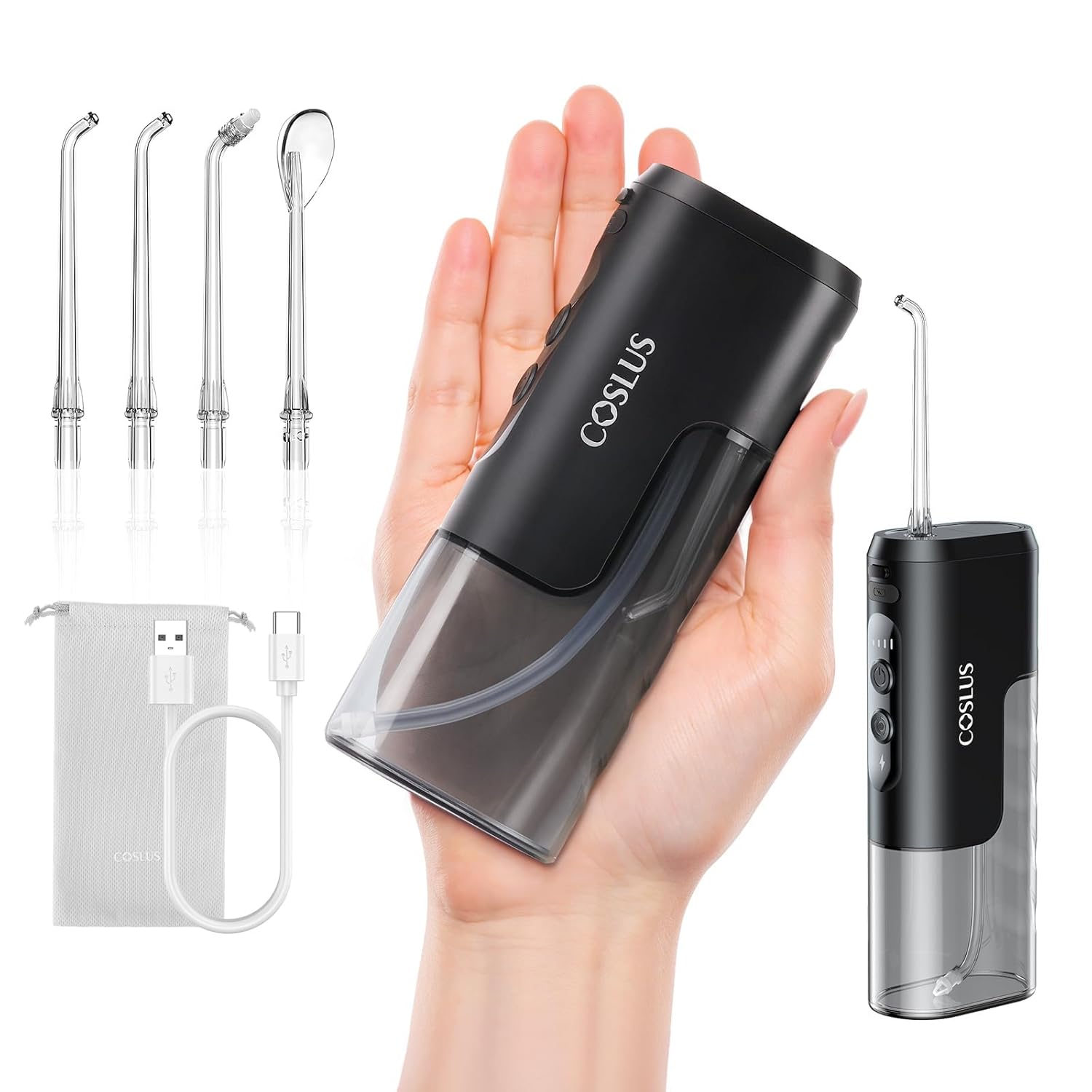
รูปที่ 1: COSLUS Mini Water Flosser T40 and included accessories, including various jet tips and charging cable.
2. ข้อมูลด้านความปลอดภัย
- Always unplug or turn off the device when not in use.
- Do not charge in the bathroom or in a humid environment.
- Always follow the instructions that came with the device.
- For optimal results, replace the jet tips every 2-3 weeks.
- Avoid using the device with hot water or near heat sources.
3. การตั้งค่าและการชาร์จ
ค่าธรรมเนียมเริ่มต้น
Before first use, fully charge the device. The COSLUS Mini Water Flosser T40 features a Type-C charging port for fast charging.
- Ensure the charging port is dry to avoid issues.
- Connect the provided Type-C charging cable to the device and a suitable power adapter (not included).
- A full charge takes approximately 3 hours and provides up to 30 days of battery life, depending on usage.
1 วิดีโอ: Demonstrates the compact size and charging of the COSLUS Mini Water Flosser T40.
การเติมน้ำลงในถังน้ำ
The device features a detachable wide-mouth tank for easy filling and cleaning.
- Open the lid on top of the device.
- Fill the detachable water tank with water. The wide-mouth design allows for quick and easy refills.
- ปิดฝาให้แน่น
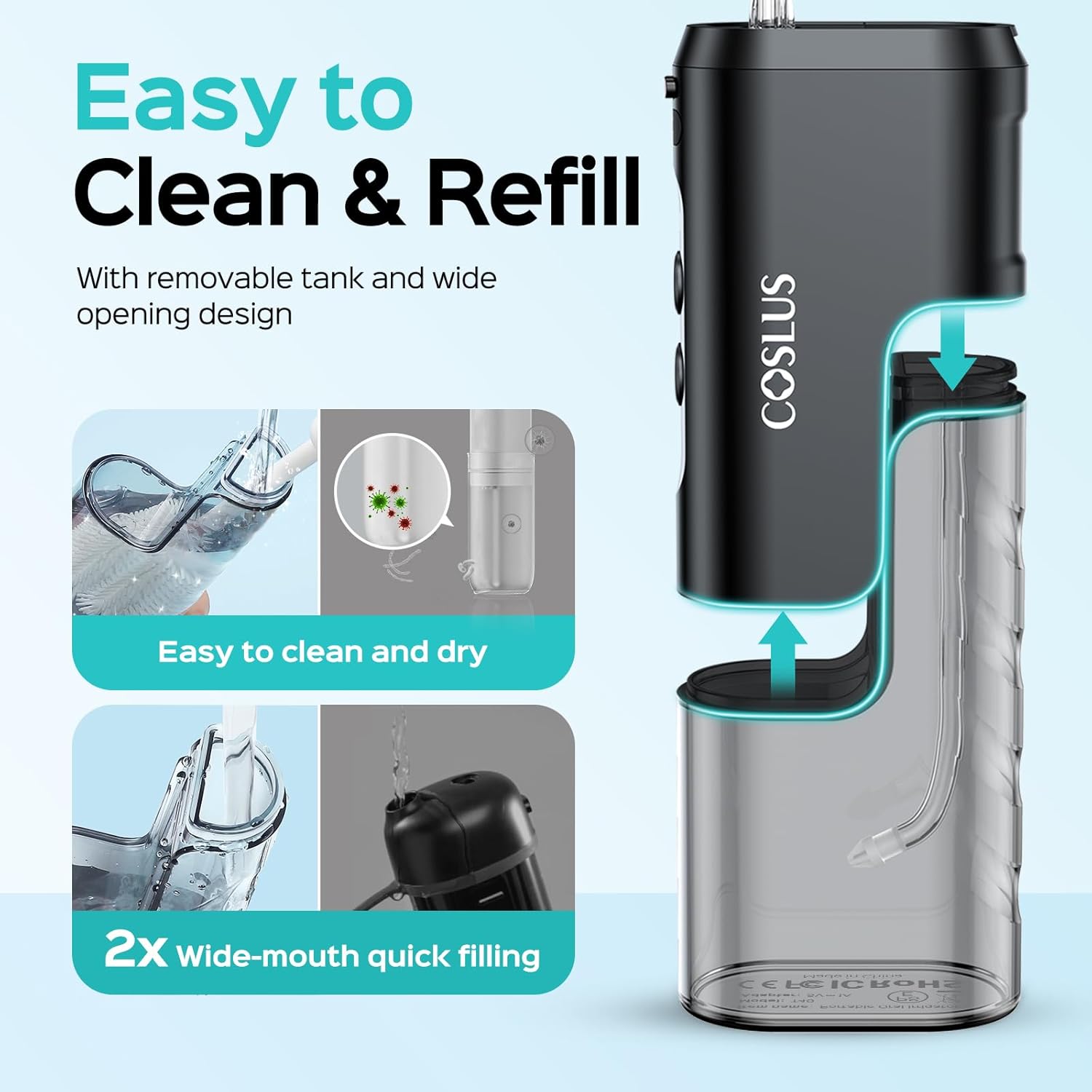
รูปที่ 2: Illustration of the wide-mouth detachable water tank, highlighting ease of cleaning and refilling.
2 วิดีโอ: Demonstrates the detachable wide-mouth tank for easy cleaning and quick refills.
การติดหัวฉีด
The device comes with 4 multi-functional nozzles for various oral care needs.
- 2 x Standard Jet Tips: For daily teeth cleaning.
- 1 x Orthodontic Jet Tip: Gentle on sensitive gums, suitable for braces wearers.
- 1 x Tongue Cleaner Tip: For effective removal of food debris and tongue cleaning.
- Select the desired jet tip.
- Insert the selected tip into the nozzle opening on top of the device until it clicks into place.

รูปที่ 3: Display of the four multi-functional nozzles: Standard, Orthodontic, and Tongue Cleaner tips.
4. คู่มือการใช้งาน
To use the COSLUS Water Flosser, follow these steps:
- Fill the detachable water tank with water and attach the desired nozzle.
- Select one of the 4 cleaning modes and adjust the water pressure using the mode button.
- Lean over the sink and place the tip in your mouth, pointing it at your teeth.
- เปิดอุปกรณ์โดยใช้ปุ่มเปิด/ปิด
- Move the tip along your teeth and gums in a gentle, circular motion.
Adjustable Modes (30-140 PSI)
The device offers 4 intensity levels to meet personalized needs:
- โหมดซอฟต์: For sensitive teeth, new users, children, or seniors.
- โหมดปกติ: For regular daily cleaning and oral care.
- โหมดพลังงาน: For effective cleaning, braces, orthodontic care, and stain removal.
- โหมดพัลส์: Adjustable intensity for deep cleaning and gum massage.

รูปที่ 4: Display of the 4 adjustable pressure modes: Soft, Normal, Power, and Pulse.
3 วิดีโอ: Shows the COSLUS Mini Water Flosser T40 in use, demonstrating its portable oral irrigation.
5. การบำรุงรักษา
การทำความสะอาดอุปกรณ์
- After each use, remove the tip and store it in the nozzle storage space.
- Clean the unit by rinsing it with water and drying it with a clean cloth.
- The detachable wide-mouth water tank can be easily removed for thorough cleaning and drying, preventing scale buildup.

รูปที่ 5: The COSLUS Mini Water Flosser T40 is IPX7 waterproof, allowing for easy cleaning and use in wet environments.
เปลี่ยนหัวฉีด
For optimal hygiene and performance, it is recommended to replace jet tips every 2-3 weeks.

รูปที่ 6: The built-in nozzle storage keeps tips organized and clean, reducing loss and damage during travel.
6 การแก้ไขปัญหา
If you encounter any issues with your COSLUS Mini Water Flosser T40, please refer to the following common solutions:
- ไม่มีการไหลของน้ำ: Ensure the water tank is filled and the nozzle is securely attached. Check if the water intake tube is clear.
- แรงดันน้ำอ่อน: Verify the device is fully charged. Select a higher intensity mode.
- อุปกรณ์ไม่เปิด: ตรวจสอบให้แน่ใจว่าอุปกรณ์ชาร์จเต็มแล้ว หากปัญหายังคงอยู่ โปรดติดต่อฝ่ายสนับสนุนลูกค้า
- การเปิดใช้งานโดยไม่ได้ตั้งใจ: Be mindful of the power button placement. Some users find it helpful to store the device with the nozzle detached or in its travel pouch to prevent accidental activation.
For further assistance, please contact COSLUS customer support.
7. ข้อมูลจำเพาะ
| คุณสมบัติ | รายละเอียด |
|---|---|
| ขนาดสินค้า | 6.57 x 2.55 x 1.49 นิ้ว |
| น้ำหนัก | 7.36 ออนซ์ |
| หมายเลขรุ่น | T40 |
| แหล่งพลังงาน | Battery Powered (Type-C Rechargeable) |
| ช่วงแรงดันน้ำ | 30-140 PSI |
| ระดับการกันน้ำ | IPX7 |
| อายุการใช้งานแบตเตอรี่ | ใช้งานได้นานสูงสุด 30 วันต่อการชาร์จหนึ่งครั้ง |
| เวลาในการชาร์จ | ประมาณ 3 ชั่วโมง |
| เส้นผ่านศูนย์กลางหัวฉีด | 0.6 mm water flow |
8. การรับประกันและการสนับสนุน
The COSLUS Mini Water Flosser T40 is designed for durability with a target service life of up to 3 years. It typically comes with a 24-month warranty. For warranty claims, technical support, or any product-related inquiries, please contact COSLUS customer service through their official channels or the retailer where the product was purchased.


