1. บทนำ
This manual provides instructions for the Miracase Magnetic Wallet with Stand. This accessory is designed to securely attach to MagSafe-compatible iPhones and magnetic cases, offering card storage and a versatile stand function. Please read this manual thoroughly to ensure proper use and care of your product.
2. คุณสมบัติของผลิตภัณฑ์
- การยึดติดด้วยแม่เหล็กที่แข็งแรง: Features 4000g of holding force for secure attachment to your device.
- Integrated Phone Stand: Converts into a stand for both landscape and portrait viewโหมดไอเอ็นจี
- ผู้ถือบัตร: Designed to securely hold 4 to 5 cards.
- การออกแบบที่ถอดออกได้: Allows for easy removal to facilitate wireless charging.
- วัสดุพรีเมี่ยม: Constructed from durable PU leather for a comfortable feel.
- ความเข้ากันได้กว้าง: Compatible with iPhone 17 Pro Max/17 Pro/17/Air/16 Pro Max/16 Pro/16 Plus/16/15 Pro Max/15 Pro/15 Plus/15/14 Pro Max/14 Pro/14 Plus/14/13 Pro Max/13 Pro/13/12 Pro Max/12 Pro/12 without a case, or with a magnetic case. เข้ากันไม่ได้กับ iPhone 13/12 มินิ
3. เนื้อหาบรรจุภัณฑ์
- 1 x Miracase Magnetic Wallet with Stand
4. การตั้งค่าและการติดตั้ง
Follow these steps to set up your Miracase Magnetic Wallet with Stand:
- เตรียมอุปกรณ์ของคุณ: Ensure your iPhone is a compatible model (iPhone 12-17 series, excluding mini models) and is either without a case or equipped with a MagSafe-compatible magnetic case.
- Attach the Wallet: Align the Miracase Magnetic Wallet with the MagSafe area on the back of your iPhone or magnetic case. The wallet will snap into place securely due to its strong magnets.
- ใส่การ์ด: Open the wallet to access the card slots. Gently slide your cards (up to 4-5) into the designated slots. Ensure cards are fully inserted to prevent them from falling out.
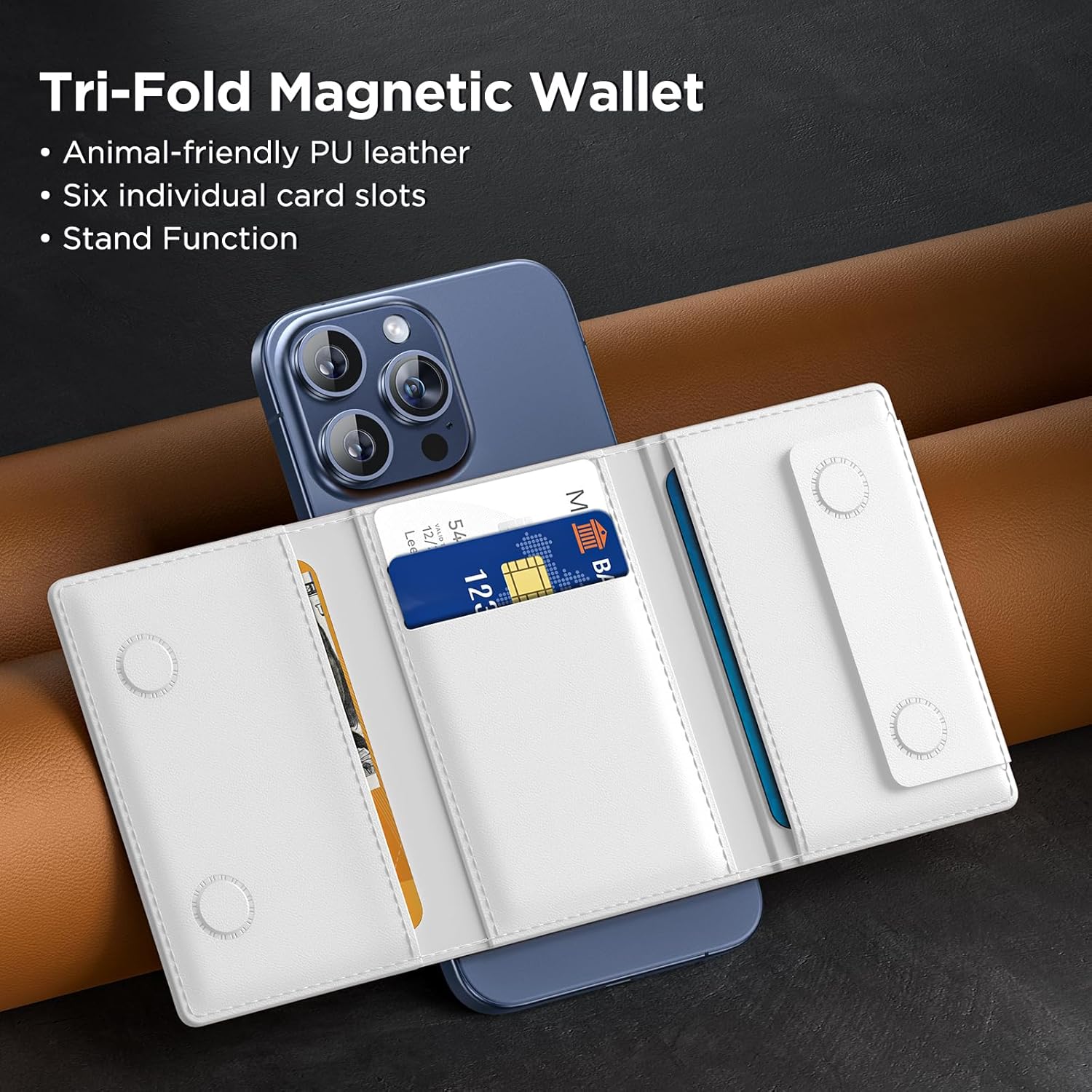
Figure 4.1: Inserting cards into the Miracase Magnetic Wallet.

Figure 4.2: Demonstrating the strong magnetic attraction of the wallet.
5. คู่มือการใช้งาน
The Miracase Magnetic Wallet offers versatile functionality:
5.1 Using the Stand Function
The wallet can be folded to create a stable stand for your iPhone in both landscape and portrait orientations.
- สำหรับโหมดแนวนอน: Fold the wallet outwards along its creases to form a triangular stand. Place your iPhone horizontally on a flat surface with the wallet supporting it.
- สำหรับโหมดภาพบุคคล: Fold the wallet in a similar manner, but position your iPhone vertically. The wallet will provide stable support for upright viewการไอเอ็นจี
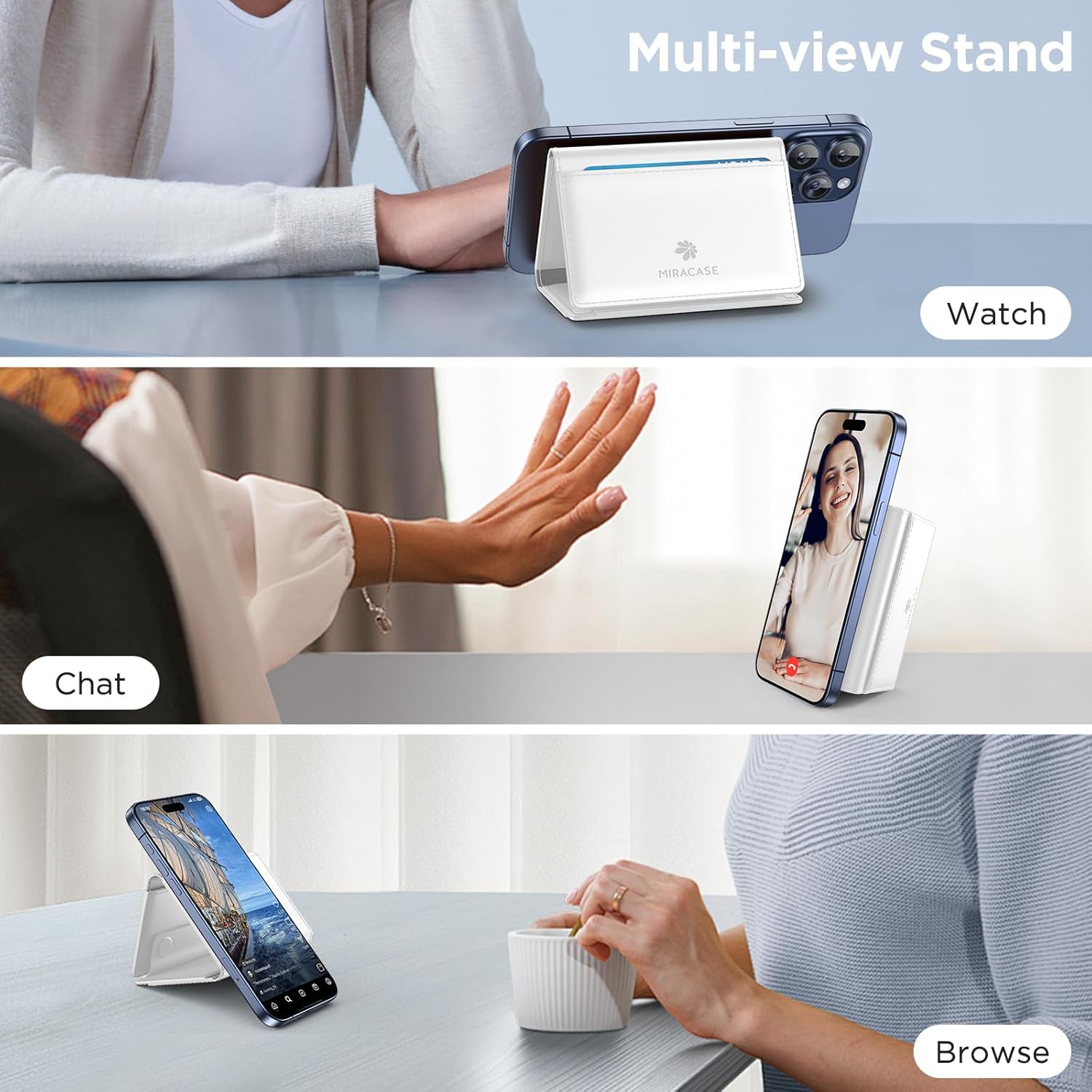
Figure 5.1: Using the multi-view stand function.
5.2 Detaching for Wireless Charging
To use wireless charging, simply detach the magnetic wallet from your iPhone. The strong magnetic connection allows for easy removal and reattachment.
5.3 Card and Cash Storage
The wallet features multiple slots for cards and a dedicated area for folded cash. Ensure items are placed securely within the wallet before closing.
Video 5.1: Demonstration of the Miracase Tri-Fold Magnetic Stand Wallet features, including card and cash storage, and stand functionality.
6. การบำรุงรักษา
To maintain the appearance and functionality of your Miracase Magnetic Wallet:
- การทำความสะอาด: เช็ดพื้นผิวหนัง PU ด้วยผ้าเนื้อนุ่มและแห้งamp ผ้า หลีกเลี่ยงสารเคมีรุนแรงหรือน้ำยาทำความสะอาดที่มีฤทธิ์กัดกร่อน
- พื้นที่จัดเก็บ: Store the wallet in a cool, dry place away from direct sunlight when not in use.
- หลีกเลี่ยงการเติมมากเกินไป: Do not overfill the card slots, as this can stretch the material and affect its ability to hold cards securely over time.
7 การแก้ไขปัญหา
If you encounter any issues with your Miracase Magnetic Wallet, refer to the following common solutions:
- กระเป๋าเงินติดไม่แน่น:
- Ensure your iPhone is a MagSafe-compatible model (iPhone 12-17 series, excluding mini models).
- Verify that your phone case, if used, is MagSafe-compatible. Non-magnetic cases will prevent proper attachment.
- Check for any debris or obstructions between the wallet and your phone/case.
- Cards falling out:
- Ensure you are not exceeding the recommended capacity of 4-5 cards.
- Verify that cards are fully inserted into the slots.
- Stand function is unstable:
- Ensure the wallet is fully unfolded into its triangular stand shape.
- Place the phone and wallet on a flat, stable surface.
8. ข้อมูลจำเพาะ
| คุณสมบัติ | ข้อมูลจำเพาะ |
|---|---|
| ขนาดสินค้า | 0.5 x 3.9 x 2.7 นิ้ว |
| น้ำหนักสินค้า | 2.89 ออนซ์ |
| วัสดุ | หนัง PU |
| สี | D-White |
| ความจุของการ์ด | 4-5 ใบ |
| พลังแม่เหล็ก | 4000กรัม |
| ความเข้ากันได้ | MagSafe-compatible iPhones (12-17 series, excluding mini models) or magnetic cases |
9. การรับประกันและการสนับสนุน
Miracase products are designed for quality and durability. If you encounter any product problems or require assistance, please contact Miracase customer support. We are committed to offering a satisfactory solution for any issues you may experience.
For support, please visit the official Miracase store or contact us through the platform where you purchased the product.


