การแนะนำ
ขอบคุณที่เลือกใช้บริการ Ourlife Mini Drone. This drone is equipped with dual 4K cameras, offering high-quality photo and video capture, and can be controlled via a smartphone app for real-time viewing. Designed for ease of use, it features one-button takeoff/landing, altitude hold, headless mode, and gesture control, making it suitable for beginners and enthusiasts alike. Its compact, foldable design ensures portability for all your adventures. Please read this manual carefully before operation to ensure safe and optimal performance.
แนวทางปฏิบัติเพื่อความปลอดภัย
Always prioritize safety when operating your drone. Failure to follow these guidelines may result in injury, damage to property, or legal issues.
- อ่านคู่มือ: Fully understand all instructions and warnings before first flight.
- พื้นที่เปิดโล่ง: Always fly in open, unobstructed areas, away from people, animals, buildings, and power lines. Avoid flying in strong winds.
- แนวสายตา: รักษาระยะการมองเห็นกับโดรนตลอดเวลา
- ความปลอดภัยของแบตเตอรี่: Use only original batteries and charging cables. Do not overcharge or short-circuit batteries. Discontinue use if batteries are damaged or swollen.
- ความปลอดภัยของใบพัด: Keep fingers, hair, and loose clothing away from rotating propellers. Always turn off the drone before handling propellers.
- ข้อจำกัดอายุ: ผลิตภัณฑ์นี้แนะนำสำหรับผู้ใช้ที่มีอายุ 14 ปีขึ้นไป
- การปฏิบัติตามกฎหมาย: Be aware of and comply with local laws and regulations regarding drone operation.
เนื้อหาแพ็คเกจ
ตรวจสอบว่ามีรายการทั้งหมดอยู่ในแพ็คเกจของคุณ:

Image: Contents of the Ourlife Mini Drone package, showing the drone, remote control, two rechargeable batteries, a screwdriver, four protective frames, four main propellers, a USB charging cable, and an instruction manual.
- Ourlife Mini Drone x 1
- รีโมทคอนโทรล x 1
- Rechargeable Drone Battery x 2
- ไขควง x 1
- กรอบป้องกัน x 4
- Main Propeller x 4 (spare)
- สายชาร์จ USB x 1
- คู่มือการใช้งาน x 1
Note: The remote control requires 3 AAA batteries, which are not included.
สินค้าเกินview
Familiarize yourself with the drone and remote control components.

ภาพ: เดอะ โอurlife Mini Drone in its unfolded state, alongside its remote control, two drone batteries, and the drone in its folded, compact form.
ส่วนประกอบโดรน
- แขนพับได้: เพื่อการจัดเก็บที่กะทัดรัดและพกพาสะดวก
- ใบพัด: ใบพัดหลักสี่ใบสำหรับใช้ในการบิน
- กล้องคู่: Front 4K camera (120° adjustable) and bottom optical flow lens for stable flight and diverse shooting angles.
- ช่องใส่แบตเตอรี่: ตั้งอยู่ด้านหลังของโดรน
- ไฟ LED: Indicate drone status and orientation.

ภาพ: ระยะใกล้ view ของ Ourlife Mini Drone's dual camera system, highlighting the adjustable front camera and the lower lens for stable flight. The front camera can be adjusted by 120 degrees.
เค้าโครงรีโมทคอนโทรล
- จอยสติ๊กซ้าย: ควบคุมระดับความสูง (ขึ้น/ลง) และการหมุน (ซ้าย/ขวา)
- จอยสติ๊กขวา: ควบคุมการเคลื่อนที่ไปข้างหน้า/ข้างหลัง และ ซ้าย/ขวา
- ปุ่มขึ้น/ลงจอดแบบใช้ปุ่มเดียว: เริ่มการขึ้นหรือลงจอดโดยอัตโนมัติ
- ปุ่มโหมดไม่มีหัว: Activates/deactivates headless mode.
- ปุ่มสวิตช์ความเร็ว: Toggles between different flight speeds (low, medium, high).
- ปุ่มหมุน 360°: ทำการหมุนตัว 360 องศา
- ที่วางโทรศัพท์: สำหรับติดตั้งสมาร์ทโฟนของคุณเข้ากับ... view ภาพจากกล้อง FPV
การตั้งค่า
1 การชาร์จแบตเตอรี่โดรน
- เชื่อมต่อสายชาร์จ USB เข้ากับแบตเตอรี่โดรน
- Plug the USB end into a 5V/1A USB adapter (not included) or a computer USB port.
- The indicator light on the cable will show charging status. It will turn off or change color when fully charged.
2 การติดตั้งแบตเตอรี่โดรน
- ตรวจสอบให้แน่ใจว่าโดรนปิดอยู่
- Insert the charged battery into the battery compartment at the rear of the drone until it clicks into place.
3. การติดตั้งแบตเตอรี่รีโมทคอนโทรล
- เปิดช่องใส่แบตเตอรี่ที่ด้านหลังของรีโมทคอนโทรล
- ใส่แบตเตอรี่ AAA 3 ก้อน (ไม่รวม) ตามเครื่องหมายขั้ว
- ปิดฝาช่องใส่แบตเตอรี่ให้แน่น
4. Attaching Propeller Guards
- Carefully attach the four protective frames to each motor arm of the drone.
- Ensure they are securely fastened to prevent detachment during flight.
5. App Installation (KY UFO)
- Scan the QR code provided in the manual or search for "KY UFO" in your smartphone's app store (App Store for iOS, Google Play for Android).
- ดาวน์โหลดและติดตั้งแอปพลิเคชัน
- Turn on the drone, then go to your phone's Wi-Fi settings and connect to the drone's Wi-Fi network (usually named "KY-UFO-XXXXXX").
- Open the KY UFO app to access the real-time FPV feed and advanced controls.
คำแนะนำการใช้งาน
1. การจับคู่โดรนและรีโมทคอนโทรล
- วางโดรนไว้บนพื้นผิวเรียบ
- เปิดสวิตช์เปิด/ปิดของโดรน ไฟแสดงสถานะของโดรนจะกะพริบ
- เปิดรีโมทคอนโทรล
- Push the left joystick all the way up, then pull it all the way down. The drone's lights will stop flashing and remain solid, indicating successful pairing.
2. การควบคุมการบินขั้นพื้นฐาน
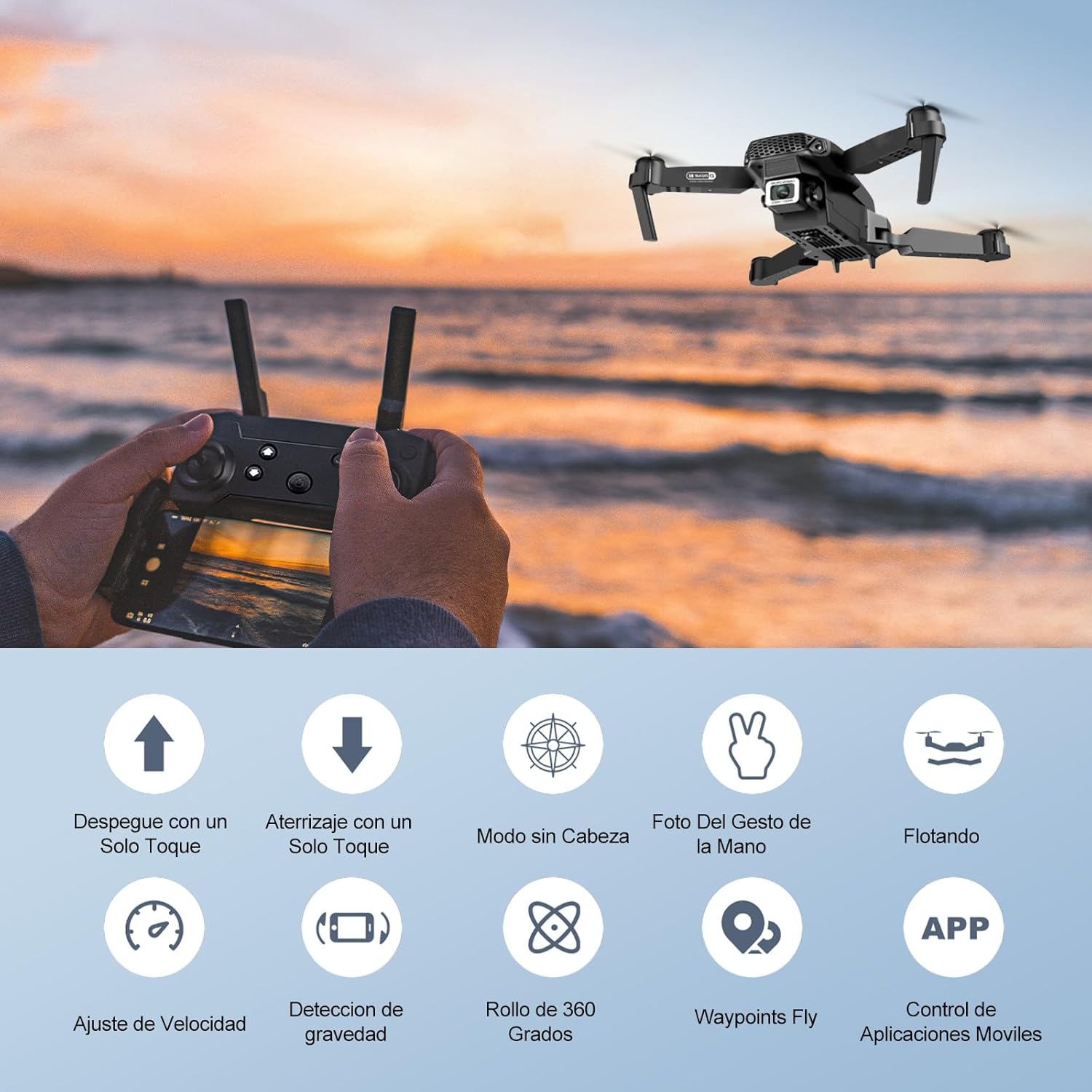
Image: Icons representing various flight features: One-touch takeoff, One-touch landing, Headless Mode, Hand Gesture Photo, Floating (Altitude Hold), Speed Adjustment, Gravity Detection, 360 Degree Roll, Waypoints Fly, and APP Control.
- ขึ้นบินด้วยปุ่มเดียว: กดปุ่ม ขึ้น/ลงด้วยปุ่มเดียว button. The drone will automatically ascend and hover at a certain altitude.
- การลงจอดด้วยปุ่มเดียว: กดปุ่ม ขึ้น/ลงด้วยปุ่มเดียว button again. The drone will automatically descend and land.
- การรักษาระดับความสูง: โดรนจะรักษาระดับความสูงปัจจุบันโดยอัตโนมัติ ทำให้สามารถบินนิ่งได้อย่างมั่นคง
- จอยสติ๊กซ้าย (คันเร่ง/หันเห):
- Push up/down: Increase/decrease altitude.
- Push left/right: Rotate drone left/right.
- Right Joystick (Forward/Backward/Sideways):
- Push up/down: Fly forward/backward.
- Push left/right: Fly left/right (strafe).

ภาพ: เดอะ โอurlife Mini Drone taking off or landing with a single button press, illustrating the ease of use for beginners.
3. คุณสมบัติการบินขั้นสูง
- โหมดไม่มีหัว: กดปุ่ม โหมดไร้หัว button. In this mode, the drone's orientation is relative to the pilot, regardless of the drone's actual front. This simplifies control, especially for beginners.
- พลิก 360°: Fly the drone to a height of at least 2 meters. Press the พลิก 360 ° button, then push the right joystick in any direction to perform a flip in that direction.
- Gesture Control (Photos/Videos): With the KY UFO app open, make specific hand gestures in front of the drone's camera to trigger photo or video recording.
- "V" Gesture: Triggers photo capture.
- ท่าทางปาล์ม: Triggers video recording.
- จุดแวะพักเที่ยวบิน: In the KY UFO app, draw a desired flight path on your smartphone screen. The drone will automatically follow this path.
- การปรับความเร็ว: กดปุ่ม สวิตซ์ปรับความเร็ว button to cycle through low, medium, and high-speed modes. Adjust according to your skill level and environmental conditions.
- การส่งสัญญาณ FPV แบบเรียลไทม์: Connect your smartphone to the drone's Wi-Fi. Open the KY UFO app to view live video feed from the drone's camera on your phone screen.
- การเหนี่ยวนำด้วยแรงโน้มถ่วง: In the KY UFO app, activate gravity induction mode. You can then control the drone's movement by tilting your smartphone.

ภาพ: เดอะ โอurlife Mini Drone performing a 360-degree flip in the air and demonstrating the Waypoints Fly feature, where the drone follows a pre-drawn path.

Image: Demonstrates 1080P FPV Real-Time Transmission, showing a live view from the drone. Also illustrates gesture control for taking photos (V-sign) and recording videos (palm gesture), and the 120-degree adjustable camera angle.
การซ่อมบำรุง
- การทำความสะอาด: ใช้ผ้าแห้งนุ่มเช็ดทำความสะอาดโดรนและรีโมทคอนโทรล ห้ามใช้สารเคมีหรือตัวทำละลายที่มีฤทธิ์กัดกร่อน
- การเปลี่ยนใบพัด: If propellers are damaged, replace them with spare ones provided. Ensure correct propeller (A or B) is installed on the corresponding motor.
- การดูแลแบตเตอรี่ เก็บแบตเตอรี่ไว้ในที่แห้งและเย็น อย่าเก็บแบตเตอรี่ที่ชาร์จเต็มหรือแบตเตอรี่ที่หมดเกลี้ยงไว้นานเกินไป ควรชาร์จแบตเตอรี่ให้เหลือประมาณ 50% สำหรับการเก็บรักษาในระยะยาว
- พื้นที่จัดเก็บ: เมื่อไม่ใช้งาน ควรเก็บโดรนและอุปกรณ์เสริมไว้ในที่ปลอดภัยและแห้ง หลีกเลี่ยงแสงแดดโดยตรงและอุณหภูมิที่สูงหรือต่ำเกินไป
การแก้ไขปัญหา
| ปัญหา | สาเหตุที่เป็นไปได้ | สารละลาย |
|---|---|---|
| โดรนไม่ตอบสนองต่อรีโมท | ไม่จับคู่; แบตเตอรี่ต่ำ (โดรน/รีโมท); มีการรบกวน | Re-pair drone and remote. Charge batteries. Move to an area with less interference. |
| โดรนลอยไปมาระหว่างบิน | ไม่ได้รับการปรับเทียบ พื้นผิวไม่เรียบขณะขึ้นบิน มีลม | Calibrate the gyroscope (refer to app instructions). Take off from a flat surface. Avoid flying in windy conditions. |
| Camera feed is not showing in app. | Not connected to drone Wi-Fi; app issue. | Ensure phone is connected to the drone's Wi-Fi network. Restart the app and drone. |
| เวลาบินสั้น | แบตเตอรี่ไม่ได้ชาร์จเต็ม แบตเตอรี่เก่า | ตรวจสอบให้แน่ใจว่าแบตเตอรี่ชาร์จเต็มก่อนขึ้นบิน พิจารณาเปลี่ยนแบตเตอรี่เก่าด้วย |
| โดรนตกง่าย | Lack of experience; strong wind; damaged propellers. | Practice in open areas. Avoid strong winds. Replace damaged propellers. |
ข้อมูลจำเพาะ

Image: Diagram showing the dimensions of the Ourlife Mini Drone (unfolded and folded) and its remote control in inches.
| คุณสมบัติ | รายละเอียด |
|---|---|
| ยี่ห้อ | Ourlชีวิต |
| หมายเลขรุ่น | AF-E88-BK |
| น้ำหนักผลิตภัณฑ์ | 430 กรัม (ประมาณ 0.95 ปอนด์) |
| ขนาดผลิตภัณฑ์ (ขยาย) | 28 x 22 x 5 ซม. (ประมาณ 11 x 8.7 x 2 นิ้ว) |
| ขนาดสินค้า (พับ) | 12.5 x 8.1 x 5.3 ซม. (ประมาณ 4.9 x 3.2 x 2.1 นิ้ว) |
| ประเภทแบตเตอรี่ | ลิเธียมไอออน (รวม 2 อัน) |
| ความละเอียดในการจับภาพวิดีโอ | 4K (Dual Cameras) |
| เทคโนโลยีการเชื่อมต่อ | ไวไฟ |
| วิธีการควบคุม | รีโมทคอนโทรล, แอปพลิเคชันบนสมาร์ทโฟน |
| สี | สีดำ |
การรับประกันและการสนับสนุน
Ourlife provides post-sale warranty support for this product. If you encounter any issues with the drone, remote control, or the KY UFO application during flight or operation, please do not hesitate to contact the seller directly for assistance.
For optimal performance and to minimize potential issues, it is recommended to conduct initial flight tests in an open space, especially when using the propeller protectors. Please note that wind interference may occur when operating outdoors.


