1. บทนำ
Welcome to the user manual for your new ECHO Rainbow Pro S Smartwatch. This elegant and functional smartwatch is designed to enhance your daily life with integrated AI assistance, Bluetooth calling, comprehensive health sensors, and various sports modes. It comes with two interchangeable straps for maximum flexibility and is IP68 waterproof for worry-free use. This manual will guide you through the setup, operation, maintenance, and troubleshooting of your device.
2. อะไรอยู่ในกล่อง
กรุณาตรวจสอบเนื้อหาในแพ็คเกจเพื่อให้แน่ใจว่ามีสินค้าครบทั้งหมด:
- ECHO Rainbow Pro S Smartwatch (Rose Gold)
- Silicone Strap (Rose Gold)
- Nylon Strap (Bordeaux)
- สายชาร์จแม่เหล็ก
- คู่มือการใช้งาน (เอกสารนี้)
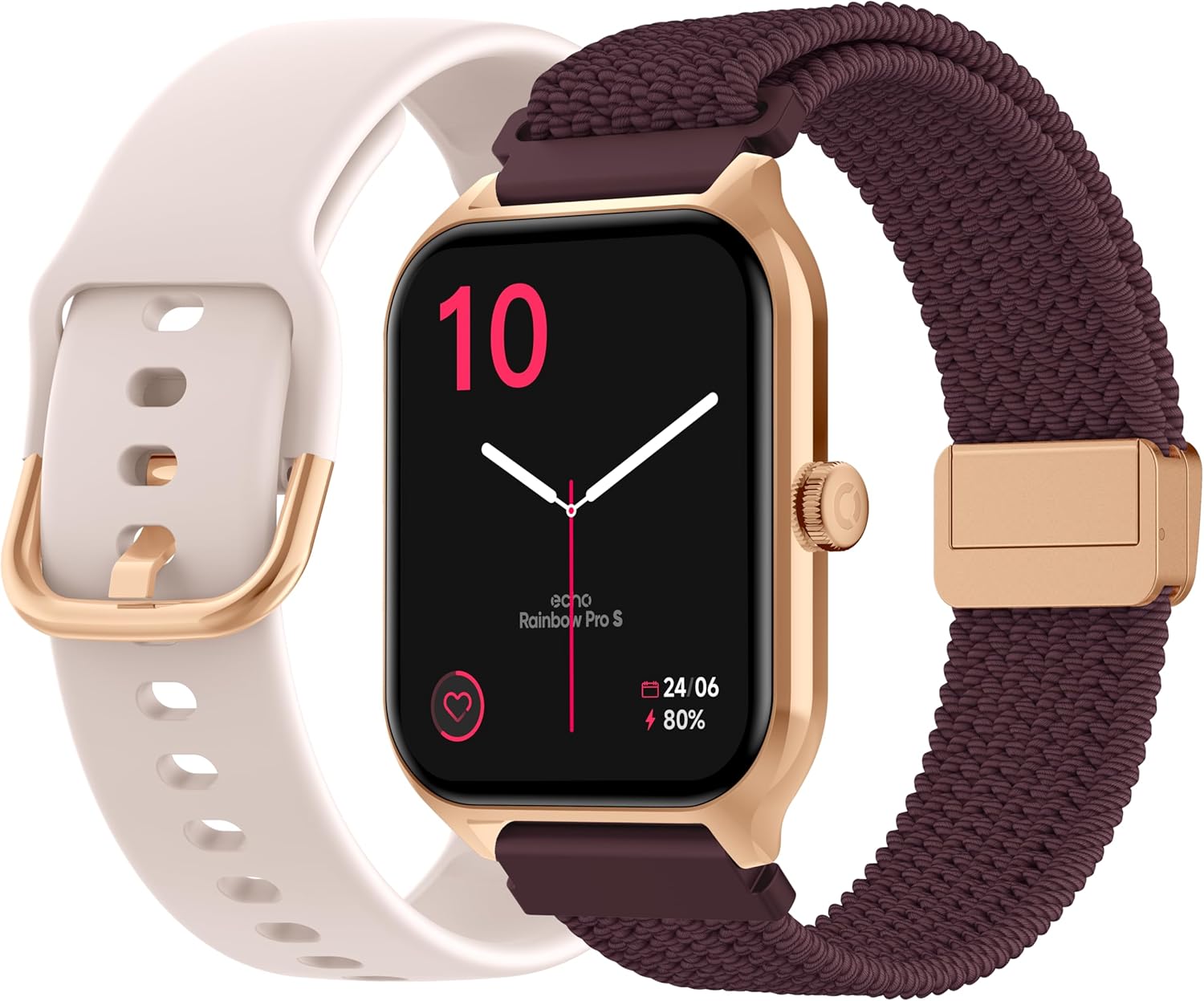
Image: The ECHO Rainbow Pro S Smartwatch, showcasing its rose gold finish, accompanied by both the rose gold silicone strap and the bordeaux nylon strap, along with the magnetic charging cable.
3. การตั้งค่า
3.1 การชาร์จอุปกรณ์
Before first use, fully charge your smartwatch. Connect the magnetic charging cable to the charging points on the back of the watch and plug the USB end into a standard USB power adapter (not included) or a computer's USB port. A full charge takes approximately 2.5 hours.
3.2 การติดตั้งแอป Da Fit
The ECHO Rainbow Pro S Smartwatch works with the Da Fit application. Download the Da Fit app from the Apple App Store (for iOS devices) or Google Play Store (for Android devices).
- Scan the QR code in the watch's manual or on the watch screen (if available) or search for "Da Fit" in your app store.
- ติดตั้งแอปพลิเคชันบนสมาร์ทโฟนของคุณ
3.3 การจับคู่กับสมาร์ทโฟนของคุณ
To unlock the full potential of your smartwatch, pair it with the Da Fit app:
- ตรวจสอบให้แน่ใจว่าได้เปิดใช้งาน Bluetooth บนสมาร์ทโฟนของคุณแล้ว
- เปิดแอป Da Fit
- Follow the on-screen instructions to add a new device. The app will search for your ECHO Rainbow Pro S.
- Select your watch from the list of found devices. Confirm the pairing request on both your phone and the watch.
- Once paired, your watch will synchronize data with the app.

Image: The ECHO Rainbow Pro S Smartwatch, showing the watch body, both the silicone and nylon straps, and the magnetic charging cable, illustrating the components for setup.
4. การใช้งานสมาร์ทวอทช์ของคุณ
4.1 การนำทางอินเทอร์เฟซ
The ECHO Rainbow Pro S features an intuitive 1.96-inch touchscreen. Swipe left, right, up, or down to access different functions and menus. The side button typically serves as a power button or a return-to-home screen button.
4.2 การตรวจติดตามสุขภาพ
Your smartwatch is equipped with advanced sensors to track your well-being:
- อัตราการเต้นของหัวใจ: ตรวจสอบอัตราการเต้นของหัวใจของคุณอย่างต่อเนื่องตลอดทั้งวัน
- ออกซิเจนในเลือด (SpO2): วัดความอิ่มตัวของออกซิเจนในเลือดของคุณ
- ความดันโลหิต: ให้ค่าประมาณความดันโลหิตของคุณ
- การติดตามการนอนหลับ: Analyzes your sleep patterns, including deep and light sleep stagใช่
ข้อมูลสุขภาพทั้งหมดสามารถ viewed in detail within the Da Fit app, allowing you to track trends and progress over time.

ภาพ: ด้านหลัง view of the ECHO Rainbow Pro S Smartwatch, highlighting the optical sensors used for heart rate, SpO2, and blood pressure monitoring.

Image: The ECHO Rainbow Pro S Smartwatch screen showing various health metrics, including heart rate (BPM), SpO2 percentage, and activity data, demonstrating its health tracking capabilities.
4.3 คุณสมบัติการสื่อสาร
เชื่อมต่อได้โดยตรงจากข้อมือของคุณ:
- การโทรผ่านบลูทูธ: โทรออกและรับสายได้โดยตรงจากนาฬิกาของคุณเมื่อเชื่อมต่อกับสมาร์ทโฟน
- การแจ้งเตือน: รับการแจ้งเตือนสำหรับสายเรียกเข้า ข้อความ และการแจ้งเตือนจากแอปต่างๆ บนสมาร์ทโฟนที่เชื่อมต่ออยู่

Image: The ECHO Rainbow Pro S Smartwatch displaying incoming call and message notifications, illustrating its communication features when paired with a smartphone.
4.4 AI Assistant
The ECHO Rainbow Pro S integrates an AI assistant for convenient voice commands and information retrieval. Simply activate the AI feature on your watch and speak your query or command.

Image: The ECHO Rainbow Pro S Smartwatch screen showing the AI assistant interface, ready to receive voice commands or queries.
4.5 Sports Modes & Coaching
With over 100 sports modes and integrated training programs, your smartwatch is an ideal companion for your fitness journey. Select your activity from the watch's menu to track performance metrics such as calories burned, distance, and duration. The Da Fit app provides personalized tracking and allows you to follow your course using your smartphone's GPS.

Image: The ECHO Rainbow Pro S Smartwatch displaying various sports modes and training exercises, with accompanying smartphone app screenshots showing detailed workout plans and GPS tracking.
ไม่เคยปรับแต่ง
ปรับแต่งประสบการณ์สมาร์ทวอทช์ของคุณ:
- หน้าปัดนาฬิกา: Choose from over 100 downloadable watch faces via the Da Fit app to match your style.
- สายรัดที่สามารถถอดเปลี่ยนได้: Easily swap between the included silicone and nylon straps to suit your activity or outfit.
Image: The ECHO Rainbow Pro S Smartwatch, showcasing its rose gold finish, accompanied by both the rose gold silicone strap and the bordeaux nylon strap, highlighting the interchangeable design.
5. การบำรุงรักษา
5.1 การทำความสะอาด
To keep your smartwatch in optimal condition, clean it regularly. Wipe the screen and body with a soft, lint-free cloth. For stubborn smudges, slightly dampชุบผ้าด้วยน้ำ หลีกเลี่ยงการใช้สารเคมีรุนแรงหรือวัสดุที่มีฤทธิ์กัดกร่อน
5.2 ความต้านทานน้ำ (IP68)
The ECHO Rainbow Pro S is IP68 rated, meaning it is resistant to water up to 1 meter deep for 30 minutes. This makes it suitable for daily activities like hand washing, rain, or accidental splashes. However, it is not recommended for swimming, diving, or high-pressure water activities. Avoid exposing the watch to hot water, steam, or corrosive liquids.
5.3 อายุการใช้งานแบตเตอรี่
The smartwatch offers up to 5 days of battery life with typical usage. To optimize battery performance:
- ลดความสว่างหน้าจอ
- ปิดการตรวจสอบอัตราการเต้นของหัวใจอย่างต่อเนื่องหากไม่จำเป็น
- จำกัดจำนวนการแจ้งเตือนแอป
6 การแก้ไขปัญหา
If you encounter any issues with your ECHO Rainbow Pro S Smartwatch, please refer to the following common problems and solutions:
| ปัญหา | สารละลาย |
|---|---|
| นาฬิกาไม่เปิด | ตรวจสอบให้แน่ใจว่านาฬิกาชาร์จเต็มแล้ว เสียบนาฬิกาเข้ากับสายชาร์จแม่เหล็กและแหล่งจ่ายไฟอย่างน้อย 30 นาที |
| ไม่สามารถจับคู่กับสมาร์ทโฟนได้ | 1. โปรดตรวจสอบให้แน่ใจว่าได้เปิดใช้งานบลูทูธบนโทรศัพท์ของคุณแล้ว 2. ตรวจสอบให้แน่ใจว่านาฬิกาอยู่ในระยะที่สามารถเชื่อมต่อกับโทรศัพท์ของคุณได้ 3. รีสตาร์ททั้งนาฬิกาและโทรศัพท์ของคุณ 4. Clear Bluetooth cache on your phone (Android) or forget the device and re-pair (iOS/Android). 5. Ensure the Da Fit app has necessary permissions. |
| การอ่านค่าสุขภาพไม่ถูกต้อง | 1. Ensure the watch is worn snugly on your wrist, not too tight or too loose. 2. ทำความสะอาดเซ็นเซอร์ด้านหลังนาฬิกา 3. Avoid excessive movement during measurements. 4. Note that these readings are for reference and not for medical diagnosis. |
| ไม่ได้รับการแจ้งเตือน | 1. Ensure the watch is paired and connected to your phone. 2. Check notification settings in the Da Fit app and on your phone (e.g., app permissions, DND mode). 3. Make sure the Da Fit app is running in the background. |
| อายุการใช้งานแบตเตอรี่สั้น | 1. ลดความสว่างหน้าจอลง 2. Disable continuous heart rate monitoring if not needed. 3. Limit background app refresh for the Da Fit app. 4. Ensure no apps are constantly running on the watch. |
7. ข้อมูลจำเพาะ
| คุณสมบัติ | รายละเอียด |
|---|---|
| ยี่ห้อ | เสียงสะท้อน |
| แบบอย่าง | เรนโบว์ โปร เอส |
| หมายเลขรุ่น | bd279646-58a1-4a95-ab0c-0847dc2ca4e6 |
| สี | โรสโกลด์ |
| ขนาดหน้าจอ | 1.96 นิ้ว |
| ประเภทจอภาพ | OLED or LED |
| การเชื่อมต่อ | บลูทูธ |
| อุปกรณ์ที่รองรับ | สมาร์ทโฟน, แท็บเล็ต |
| องค์ประกอบของแบตเตอรี่ | ลิเธียมโพลิเมอร์ |
| อายุการใช้งานแบตเตอรี่ (ทั่วไป) | 5 วัน |
| เวลาในการชาร์จ | 2.5 ชั่วโมง |
| ความต้านทานต่อน้ำ | IP68 (ลึกสูงสุด 1 เมตร เป็นเวลา 30 นาที) |
| จีพีเอส | ไม่มีจีพีเอส |
| รูปร่าง | กลม |
| ความเข้ากันได้ของแอป | ดาฟิต |
| ประเทศต้นกำเนิด | จีน |
8. การรับประกันและการสนับสนุน
8.1 การรับประกันสินค้า
Your ECHO Rainbow Pro S Smartwatch is covered by a standard manufacturer's warranty against defects in materials and workmanship. The specific duration and terms of the warranty may vary based on your region and point of purchase. Please refer to your purchase documentation or contact your retailer for detailed warranty information.
8.2 การสนับสนุนลูกค้า
For technical assistance, troubleshooting beyond this manual, or warranty claims, please contact the retailer or manufacturer directly. Have your product model number (bd279646-58a1-4a95-ab0c-0847dc2ca4e6) and proof of purchase ready when contacting support.


