1. สินค้าหมดview
The Tongtion Wireless HDMI Extender (Model H-1) provides a solution for extending HDMI video and audio signals wirelessly. It supports 1080P Full HD resolution at 60Hz and offers a transmission range of up to 1640 feet (500 meters) in line-of-sight conditions. Designed for plug-and-play operation, it eliminates the need for complex driver installations or software configurations, making it suitable for various applications including conference rooms, live events, and home theaters.
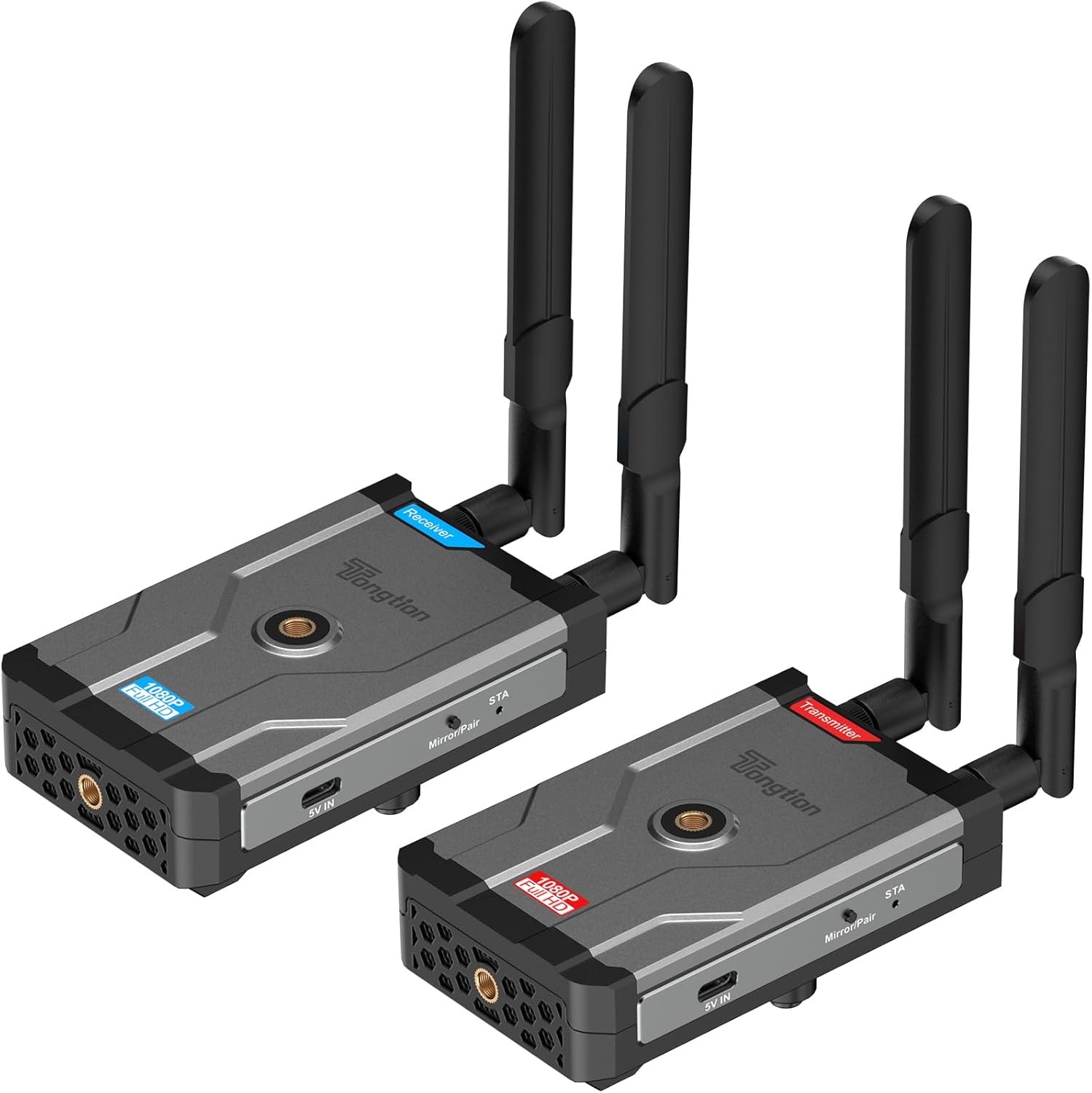
Image: The Tongtion Wireless HDMI Extender system, showing both the transmitter and receiver units with their antennas.
2. อะไรอยู่ในกล่อง
ตรวจสอบว่ามีส่วนประกอบทั้งหมดอยู่ในแพ็คเกจ:
- เครื่องส่งสัญญาณ HDMI ไร้สาย 1 เครื่อง
- ตัวรับสัญญาณ HDMI ไร้สาย 1 ตัว
- 4 x เสาอากาศ
- 2 x อะแดปเตอร์ไฟฟ้า
- 2 x USB-C Power Cables
- 1 x คู่มือผู้ใช้
- สาย HDMI

Image: A visual representation of the package contents, including the transmitter, receiver, antennas, power adapters, USB-C cables, and user guide.
3. ข้อมูลจำเพาะ
| คุณสมบัติ | รายละเอียด |
|---|---|
| หมายเลขรุ่น | เอช-1 |
| การสนับสนุนความละเอียด | 1920×1080@60Hz (1080P Full HD) |
| ช่วงการส่งผ่าน | Up to 500m (1640ft) Line-of-Sight |
| ความถี่ไร้สาย | 5GHz (802.11a/n) |
| การกำหนดค่าเสาอากาศ | 2T2R Dual-Antenna |
| มาตรฐาน HDMI | HDMI1.4 / HDCP1.4 |
| ตัวเลือกพลังงาน | Power bank, NP-F series batteries (not included), USB-C ports |
| สี | สีดำ |
| น้ำหนักสินค้า | 1.17 ปอนด์ (0.53 กก.) |
| ขนาดสินค้า | 5.87 x 3.74 x 0.96 นิ้ว (14.9 x 9.5 x 2.4 ซม.) |
| คุณสมบัติพิเศษ | การปรับเทียบอัตโนมัติ |
4. คำแนะนำในการตั้งค่า
The Tongtion Wireless HDMI Extender is designed for true plug-and-play operation, requiring no drivers or software installation.
- เชื่อมต่อเสาอากาศ: Screw the four provided antennas onto the designated ports on both the Transmitter and Receiver units. Ensure they are securely fastened.

ภาพ: ระยะใกล้ view of the transmitter and receiver units, highlighting the antenna connection points.
- จ่ายพลังงานให้เครื่องรับ: Connect one end of a USB-C power cable to the Receiver unit's USB-C port and the other end to a power adapter. Plug the power adapter into an electrical outlet. Alternatively, use a power bank or compatible NP-F series battery (not included) for portable power.
- เชื่อมต่อตัวรับสัญญาณเข้ากับจอแสดงผล: Use an HDMI cable to connect the HDMI OUT port on the Receiver unit to the HDMI input port on your display device (e.g., TV, projector, monitor).
- เปิดใช้งานเครื่องส่งสัญญาณ: Connect the second USB-C power cable to the Transmitter unit's USB-C port and the other end to its power adapter. Plug the power adapter into an electrical outlet. Similar to the receiver, a power bank or NP-F series battery can be used.
- Connect Transmitter to Source: Use an HDMI cable to connect the HDMI IN port on the Transmitter unit to the HDMI output port on your source device (e.g., laptop, camera, set-top box, PC, DV).

Image: A diagram illustrating the connection process: transmitter connected to a laptop and receiver connected to a television.
- การจับคู่อัตโนมัติ: The Transmitter and Receiver units are designed to pair automatically within seconds. No manual pairing or software configuration is typically required. Wait for the connection indicator lights on both units to show a stable connection.
Note: For optimal performance, ensure a clear line of sight between the transmitter and receiver, especially for longer distances. Walls and other obstructions can reduce the effective transmission range.
5. คู่มือการใช้งาน
Once the setup is complete and the units are paired, the system operates automatically.
- เปิดเครื่อง: Ensure both the Transmitter and Receiver units are powered on.
- เอาท์พุตอุปกรณ์ต้นทาง: Ensure your source device (laptop, camera, etc.) is outputting video via its HDMI port.
- อินพุตการแสดงผล: Set your display device (TV, projector) to the correct HDMI input channel where the Receiver is connected.
- การส่งสัญญาณ: สัญญาณวิดีโอและเสียงจากอุปกรณ์ต้นทางของคุณจะถูกส่งไปยังจอแสดงผลของคุณแบบไร้สาย
- One-Button Sync: If pairing is lost or you need to re-sync, press the sync button on both the Transmitter and Receiver units simultaneously.

Image: A visual representation of the extender in operation, showing a clear 1080P Full HD signal being transmitted wirelessly to a display.
5.1. Universal Device Compatibility
The system is compatible with a wide range of HDMI-enabled devices:
- อุปกรณ์ต้นทาง: Cameras, Laptops, Set-top boxes, Switchers, PCs, DVs.
- อุปกรณ์แสดงผล: Projectors, TVs, Monitors.
It supports HDMI1.4/HDCP1.4, allowing for protected content streaming from various platforms.

Image: An illustration demonstrating the broad compatibility of the wireless HDMI extender with various input and output devices.
5.2. Transmission Range and Performance
The device offers a long-range 5GHz dual-antenna transmission, minimizing interference and ensuring stable signal coverage.
- Line-of-Sight (LOS) Range: สูงสุด 1640 ฟุต (500 เมตร)
- Through-Wall Penetration: Effective range is reduced when transmitting through walls or obstructions. Typical ranges are 164-295 feet (50-90 meters) through complex home environments.
- ความหน่วง: The system is designed for low latency, suitable for video streaming and presentations. Note: Not recommended for gaming due to potential minor latency.

Image: A graphic depicting the extensive transmission range of 1640 feet and the low latency of 0.15 seconds, with a visual of the transmitter and receiver units.

ภาพ: เหนือศีรษะ view of a house layout illustrating the signal penetration capabilities through walls and the difference between line-of-sight and obstructed transmission ranges.
6 การแก้ไขปัญหา
หากคุณพบปัญหา โปรดดูขั้นตอนการแก้ไขปัญหาทั่วไปต่อไปนี้:
- ไม่มีสัญญาณบนจอแสดงผล:
- Ensure both Transmitter and Receiver are powered on and their power indicators are lit.
- Verify all HDMI cables are securely connected to the correct ports (HDMI IN on Transmitter, HDMI OUT on Receiver).
- ตรวจสอบให้แน่ใจว่าอุปกรณ์แสดงผลของคุณตั้งค่าแหล่งสัญญาณ HDMI ถูกต้องแล้ว
- Ensure the source device is outputting an HDMI signal.
- Try pressing the sync button on both units simultaneously to re-establish pairing.
- Reduce the distance between the Transmitter and Receiver, and remove any obstructions.
- Intermittent Signal / Poor Quality:
- ตรวจสอบให้แน่ใจว่าเสาอากาศได้รับการติดตั้งอย่างแน่นหนาและวางแนวอย่างถูกต้อง
- Check for strong interference sources (e.g., Wi-Fi routers, microwaves) operating on the 5GHz band nearby.
- Move the units closer together or adjust their positions to improve line of sight.
- Verify that the power supply is stable and sufficient for both units.
- ไม่มีเสียง:
- ตรวจสอบการตั้งค่าเสียงบนอุปกรณ์ต้นทางของคุณ
- Ensure the display device's volume is not muted or set too low.
- Confirm HDMI cables are fully inserted.
- หน่วยที่ไม่จับคู่:
- ตรวจสอบให้แน่ใจว่าทั้งสองหน่วยเปิดอยู่
- Perform a manual sync by pressing the pairing button on both units.
- Power cycle both the Transmitter and Receiver units.
7. การบำรุงรักษา
เพื่อให้มั่นใจได้ถึงอายุการใช้งานที่ยาวนานและประสิทธิภาพสูงสุดของตัวขยายสัญญาณ HDMI ไร้สายของคุณ โปรดปฏิบัติตามคำแนะนำในการบำรุงรักษาเหล่านี้:
- การทำความสะอาด: ใช้ผ้านุ่มและแห้งเช็ดทำความสะอาดภายนอกตัวเครื่อง ห้ามใช้น้ำยาทำความสะอาดหรือสเปรย์
- พื้นที่จัดเก็บ: เมื่อไม่ได้ใช้งานเป็นเวลานาน ควรเก็บอุปกรณ์ไว้ในที่แห้งและเย็น หลีกเลี่ยงแสงแดดโดยตรงและอุณหภูมิที่สูงหรือต่ำเกินไป
- การจัดการ: Handle the units and antennas with care to avoid physical damage. Avoid dropping or subjecting them to strong impacts.
- การระบายอากาศ : Ensure the units have adequate ventilation to prevent overheating, especially during prolonged operation. Do not block ventilation holes.
- แหล่งจ่ายไฟ: Always use the provided power adapters or compatible power sources to prevent damage.
8. การรับประกันและการสนับสนุน
The Tongtion Wireless HDMI Extender comes with a รับประกัน 1 ปี ตั้งแต่วันที่ซื้อสินค้า
Tongtion also provides การสนับสนุน for this product. If you encounter any issues or have questions that are not covered in this manual, please contact Tongtion customer support through their official channels or refer to the 24/7 troubleshooting guides mentioned in the product features.
หากต้องการความช่วยเหลือเพิ่มเติม โปรดไปที่ ร้าน Tongtion บน Amazon.


