1. บทนำ
This manual provides essential information for setting up, operating, and maintaining your XIAOMI 14T Pro Ai 5G smartphone. Please read it carefully to ensure optimal performance and longevity of your device.
มีอะไรอยู่ในกล่อง
- สมาร์ทโฟน XIAOMI 14T Pro
- สายเคเบิล USB Type-C
- พินถอดซิม
- เคสโทรศัพท์
- คู่มือเริ่มต้นใช้งานฉบับย่อและใบรับประกัน

Image: The XIAOMI 14T Pro smartphone, USB cable, SIM eject pin, phone case, and user manual as packaged in the retail box.
2. อุปกรณ์โอเวอร์view
The XIAOMI 14T Pro features a premium design with an aluminum alloy metallic frame, offering both durability and a sophisticated feel. Its ultra-thin bezel design provides an immersive viewการสร้างประสบการณ์
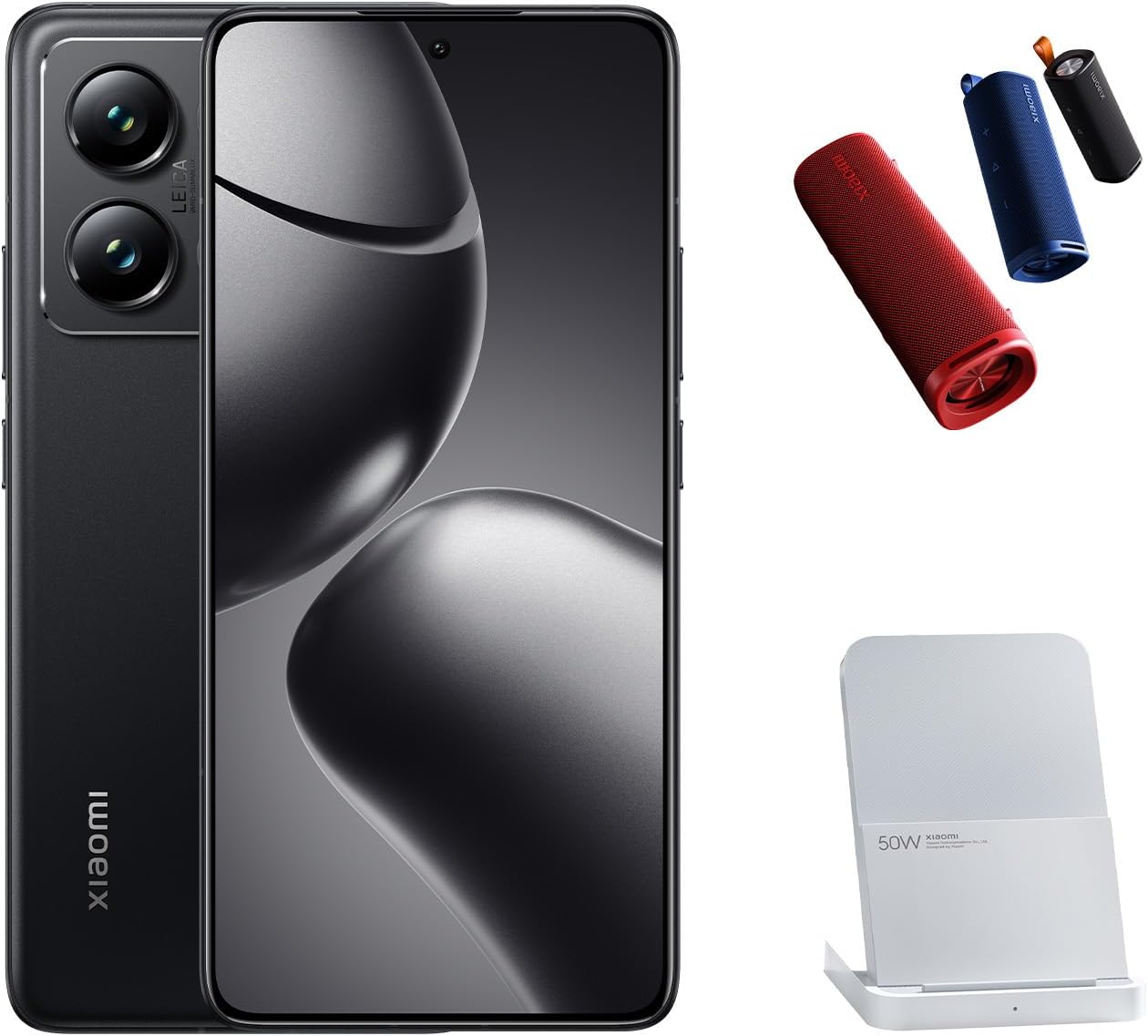
Image: The XIAOMI 14T Pro smartphone, displaying its sleek design and prominent camera array.
คุณสมบัติหลัก
- แสดง: 6.67-inch 144Hz AI AMOLED display with 2712 x 1220 resolution and 4000 nits peak brightness.
- โปรเซสเซอร์: MediaTek Dimensity 9300+ 4nm power-efficient manufacturing process.
- ระบบกล้อง: 50MP Triple Pro Leica Camera (Main, Telephoto, Ultra-wide) with Light Fusion 900 sensor.
- แบตเตอรี่: 5000mAh (typ) battery with 120W HyperCharge support.
- ระบบปฏิบัติการ: ระบบปฏิบัติการ Android 14 พร้อม Xiaomi HyperOS
- การเชื่อมต่อ: Dual Nano SIM 5G + eSIM, Wi-Fi 7, Bluetooth 5.4, NFC.
- คุณสมบัติ AI: Circle to Search with Google, Google Gemini AI Interpreter, AI Notes, AI Recorder, AI Subtitles, AI Film, AI image editing, AI Portrait.
3. การตั้งค่า
3.1 การเปิดเครื่องครั้งแรก
- Ensure your device has sufficient charge. If not, connect it to the provided USB cable and a power adapter.
- กดปุ่มค้างไว้ ปุ่มเปิดปิด (located on the right side of the device) until the XIAOMI logo appears.
- ทำตามคำแนะนำบนหน้าจอเพื่อทำการตั้งค่าเริ่มต้นให้เสร็จสมบูรณ์ รวมถึงการเลือกภาษา การเชื่อมต่อ Wi-Fi และการลงชื่อเข้าใช้บัญชี Google
3.2 SIM Card and eSIM Installation
The XIAOMI 14T Pro supports Dual Nano SIM and eSIM functionality.
- ค้นหาถาดใส่การ์ด SIM ที่ด้านข้างอุปกรณ์ของคุณ
- Insert the SIM eject pin into the small hole on the SIM tray and gently push until the tray pops out.
- Place your Nano SIM card(s) into the tray with the gold contacts facing down. Ensure they are correctly seated.
- ใส่ถาดซิมกลับเข้าไปในอุปกรณ์อย่างระมัดระวัง
- สำหรับการเปิดใช้งาน eSIM โปรดไปที่ การตั้งค่า > เครือข่ายและอินเทอร์เน็ต > ซิม and follow the instructions to add an eSIM profile.

Image: The right side of the XIAOMI 14T Pro, highlighting the SIM card tray slot and physical buttons.
4. การใช้งานอุปกรณ์ของคุณ
4.1 การแสดงผลและการนำทาง
The 6.67-inch AI AMOLED display offers vibrant colors and deep contrasts. Its 144Hz refresh rate ensures smooth scrolling and fluid animations, enhancing your overall user experience. The touch sampling rate of up to 480Hz provides highly responsive interaction.
4.2 ฟังก์ชันกล้อง
The XIAOMI 14T Pro features a professional Leica co-engineered triple-lens camera system, designed to capture exceptional images in various conditions.
- กล้องหลัก: 50MP with Leica Summilux optical lens, Light Fusion 900 image sensor, OIS, and f/1.6 aperture for excellent low-light performance.
- กล้องเทเลโฟโต้: 50MP with f/2.0 aperture, ideal for detailed zoomed shots.
- กล้องอัลตร้าไวด์: 12MP with f/2.2 aperture and 120° FOV for expansive landscape and group photos.
- คุณสมบัติการถ่ายภาพ: Leica Authentic Look, Leica Vibrant Look, Leica filters, Master-lens system (35mm Documentary, 50mm Swirly bokeh, 75mm Portrait, 90mm Soft focus), Digital zoom up to 30x.
- กล้องหน้า: 32MP in-display selfie camera with f/2.0 aperture, Night mode, HDR, and Portrait mode.

ภาพ: รายละเอียด view of the XIAOMI 14T Pro's advanced Leica camera system.
4.3 คุณสมบัติ AI
ใช้ประโยชน์จากความสามารถ AI แบบบูรณาการเพื่อเพิ่มประสิทธิภาพการทำงานและความคิดสร้างสรรค์:
- วงกลมเพื่อค้นหาด้วย Google: Circle, highlight, or tap anything on your screen to get instant search results.
- ล่าม AI ของ Google Gemini: การแปลภาษาแบบเรียลไทม์
- AI Notes & AI Recorder: Smart note-taking and transcription features.
- AI Film & AI Image Editing: Advanced tools for video creation and photo enhancement.
5. การบำรุงรักษา
5.1 การจัดการแบตเตอรี่
The 5000mAh battery provides extended usage. Utilize the 120W HyperCharge for rapid charging. To prolong battery life, avoid extreme temperatures and fully discharging the battery frequently.
5.2 การอัปเดตซอฟต์แวร์
Regularly check for and install system updates to ensure your device has the latest features, security patches, and performance improvements. Updates are typically found under การตั้งค่า > เกี่ยวกับโทรศัพท์ > เวอร์ชัน MIUI (or HyperOS version).
5.3 การทำความสะอาดและการดูแล
Use a soft, lint-free cloth to clean your device. Avoid harsh chemicals or abrasive materials. The device features LiquidCool Technology for thermal management; ensure proper ventilation during heavy use.
6 การแก้ไขปัญหา
6.1 ปัญหาทั่วไป
- อุปกรณ์ไม่เปิดเครื่อง: Ensure the battery is charged. If the issue persists, try a forced restart by holding the Power button for 10-15 seconds.
- ปัญหาการเชื่อมต่อเครือข่าย: Check SIM card insertion, ensure mobile data is enabled, or try toggling Airplane Mode. Verify your carrier settings.
- แอปขัดข้องหรือค้าง: Clear the app's cache (Settings > Apps > [App Name] > Storage > Clear cache) or reinstall the app. Ensure your device's software is up to date.
- เซ็นเซอร์ลายนิ้วมือไม่ทำงาน: Ensure your finger is clean and dry. Re-register your fingerprints in Settings.
6.2 รีเซ็ตเป็นค่าโรงงาน
หากคุณพบปัญหาซอฟต์แวร์อย่างต่อเนื่อง อาจจำเป็นต้องรีเซ็ตเป็นค่าโรงงาน คำเตือน: การดำเนินการนี้จะลบข้อมูลทั้งหมดในอุปกรณ์ของคุณ โปรดสำรองข้อมูลสำคัญก่อนดำเนินการต่อ
- ไปที่ การตั้งค่า > เกี่ยวกับโทรศัพท์ > รีเซ็ตเป็นค่าจากโรงงาน.
- แตะ ลบข้อมูลทั้งหมด และยืนยันการตัดสินใจของคุณ
7. ข้อมูลจำเพาะ
| คุณสมบัติ | รายละเอียด |
|---|---|
| ชื่อรุ่น | 14T โปร |
| หมายเลขรุ่นสินค้า | MZB0HIYEU |
| ระบบปฏิบัติการ | Android 14 (พร้อม Xiaomi HyperOS) |
| ขนาดจอแสดงผล | 6.67 นิ้ว |
| ความละเอียดการแสดงผล | 2712 x 1220 (446ppi) |
| อัตราการรีเฟรช | สูงถึง 144Hz |
| โปรเซสเซอร์ | MediaTek Dimensity 9300+ |
| หน่วยความจำแรม | 12GB |
| ความจุในการเก็บข้อมูล | 1024 GB (Internal, no SD card slot) |
| กล้องหลัก | 50MP Leica Summilux optical lens |
| กล้องเทเลโฟโต้ | 50MP |
| กล้องอัลตร้าไวด์ | 12MP |
| กล้องหน้า | 32MP |
| ความจุของแบตเตอรี่ | 5000 มิลลิแอมป์ |
| การชาร์จไฟ | 120W HyperCharge (wired), Wireless Charging supported |
| การเชื่อมต่อ | 5G, Wi-Fi 7, บลูทูธ 5.4, NFC, GPS |
| เซ็นเซอร์ | Fingerprint (under display, optical), accelerometer, proximity, gyro, compass, color spectrum |
| ขนาด | 6.31 x 2.96 x 0.33 นิ้ว |
| น้ำหนักสินค้า | 7.9 ออนซ์ |
| สี | ไททันแบล็ค |
8. การรับประกันและการสนับสนุน
Please note that this is an International Model and may not include warranty coverage in the US. For warranty details specific to your region, please refer to the warranty card included in your product packaging or contact your local XIAOMI authorized service center.
For further assistance, visit the official XIAOMI support website or contact their customer service. You can find more information and products on the ร้านค้าเสี่ยวหมี่.


