การแนะนำ
The SONICAKE Sonic One Loop is a versatile 3-in-1 guitar and bass effects pedal designed to enhance your signal chain with AB line selection, a dedicated effects loop, and switchable buffer functions. Its true bypass design ensures your instrument's original tone is preserved when the pedal is disengaged. This manual provides detailed instructions for setup, operation, and maintenance to help you get the most out of your Sonic One Loop pedal.
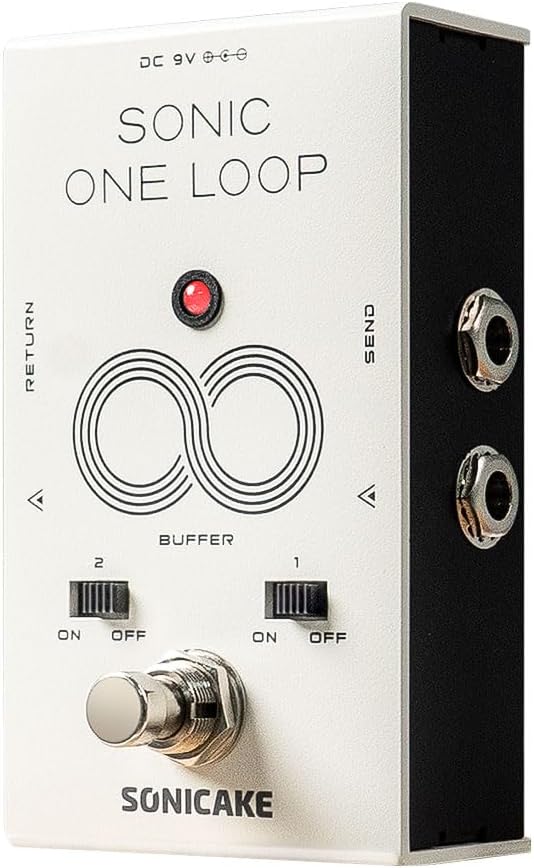
รูปที่ 1 : ด้านหน้า view of the SONICAKE Sonic One Loop pedal, showing the footswitch, buffer switches, and input/output jacks.
การตั้งค่า
ความต้องการด้านพลังงาน
The Sonic One Loop pedal requires a standard 9V DC power supply with a center-negative polarity. Ensure your power supply meets these specifications to prevent damage to the unit.
Connecting Your Pedal
- Connect your instrument (guitar or bass) to the ป้อนข้อมูล ต่อแจ็คเข้ากับแป้นเหยียบโดยใช้สายเคเบิลเครื่องดนตรีขนาดมาตรฐาน 1/4 นิ้ว
- เชื่อมต่อ เอาท์พุต แจ็คของแป้นเหยียบไปยังของคุณ ampแอมป์หรือเอฟเฟ็กต์ตัวถัดไปในลำดับสัญญาณของคุณ
- For the effects loop function, connect the ส่ง jack to the input of the effects pedals you wish to include in the loop.
- Connect the output of the last pedal in your effects loop chain to the กลับ jack on the Sonic One Loop pedal.
- Plug in the 9V DC center-negative power supply to the กระแสตรง 9 โวลต์ แจ็คอินพุต

รูปที่ 2: เกินview of the Sonic One Loop pedal highlighting its AB, Loop, and Buffer functionalities.
คำแนะนำการใช้งาน
AB Line Selection Function
The Sonic One Loop allows you to select between two distinct signal paths (A or B) by tapping the main footswitch. This is useful for switching between different effects chains or routing your signal to different destinations.

Figure 3: Visual representation of the AB Line Selection function, showing how the footswitch toggles between output paths A and B.
ฟังก์ชั่นลูป
The integrated loop function enables you to engage or disengage an external chain of effects pedals with a single tap of the footswitch. This is ideal for bringing multiple effects in and out of your signal path simultaneously.
- To activate the loop, tap the footswitch. The indicator LED will change color (e.g., from red to green) to show the loop is active.
- To bypass the loop, tap the footswitch again. The signal will then pass directly through the pedal via true bypass.

Figure 4: Diagram showing how to connect and utilize the Loop Function for external effects pedals.
Buffer Function
The Sonic One Loop features two independent buffer switches (Buffer 1 and Buffer 2) that can be toggled ON or OFF. Buffers help maintain signal integrity over long cable runs or through complex pedalboards, preventing tone loss due to capacitance.
- Buffer 1: Controls the buffer for the input/output line.
- Buffer 2: Controls the buffer for the loop line.
- Use the small toggle switches located above the footswitch to activate or deactivate each buffer independently.
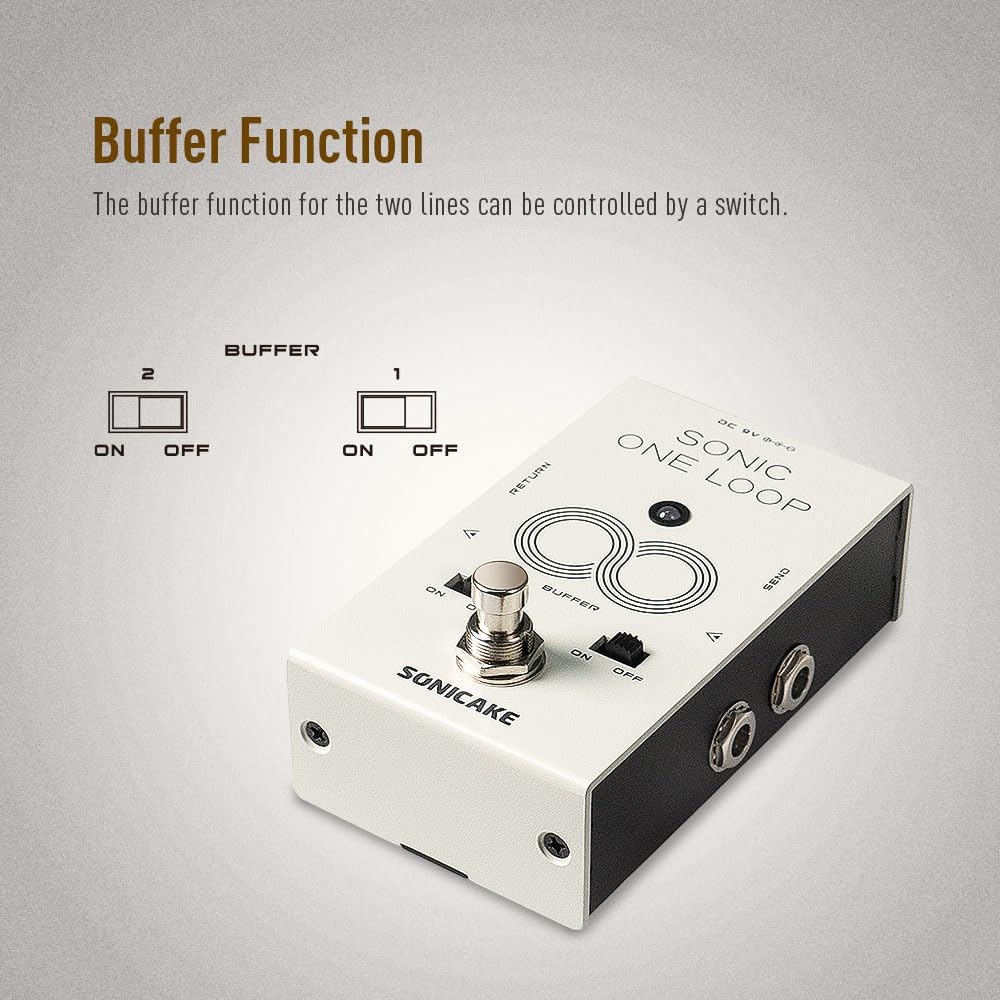
รูปที่ 5: ระยะใกล้ view of the buffer switches (1 and 2) and their ON/OFF positions.
บายพาสจริง
The Sonic One Loop is equipped with true bypass circuitry. When the pedal's effect or loop is disengaged, the signal passes directly through the pedal without any electronic interference, ensuring your instrument's original, uncolored tone is maintained.

Figure 6: Representation of True Bypass, indicating a clean signal path when the effect is off.
การซ่อมบำรุง
- การทำความสะอาด: Use a soft, dry cloth to clean the pedal's exterior. Avoid using abrasive cleaners or solvents, which may damage the finish.
- พื้นที่จัดเก็บ: Store the pedal in a dry environment, away from extreme temperatures and direct sunlight. Disconnect the power supply when not in use for extended periods.
- การเชื่อมต่อ: Periodically check all cable connections for tightness and wear. Ensure instrument cables are in good condition to prevent signal loss or noise.
การแก้ไขปัญหา
| ปัญหา | สาเหตุที่เป็นไปได้ | สารละลาย |
|---|---|---|
| ไม่มีเสียงหรือสัญญาณอ่อน | Incorrect power supply; faulty cables; incorrect connections; buffer switches off when needed. |
|
| เสียงรบกวนหรือเสียงฮัมที่ไม่พึงประสงค์ | Ground loop; faulty power supply; interference from other electronics. |
|
| Footswitch not responding | No power; internal issue. |
|
ข้อมูลจำเพาะ
| คุณสมบัติ | รายละเอียด |
|---|---|
| หมายเลขรุ่น | QCS-01 |
| น้ำหนักสินค้า | 10.6 ออนซ์ (300 กรัม) |
| ขนาดแพ็คเกจ | 4.76 x 3.27 x 2.52 นิ้ว |
| ความต้องการพลังงาน | 9V DC, ขั้วลบอยู่ตรงกลาง |
| ฮาร์ดแวร์อินเตอร์เฟซ | แจ็คเสียงขนาด 1/4 นิ้ว |
| ฟังก์ชั่น | AB Line Selection, Effects Loop, Buffer |
| ประเภทบายพาส | บายพาสจริง |
| ประเทศต้นกำเนิด | จีน |
หมายเหตุ: ข้อมูลจำเพาะอาจมีการเปลี่ยนแปลงโดยไม่ต้องแจ้งให้ทราบล่วงหน้าเพื่อการปรับปรุงผลิตภัณฑ์
การรับประกันและการสนับสนุน
สำหรับข้อมูลการรับประกันและการสนับสนุนทางเทคนิค โปรดดูที่เว็บไซต์อย่างเป็นทางการของ SONICAKE webหรือติดต่อตัวแทนจำหน่ายที่ได้รับอนุญาต เก็บใบเสร็จรับเงินไว้เป็นหลักฐานการซื้อสำหรับการเรียกร้องการรับประกันใดๆ
For further assistance, you may visit the SONICAKE Store on Amazon: SONICAKE Store.


