1. บทนำ
ขอบคุณสำหรับการซื้อasing the Greadio Portable CD Player Boombox, Model CD-X9B. This device offers multiple audio playback options including CD, Bluetooth, USB, AUX, and FM radio. This manual provides detailed instructions for setup, operation, maintenance, and troubleshooting to ensure optimal performance and longevity of your device. Please read this manual thoroughly before use and retain it for future reference.

Figure 1: Greadio CD-X9B Portable CD Player Boombox
2. สินค้าหมดview
2.1 เนื้อหาบรรจุภัณฑ์
- CD Player Boombox (Model CD-X9B) x 1
- สายไฟ AC x 1
- สาย AUX x 1
- คู่มือการใช้งาน x 1

รูปที่ 2: อุปกรณ์เสริมที่รวมอยู่
2.2 Controls and Components
Familiarize yourself with the various buttons and ports on your boombox:

Figure 3: Front, Top, and Rear View ของการควบคุม
- Power ON/OFF / Function Selector: Turns the unit on/off and switches between modes (CD, Bluetooth, USB, AUX, FM).
- ปุ่มโหมด/โปรแกรม: Selects playback mode (e.g., repeat, random) or programs CD tracks.
- Previous Song / Fast Rewind Button: Skips to the previous track or fast rewinds during playback.
- ปริมาณ -: ลดระดับเสียง
- แจ็คหูฟัง: ช่องเสียบหูฟังขนาด 3.5 มม.
- แจ็ค USB: สำหรับการเล่นไดรฟ์ USB
- แจ็ค AUX IN: อินพุต 3.5 มม. สำหรับอุปกรณ์เสียงภายนอก
- เล่น / หยุดชั่วคราว / สแกน: Plays or pauses playback; initiates FM radio scan.
- Stop/Sleep: Stops playback; sets the sleep timer.
- Next Song / Fast Forward Button: Skips to the next track or fast forwards during playback.
- ปริมาณ +: เพิ่มระดับเสียง
- ผู้บรรยาย: ลำโพงสเตอริโอในตัว
- จอแสดงผล LCD: แสดงโหมดปัจจุบัน หมายเลขแทร็ก เวลา และความถี่ FM
- CD Disc Door: เปิดเพื่อใส่หรือถอดซีดี
- รับมือ: For portable carrying.
- เสาอากาศ FM: เสาอากาศแบบยืดหดได้สำหรับรับสัญญาณวิทยุ FM
- เต้าเสียบไฟ AC: สำหรับเชื่อมต่อสายไฟ AC
- ช่องใส่แบตเตอรี่: Holds 6 C-size batteries (not included).
3. การตั้งค่า
3.1 แหล่งจ่ายไฟ
The Greadio CD-X9B boombox can be powered by either AC power or batteries.
- ไฟฟ้ากระแสสลับ: Connect the provided AC power cord to the AC outlet on the back of the unit and then plug it into a standard wall outlet.
- พลังงานแบตเตอรี่: For portable use, open the battery compartment on the bottom of the unit and insert 6 C-size batteries (not included), ensuring correct polarity.

รูปที่ 4: ตัวเลือกแหล่งจ่ายไฟแบบคู่
3.2 การเปิดเครื่องครั้งแรก
กดปุ่ม เปิด/ปิดเครื่อง กดปุ่มเพื่อเปิดเครื่อง หน้าจอ LCD จะสว่างขึ้น
4. คู่มือการใช้งาน
4.1 การเล่นแผ่นซีดี
เครื่องเล่นเทปพกพานี้รองรับไฟล์ CD, CD-R และ CD-RW
- กดปุ่ม Power ON/OFF / Function Selector button repeatedly until 'CD' appears on the LCD display.
- เปิด CD Disc Door by gently lifting it.
- Place a CD onto the spindle with the label side facing up. Close the CD Disc Door.
- The unit will read the disc, and the total number of tracks will appear on the display.
- กดปุ่ม เล่น/หยุดชั่วคราว ปุ่มเพื่อเริ่มเล่น
- ใช้ Previous Song / Fast Rewind และ เพลงถัดไป / กรอไปข้างหน้า buttons to navigate tracks. Hold these buttons to fast rewind or fast forward.
- กดปุ่ม โหมด/โปรแกรม button to cycle through playback modes: Normal, Single Cycle (repeat current track), Full Cycle (repeat all tracks), and Random Play.
- กดปุ่ม Stop/Sleep ปุ่มเพื่อหยุดเล่น
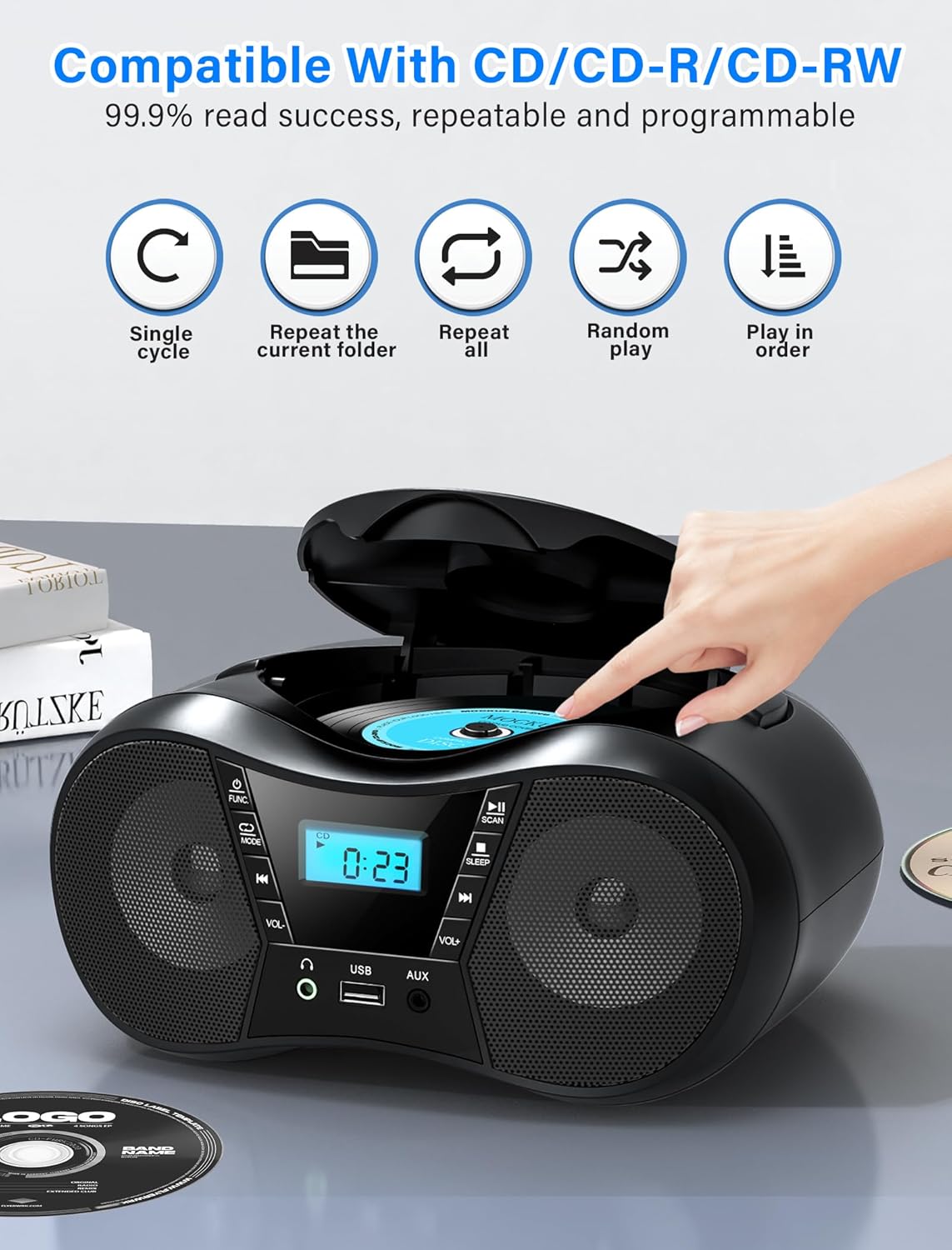
Figure 5: CD Playback Features
4.2 การทำงานของบลูทูธ
Connect your Bluetooth-enabled device to the boombox.
- กดปุ่ม Power ON/OFF / Function Selector button repeatedly until 'BT' appears on the LCD display. The unit will enter pairing mode, indicated by a flashing 'BT'.
- Enable Bluetooth on your external device (smartphone, tablet, computer) and search for available devices.
- Select 'CD-X9B' from the list of devices. Once connected, 'BT' will stop flashing and remain solid.
- ตอนนี้คุณสามารถเล่นเสียงจากอุปกรณ์ที่เชื่อมต่อผ่านลำโพงพกพาได้แล้ว
- ระยะการเชื่อมต่อบลูทูธสูงสุด 26 ฟุต (8 เมตร)
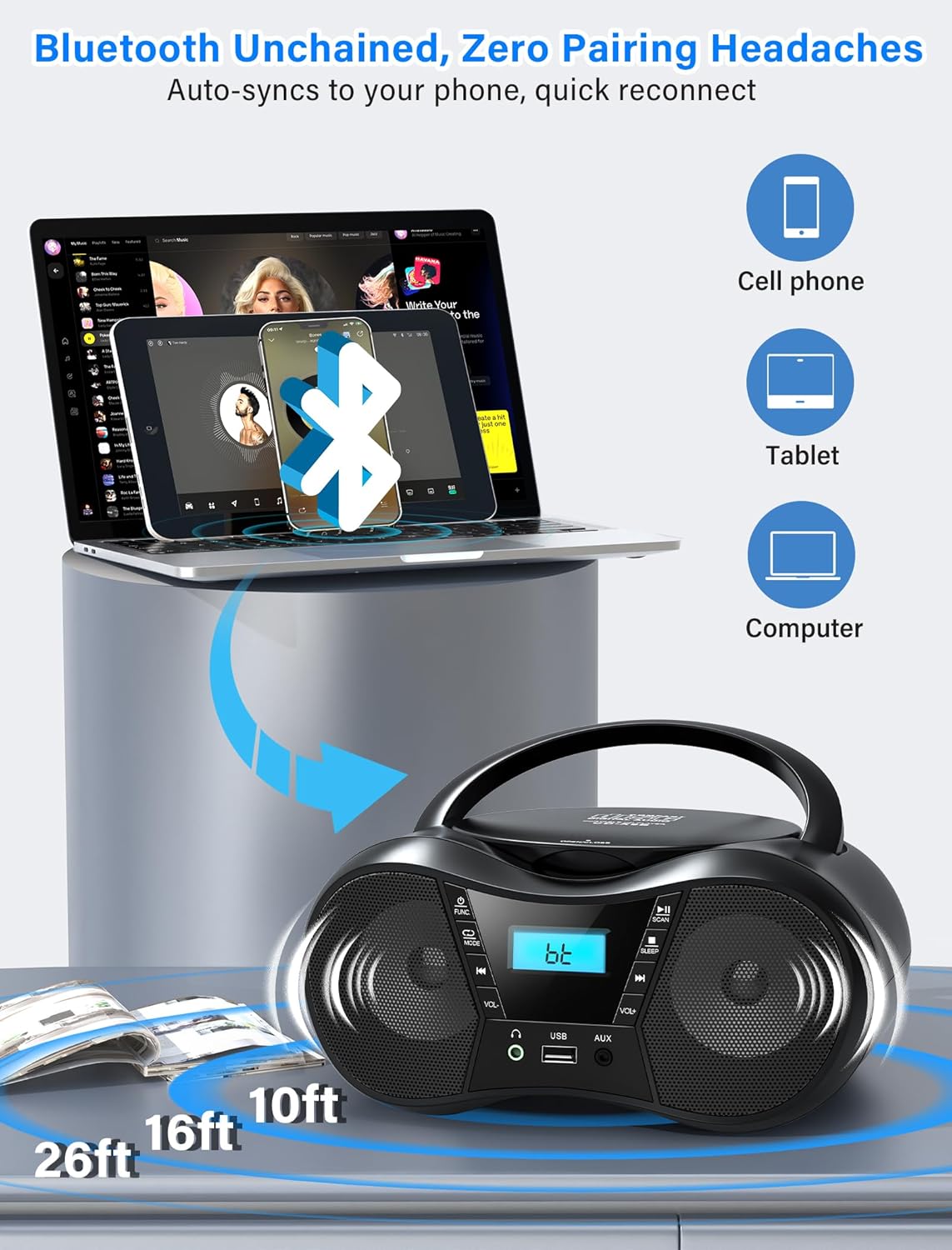
รูปที่ 6: การเชื่อมต่อบลูทูธ
4.3 วิทยุ FM
Listen to FM radio stations.
- กดปุ่ม Power ON/OFF / Function Selector button repeatedly until 'FM' appears on the LCD display.
- ขยายเวลา เสาอากาศเอฟเอ็ม fully and adjust its position for optimal reception.
- กดปุ่ม เล่น/หยุดชั่วคราว/สแกน ปุ่มสแกนและบันทึกสถานี FM ที่มีอยู่โดยอัตโนมัติ
- ใช้ Previous Song / Fast Rewind และ เพลงถัดไป / กรอไปข้างหน้า buttons to manually tune or select saved stations.
- The FM frequency range is 87.5 to 108 MHz.
4.4 การเล่น USB
เล่นเสียง fileจากไดรฟ์ USB
- เสียบไดรฟ์ USB เข้าไป แจ็ค USB.
- กดปุ่ม Power ON/OFF / Function Selector button repeatedly until 'USB' appears on the LCD display.
- The unit will automatically begin playing MP3 audio fileจากไดรฟ์ USB
- ใช้ Previous Song / Fast Rewind และ เพลงถัดไป / กรอไปข้างหน้า ปุ่มสำหรับการนำทางเพลง
อินพุต AUX 4.5 ช่อง
Connect external audio devices using the AUX cable.
- เชื่อมต่อปลายด้านหนึ่งของสาย AUX ที่ให้มาเข้ากับ... แจ็ค AUX IN on the boombox.
- ต่อปลายอีกด้านหนึ่งเข้ากับช่องเสียบหูฟังหรือช่องสัญญาณเสียงออกของอุปกรณ์ภายนอกของคุณ (เช่น เครื่องเล่น MP3, คอมพิวเตอร์)
- กดปุ่ม Power ON/OFF / Function Selector button repeatedly until 'AUX' appears on the LCD display.
- Play audio from your external device. The boombox will output the sound.

Figure 7: USB, AUX, and FM Modes
4.6 การควบคุมระดับเสียง
ปรับระดับเสียงโดยใช้ปุ่ม เล่ม + และ ปริมาณ - ปุ่ม
4.7 การใช้หูฟัง
For private listening, plug 3.5mm headphones into the แจ็คหูฟัง.
4.8 ตัวตั้งเวลาปิดเครื่อง
The sleep timer allows the unit to automatically turn off after a set period.
- ขณะที่เครื่องเปิดอยู่ ให้กดปุ่ม Stop/Sleep button repeatedly to cycle through sleep timer options (90, 80, 70, 60, 50, 40, 30, 20, 10 minutes, or OFF).
- The selected time will appear on the display. The unit will automatically power off after the set duration.

รูปที่ 8: ฟังก์ชันตั้งเวลาปิดเครื่องอัตโนมัติ
5. การบำรุงรักษา
5.1 การทำความสะอาด
- เช็ดภายนอกตัวเครื่องด้วยผ้านุ่มและแห้ง ห้ามใช้น้ำยาทำความสะอาดที่มีฤทธิ์กัดกร่อนหรือตัวทำละลาย
- สำหรับเลนส์ซีดี ให้ใช้แผ่นทำความสะอาดเลนส์ซีดีโดยเฉพาะ
5.2 การดูแลซีดี
- ควรจับแผ่นซีดีที่ขอบเพื่อหลีกเลี่ยงรอยนิ้วมือบนพื้นผิวที่ใช้เล่น
- Store CDs in their cases when not in use to prevent scratches.
- ทำความสะอาดแผ่นซีดีที่สกปรกด้วยผ้าเนื้อนุ่มที่ไม่เป็นขุย โดยเช็ดจากตรงกลางออกไปด้านนอก
5.3 การเปลี่ยนแบตเตอรี่
When using battery power, replace all 6 C-size batteries when the unit's performance degrades or the display dims. Ensure correct polarity when inserting new batteries.

รูปที่ 9: รายละเอียด Views of CD Compartment, Controls, and Battery Compartment
6 การแก้ไขปัญหา
| ปัญหา | สาเหตุที่เป็นไปได้ | สารละลาย |
|---|---|---|
| เครื่องไม่เปิด | No AC power or depleted batteries. | Ensure AC cord is securely plugged in or replace batteries. |
| แผ่นซีดีเล่นไม่ได้หรือเล่นสะดุด | ซีดีสกปรก มีรอยขีดข่วน หรือใส่ไม่ถูกต้อง | Clean the CD, check for damage, or reinsert correctly. |
| การรับสัญญาณวิทยุ FM ไม่ดี | เสาอากาศไม่ยืดออกหรือมีสิ่งกีดขวาง | Fully extend and adjust the FM antenna. Reposition the unit near a window and away from electronic devices. |
| ไม่สามารถจับคู่บลูทูธได้ | Boombox not in pairing mode or device out of range. | Ensure boombox is in 'BT' mode and flashing. Move device closer to the boombox (within 26 feet). |
| No sound from USB. | USB drive not inserted correctly or unsupported file รูปแบบ | Ensure USB drive is fully inserted. Verify audio files อยู่ในรูปแบบ MP3 |
| No sound from AUX. | AUX cable not connected or external device volume too low. | Check AUX cable connection. Increase volume on both the boombox and the external device. |
7. ข้อมูลจำเพาะ
- แบบอย่าง: CD-X9B
- ยี่ห้อ: Gredio
- ขนาดสินค้า (กว้าง x ยาว x สูง) : 9.01 x 8.23 x 4.29 นิ้ว (22.89 x 20.90 x 10.89 ซม.)
- น้ำหนักสินค้า: 2.1 ปอนด์ (0.95 กก.)
- เทคโนโลยีการเชื่อมต่อ: อุปกรณ์เสริม, บลูทูธ 5.1, USB
- สี: สีดำ
- ประเภทลำโพง: ลำโพงสเตอริโอในตัว
- ความเข้ากันได้ของซีดี: ซีดี, ซีดี-อาร์, ซีดี-อาร์ดับเบิลยู
- ช่วงความถี่ FM: 87.5 - 108 เมกะเฮิรตซ์
- แหล่งจ่ายไฟ: AC 120V~60Hz or 6 x C-size batteries (not included)
- ช่วงบลูทู ธ : สูงถึง 26 ฟุต (8 เมตร)
8. การรับประกันและการสนับสนุน
Greadio is committed to providing quality products and customer service.
- Hesitation Period: 15 วัน
- Maintenance Period: 12 เดือน
- การสนับสนุนการบริการ: ตลอดอายุการใช้งาน
For any questions or support needs, please contact Greadio customer service. Our service offices are based in Seattle and Berlin to provide comprehensive customer experience.


