1. บทนำ
The LAUNCH Creader Elite 2.0 is a professional OBD2 diagnostic tool designed for BMW, Mercedes-Benz, and Audi group vehicles. It offers comprehensive system diagnostics, advanced reset services, bi-directional control (active tests), and ECU coding capabilities. This manual provides essential information for operating and maintaining your device.
2. ข้อมูลด้านความปลอดภัย
- ควรทำการทดสอบรถยนต์ในบริเวณที่มีอากาศถ่ายเทได้ดีเสมอ
- Wear eye protection and safety gloves when working on vehicles.
- รักษาอุปกรณ์ให้แห้งและสะอาด หลีกเลี่ยงการสัมผัสกับอุณหภูมิหรือความชื้นที่สูงหรือต่ำเกินไป
- Do not attempt to disassemble or modify the device. Refer to qualified personnel for repairs.
- โปรดตรวจสอบให้แน่ใจว่าได้ปิดสวิตช์กุญแจรถแล้วก่อนที่จะเชื่อมต่อหรือถอดอุปกรณ์วินิจฉัย
3. อุปกรณ์โอเวอร์view
The LAUNCH Creader Elite 2.0 features a 4-inch Android 8.0 touchscreen display, providing an intuitive interface for diagnostics. It is equipped with a 3000 mAh battery and 2x16GB memory for efficient operation and data storage.

ภาพ: ด้านหน้า view of the LAUNCH Creader Elite 2.0 diagnostic tool, showing its touchscreen interface and control buttons.
4. การตั้งค่าและการกำหนดค่าเริ่มต้น
- เปิดเครื่อง: กดปุ่มเปิดปิดค้างไว้เพื่อเปิดอุปกรณ์
- เลือกภาษา: Follow the on-screen prompts to select your preferred language. The device supports 10 languages.
- การเชื่อมต่อ Wi-Fi: Navigate to 'Settings' and connect to a stable Wi-Fi network. This is crucial for software updates and online features.
- อัพเดตซอฟต์แวร์: After connecting to Wi-Fi, check for available updates in the 'Upgrade' section. Perform a one-click update to ensure you have the latest software and vehicle coverage.
5. คู่มือการใช้งาน
5.1 การเชื่อมต่อกับรถยนต์
- ค้นหาพอร์ต OBD2 ของรถ (โดยปกติจะอยู่ใต้แผงหน้าปัด)
- Connect the diagnostic cable from the Creader Elite 2.0 to the vehicle's OBD2 port.
- หมุนกุญแจรถไปที่ตำแหน่ง 'เปิด' (เครื่องยนต์ดับ)
- The device will automatically power on or prompt you to select 'Diagnose'.
5.2. การวินิจฉัยระบบแบบเต็มรูปแบบ
This function allows you to scan all available electronic control systems in the vehicle, including Engine (ENG), Anti-lock Braking System (ABS), Supplemental Restraint System (SRS), Transmission, Tire Pressure Monitoring System (TPMS), Electronic Parking Brake (EPB), Battery Management System (BMS), and Fuel systems. The device supports Auto VIN for quick vehicle identification.

Image: Diagram illustrating the comprehensive system diagnostic capabilities, showing various vehicle systems like engine, ABS, SRS, and TPMS, and the device performing a scan.
5.3. OBDII Functions
The device provides standard OBDII functions for all OBDII/EOBD compliant vehicles (1994-2000 for EOBD/OBDII global vehicles, 1996-2025 for BBA group vehicles). These include:
- Read/Clear Diagnostic Trouble Codes (DTCs)
- View Live Data Stream (text and graph format)
- Retrieve Freeze Frame Data
- สถานะความพร้อม I/M
- การทดสอบเซ็นเซอร์ O2
- การทดสอบออนบอร์ดมอนิเตอร์
- การทดสอบส่วนประกอบ
- Vehicle Information Retrieval (VIN, CIN, CVN)
5.4. Special Functions (Reset Services)
The Creader Elite 2.0 offers over 100 reset functions specifically for Benz, BMW, and Audi group vehicles. These services assist in maintenance and repair tasks.

Image: A collage of icons representing various reset functions such as Oil Reset, ABS Bleeding, DPF Regeneration, Injector Coding, and TPMS Reset, available on the diagnostic tool.
Examples of supported reset functions include:
- รีเซ็ตน้ำมัน
- ABS เลือดออก
- การสอบเทียบคันเร่ง
- EPB รีเซ็ต
- การฟื้นฟู DPF
- การเข้ารหัสหัวฉีด
- การสอบเทียบ SAS
- BMS รีเซ็ต
- รีเซ็ต TPMS
- รีเซ็ต AdBlue
- รีเซ็ตเกียร์
- Sunroof Reset
- การปรับเทียบที่นั่ง
Note: Specific reset functions may vary by vehicle model and year.
5.5. การควบคุมแบบสองทิศทาง (การทดสอบเชิงรุก)
This feature allows the diagnostic tool to send commands to vehicle components and modules to test their functionality directly, without using the vehicle's controls. This helps in quickly pinpointing faulty parts.
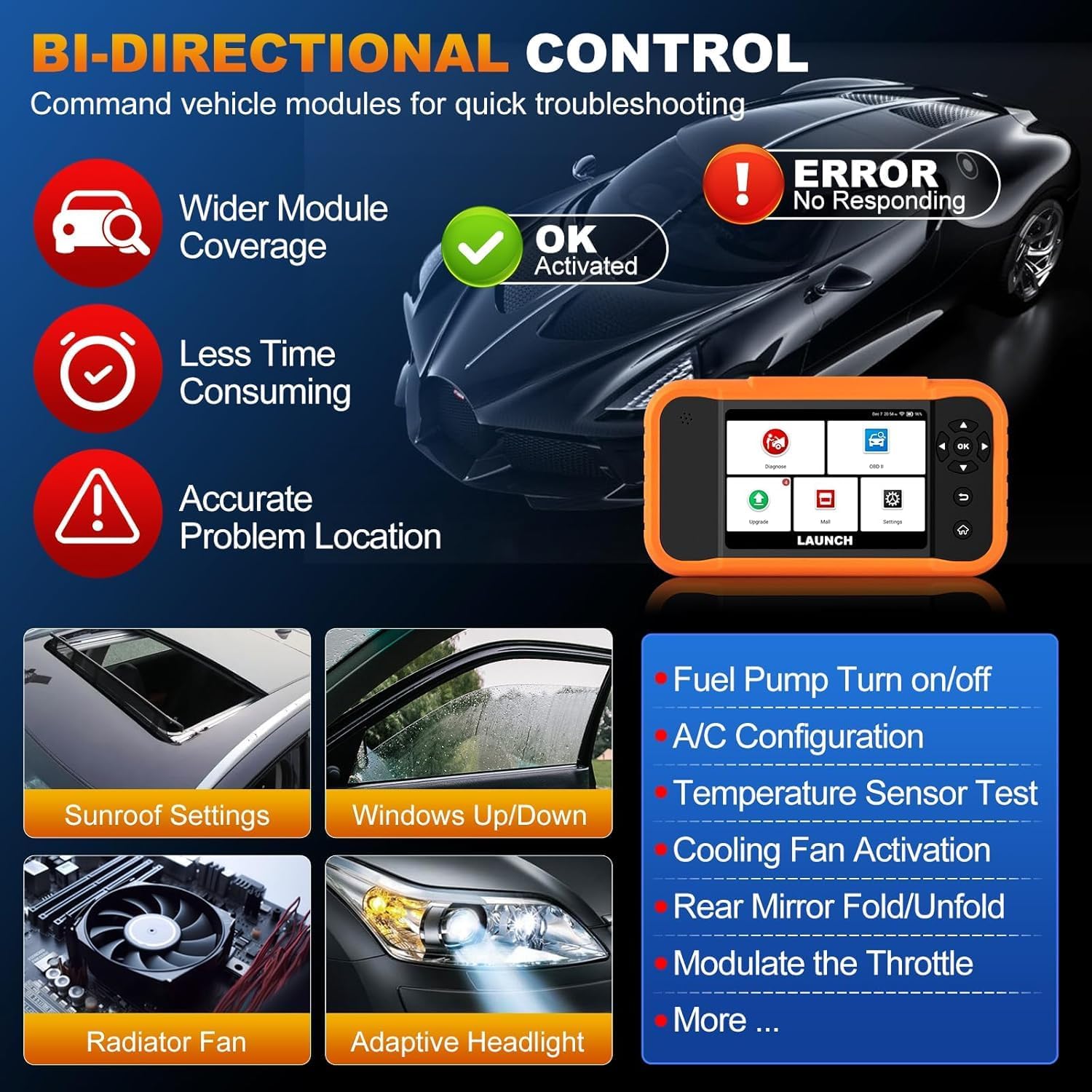
Image: Illustration of bi-directional control, showing the diagnostic tool sending commands to a car to test components like fuel pump, A/C, windows, and radiator fan, indicating successful activation or errors.
Exampตัวอย่างของการทดสอบเชิงรุก ได้แก่:
- Fuel Pump Turn on/off
- A/C Configuration
- Temperature Sensor Test
- การเปิดใช้งานพัดลมระบายความร้อน
- Windows Up/Down
- Sunroof Settings
5.6. การเขียนโค้ด ECU
ECU Coding allows for customization of vehicle settings, re-flashing hidden functions, restoring data, and opening/closing comfort functions. It also supports adaptive data for replacement and complex ECU issue repair.
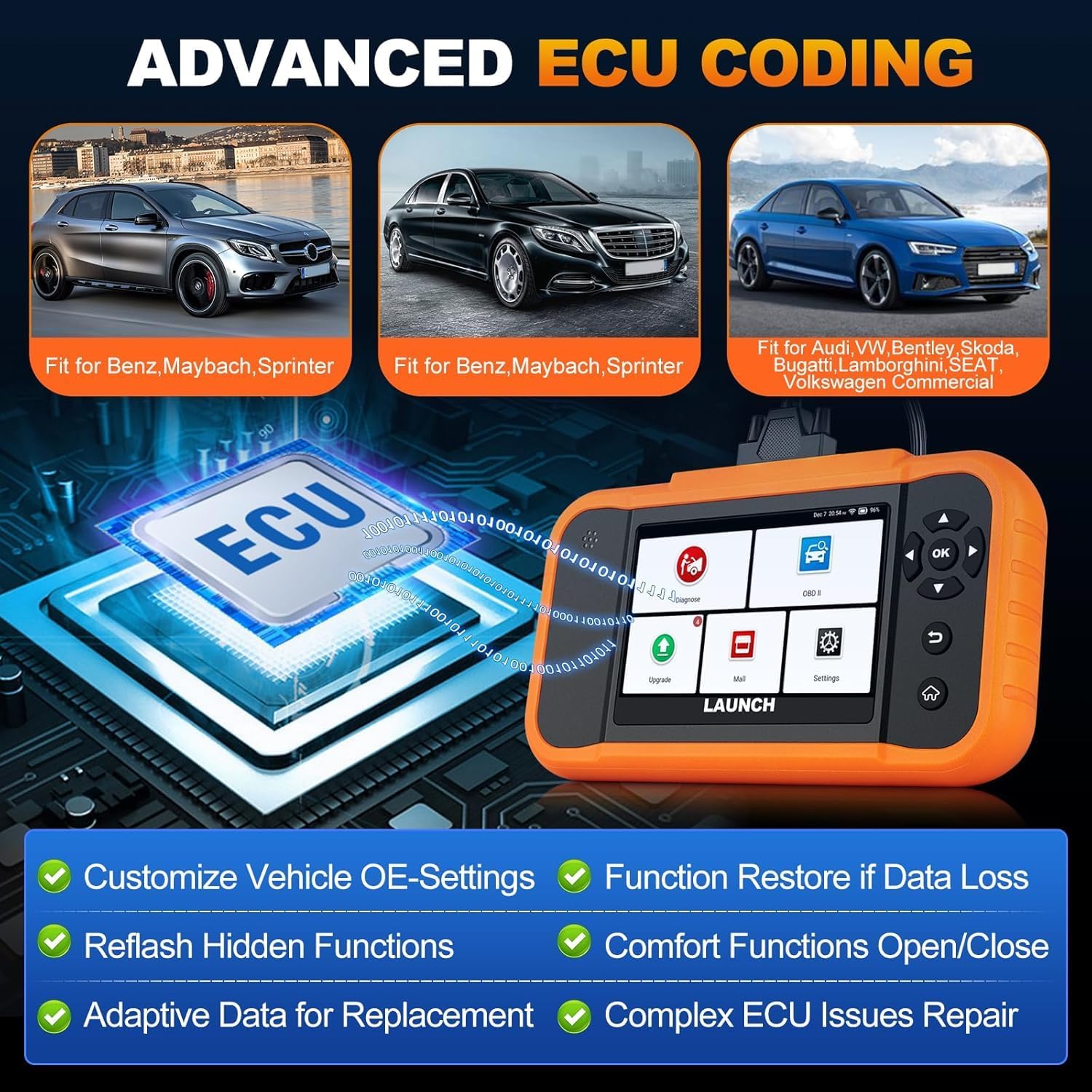
Image: A visual representation of ECU coding, showing a circuit board with 'ECU' text and the diagnostic tool, highlighting features like customizing OE-settings, re-flashing hidden functions, and restoring data.
5.7. Data Management and Reporting
The device facilitates efficient data handling:
- สแกนหมายเลข VIN อัตโนมัติ: Automatically identifies vehicle information for quick diagnostics.
- การค้นหา DTC: ให้คำจำกัดความของรหัสปัญหาการวินิจฉัย
- 4-in-1 Live Data Stream: Displays multiple data parameters simultaneously for detailed analysis.
- การลงทะเบียนแบตเตอรี่: Supports battery registration functions.
- รายงานการวินิจฉัย: Generates comprehensive health reports that can be shared or printed.
- Diagnostic History/Feedback: Stores diagnostic records and allows users to submit feedback to LAUNCH.

Image: A grid displaying various features of the diagnostic tool, including Auto VIN Scan, DTC Lookup, 4-in-1 Live Data Stream, Battery Registration, Online Diagnostic Feedback, and Diagnostic Report sharing.
6. การบำรุงรักษา
- การทำความสะอาด: ใช้แบบนุ่มๆamp ใช้ผ้าเช็ดทำความสะอาดอุปกรณ์ หลีกเลี่ยงการใช้สารทำความสะอาดที่มีฤทธิ์กัดกร่อนหรือตัวทำละลาย
- พื้นที่จัดเก็บ: เก็บอุปกรณ์ไว้ในที่แห้งและเย็น หลีกเลี่ยงแสงแดดโดยตรงและอุณหภูมิที่สูงหรือต่ำเกินไป
- การดูแลแบตเตอรี่ เพื่อให้แบตเตอรี่ใช้งานได้นานที่สุด ควรหลีกเลี่ยงการปล่อยให้แบตเตอรี่หมดจนเกลี้ยงบ่อยๆ และควรชาร์จอุปกรณ์เป็นประจำ
7 การแก้ไขปัญหา
- อุปกรณ์ไม่เปิดเครื่อง: Ensure the battery is charged or connect the device to the vehicle's OBD2 port for power.
- ปัญหาการเชื่อมต่อกับรถยนต์: Verify the OBD2 cable is securely connected to both the device and the vehicle. Ensure the vehicle's ignition is on.
- Software update problems: Check your Wi-Fi connection. If issues persist, try restarting the device and attempting the update again.
- การอ่านค่าไม่ถูกต้อง หรือฟังก์ชันบางอย่างใช้งานไม่ได้: Ensure the software is up to date. Verify the vehicle model and year are correctly selected.
8. ข้อมูลจำเพาะ
| คุณสมบัติ | ข้อมูลจำเพาะ |
|---|---|
| แบบอย่าง | YZB23-1 |
| น้ำหนักสินค้า | 900 กรัม |
| ขนาดแพ็คเกจ | 25 x 18 x 8 ซม. |
| แบตเตอรี่ | 1 AAA (included), 3000 mAh capacity |
| หน่วยความจำ | 2x16GB ความจุ |
| ระบบปฏิบัติการ | แอนดรอยด์ 8.0 |
| หน้าจอ | หน้าจอสัมผัสขนาด 4 นิ้ว |
| ภาษา | รองรับ 10 ภาษา |
| การเชื่อมต่อ | ไวไฟ |
9. การรับประกันและการสนับสนุน
This product comes with a manufacturer's warranty. For warranty details, technical support, or any operational questions, please refer to the official LAUNCH website or contact your authorized dealer. Ensure you have your product model number (YZB23-1) and purchase information ready when seeking support.


