1. สินค้าหมดview
The Morel Biggie is a high-fidelity portable Bluetooth speaker designed to deliver exceptional sound quality in a compact form factor. Featuring precision-handcrafted drivers and advanced DSP technology, it provides a balanced and immersive listening experience. Its robust design and long battery life make it suitable for various indoor environments.

Figure 1.1: The Morel Biggie speaker, showcasing its compact and modern design within a home environment.
Key features include a 2-way bass reflex system with a 4-inch woofer and 25mm soft dome tweeter, ensuring accurate and deep sound reproduction. The customized Digital Signal Processing (DSP) optimizes audio quality, preventing distortion and maintaining natural sound. The Biggie also supports True Wireless Stereo (TWS) pairing for a wider soundstage and offers up to 20 hours of playtime.
2. เนื้อหาบรรจุภัณฑ์
โปรดตรวจสอบให้แน่ใจว่ามีสินค้าทั้งหมดอยู่ในแพ็คเกจ:
- Morel Biggie Portable Bluetooth Speaker
- สายชาร์จ (USB-C)
- คู่มือการใช้งาน (เอกสารนี้)
3. คู่มือการติดตั้ง
3.1 การชาร์จเริ่มต้น
Before first use, fully charge your Morel Biggie speaker. Connect the provided charging cable to the speaker's charging port and plug the other end into a compatible USB power adapter (not included). The charging indicator light will show the charging status and turn off when fully charged. A full charge provides up to 20 hours of playback.
3.2 การเปิด/ปิดเครื่อง
- การเปิดเครื่อง: กดปุ่มเปิดปิดค้างไว้ (⏻) located on the side panel until you hear an audible chime and the indicator light illuminates.
- วิธีปิดเครื่อง: กดปุ่มเปิดปิดค้างไว้ (⏻) until you hear an audible chime and the indicator light turns off.

Figure 3.1: Side panel controls of the Morel Biggie speaker.
3.3 การจับคู่บลูทูธ
The Morel Biggie uses Bluetooth 5.3 for stable and efficient wireless connectivity.
- ตรวจสอบให้แน่ใจว่าลำโพงเปิดอยู่และอยู่ห่างจากอุปกรณ์บลูทูธของคุณไม่เกิน 50 เมตร (164 ฟุต)
- The speaker will automatically enter pairing mode when powered on for the first time or if no device is connected. The Bluetooth indicator light will flash.
- บนอุปกรณ์ของคุณ (สมาร์ทโฟน แท็บเล็ต แล็ปท็อป) ไปที่การตั้งค่าบลูทูธ และค้นหาอุปกรณ์ที่พร้อมใช้งาน
- Select "Morel Biggie" from the list.
- Once connected, the Bluetooth indicator light on the speaker will become solid, and you will hear a confirmation sound.
If you wish to pair with a new device, disconnect the current connection from your device's Bluetooth settings, or press and hold the Bluetooth button on the speaker to enter pairing mode again.
การจับคู่ระบบเสียงสเตอริโอไร้สาย 3.4 True Wireless Stereo (TWS)
For an enhanced stereo soundstage, you can pair two Morel Biggie speakers together wirelessly. This feature will be fully supported with an upcoming app release in 2024.
- Ensure both Biggie speakers are powered on and not connected to any other Bluetooth devices.
- On one speaker (this will be your primary speaker), press and hold the TWS pairing button (often indicated by an interlocking circles icon).
- On the second speaker, briefly press the TWS pairing button.
- The speakers will attempt to connect to each other. Once successfully paired, you will hear a confirmation sound, and their indicator lights will change to reflect the TWS connection.
- Now, connect your Bluetooth device to the primary speaker. Audio will play in stereo across both units.

Figure 3.2: Two Morel Biggie speakers ready for True Wireless Stereo (TWS) pairing.
4. คู่มือการใช้งาน
4.1 การควบคุมขั้นพื้นฐาน
The Morel Biggie features intuitive touch controls on its side panel:
- ปุ่มเพาเวอร์ (⏻): กดค้างไว้เพื่อเปิด/ปิด
- ปุ่มบลูทูธ (⏚): กดค้างไว้เพื่อเข้าสู่โหมดจับคู่บลูทูธ
- เพิ่มระดับเสียง (+): กดเพื่อเพิ่มระดับเสียง
- ลดเสียงลง (-): กดเพื่อลดระดับเสียง
- Play/Pause/Call Answer (Multi-function button, often indicated by a play/pause symbol or phone icon): Briefly press to play/pause music or answer/end calls. Double-press for next track (if supported).
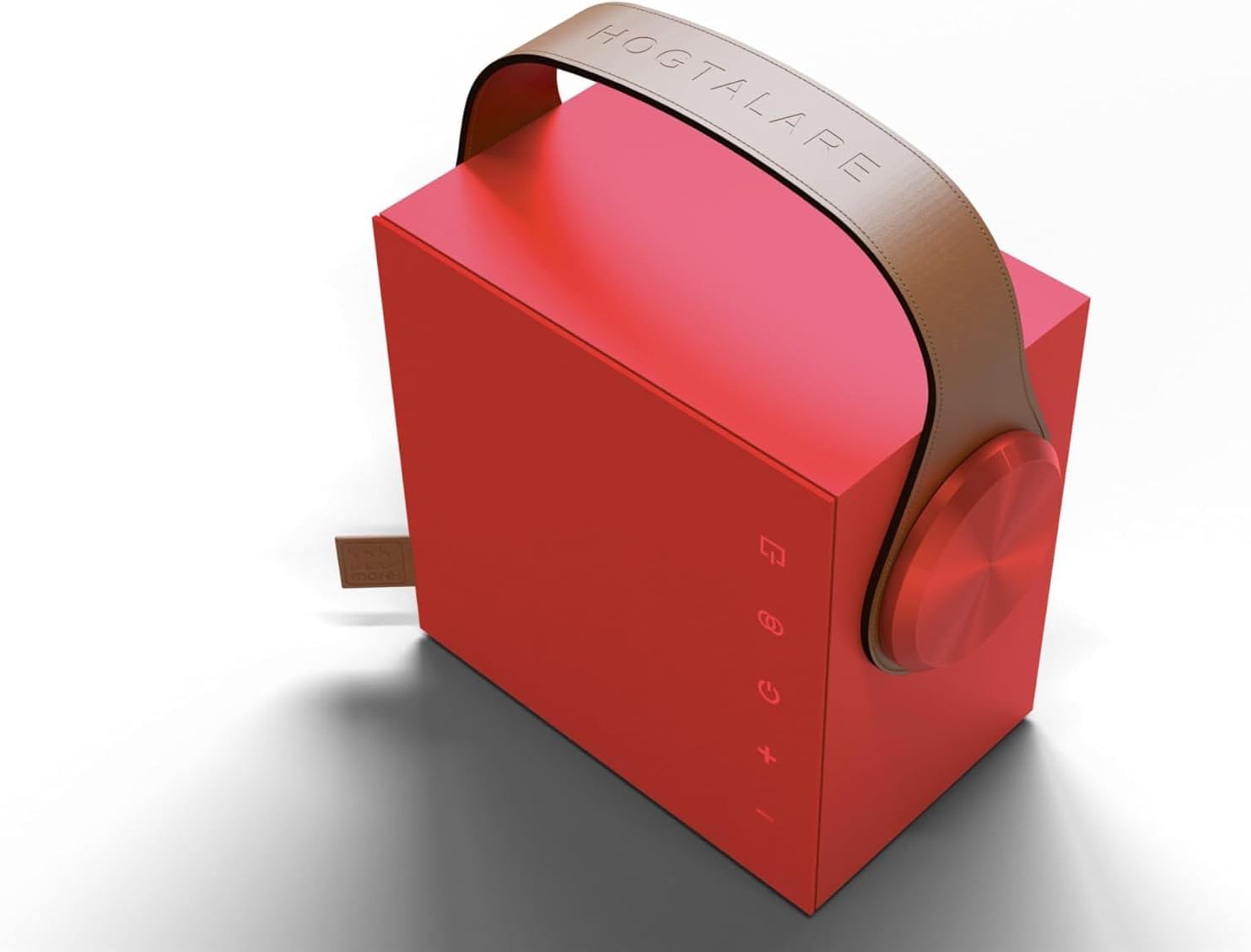
รูปที่ 4.1: รายละเอียด view of the Morel Biggie's touch control panel.
4.2 การเล่นเสียง
Once connected via Bluetooth, audio from your paired device will automatically play through the Morel Biggie. Use the volume controls on the speaker or your device to adjust the sound level. The speaker's advanced DSP and dynamic EQ ensure optimal sound balance at all volume levels.
5. การบำรุงรักษาและการดูแล
Proper care will ensure the longevity and performance of your Morel Biggie speaker.
- การทำความสะอาด: Use a soft, dry, lint-free cloth to clean the speaker's exterior. Do not use abrasive cleaners, alcohol, benzene, or other chemicals, as these may damage the surface.
- การดูแลแบตเตอรี่ To maximize battery life, avoid fully discharging the speaker frequently. Recharge the battery regularly, even if not in use for extended periods. Store in a cool, dry place.
- สภาพแวดล้อม : The Morel Biggie is designed for indoor use. While it can be used in sheltered outdoor areas, it is ไม่กันน้ำ and should be protected from rain, splashes, and extreme temperatures. Avoid direct sunlight exposure for prolonged periods.
- พื้นที่จัดเก็บ: เมื่อเก็บลำโพงไว้เป็นเวลานาน โปรดตรวจสอบให้แน่ใจว่าได้ชาร์จแบตเตอรี่จนเต็มแล้ว และปิดเครื่องเรียบร้อยแล้ว
6 การแก้ไขปัญหา
If you encounter issues with your Morel Biggie speaker, please refer to the following common problems and solutions:
| ปัญหา | สาเหตุที่เป็นไปได้ | สารละลาย |
|---|---|---|
| ลำโพงไม่เปิดเครื่อง | แบตเตอรี่เหลือน้อย; ไม่ได้กดปุ่มเปิด/ปิดค้างไว้นานพอ | Charge the speaker fully. Press and hold the power button for at least 3 seconds. |
| ไม่สามารถจับคู่ผ่านบลูทูธได้ | ลำโพงไม่ได้อยู่ในโหมดจับคู่; บลูทูธของอุปกรณ์ปิดอยู่; อยู่ห่างจากลำโพงมากเกินไป; มีสัญญาณรบกวน | Ensure speaker is in pairing mode (flashing light). Turn Bluetooth on your device. Move device closer to speaker. Turn off other Bluetooth devices nearby. |
| ไม่มีเสียงหรือเสียงเบา | Volume too low on speaker or device; speaker not connected; incorrect audio source. | Increase volume on both speaker and device. Verify Bluetooth connection. Ensure audio is playing from the correct source on your device. |
| ความผิดเพี้ยนของเสียง | ระดับเสียงดังเกินไป คุณภาพเสียงต้นฉบับไม่ดี | ลดระดับเสียงลง ลองใช้แหล่งเสียงอื่น หรือ file. Allow for break-in period (up to 15 hours) for optimal sound. |
| การจับคู่ TWS ล้มเหลว | Speakers already connected to another device; incorrect pairing sequence. | Ensure both speakers are disconnected from other devices. Follow the TWS pairing steps precisely. |
If the problem persists after trying these solutions, please contact Morel customer support for further assistance.
7. ข้อมูลจำเพาะ
| คุณสมบัติ | รายละเอียด |
|---|---|
| ชื่อรุ่น | Biggie |
| หมายเลขรุ่นสินค้า | RM |
| ยี่ห้อ | เห็ดมอเรล |
| ประเภทลำโพง | ลำโพงบลูทูธแบบพกพา |
| เทคโนโลยีการเชื่อมต่อ | Bluetooth 5.3 BLE, Wireless |
| ช่วงสาย | สูงถึง 50 เมตร (164 ฟุต) |
| โหมดเอาต์พุตเสียง | ระบบเสียงสเตอริโอ (พร้อมการจับคู่ TWS) |
| การกำหนดค่าช่องเสียงรอบทิศทาง | 2.0 |
| ไดรเวอร์ | 4-inch Woofer, 25mm Soft Dome Tweeter |
| แหล่งพลังงาน | ใช้พลังงานจากแบตเตอรี่ |
| อายุการใช้งานแบตเตอรี่ | สูงสุด 20 ชั่วโมง (แตกต่างกันไปตามปริมาณและเนื้อหา) |
| วิธีการควบคุม | สัมผัส |
| ขนาดสินค้า (ลึก x กว้าง x สูง) | 7.5" x 5" x 7.5" (18cm x 18cm) |
| น้ำหนักสินค้า | 7.7 ปอนด์ |
| สี | Ruby Red (other colors available: Cosmic Black, Olive Green, Midnight Blue, Aqua Frost, Oak Wood, Golden Glow, Minimal White, Denim Sky) |
| กันน้ำ | เลขที่ |
| การใช้ที่แนะนำ | Indoor/Outdoor (with caution for elements) |
| อุปกรณ์ที่รองรับ | แล็ปท็อป, สมาร์ทโฟน, แท็บเล็ต, โทรทัศน์ |
8. การรับประกันและการสนับสนุน
8.1 การรับประกันแบบจำกัด
The Morel Biggie Portable Bluetooth Speaker comes with a limited warranty. Please refer to the warranty card included in your product packaging for specific terms and conditions, including coverage duration and limitations. Keep your proof of purchase for warranty claims.
8.2 การสนับสนุนลูกค้า
For technical assistance, troubleshooting beyond this manual, or warranty inquiries, please contact Morel customer support. Visit the official Morel webไซต์สำหรับข้อมูลติดต่อและแหล่งข้อมูลเพิ่มเติม
Visit the Morel Store on Amazon สำหรับข้อมูลผลิตภัณฑ์และการสนับสนุนเพิ่มเติม


