1. บทนำ
Thank you for choosing Blackview Smart Glasses. These innovative sunglasses combine stylish design with advanced audio technology, allowing you to enjoy music, make calls, and interact with your voice assistant while staying aware of your surroundings. This manual provides detailed instructions for setup, operation, and maintenance to ensure optimal performance and longevity of your device.

รูปที่ 1 : ด้านหน้า view ของสีดำview Smart Glasses.
2. คุณสมบัติของผลิตภัณฑ์
- เทคโนโลยีบลูทูธ 5.3: Ensures faster and more stable signal transmission with low latency, offering a connection range of up to 12 meters.
- ระดับการกันน้ำ IP65: Protects against sweat and small raindrops, suitable for outdoor activities and gym use.
- การจับคู่แบบขั้นตอนเดียว: After initial pairing, the glasses automatically reconnect to the last paired device upon opening.
- ความเข้ากันได้กว้าง: Compatible with various devices including smartphones and computers.
- Immersive Open Ear Sound: Features an open headphone speaker design, dynamic drivers, and ultra-sensitive polymer diaphragms for rich, balanced audio without isolating you from your environment.
- Unparalleled Call Clarity: Advanced microphone design with noise reduction technology suppresses up to 90% of background noise for clear communication.
- ระบบควบคุมแบบสัมผัสที่ใช้งานง่าย: Manage playback, volume, calls, and voice assistant activation directly from the glasses.
- เวลาทำการเพิ่มเติม: Equipped with 80mAh+80mAh rechargeable batteries, providing approximately 7 hours of communication, 6 hours of music playback, and 160 hours of standby time.
3. สินค้าหมดview
Familiarize yourself with the components of your Blackview แว่นตาอัจฉริยะ:

Figure 2: Key components of the Smart Glasses.
- เลนส์: TAC+UV400 (UV resistant)
- Nose Bridge: Provides comfortable fit.
- ปุ่มสัมผัส: For various control functions.
- Stereo-speaker: Delivers open-ear audio.
- ไมโครโฟนในตัว: For clear call quality.
- Charging Indicator Port: For magnetic charging.
- กรอบกระจก: PC+light steel construction.
4. ข้อมูลจำเพาะ
Refer to the following specifications for your Blackview แว่นตาอัจฉริยะ:
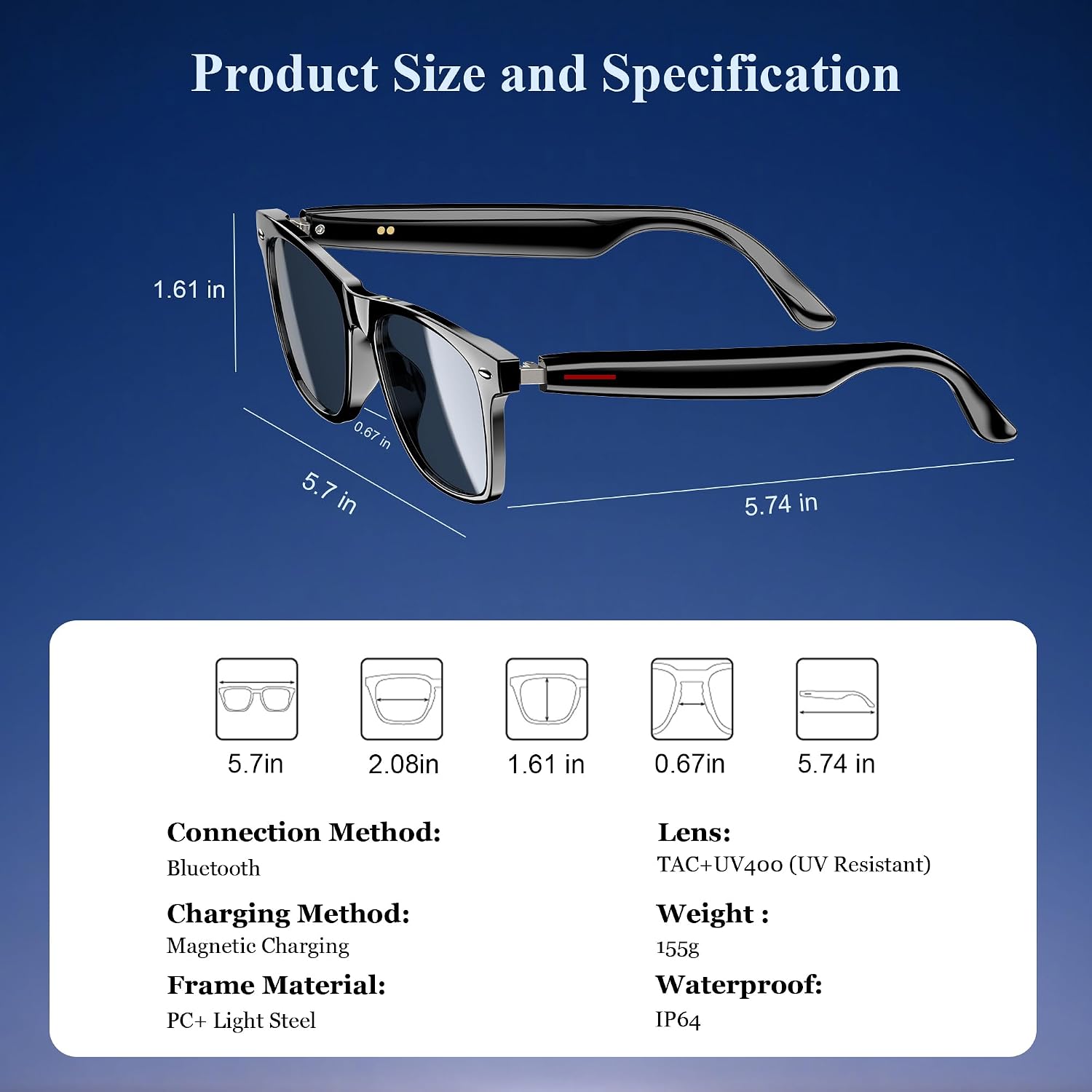
รูปที่ 3: ขนาดผลิตภัณฑ์และข้อมูลจำเพาะที่สำคัญ
| ข้อมูลจำเพาะ | ค่า |
|---|---|
| เวอร์ชันบลูทูธ | 5.3 |
| ระดับการกันน้ำ | IP65 |
| ความจุของแบตเตอรี่ | 80mAh+80mAh |
| เวลาในการติดต่อสื่อสาร | ประมาณ 7 ชั่วโมง |
| เวลาเล่นเพลง | ประมาณ 6 ชั่วโมง |
| เวลาสแตนด์บาย | ประมาณ 160 ชั่วโมง |
| เวลาในการชาร์จ | Approx. 1.2 hours (magnetic charge) |
| ประเภทเลนส์ | TAC+UV400 (UV Resistant) |
| วัสดุกรอบ | PC + Light Steel |
| น้ำหนักสินค้า | 4.6 ออนซ์ |
| ขนาดแพ็คเกจ | 6.65 x 2.36 x 1.93 นิ้ว |
5. อะไรอยู่ในกล่อง
สีดำของคุณview Smart Glasses package includes:
- แว่นกันแดดอัจฉริยะ
- สายชาร์จแม่เหล็ก
- ผ้าเช็ดทำความสะอาด
- คู่มือการใช้งาน
6. การตั้งค่า
6.1. การชาร์จแว่นตา
ก่อนใช้งานครั้งแรก โปรดชาร์จแบตเตอรี่ Black ให้เต็มก่อนview Smart Glasses. Use the provided magnetic charging cable.
- Connect the magnetic charging cable to the charging port on the temple of the glasses.
- เชื่อมต่อปลายอีกด้านของสายเคเบิลเข้ากับแหล่งจ่ายไฟ USB (เช่น คอมพิวเตอร์ อะแดปเตอร์ติดผนัง)
- The charging indicator light will illuminate (usually red) during charging and turn off or change color (usually blue/green) when fully charged.
- การชาร์จเต็มจะใช้เวลาประมาณ 1.2 ชั่วโมง

Figure 4: Magnetic charging connection.
6.2. เปิด/ปิดเครื่อง
- เปิดเครื่อง: Long touch the touch button on the temple for 5 seconds until you hear a power-on prompt.
- หมดแรง: Long touch the touch button for 5 seconds until you hear a power-off prompt.
6.3. การจับคู่บลูทู ธ
- ตรวจสอบให้แน่ใจว่าแว่นตาได้รับการชาร์จและเปิดใช้งานแล้ว
- บนสมาร์ทโฟนหรืออุปกรณ์ของคุณ เปิดใช้งาน Bluetooth และค้นหาอุปกรณ์ที่มีอยู่
- Select "Blackview Smart Glasses" (or similar name) from the list to pair.
- Once paired, the glasses will automatically reconnect to your device when powered on and within range.
7. คู่มือการใช้งาน
สีดำของคุณview Smart Glasses feature intuitive touch controls located on the temples:

รูปที่ 5: ฟังก์ชันการควบคุมแบบสัมผัส
- เล่น/หยุดเพลง: One-tap the touch button on either temple.
- เพลงถัดไป: Twice-tap the touch button on the right temple.
- แทร็กก่อนหน้า: Twice-tap the touch button on the left temple.
- เพิ่ม/ลดระดับเสียง: (Specific gesture not detailed in image, typically long press or swipe, refer to quick start guide if included).
- รับสาย/วางสาย: One-tap the touch button on either temple.
- เปิดใช้งาน Voice Assistant: Long touch the touch button for 2 seconds.
- การถ่ายภาพระยะไกล: Double click the touch button to trigger your phone's camera shutter.

Figure 6: Voice assistant activation exampเล.
8. การดูแลรักษา
เพื่อให้แว่นตาอัจฉริยะของคุณมีอายุการใช้งานยาวนานและมีประสิทธิภาพสูงสุด โปรดปฏิบัติตามคำแนะนำในการดูแลดังต่อไปนี้:
- การทำความสะอาด: Use the provided cleaning cloth to gently wipe the lenses and frame. Avoid using abrasive materials or harsh chemicals.
- ความต้านทานน้ำ: The glasses have an IP65 rating, meaning they are resistant to sweat and light splashes of water. Do not submerge them in water or expose them to heavy rain.
- พื้นที่จัดเก็บ: Store the glasses in a protective case when not in use to prevent scratches and damage. Avoid exposing them to extreme temperatures.
- หลีกเลี่ยงผลกระทบ: While the lenses are strong, avoid dropping the glasses or subjecting them to strong impacts.

Figure 7: Smart Glasses demonstrating water resistance.
9 การแก้ไขปัญหา
If you encounter any issues with your Blackview Smart Glasses, refer to the following common solutions:
- ไม่มีไฟฟ้า: Ensure the glasses are fully charged. Connect them to the magnetic charger and check the indicator light.
- ไม่สามารถจับคู่ได้:
- Ensure Bluetooth is enabled on your device and the glasses are in pairing mode (usually indicated by a flashing light).
- Make sure the glasses are not already connected to another device. Turn off Bluetooth on other nearby devices.
- Restart both the glasses and your device, then attempt pairing again.
- ไม่มีเสียง/ระดับเสียงต่ำ:
- ตรวจสอบระดับเสียงทั้งบนแว่นตาและอุปกรณ์ที่เชื่อมต่อของคุณ
- Ensure the glasses are properly positioned on your ears for optimal open-ear audio.
- ตรวจสอบให้แน่ใจว่าได้จับคู่แว่นตาและเลือกเป็นอุปกรณ์ส่งสัญญาณเสียงบนโทรศัพท์ของคุณอย่างถูกต้องแล้ว
- ปัญหาคุณภาพการโทร:
- ตรวจสอบให้แน่ใจว่าไมโครโฟนไม่ได้ถูกกีดขวาง
- ย้ายไปยังพื้นที่ที่มีเสียงรบกวนพื้นหลังน้อยที่สุด
- Check your phone's signal strength.
- ระบบควบคุมแบบสัมผัสที่ไม่ตอบสนอง:
- ให้แน่ใจว่านิ้วของคุณสะอาดและแห้ง
- รีสตาร์ทแว่นใหม่
If these steps do not resolve the issue, please contact Blackview ฝ่ายสนับสนุนลูกค้าเพื่อขอความช่วยเหลือเพิ่มเติม
10. วิดีโอผลิตภัณฑ์อย่างเป็นทางการ
ชมวิดีโอผลิตภัณฑ์อย่างเป็นทางการเพื่อดูรายละเอียดเพิ่มเติมview ของสีดำview Smart Glasses features and usage:
วิดีโอ 1: สีดำview Polarized Sport Smart Sunglasses for Men and Women. This video highlights the design and features of the smart sunglasses, including their polarized lenses and smart capabilities.


