1. บทนำ
This manual provides essential information for the proper use and maintenance of your Xgody Mate 70 mobile phone. Please read it thoroughly before operating your device to ensure optimal performance and longevity.

ภาพที่ 1.1: ด้านหน้าและด้านหลัง view of the Xgody Mate 70 mobile phone, showcasinก. การออกแบบและโมดูลกล้อง
2. อะไรอยู่ในกล่อง
Upon unboxing your Xgody Mate 70, verify that all listed items are present:
- 1 x Xgody Mate 70 Mobile Phone
- 1 x เครื่องชาร์จ
- สายเคเบิล Type-C 1 เส้น
- 1 x หูฟัง
- 1 x Pin (for SIM tray)
- 1 x Tempered Film & HD Film
- 1 x เคสป้องกัน
- 1 x Phone Manual

Image 2.1: Diagram illustrating the items included in the Xgody Mate 70 product packaging.
3. อุปกรณ์โอเวอร์view
The Xgody Mate 70 features a sleek design with essential components strategically placed for user convenience.
3.1 ลักษณะทางกายภาพ
- ขนาด : Approximately 167.1mm (height) x 76.4mm (width) x 9.3mm (thickness).
- น้ำหนัก: น้ำหนักประมาณ 196 กรัม.
- แสดง: 6.52-inch HD+ IPS screen.
- กล้อง: Dual rear cameras (24MP main) and a single front camera (8MP).
- พอร์ต: USB Type-C charging port, 3.5mm headphone jack (if present, typically at top or bottom).
- ปุ่ม: ปุ่มเปิด/ปิดเครื่อง, ปุ่มเพิ่ม/ลดเสียง

Image 3.1: The Xgody Mate 70's slim profile, highlighting its 9.3mm thickness.
4. การตั้งค่า
4.1 การติดตั้งซิมการ์ดและที่เก็บข้อมูล
The Xgody Mate 70 supports dual Nano SIM cards or one Nano SIM card and one TF (Micro SD) card for expanded storage. Ensure the phone is powered off before inserting or removing cards.
- ค้นหาถาดซิมที่ด้านข้างของโทรศัพท์
- Insert the provided pin into the small hole on the SIM tray to eject it.
- Carefully place your Nano SIM card(s) and/or TF card into the designated slots on the tray. Refer to the diagram for correct orientation.
- ค่อยๆ ดันถาดกลับเข้าไปในโทรศัพท์จนกระทั่งแนบสนิทกับตัวเครื่อง
Notice: SIM cards and TF cards are not included and must be purchased separately. Verify compatibility with your network carrier before purchase.

Image 4.1: Illustration of the dual SIM and Micro SD card tray, showing placement options.
4.2 การเปิดเครื่องครั้งแรก
- กดปุ่มเปิด/ปิดค้างไว้จนกว่าโลโก้ Xgody จะปรากฏขึ้น
- ทำตามคำแนะนำบนหน้าจอเพื่อทำการตั้งค่าเริ่มต้นให้เสร็จสมบูรณ์ ซึ่งรวมถึงการเลือกภาษา การเชื่อมต่อ Wi-Fi การเข้าสู่ระบบบัญชี Google และการตั้งค่าความปลอดภัย
5. ระบบปฏิบัติการ (Android 14)
The Xgody Mate 70 runs on the Android 14 operating system, offering enhanced security, privacy controls, and a user-friendly interface.
5.1 Key Features of Android 14
- Enhanced Privacy Controls: Granular permissions for apps, allowing you to control access to your data.
- Updated Data Sharing: Improved transparency and control over how your data is shared.
- Strengthened Password Support: Advanced security measures for protecting your accounts.
- Malware Defense Enhancements: Improved system-level protection against malicious software.
- การรับรอง GMS: Ensures access to Google services and the Google Play Store.

Image 5.1: Visual representation of Android 14's security and smart features, including privacy controls and malware defense.
6. การแสดงผล
The Xgody Mate 70 features a 6.52-inch HD+ IPS display with In-cell technology, providing clear visuals and vibrant colors.
- ขนาด: 6.52 นิ้ว
- ปณิธาน: 720*1600 พิกเซล
- อัตราการรีเฟรช: 90Hz เพื่อการเลื่อนและแอนิเมชันที่ราบรื่นยิ่งขึ้น
- อัตราส่วนหน้าจอต่อตัวเครื่อง: 81% for an immersive viewการสร้างประสบการณ์

Image 6.1: Details of the 6.52-inch HD+ IPS screen with In-cell technology, showing resolution and refresh rate.
7. ประสิทธิภาพและการจัดเก็บ
The device is powered by a T606 Octa-core processor and offers substantial memory and storage capabilities.
- โปรเซสเซอร์: T606 Octa-core processor for efficient multitasking and smooth operation.
- แรม : 12GB (4GB physical RAM + 8GB virtual memory) for seamless app switching.
- หน่วยความจำภายใน (ROM): 128GB for applications, photos, and videos.
- พื้นที่เก็บข้อมูลที่ขยายได้: Supports up to 1TB via TF (Micro SD) card.

Image 7.1: Diagram illustrating the 4GB physical RAM, 8GB extended RAM, and 128GB ROM, with support for 1TB TF card extension.
8. คุณสมบัติของกล้อง
Capture moments with the Xgody Mate 70's versatile camera system.
- กล้องหลัง: 24MP main camera for high-definition photos.
- กล้องหน้า: 8MP camera with AI beauty and facial recognition for selfies.
- โหมดการถ่ายภาพ: HDR Mode, Panorama Mode, Beauty Mode, Professional Mode.

ภาพที่ 8.1: จบแล้วview of the Xgody Mate 70's camera capabilities, including 24MP photography and various shooting modes.
9. การจัดการแบตเตอรี่
The Xgody Mate 70 is equipped with a large capacity battery to support extended usage.
- ความจุแบตเตอรี่: 5500mAh.
- การชาร์จ: Supports 5V 2A fast charging via Type-C port.
- เวลาสแตนด์บาย: นานถึง 400 ชั่วโมง
- เวลาโทร: นานถึง 36 ชั่วโมง
- การเล่นวิดีโอ: นานถึง 11 ชั่วโมง
- การเล่นเพลง: นานถึง 65 ชั่วโมง

Image 9.1: Visual representation of the 5500mAh battery, Type-C charging, and standby time.
10. การเชื่อมต่อ
The Xgody Mate 70 offers various connectivity options for staying connected.
- เครือข่าย: 4G Dual SIM support.
- ไวไฟ : 2.4G + 5G Dual WiFi for faster and more stable internet connections.
- บลูทูธ: Bluetooth 5.0 for faster and more reliable connections with wireless devices.
- การนำทาง: GPS/Beidou/GLONASS for accurate positioning.

Image 10.1: Icons representing 2.4G+5G Dual WiFi, Bluetooth 5.0, Dual 4G SIM, and GPS/Beidou/GLONASS navigation.
11. โหมดพิเศษ
The Xgody Mate 70 includes dedicated modes to enhance user experience for different demographics.
- โหมดเกม: Optimizes performance for gaming, reducing lag and improving responsiveness.
- โหมดเด็ก: Provides a secure and engaging environment for children with parental controls for app access and screen time.
- Senior Mode: Simplifies the interface with clear colors and large fonts for easier navigation and readability.
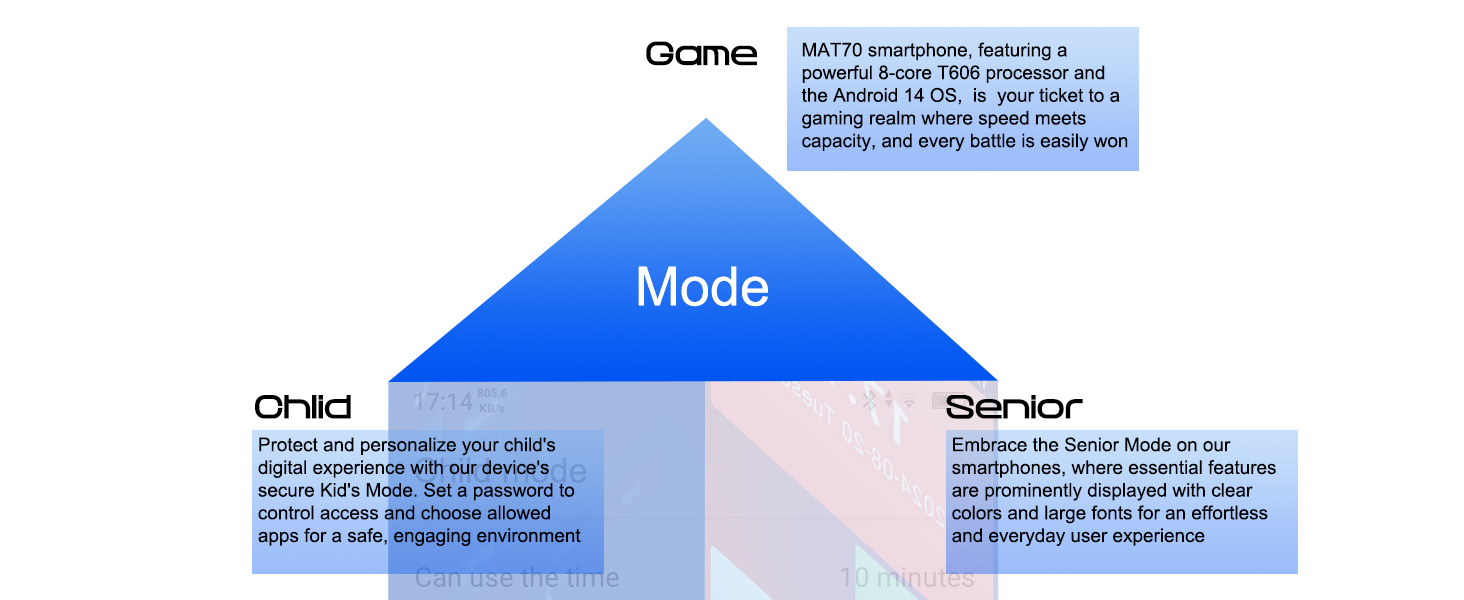
Image 11.1: Diagram illustrating the Game, Child, and Senior modes available on the Xgody Mate 70.
12. การบำรุงรักษา
To ensure the longevity and optimal performance of your Xgody Mate 70, follow these maintenance guidelines:
- การทำความสะอาด: ใช้ผ้านุ่มไม่เป็นขุยทำความสะอาดหน้าจอและตัวเครื่อง หลีกเลี่ยงวัสดุที่มีฤทธิ์กัดกร่อนหรือสารเคมีรุนแรง
- การป้องกัน: ใช้เคสป้องกันและฟิล์มหน้าจอที่ให้มาเพื่อป้องกันรอยขีดข่วนและการกระแทกเล็กน้อย
- อุณหภูมิ: ควรหลีกเลี่ยงการวางโทรศัพท์ไว้ในที่ที่มีอุณหภูมิสูงหรือต่ำเกินไป หรือโดนแสงแดดโดยตรงเป็นเวลานาน
- ความชื้น: Keep the phone dry. Do not immerse it in water or expose it to high humidity.
- การอัปเดตซอฟต์แวร์: Regularly check for and install system updates to benefit from improved security and features.
13 การแก้ไขปัญหา
This section addresses common issues you might encounter with your Xgody Mate 70.
13.1 ปัญหาทั่วไปและแนวทางแก้ไข
- Phone does not turn on:
- ตรวจสอบให้แน่ใจว่าแบตเตอรี่ชาร์จเต็มแล้ว เสียบโทรศัพท์เข้ากับที่ชาร์จอย่างน้อย 30 นาที
- กดปุ่มเปิด/ปิดค้างไว้ 10-15 วินาทีเพื่อบังคับให้รีสตาร์ท
- แบตเตอรี่หมดเร็ว:
- ปิดแอปพลิเคชันที่ไม่ได้ใช้งานซึ่งทำงานอยู่เบื้องหลัง
- ลดความสว่างหน้าจอ
- ปิดใช้งาน Wi-Fi, Bluetooth หรือ GPS เมื่อไม่ได้ใช้งาน
- ตรวจสอบการใช้งานแบตเตอรี่ในการตั้งค่าเพื่อระบุแอปที่กินพลังงาน
- ไม่สามารถเชื่อมต่อกับ Wi-Fi:
- โปรดตรวจสอบให้แน่ใจว่าได้เปิดใช้งาน Wi-Fi บนโทรศัพท์ของคุณแล้ว
- รีสตาร์ทเราเตอร์ Wi-Fi ของคุณ
- Forget the network in your phone's Wi-Fi settings and reconnect.
- Apps are crashing or freezing:
- Clear the cache and data of the problematic app in Settings > Apps.
- Update the app to its latest version.
- รีสตาร์ทโทรศัพท์
- ไม่ตรวจพบซิมการ์ด:
- Ensure the SIM card is correctly inserted into the tray.
- รีสตาร์ทโทรศัพท์
- Test the SIM card in another compatible device to rule out a card issue.
If issues persist, contact Xgody customer support for further assistance.
14. ข้อมูลจำเพาะ
Detailed technical specifications for the Xgody Mate 70.
| คุณสมบัติ | ข้อมูลจำเพาะ |
|---|---|
| ยี่ห้อ | ซ๊อกดี้ |
| หมายเลขรุ่น | เมท 70 |
| ระบบปฏิบัติการ | แอนดรอยด์ 14 |
| โปรเซสเซอร์ | T606 Octa-core |
| หน่วยความจำแรม | หน่วยความจำ 12 GB (4 GB แบบกายภาพ + 8 GB แบบเสมือน) |
| การจัดเก็บข้อมูลภายใน | 128GB |
| พื้นที่เก็บข้อมูลแบบขยายได้ | สูงสุด 1 TB (การ์ด TF) |
| ขนาดหน้าจอ | 6.52 นิ้ว |
| ปณิธาน | 720 x 1600 (เอชดี+) |
| อัตราการรีเฟรช | 90เฮิรตซ์ |
| กล้องหลัง | 24 MP |
| กล้องหน้า | 8 MP |
| ความจุของแบตเตอรี่ | 5500 มิลลิแอมป์ |
| การชาร์จไฟ | 5V 2A Fast Charging (Type-C) |
| ผู้ให้บริการไร้สาย | ปลดล็อคแล้ว |
| เทคโนโลยีเซลลูล่าร์ | 4G |
| เทคโนโลยีเครือข่ายไร้สาย | LTE, 2.4G+5G WiFi |
| เทคโนโลยีการเชื่อมต่อ | 4G, บลูทูธ 5.0 |
| การนำทาง | จีพีเอส/เป่ยโต่ว/GLONASS |
| น้ำหนักสินค้า | 196 กรัม |
| ขนาดแพ็คเกจ | 19.9 x 11.5 x 7.7 ซม. |
15. การรับประกันและการสนับสนุน
For warranty information and customer support, please refer to the warranty card included in your product packaging or visit the official Xgody webไซต์นี้ โปรดเก็บหลักฐานการซื้อไว้เพื่อใช้ยืนยันการรับประกัน
การสนับสนุนทางออนไลน์: For frequently asked questions and additional resources, please visit the Xgody support page.


