1. บทนำ
Thank you for choosing the LONPOO LP42M Active Bookshelf Speakers. These speakers are designed to deliver high-quality audio with versatile connectivity options, suitable for various home audio setups. This manual provides essential information for safe and efficient use of your new speakers.
2. ข้อมูลด้านความปลอดภัย
โปรดอ่านคำแนะนำด้านความปลอดภัยทั้งหมดอย่างละเอียดก่อนใช้ผลิตภัณฑ์ เก็บคู่มือนี้ไว้เพื่อใช้อ้างอิงในอนาคต
- แหล่งพลังงาน: ใช้เฉพาะอะแดปเตอร์ไฟฟ้าที่ให้มาเท่านั้น ตรวจสอบให้แน่ใจว่าระดับเสียงtage ตรงกับแหล่งจ่ายไฟในพื้นที่ของคุณ
- การระบายอากาศ : Do not block any ventilation openings. Maintain adequate space around the speakers for proper airflow.
- น้ำและความชื้น: Do not expose the speakers to water, rain, or moisture. Avoid placing liquid-filled objects on or near the speakers.
- ความร้อน: Keep the speakers away from heat sources such as radiators, heat registers, stoves, or other heat-producing appliances.
- การทำความสะอาด: Unplug the speakers from the power outlet before cleaning. Use a soft, dry cloth. Do not use liquid cleaners or aerosol cleaners.
- การบริการ: อย่าพยายามให้บริการผลิตภัณฑ์นี้ด้วยตนเอง ส่งต่อการบริการทั้งหมดไปยังช่างบริการที่ผ่านการรับรอง
3. เนื้อหาบรรจุภัณฑ์
ตรวจสอบว่ามีรายการทั้งหมดอยู่ในแพ็คเกจ:
- LONPOO LP42M Active Bookshelf Speaker Pair (1 powered speaker, 1 passive speaker)
- รีโมทคอนโทรล x 1
- Speaker Wire (6.56ft / 2m) x 1
- Optical Cable (4.92ft / 1.5m) x 1
- AC Power Cord (3.94ft / 1.2m) x 1

4. สินค้าหมดview
The LONPOO LP42M speakers feature a classic wooden design with advanced audio components and multiple connectivity options.
4.1 Front Panel (Powered Speaker)
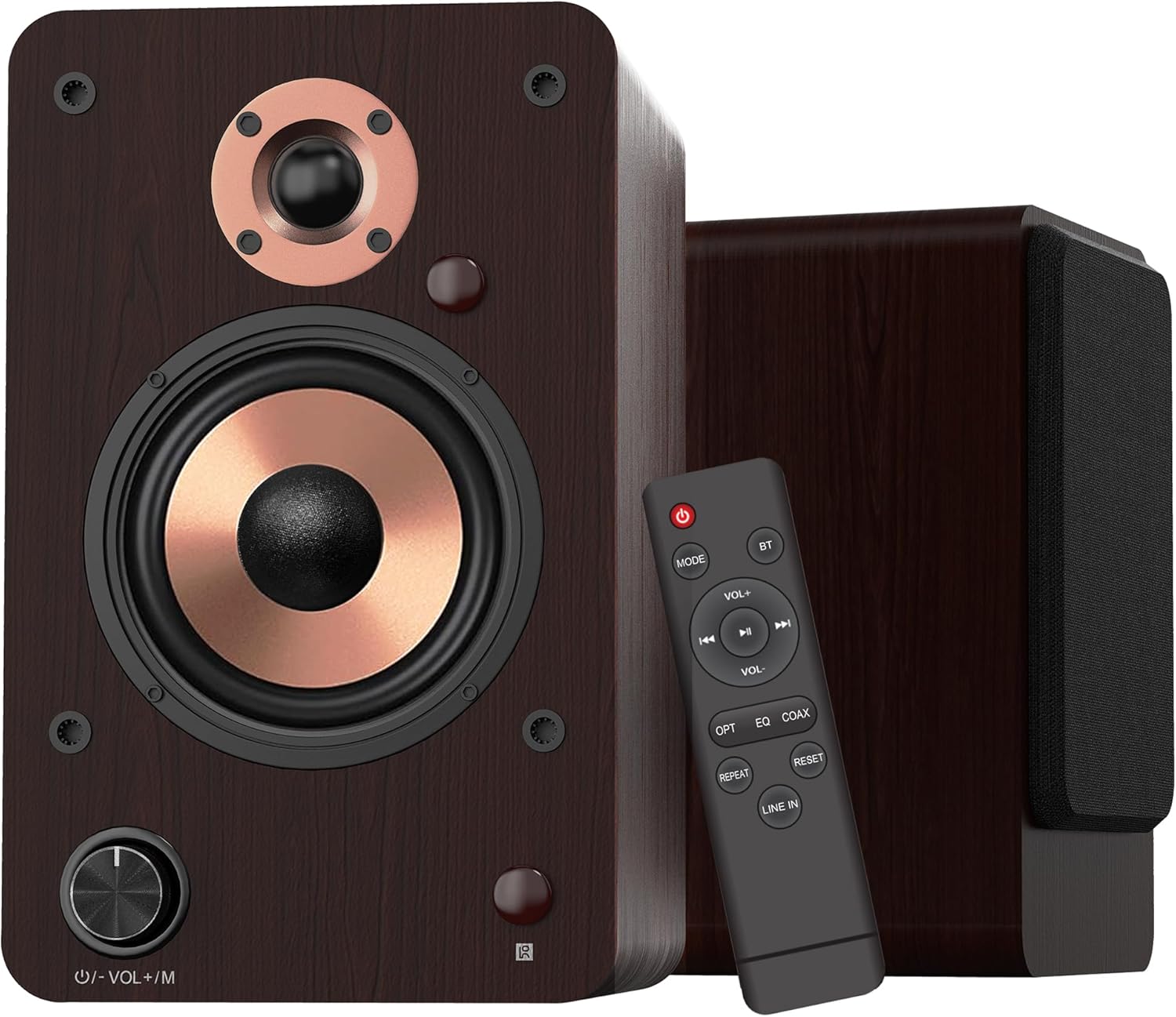
- ปุ่มปรับระดับเสียง/โหมด: Rotate to adjust volume. Press to cycle through input modes.
- ไฟแสดงสถานะ LED: Displays the current input mode (Red: Standby, Blue: Bluetooth, Green: Optical, Purple: Coaxial/USB, Yellow: AUX, Light Blue: Line-in).
4.2 ส่วนประกอบของลำโพง

- 1-inch Silk Dome Tweeter: Delivers crisp and clear high frequencies.
- 4-inch Aluminum Cone Woofer: Provides rich and powerful bass.
- 12mm MDF Wood Cabinet: Ensures solid construction and minimizes resonance for improved audio clarity.
4.3 Rear Panel (Powered Speaker)

- TREBLE Button: ปรับเอาท์พุตความถี่สูง
- ปุ่มเบส: ปรับเอาท์พุตความถี่ต่ำ
- สวิตช์เพาเวอร์: Turns the speaker system on or off.
- AC PORT: เชื่อมต่อกับสายไฟ AC
- ลำโพงออก: Connects to the passive speaker using the provided speaker wire.
- LINE IN (RCA L/R): For connecting devices with RCA audio output (e.g., turntables, CD players).
- ช่องรับสัญญาณเสียงเข้า: For connecting devices with a 3.5mm audio output.
- ออปติคัล: For connecting devices with optical audio output (e.g., TVs, game consoles).
- โคแอกเซียล: For connecting devices with coaxial audio output.
- อินพุต USB: For connecting USB flash drives for audio playback or connecting to a PC.
5. การตั้งค่า
5.1 การแกะกล่อง
นำส่วนประกอบทั้งหมดออกจากบรรจุภัณฑ์อย่างระมัดระวัง เก็บบรรจุภัณฑ์ไว้เพื่อการขนส่งหรือจัดเก็บในอนาคต
5.2 การจัดวางลำโพง
For optimal sound quality, place the speakers on a stable surface, such as a bookshelf or speaker stands. Position them along a wall or near a corner of the room to enhance bass response. Ensure the speakers are equidistant from your listening position for a balanced stereo image.
5.3 การเชื่อมต่อลำโพง
Connect the powered speaker to the passive speaker using the provided speaker wire. Ensure the red wire connects to the red terminal and the white/black wire connects to the black terminal on both speakers.

5.4 การเชื่อมต่อกับแหล่งกำเนิดเสียง
The LP42M speakers offer multiple input options:
- บลูทูธ: สำหรับการเชื่อมต่อแบบไร้สายกับสมาร์ทโฟน แท็บเล็ต หรืออุปกรณ์อื่นๆ ที่รองรับบลูทูธ
- ยูเอสบี: Connect a USB flash drive for direct audio playback or connect to a PC using a USB cable.
- ออปติคอล: Use the optical cable to connect to TVs, game consoles, or other digital audio sources.
- โคแอกเซียล: Use a coaxial cable to connect to compatible digital audio sources.
- RCA (Line In): Use RCA cables to connect to devices like turntables, CD players, or DVD players.
- ช่องรับสัญญาณเสียงเข้า: Use a 3.5mm audio cable to connect to devices with a headphone jack.


5.5 การเชื่อมต่อสายไฟ
Connect the AC power cord to the AC port on the rear of the powered speaker, then plug the other end into a wall outlet.
6. คู่มือการใช้งาน
6.1 เปิด/ปิดเครื่อง
พลิกกลับ พลัง switch on the rear panel of the powered speaker to the 'ON' position to turn on the speakers. Flip it to 'OFF' to power down.
6.2 การเลือกอินพุต
กดปุ่ม Volume/Mode Knob on the front of the powered speaker or the 'MODE' button on the remote control to cycle through the available input modes: Bluetooth, Optical, Coaxial, RCA (Line In), USB, and AUX-in. The LED indicator will change color to reflect the selected mode.

6.3 การควบคุมระดับเสียง
หมุน Volume/Mode Knob on the front of the powered speaker clockwise to increase volume and counter-clockwise to decrease volume. Alternatively, use the 'VOL+' and 'VOL-' buttons on the remote control.
6.4 โทนคอนโทรล
ใช้ เสียงแหลม และ BASS knobs on the rear panel of the powered speaker to adjust the high and low frequencies to your preference.

6.5 การจับคู่บลูทูธ
- Switch the speaker to Bluetooth mode (blue LED indicator).
- On your device (smartphone, tablet), enable Bluetooth and search for 'LP42M'.
- Select 'LP42M' to pair. Once connected, the blue LED will remain solid.
6.6 การเล่น USB
Insert a USB flash drive containing MP3/WMA audio files into the USB port. The speaker will automatically switch to USB mode and begin playback. Use the remote control for playback functions (play/pause, next/previous track).
6.7 ฟังก์ชั่นการควบคุมระยะไกล

- ปุ่มเปิด/ปิด: Turns the speakers on/off (standby).
- เส้นทาง: หมุนเวียนผ่านโหมดอินพุต
- บีที: Directly switches to Bluetooth mode.
- ฉบับ+/ฉบับ-: ปรับระดับเสียง
- Play/Pause, Next/Previous: Controls audio playback (USB/Bluetooth).
- เลือก: Directly switches to Optical mode.
- EQ: Cycles through sound equalization presets.
- โคแอกซ์: Directly switches to Coaxial mode.
- ทำซ้ำ: Repeats current track or playlist (USB).
- รีเซ็ต: รีเซ็ตการตั้งค่า
- เข้าแถว: Directly switches to Line In (RCA) mode.
7. การบำรุงรักษา
การบำรุงรักษาอย่างถูกวิธีจะช่วยให้ลำโพงของคุณมีอายุการใช้งานยาวนานและทำงานได้อย่างมีประสิทธิภาพ
- การทำความสะอาด: Use a soft, dry, lint-free cloth to clean the speaker cabinets. Do not use abrasive cleaners, waxes, or solvents.
- ฝุ่น: ควรปัดฝุ่นตะแกรงลำโพงและพื้นผิวต่างๆ เป็นประจำเพื่อป้องกันฝุ่นสะสม
- สิ่งแวดล้อม: ควรหลีกเลี่ยงการวางลำโพงในที่ที่มีแสงแดดส่องโดยตรง ใกล้แหล่งความร้อน หรือในบริเวณที่มีความชื้นสูง
8 การแก้ไขปัญหา
หากคุณพบปัญหา โปรดดูปัญหาทั่วไปและวิธีแก้ไขต่อไปนี้:
| ปัญหา | สาเหตุที่เป็นไปได้ | สารละลาย |
|---|---|---|
| ไม่มีเสียง | Power not connected; incorrect input mode; volume too low; cables loose. | Ensure power is on; select correct input mode; increase volume; check all cable connections. |
| บลูทูธไม่เชื่อมต่อ | Speaker not in Bluetooth mode; device too far; already paired with another device. | Switch speaker to Bluetooth mode; ensure device is within 10m range; disconnect from other devices and try pairing again. |
| เสียงบิดเบี้ยว | Volume too high; poor source quality; loose cable connection. | Reduce volume on speaker and source; try a different audio source; check cable connections. |
| รีโมตคอนโทรลไม่ทำงาน | Batteries dead; obstruction between remote and speaker; remote not pointed at sensor. | Replace batteries; remove obstructions; ensure remote is pointed at the speaker's sensor. |
9. ข้อมูลจำเพาะ
| คุณสมบัติ | ข้อมูลจำเพาะ |
|---|---|
| ประเภทลำโพง | ลำโพงชั้นวางหนังสือที่ใช้งานอยู่ |
| กำลังขับ | 100 วัตต์ (50 วัตต์ x 2) |
| เส้นผ่านศูนย์กลางวูฟเฟอร์ | 4 inches (Aluminum Cone) |
| เส้นผ่านศูนย์กลางทวีตเตอร์ | 1 inch (Silk Dome) |
| การตอบสนองความถี่ | 40เฮิรตซ์-20กิโลเฮิรตซ์ |
| อิมพีแดนซ์ | 4 โอห์ม |
| อัตราส่วนสัญญาณต่อเสียงรบกวน (S/N) | 80เดซิเบล |
| การเชื่อมต่อ | Bluetooth 5.3, Optical, Coaxial, RCA (Line In), USB, AUX-in (3.5mm) |
| ช่วงบลูทูธ | สูงถึง 10 เมตร (33 ฟุต) |
| วิธีการควบคุม | รีโมทคอนโทรล, ปุ่มปรับบนลำโพง |
| วัสดุของตู้ | 12mm MDF Wood |
| ขนาด (ลำโพงแต่ละตัว) | 9.84" (H) x 7.07" (W) x 6.1" (L) / 25cm (H) x 18cm (W) x 15.5cm (L) |
| น้ำหนัก (คู่) | 5.05 กก. (11.13 ปอนด์) |
| สี | สีน้ำตาล |
10. วิดีโอผลิตภัณฑ์อย่างเป็นทางการ
Watch these official videos for additional setup and feature demonstrations:
LONPOO Premium Bookshelf Speakers LP-42M
วิดีโอ: เจ้าหน้าที่ผ่านview of the LONPOO LP-42M Premium Bookshelf Speakers, showcasinรวมถึงการออกแบบและคุณสมบัติหลักของพวกเขา
Active Bookshelf Speaker 100W
Video: A short demonstration highlighting the active features and 100W power output of the bookshelf speakers.
11. การรับประกันและการสนับสนุน
The LONPOO LP42M speakers come with a Limited Warranty. Please refer to the warranty card included in your package for detailed terms and conditions.
For technical support, troubleshooting assistance, or warranty claims, please contact LONPOO customer service through the official webไซต์หรือร้านค้าปลีกของคุณ


