1. บทนำ
This manual provides detailed instructions for the setup, operation, maintenance, and troubleshooting of your SGPRO SG-82BB Dual Wireless Microphone System. This professional-grade UHF system is designed for reliable audio transmission in various settings, including live performances, presentations, and events. It features a durable metal receiver and two bodypack transmitters, compatible with both headset and lavalier microphones.
2. อะไรอยู่ในกล่อง
โปรดตรวจสอบให้แน่ใจว่ามีส่วนประกอบทั้งหมดอยู่ครบเมื่อแกะกล่อง:
- 1 x SGPRO SG-82BB Dual Channel Receiver
- 2 x SGPRO Bodypack Transmitters (SG-82)
- ไมโครโฟนชุดหูฟัง 2 ตัว
- ไมโครโฟนแบบหนีบปก 2 ตัว
- 2 x BNC Antennas
- 1 x อะแดปเตอร์แปลงไฟสำหรับเครื่องรับสัญญาณ
- 1 x 6.35mm (1/4 inch) Audio Cable
- คู่มือการใช้งาน
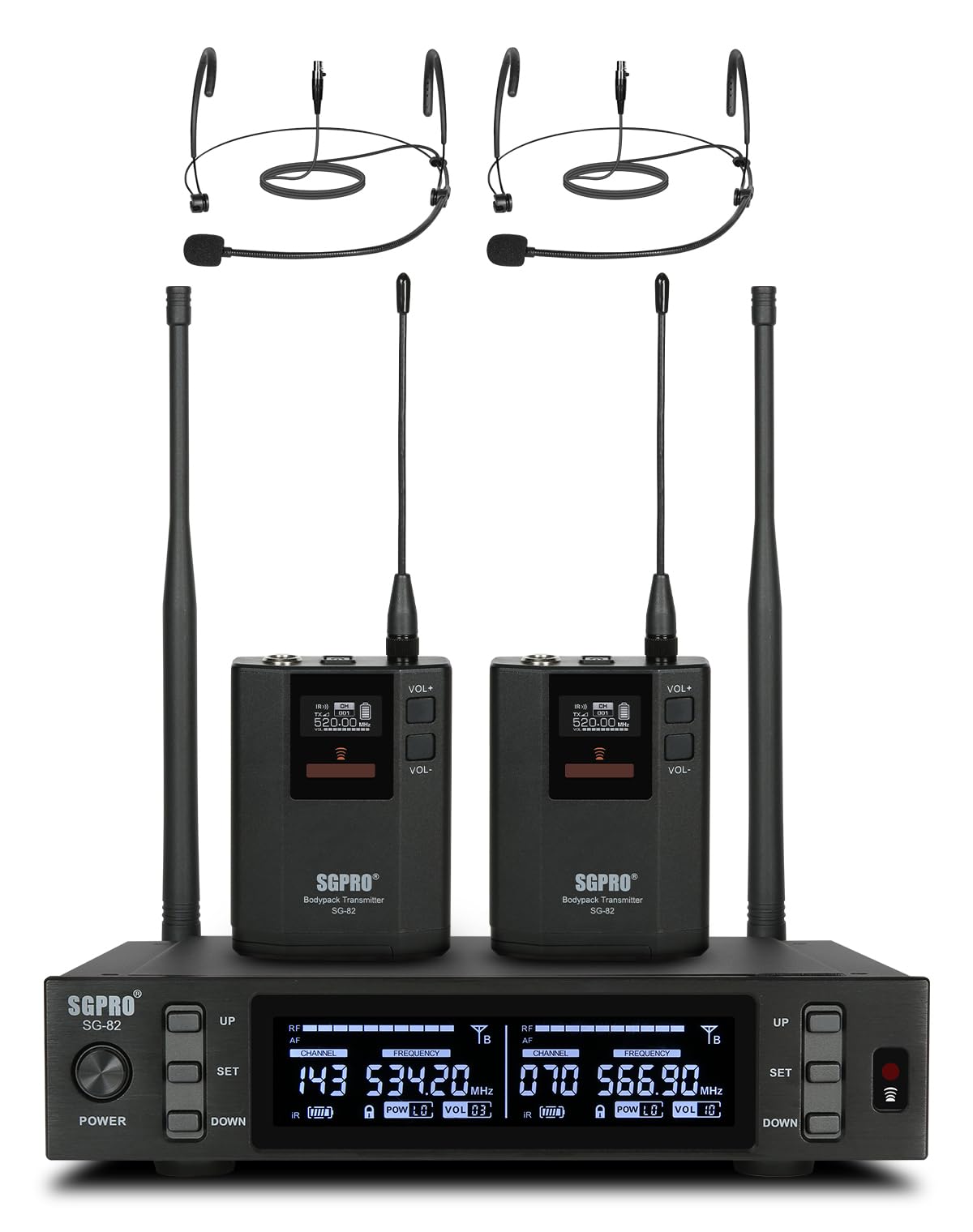
ภาพ: เหนือview of the SGPRO SG-82BB Dual Wireless Microphone System, showing the receiver, two bodypack transmitters, and two headset microphones.
3. คู่มือการติดตั้ง
3.1. การตั้งค่าตัวรับ
- เชื่อมต่อเสาอากาศ: Screw the two BNC antennas into the ANT A and ANT B connectors on the rear panel of the receiver. Ensure they are securely tightened.
- การเชื่อมต่อไฟฟ้า: Connect the provided power adapter to the DC INPUT 12V/1A port on the receiver and plug it into a power outlet.
- เอาต์พุตเสียง: เชื่อมต่อตัวรับสัญญาณเข้ากับมิกเซอร์เสียงของคุณ amplifier, or audio interface using either the balanced XLR outputs (CH.A, CH.B) or the unbalanced 6.35mm (1/4 inch) MIX OUT jack. For optimal sound quality and individual channel control, using XLR outputs is recommended.
- เปิดเครื่อง: Press the POWER button on the receiver's front panel. The display should illuminate.

Image: Close-up of the receiver's rear panel showing the BNC antenna connections.

Image: The rear panel of the SGPRO receiver, highlighting the balanced XLR outputs and the mixed 6.35mm output.
3.2. การตั้งค่าเครื่องส่งสัญญาณ
- การติดตั้งแบตเตอรี่: Open the battery compartment on each bodypack transmitter. Insert two AA batteries, ensuring correct polarity. Close the compartment securely.
- การเชื่อมต่อไมโครโฟน: Connect your desired headset or lavalier microphone to the mini XLR input on the bodypack transmitter.
- เปิดเครื่อง: Press and hold the power button on each bodypack transmitter until the display illuminates.

Image: A SGPRO bodypack transmitter connected to a headset microphone, showing the mini XLR input.
3.3. Frequency Synchronization (IR Sync)
The system features an infrared (IR) synchronization function for easy pairing:
- On the receiver, select the desired channel (CH.A or CH.B) using the UP/DOWN buttons.
- Press the 'SET' button on the receiver to initiate frequency scanning.
- Once a clear frequency is found, align the IR window of the bodypack transmitter with the IR sensor on the receiver.
- The transmitter and receiver will automatically synchronize. The display on both units will show the same frequency and channel. Repeat for the second transmitter.
Video: This video demonstrates the setup process, including connecting antennas, installing batteries in transmitters, and synchronizing frequencies via IR sync. It also shows the system in use with both handheld and bodypack microphones.
4. คู่มือการใช้งาน
4.1. ปรับระดับเสียง
Each bodypack transmitter has VOL+ and VOL- buttons to adjust the microphone's input sensitivity. The receiver also has individual volume controls for each channel (CH.A and CH.B) to fine-tune the output level.
4.2. ฟังก์ชั่นปิดเสียง
To temporarily mute a transmitter, briefly press the power button on the bodypack. The display will indicate 'MUTE'. Press it again to unmute.
4.3. การเปลี่ยนแปลงความถี่
If you experience interference, you can manually change the frequency:
- On the receiver, press the 'SET' button for the desired channel.
- Use the UP/DOWN buttons to cycle through available frequencies.
- Once a new frequency is selected, perform an IR sync with the corresponding bodypack transmitter as described in Section 3.3.

Image: The receiver's front panel display, showing active channels, frequencies, and signal strength indicators.
4.4. การตั้งค่าหน่วยความจำ
The receiver retains your last used frequency settings even after being powered off, ensuring quick setup for recurring events.

Image: The receiver display indicating that settings are saved and will be recalled upon power-up.
5. การบำรุงรักษา
5.1. การทำความสะอาด
Wipe the receiver and transmitters with a soft, dry cloth. Do not use liquid cleaners or solvents, as they may damage the finish or internal components.
5.2. การดูแลแบตเตอรี่
Remove batteries from transmitters if the system will not be used for an extended period to prevent leakage and damage. Use high-quality alkaline or rechargeable AA batteries for optimal performance.
5.3. การจัดเก็บ
Store the system in a cool, dry place away from direct sunlight and extreme temperatures. Keep components in their original packaging or a protective case when not in use.
6 การแก้ไขปัญหา
| ปัญหา | สาเหตุที่เป็นไปได้ | สารละลาย |
|---|---|---|
| ไม่มีเสียงออก | Transmitter not powered on; Receiver not powered on; Incorrect frequency synchronization; Audio cable disconnected; Mixer/ampระดับเสียงของเครื่องขยายเสียงเบาเกินไป | Ensure all units are powered on. Perform IR sync. Check all cable connections. Increase volume on mixer/ampชีวิต. |
| สัญญาณรบกวนหรือไฟฟ้าสถิต | Nearby electronic devices; Other wireless systems on the same frequency; Weak signal due to distance or obstacles. | Change the operating frequency. Ensure line of sight between transmitter and receiver. Move away from sources of interference. |
| Low volume or distorted audio | Low battery in transmitter; Transmitter volume too low; Microphone too far from source. | Replace or recharge batteries. Increase transmitter volume. Position microphone closer to the sound source. |
| Transmitter not syncing | IR windows not aligned; Receiver not in sync mode. | Ensure IR windows are facing each other closely. Press 'SET' on the receiver to activate sync mode. |
7. ข้อมูลจำเพาะ
| คุณสมบัติ | รายละเอียด |
|---|---|
| ชื่อรุ่น | SG-82BB |
| ยี่ห้อ | เอสจีโปร |
| เทคโนโลยีการเชื่อมต่อ | ยูเอชเอฟ |
| ช่วงความถี่ | 520-590 เมกะเฮิรตซ์ |
| จำนวนช่องสัญญาณ | 2 (ช่องสัญญาณคู่) |
| คุณสมบัติพิเศษ | 600 Preset Frequencies, Frequency Scan, Full-metal Cased Receiver, Mute Function, Noise Reduction, Antenna Diversity |
| ประเภทขั้วต่อ | แจ็ค 6.35 มม. XLR |
| อุปกรณ์ที่รองรับ | Active Speakers, Ampเครื่องขยายเสียง, อินเทอร์เฟซเสียง, มิกเซอร์เสียง |
| ปัจจัยรูปแบบไมโครโฟน | Headset (also compatible with Lavalier) |
| แหล่งจ่ายไฟ (ตัวส่งสัญญาณ) | ต้องใช้แบตเตอรี่ AA 2 ก้อน (ไม่รวม) |
| วัสดุของตู้หุ้ม | โลหะ |
| น้ำหนักสินค้า | 1.97 กิโลกรัม |
| ติดตั้งกับตู้แร็คได้ | 1/2 standard audio rack size, preset rack mount holes |
8. การรับประกันและการสนับสนุน
8.1. ข้อมูลการรับประกัน
The SGPRO SG-82BB Dual Wireless Microphone System comes with a การรับประกันจากผู้ผลิต 1 ปีการรับประกันนี้ครอบคลุมข้อบกพร่องด้านวัสดุและฝีมือการผลิตภายใต้การใช้งานปกติ โปรดเก็บหลักฐานการซื้อไว้เพื่อขอรับสิทธิ์การรับประกัน
8.2. การสนับสนุนลูกค้า
For technical assistance, troubleshooting, or warranty inquiries, please contact SGPRO customer support through the retailer's platform or visit the official SGPRO webไซต์ คุณยังสามารถดูได้ที่ ร้าน SGPRO บน Amazon สำหรับแหล่งข้อมูลเพิ่มเติมและข้อมูลการติดต่อ


