1. สินค้าหมดview
The MageGee LIGHT87 is a versatile 87-key wireless mechanical keyboard designed for gaming and productivity. It features a gasket-mounted structure for a creamy typing sound, hot-swappable switches, vibrant RGB backlighting, and multiple connectivity options including 2.4GHz wireless, Bluetooth 5.0, and USB-C wired mode. It is equipped with an 8000mAh battery and durable side-printed PBT keycaps.

รูปที่ 1: จากบนลงล่าง view of the MageGee LIGHT87 Wireless Mechanical Keyboard, showcasing its 87-key layout and RGB backlighting.

รูปที่ 2: เกินview of the MageGee LIGHT87's key features, including 8000mAh battery, PBT keycaps, Win/Mac dual system support, gasket mount, 5 layers of silencing foams, 16.8 million RGB backlight, triple mode connection, custom hot-swappable switches, and 87-key anti-ghosting.
2. เนื้อหาบรรจุภัณฑ์
ก่อนเริ่มต้น โปรดตรวจสอบให้แน่ใจว่ามีสินค้าทั้งหมดอยู่ในแพ็คเกจ:
- MageGee LIGHT87 Wireless Mechanical Keyboard
- สาย USB-C ถึง USB-A
- ตัวรับสัญญาณ USB 2.4GHz
- ตัวดึงกุญแจ
- ตัวดึงสวิตช์
- คู่มือการใช้งาน (เอกสารนี้)

Figure 3: Contents of the MageGee LIGHT87 keyboard package, including the keyboard, USB cable, keycap puller, switch puller, and user manual.
3. การตั้งค่าและการเชื่อมต่อ
The MageGee LIGHT87 keyboard offers three connection modes: USB-C wired, 2.4GHz wireless, and Bluetooth 5.0.
3.1 การชาร์จคีย์บอร์ด
Before first use, it is recommended to fully charge the keyboard. Connect the provided USB-C cable to the keyboard's USB-C port and the other end to a USB power source (e.g., computer USB port, wall adapter). The keyboard features an 8000mAh large-capacity battery.

Figure 4: Illustration of the 8000mAh battery capacity, providing approximately 53 hours with RGB backlight on and 400 hours with RGB backlight off.

Figure 5: Detailed battery life estimates: 53 hours with backlight on, 400 hours with backlight off, and 450 hours of sleep standby time.
3.2 โหมดการเชื่อมต่อ
The keyboard supports seamless switching between wired, 2.4GHz, and Bluetooth modes.
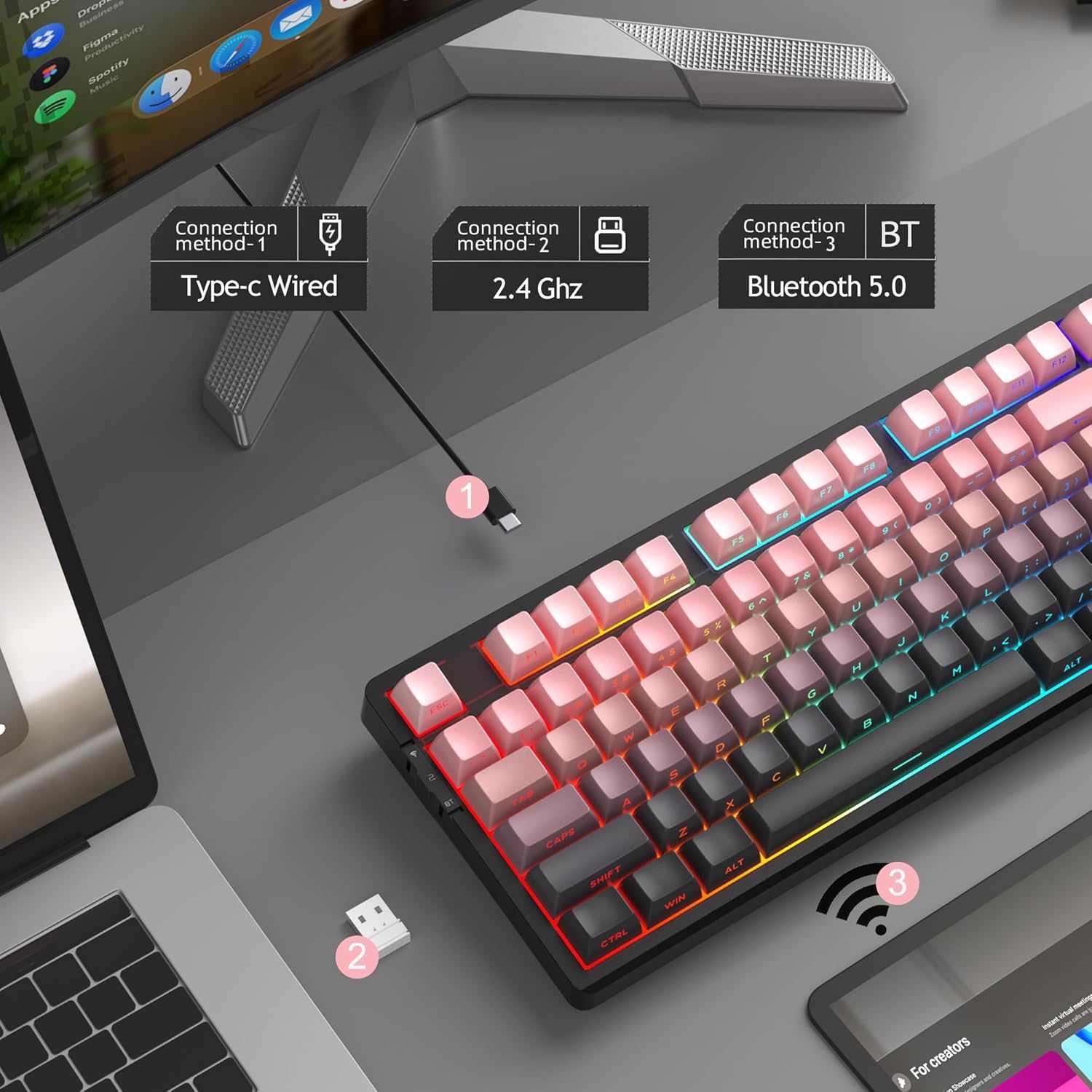
Figure 6: Visual representation of the three connection methods: Type-C Wired, 2.4 GHz Wireless, and Bluetooth 5.0.

Figure 7: Detailed instructions for switching between 2.4GHz, Bluetooth 5.0, and Type-C wired modes using the toggle switch and Fn key combinations.
3.2.1 USB-C Wired Mode
- Connect the USB-C cable to the keyboard and your computer's USB port.
- Toggle the switch on the keyboard to the "2" position (wired mode).
- ระบบของคุณจะจดจำแป้นพิมพ์โดยอัตโนมัติ
โหมดไร้สาย 3.2.2 2.4GHz
- ค้นหาตัวรับสัญญาณ USB 2.4GHz (โดยปกติจะเก็บไว้ในช่องบนแป้นพิมพ์)
- เสียบตัวรับสัญญาณ USB เข้ากับพอร์ต USB ที่พร้อมใช้งานบนคอมพิวเตอร์ของคุณ
- Toggle the switch on the keyboard to the "wifi" icon position (2.4G wireless mode).
- กด fn+4 to activate 2.4GHz mode. The keyboard should connect automatically.
3.2.3 โหมดบลูทูธ 5.0
The keyboard can connect to up to three Bluetooth devices.
- Toggle the switch on the keyboard to the "BT" position (Bluetooth mode).
- กดค้างไว้ fn+1, fn+2, หรือ fn+3 for 3-5 seconds to enter pairing mode for the desired channel. The indicator light will flash rapidly.
- On your device (PC, laptop, tablet, smartphone), enable Bluetooth and search for "MageGee LIGHT87".
- เลือกคีย์บอร์ดที่จะจับคู่ เมื่อเชื่อมต่อแล้ว ไฟแสดงสถานะจะหยุดกะพริบ
- หากต้องการสลับระหว่างอุปกรณ์บลูทูธที่จับคู่ เพียงแค่กด fn+1, fn+2, หรือ fn+3.
4. คู่มือการใช้งาน
4.1 การควบคุมไฟแบ็คไลท์ RGB
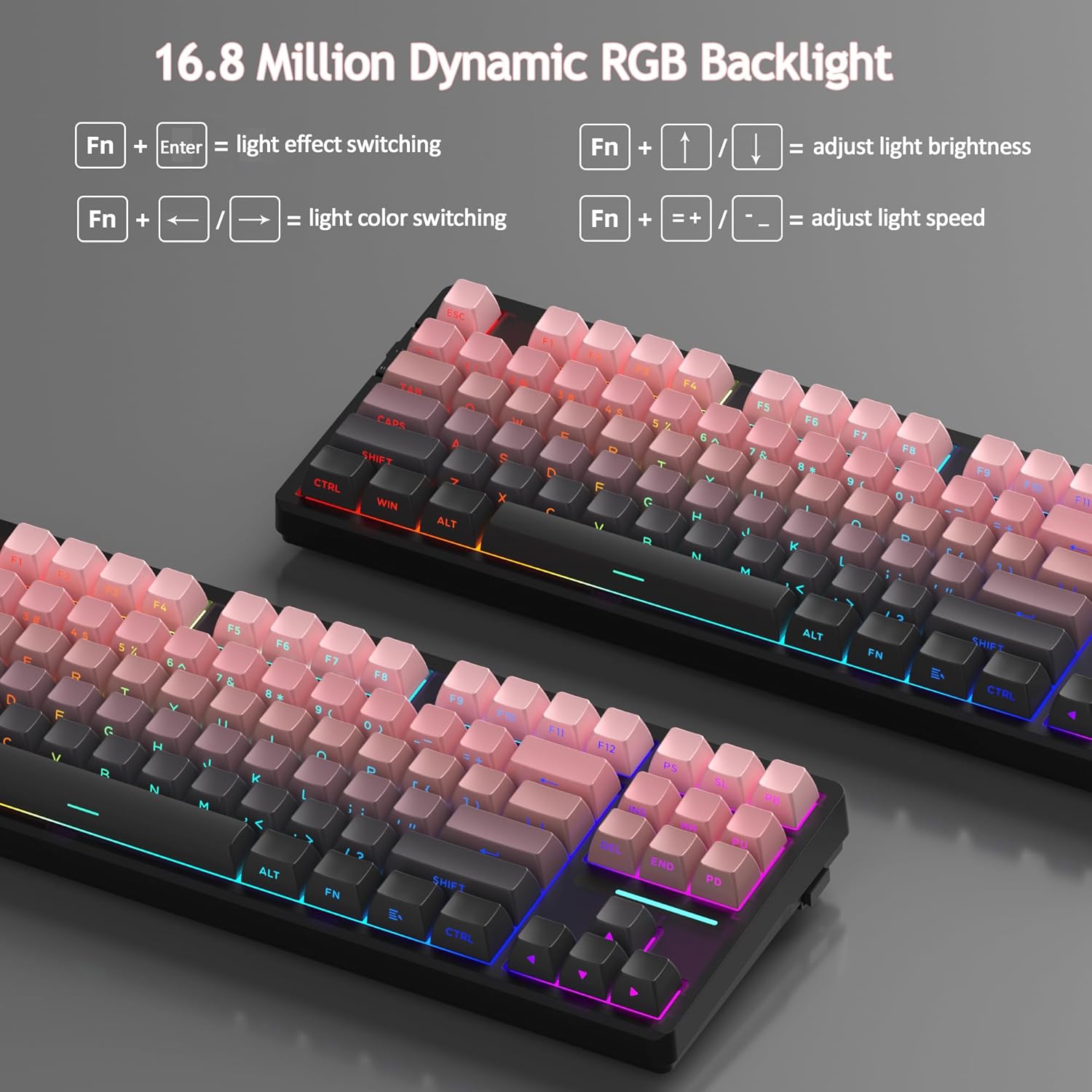
The MageGee LIGHT87 features 16.8 million cool RGB backlight options with various effects.
- Fn + ป้อน: Toggle between approximately 20 different backlight modes/effects.
- เอฟเอ็น + ←: Adjust light direction (for certain effects).
- Fn + →: Adjust light color (for static modes or color cycling).
- Fn + ↑: เพิ่มความสว่างของแสงไฟด้านหลัง
- Fn + ↓: ลดความสว่างของแสงไฟด้านหลัง
- Fn + =+: Increase backlight speed (for dynamic effects).
- Fn + -_: Decrease backlight speed (for dynamic effects).
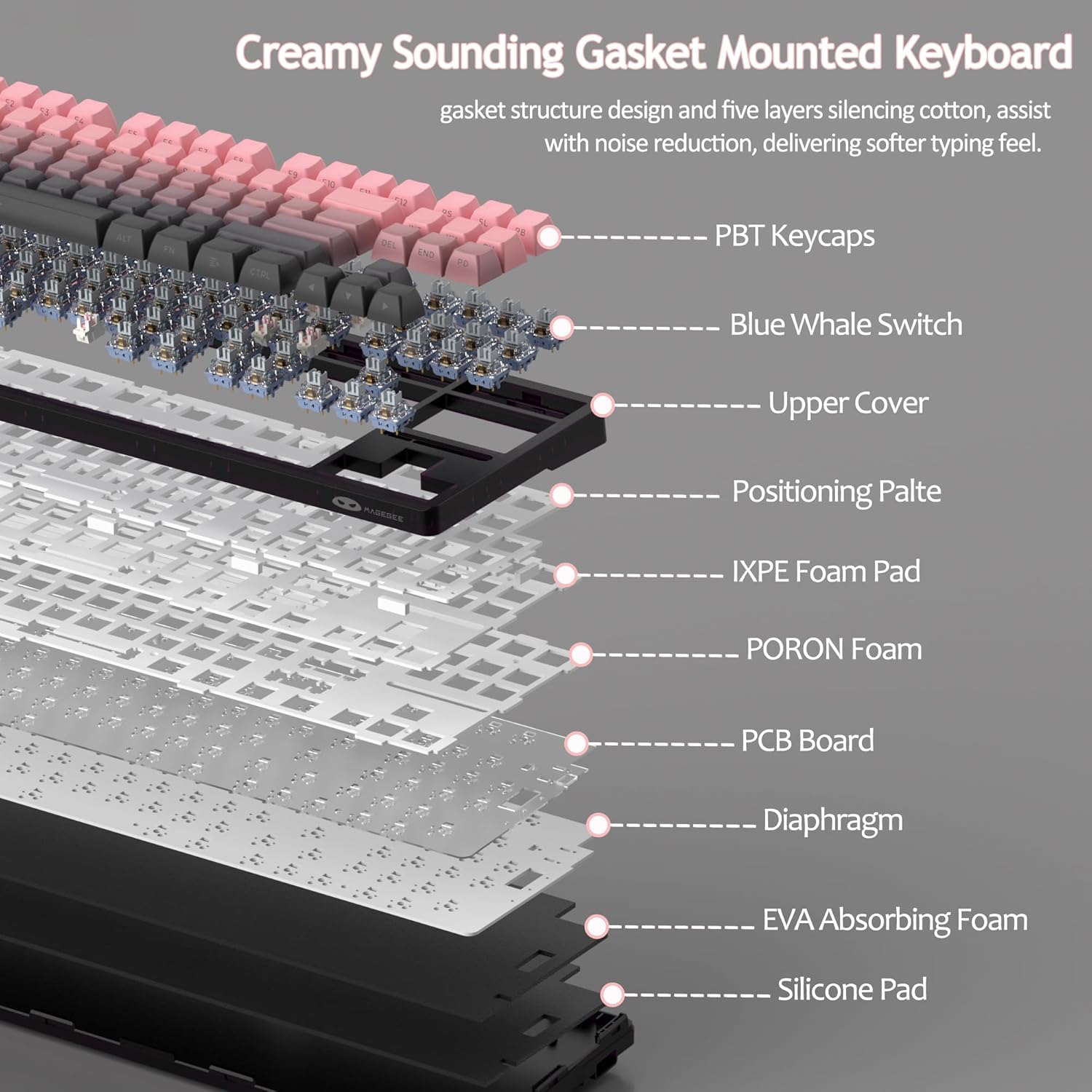
Figure 8: Visual guide to RGB backlight control key combinations.

Figure 9: Table summarizing RGB backlight functions and their corresponding Fn key combinations.
4.2 สวิตช์แบบ Hot-Swappable
The LIGHT87 keyboard features hot-swappable sockets, allowing you to change switches without soldering. It supports both 3-pin and 5-pin mechanical switches. The keyboard comes pre-installed with quiet linear Blue Whale switches.

Figure 10: Diagram illustrating the hot-swappable switch mechanism, showing compatibility with 3-pin and 5-pin switches and the pre-lubed Blue Whale switch.

Figure 11: Specifications of the Blue Whale Switch, including linear type, conduction stroke, total travel, operating force, material, and lifespan.
To Replace Switches:
- ถอดฝาครอบปุ่มออกอย่างระมัดระวังโดยใช้ตัวดึงฝาครอบปุ่มที่ให้มา
- Use the switch puller to gently grip the top and bottom clips of the switch.
- ดึงสวิตช์ขึ้นตรงๆ เพื่อถอดออกจาก PCB
- จัดตำแหน่งพินของสวิตช์ใหม่ให้ตรงกับรูบน PCB
- Press the new switch firmly into place until it clicks. Ensure it is seated properly and not bent.
- เปลี่ยนปุ่มคีย์แคป
4.3 โครงสร้างปะเก็นและเสียง Dampเอนดิ้ง
The LIGHT87 utilizes a gasket-mounted design, which provides a softer, more flexible typing feel and contributes to a "creamy thock" sound profile. Additionally, it incorporates five layers of sound-absorbing foams to effectively reduce noise and improve typing comfort.

รูปที่ 12: ระเบิด view of the keyboard's internal components, highlighting the gasket structure and various foam layers (IXPE Foam Pad, PORON Foam, EVA Absorbing Foam, Silicone Pad) for sound dampเอนนิ่ง
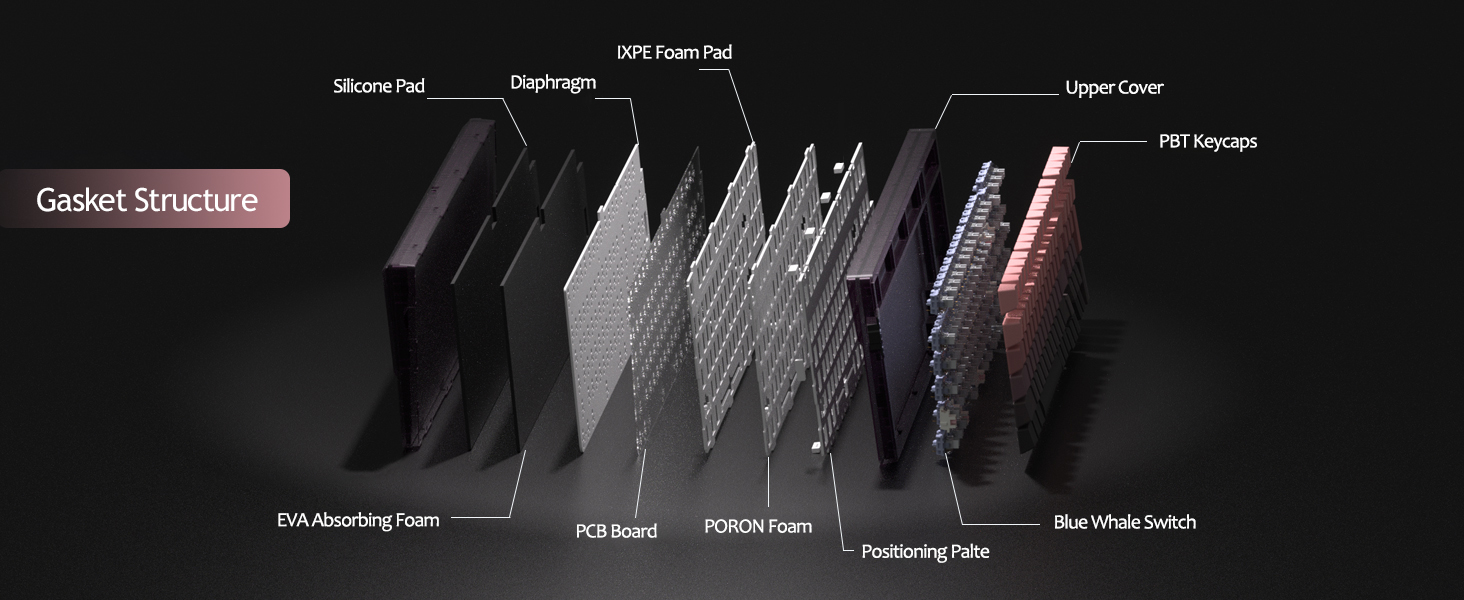
Figure 13: Detailed diagram of the gasket structure, showing how the plate is isolated from the case by gaskets, along with the various foam layers.
4.4 คีย์แคป PBT
The keyboard is equipped with durable PBT keycaps, known for their resistance to shine and wear over time. The legends are side-printed for a clean top surface aesthetic.
รูปที่ 14: ระยะใกล้ view of the keyboard's side-printed PBT keycaps.
4.5 Layout and Compatibility
The LIGHT87 features a compact 80% (TKL) layout with 87 keys, saving desktop space while retaining essential function and arrow keys. It supports both Windows and Mac operating systems, and all 87 keys feature 100% anti-ghosting for accurate input during intense gaming or typing sessions.
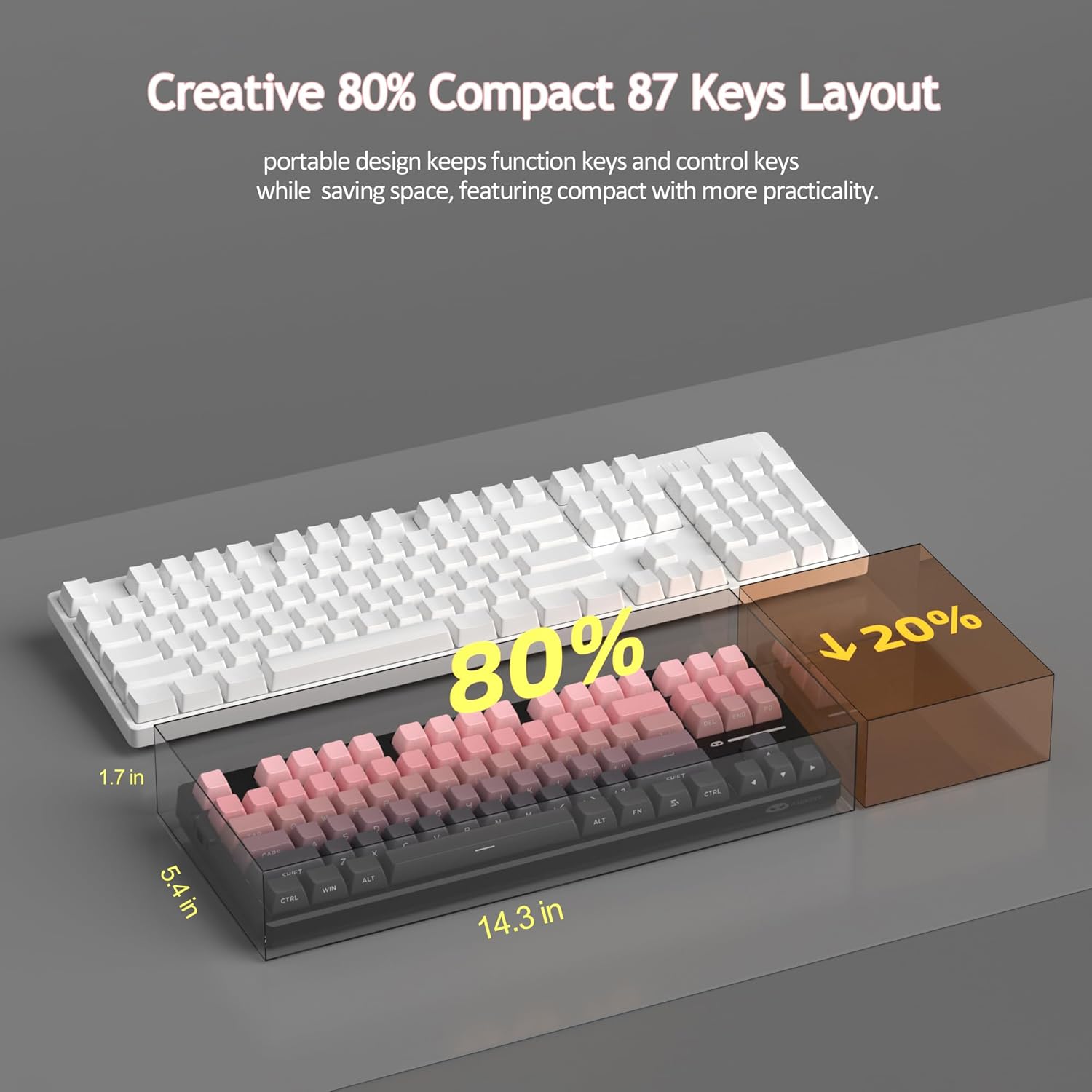
Figure 15: Comparison illustrating the compact 80% layout of the LIGHT87 keyboard compared to a full-size keyboard, highlighting space savings.

Figure 16: The MageGee LIGHT87 keyboard integrated into a desktop setup, demonstrating its use with a computer and monitor.
5. การบำรุงรักษา
5.1 การทำความสะอาดแป้นพิมพ์
To maintain the performance and appearance of your keyboard, regular cleaning is recommended.
- ถอดแป้นพิมพ์ออกจากคอมพิวเตอร์ของคุณก่อนทำความสะอาด
- ใช้แปรงขนนุ่มหรือลมอัดเพื่อขจัดฝุ่นและเศษต่างๆ ออกจากระหว่างปุ่มต่างๆ
- For stubborn dirt, you can carefully remove keycaps using the provided keycap puller and clean the surface underneath with a slightly damp, lint-free cloth. Ensure the cloth is not dripping wet.
- Wipe the keycaps and keyboard surface with a dry, soft cloth.
- Do not use harsh chemicals, abrasive cleaners, or immerse the keyboard in liquid.

Figure 17: Image showing keycaps being removed from the keyboard, useful for cleaning or switch replacement.
5.2 การปรับมุมแป้นพิมพ์
The keyboard features adjustable feet to customize your typing angle for ergonomic comfort.

Figure 18: Image demonstrating the adjustable feet on the underside of the keyboard for tilt customization.

รูปที่ 19: โปรด้านข้างfile of the keyboard illustrating its ergonomic keycap profile เพื่อการพิมพ์ที่สะดวกสบาย
6 การแก้ไขปัญหา
| ปัญหา | สาเหตุที่เป็นไปได้ | สารละลาย |
|---|---|---|
| Keyboard not responding in wired mode. | Loose cable connection, incorrect mode selected, faulty USB port. | Ensure USB-C cable is securely connected. Check if the keyboard switch is set to "2" (wired mode). Try a different USB port on your computer. |
| 2.4GHz wireless not connecting. | USB receiver not plugged in, incorrect mode, low battery. | Ensure the 2.4GHz USB receiver is plugged in. Set the keyboard switch to "wifi" icon and press fn+4ชาร์จคีย์บอร์ด |
| Bluetooth pairing failed or connection unstable. | Incorrect pairing procedure, interference, device Bluetooth issues, low battery. | Ensure keyboard switch is set to "BT". Press and hold Fn + 1/2/3 to re-enter pairing mode. Forget the device on your computer/device and re-pair. Move closer to the device. Charge the keyboard. Restart your device's Bluetooth. |
| ไฟแบ็คไลท์ไม่ทำงานหรือค้าง | Backlight turned off, low battery, software glitch. | กด Fn + ↑ to increase brightness. Charge the keyboard. Try cycling through backlight modes with Fn + ป้อน. |
| Certain keys not responding. | สวิตช์หลวมหรือชำรุด มีเศษสิ่งสกปรกอยู่ใต้ปุ่มกด | Remove the keycap and check for debris. If hot-swappable, try reseating the switch or replacing it with a known working switch. |
7. ข้อมูลจำเพาะ
| คุณสมบัติ | รายละเอียด |
|---|---|
| แบบอย่าง | ไลท์87 |
| ยี่ห้อ | เมจจี |
| การเชื่อมต่อ | 2.4GHz ไร้สาย, บลูทูธ 5.0, USB-C แบบมีสาย |
| เค้าโครง | 87-key (80% TKL) |
| สวิตซ์ | Hot-swappable (3-pin/5-pin compatible), Blue Whale Linear Switches |
| ปุ่มกด | Side-printed PBT |
| แสงไฟแบ็คไลท์ | 16.8 ล้าน RGB |
| ความจุของแบตเตอรี่ | 8000mAh |
| อายุการใช้งานแบตเตอรี่ (เปิด RGB) | ประมาณ 53 ชั่วโมง |
| อายุการใช้งานแบตเตอรี่ (ปิด RGB) | ประมาณ 400 ชั่วโมง |
| อุปกรณ์ที่รองรับ | PC, Laptop, Tablet, Smartphone, Gaming Console |
| การรองรับระบบปฏิบัติการ | วินโดวส์, แมคโอเอส |
| ป้องกันการโดนผีหลอก | All 87 keys |
| ขนาด (แพ็คเกจ) | 15.91 x 7.17 x 2.6 นิ้ว |
| น้ำหนักสินค้า | 2.72 ปอนด์ |
8. การรับประกันและการสนับสนุน
MageGee products are designed for reliability and performance. For warranty information and customer support, please refer to the official MageGee webหรือติดต่อผู้ขายโดยตรงผ่านแพลตฟอร์มการซื้อของคุณ
You can visit the official MageGee store on Amazon for more information and product updates: MageGee Amazon Store


