1. บทนำ
This manual provides essential information for the installation, operation, and maintenance of your ZOTAC GAMING GeForce RTX 4070 Ti SUPER SOLID OC 16GB graphics card. Please read this manual thoroughly before installation to ensure proper functionality and to prevent damage.

Image 1.1: ZOTAC GAMING GeForce RTX 4070 Ti SUPER SOLID OC 16GB Graphics Card and its retail packaging.
2. เนื้อหาบรรจุภัณฑ์
ตรวจสอบว่ามีรายการทั้งหมดอยู่ในแพ็คเกจ:
- ZOTAC GAMING GeForce RTX 4070 Ti SUPER SOLID OC 16GB Graphics Card
- ขาตั้งรองรับ GPU
- คู่มือการใช้งาน (เอกสารนี้)
- Power Adapter Cable (if applicable, check your specific model)
3. ข้อกำหนดของระบบ
- เมนบอร์ดที่รองรับ PCI Express พร้อมสล็อตกราฟิก x16 ความกว้างคู่หนึ่งช่อง
- Minimum 750W power supply with three available 8-pin PCIe power connectors (or equivalent 12VHPWR connector)
- Minimum 16GB system memory
- Microsoft Windows 10/11 64-bit or Linux 64-bit operating system
- ต้องใช้การเชื่อมต่ออินเทอร์เน็ตในการติดตั้งไดรเวอร์
4. คู่มือการติดตั้ง
4.1. การเตรียมพร้อม
- ปิดคอมพิวเตอร์และถอดสายไฟ
- เปิดเคสคอมพิวเตอร์ของคุณ
- ต่อสายดินเพื่อระบายไฟฟ้าสถิต
4.2. การติดตั้งการ์ดจอ
- ค้นหาสล็อต PCI Express x16 ที่ว่างบนเมนบอร์ดของคุณ
- ถอดฝาปิดช่องเสียบอุปกรณ์เสริมที่จำเป็นออกจากเคสคอมพิวเตอร์ของคุณ
- Carefully insert the graphics card into the PCIe x16 slot until it is fully seated. Ensure the retention clip locks into place.
- ยึดการ์ดกราฟิกเข้ากับเคสด้วยสกรู
- Connect the required power cables from your power supply to the graphics card. This model typically requires three 8-pin PCIe power connectors or a single 12VHPWR connector. Ensure all connections are secure.
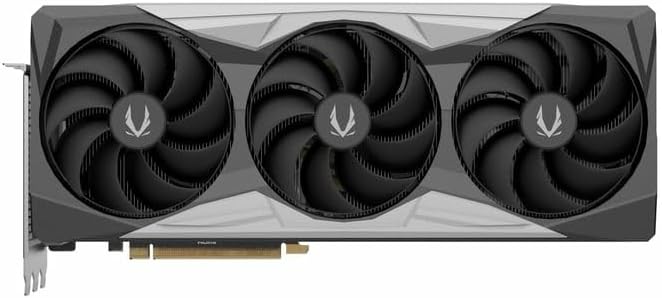
ภาพที่ 4.1: ด้านหน้า view of the graphics card, showing the triple fan design.
4.3. Installing the GPU Support Stand
The included GPU support stand helps prevent sag and provides additional stability for the graphics card. Follow the instructions provided with the stand for proper installation within your PC case.
4.4. Closing the Case and Connecting Peripherals
- ปิดเคสคอมพิวเตอร์ของคุณ
- Connect your monitor(s) to the display outputs on the graphics card (DisplayPort or HDMI).
- Reconnect the power cable and other peripherals to your computer.

ภาพที่ 4.2: ด้านหลัง view of the graphics card, showing three DisplayPort outputs and one HDMI output.
5. คู่มือการใช้งาน
5.1. การติดตั้งไดร์เวอร์
- เปิดเครื่องคอมพิวเตอร์ของคุณ
- เมื่อระบบปฏิบัติการโหลดเสร็จแล้ว ให้ดาวน์โหลดไดรเวอร์การ์ดจอเวอร์ชั่นล่าสุดจากเว็บไซต์ทางการของ NVIDIA webงาน (www.nvidia.com/drivers) หรือ ZOTAC webงาน (www.zotac.com/support).
- ทำตามคำแนะนำบนหน้าจอเพื่อติดตั้งไดรเวอร์ให้เสร็จสมบูรณ์ อาจจำเป็นต้องรีสตาร์ทระบบ
5.2. ยูทิลิตี้ซอฟต์แวร์
ZOTAC provides utilities such as FireStorm for monitoring and adjusting graphics card settings, including fan speed control (Active Fan Control, FREEZE Fan Stop) and performance profiles. These can be downloaded from the ZOTAC webเว็บไซต์.
6. การบำรุงรักษา
- การกำจัดฝุ่น: ทำความสะอาดฝุ่นออกจากพัดลมการ์ดจอและฮีตซิงก์เป็นระยะโดยใช้ลมอัด ตรวจสอบให้แน่ใจว่าคอมพิวเตอร์ปิดเครื่องและถอดปลั๊กออกก่อนทำความสะอาด
- การอัปเดตไดรเวอร์: Keep your graphics drivers updated to ensure optimal performance and compatibility.
- การตรวจติดตามอุณหภูมิ: Use monitoring software to keep track of the graphics card's temperature during operation. Excessive temperatures can indicate poor airflow or dust buildup.

ภาพที่ 6.1: มุม view of the graphics card, highlighting its robust cooling solution.
7 การแก้ไขปัญหา
- ไม่มีการแสดงผล:
- ตรวจสอบให้แน่ใจว่าสายเคเบิลจอภาพเชื่อมต่อกับการ์ดจอและจอภาพอย่างแน่นหนา
- ตรวจสอบว่าการ์ดกราฟิกเสียบอยู่ในสล็อต PCIe อย่างสมบูรณ์
- Check that all power cables are properly connected to the graphics card.
- ทดสอบด้วยจอภาพหรือสายเคเบิลอื่นหากเป็นไปได้
- ความไม่เสถียรของระบบหรือเกิดการขัดข้อง:
- Ensure graphics drivers are correctly installed and up to date.
- Check for adequate power supply capacity.
- ตรวจสอบอุณหภูมิเพื่อป้องกันความร้อนมากเกินไป
- Verify system memory (RAM) stability.
- เสียงดังผิดปกติหรือการทำงานผิดปกติของพัดลม:
- ทำความสะอาดฝุ่นออกจากพัดลมและฮีทซิงก์
- ตรวจสอบให้แน่ใจว่าไม่มีสายเคเบิลใดกีดขวางการหมุนของพัดลม
- Use ZOTAC FireStorm utility to check fan speed settings.
8. ข้อมูลจำเพาะ
| คุณสมบัติ | รายละเอียด |
|---|---|
| หมายเลขรุ่น | ZT-D40730R-10P |
| หน่วยประมวลผลกราฟิก | NVIDIA GeForce RTX 4070 Ti ซุปเปอร์ |
| หน่วยความจำวิดีโอ | 16GB GDDR6X |
| อินเทอร์เฟซหน่วยความจำ | 256 บิต |
| นาฬิกาความจำ | 21000 MHz (Effective) |
| นาฬิกาเครื่องยนต์ | บูสต์: 2640 MHz |
| การแสดงผลเอาท์พุต | 3 x DisplayPort 1.4a, 1 x HDMI 2.1a |
| รองรับ HDCP | ใช่ |
| ความละเอียดดิจิตอลสูงสุด | Up to 4K (7680x4320 @60Hz) |
| พีซีไอ เอ็กซ์เพรส | PCI Express 4.0 x16 |
| พาวเวอร์ซัพพลายที่แนะนำ | 750วัตต์ |
| ขั้วต่อไฟฟ้า | 1 x 12VHPWR (or 3 x 8-pin PCIe via adapter) |
| ขนาด (กxยxส) | 16.73 x 11.54 x 3.94 นิ้ว (โดยประมาณ) |
| น้ำหนัก | 2.2 ปอนด์ (ประมาณ) |
| ระบบระบายความร้อน | IceStorm 2.0 Advanced Cooling, Triple 100mm Fans, FREEZE Fan Stop, Active Fan Control |
| คุณสมบัติ | NVIDIA DLSS 3.5, Ray Tracing, Metal Backplate, GPU Support Stand |
9. การรับประกันและการสนับสนุน
สำหรับข้อมูลการรับประกันโดยละเอียด โปรดดูบัตรรับประกันที่แนบมากับผลิตภัณฑ์ของคุณ หรือเยี่ยมชมเว็บไซต์อย่างเป็นทางการของ ZOTAC website's support section. ZOTAC provides technical support and resources for their products.
- ฝ่ายสนับสนุน ZOTAC Webเว็บไซต์: www.zotac.com/support
- การลงทะเบียนผลิตภัณฑ์: ลงทะเบียนผลิตภัณฑ์ของคุณบน ZOTAC webเข้าไปที่เว็บไซต์นี้เพื่อเปิดใช้งานการรับประกันและรับข้อมูลอัปเดตเกี่ยวกับผลิตภัณฑ์


