1. สินค้าหมดview
The GeekTale F08 Fingerprint Smart Deadbolt Lock offers advanced security and convenient keyless entry for your home or office. This smart lock integrates multiple unlocking methods including fingerprint recognition, smartphone app control via Bluetooth, and traditional physical keys. It is designed for easy installation and provides robust security features.

Image: The GeekTale F08 Fingerprint Smart Deadbolt Lock, showcasing its sleek black design and the illuminated fingerprint sensor, with a smartphone displaying the companion app interface.
คุณสมบัติหลัก:
- การจดจำลายนิ้วมือ: High accuracy fingerprint scanner supporting up to 50 unique user profiles for quick, one-touch unlocking.
- การควบคุมแอพ: Manage lock functions, add/delete users, and review access logs via a dedicated smartphone application (Bluetooth within 10 meters).
- Remote Access (Gateway Required): Optional gateway (sold separately) enables remote unlocking and real-time notifications from any location.
- แบตเตอรี่แบบชาร์จไฟได้: Built-in battery provides up to 8 months of use on a 2-hour charge, with low-battery alerts and emergency USB power access.
- โครงสร้างทนทาน: Made from aluminum alloy, suitable for both indoor and outdoor use (under covered entries for exterior doors).
2. เนื้อหาบรรจุภัณฑ์
ตรวจสอบว่าส่วนประกอบทั้งหมดมีอยู่ก่อนเริ่มการติดตั้ง:
- GeekTale F08 Fingerprint Deadbolt Lock (Exterior and Interior Assemblies)
- สลัก Deadbolt
- จานตี
- อุปกรณ์ติดตั้ง (สกรู)
- Physical Keys (2-3, quantity may vary)
- คู่มือการติดตั้ง (เอกสารนี้)
3. คู่มือการติดตั้ง
3.1. การตรวจสอบความเข้ากันได้ของประตู
ตรวจสอบให้แน่ใจว่าประตูของคุณตรงตามข้อกำหนดต่อไปนี้:
- เส้นผ่านศูนย์กลางรูประตู: 2-1/8 นิ้ว (54 มม.)
- ความหนาของประตู: 1-3/8 นิ้ว ถึง 2-1/8 นิ้ว (35 มม. ถึง 54 มม.)
- เจาะตลับกุญแจ: Adjustable for 2-3/4 inches (70mm) or 2-3/8 inches (60mm). If your door's backset is 2-3/4 inches (70mm), pull out the face plate to extend.

Image: Diagram illustrating required door hole diameter, door thickness, and backset measurements for proper installation of the deadbolt lock. It also shows incompatible lock types like Rim Cylinder, Mortise, and Integrated handles.
3.2. ขั้นตอนการติดตั้ง
- เตรียมประตู: If replacing an existing lock, remove it. Ensure the door frame is clean and free of debris.
- ติดตั้งกลอนประตู: Insert the deadbolt latch into the door edge. Ensure the "UP" arrow on the latch is facing upwards. Adjust the backset if necessary (60mm or 70mm). Secure with screws.
- ติดตั้งชุดประกอบภายนอก: Route the cable from the exterior assembly through the door hole, ensuring the spindle passes through the latch mechanism.
- ติดตั้งแผ่นยึดภายใน: Secure the interior mounting plate to the door using screws, ensuring it aligns with the exterior assembly.
- Connect the Cable and Install the Interior Assembly: Connect the cable from the exterior assembly to the interior assembly. Attach the interior assembly to the mounting plate, ensuring the thumb turn operates smoothly. Secure with screws.
- ติดตั้งแผ่นปิดประตู: Install the strike plate on the door frame, aligning it with the deadbolt latch.
- การดำเนินการทดสอบ: Manually test the lock and unlock function with the thumb turn and physical key to ensure smooth operation.
4. คู่มือการใช้งาน
4.1. วิธีการปลดล็อค
The GeekTale F08 offers three primary ways to unlock your door:
- ปลดล็อคลายนิ้วมือ:
Place your registered finger on the fingerprint sensor. The lock will recognize your fingerprint in approximately 0.3 seconds. Once recognized, twist the deadbolt knob to unlock the door.

Image: A hand placing a finger on the illuminated fingerprint sensor of the GeekTale F08 lock, indicating a quick 0.3-second recognition speed.
- App Unlock (Bluetooth):
Download the dedicated GeekTale app (or compatible smart home app like Tuya Smart). Pair your lock via Bluetooth. Within 10 meters of the lock, open the app and tap the unlock icon. Once unlocked, twist the deadbolt knob to open the door.

Image: A smartphone displaying the lock's app interface with an unlock button, positioned next to the GeekTale F08 deadbolt, illustrating app-based unlocking.
- ปลดล็อคกุญแจ:
In case of emergency or preference, use the provided physical key to unlock the deadbolt. The keyhole is discreetly located on the exterior assembly.

Image: A hand inserting a physical key into the keyhole of the GeekTale F08 deadbolt lock, demonstrating manual unlocking.
4.2. การล็อคประตู
To lock the door, simply twist the deadbolt knob from either the interior or exterior side. The lock will engage automatically.
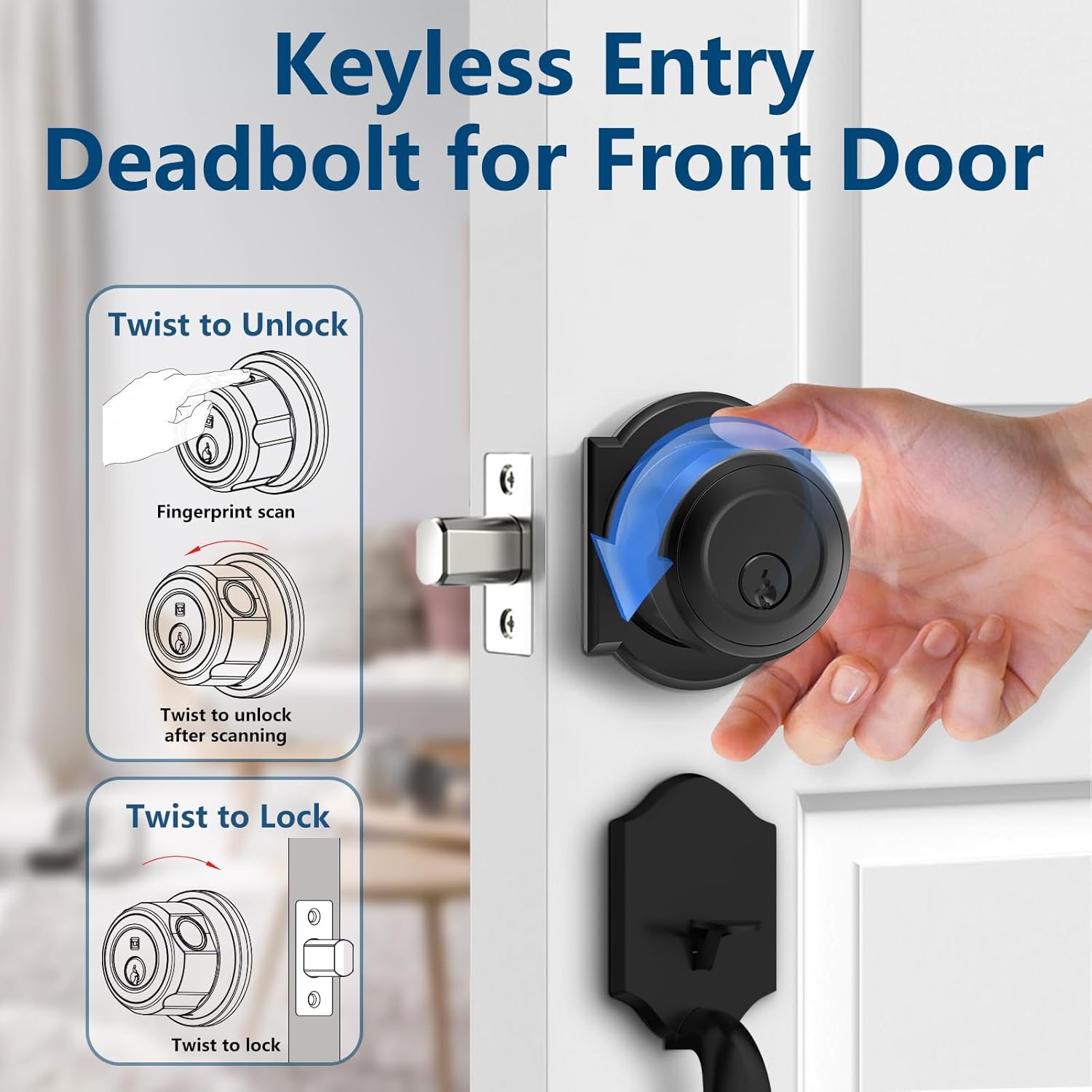
Image: A diagram showing the "Twist to Unlock" action after a fingerprint scan and the "Twist to Lock" action for the GeekTale F08 deadbolt, illustrating the manual operation of the lock.
4.3. App Management and Remote Control
The companion app allows for comprehensive management of your lock:
- การจัดการผู้ใช้: Add or delete fingerprint profiles for family members or guests.
- บันทึกการเข้าถึง: Review a history of entries and exits, including the method used (fingerprint, app).
- Remote Unlock (Requires Gateway): For remote unlocking functionality and real-time door status notifications from anywhere, a GeekTale G3 Gateway (sold separately) is required. Pair the gateway with your lock and connect it to your home Wi-Fi network.
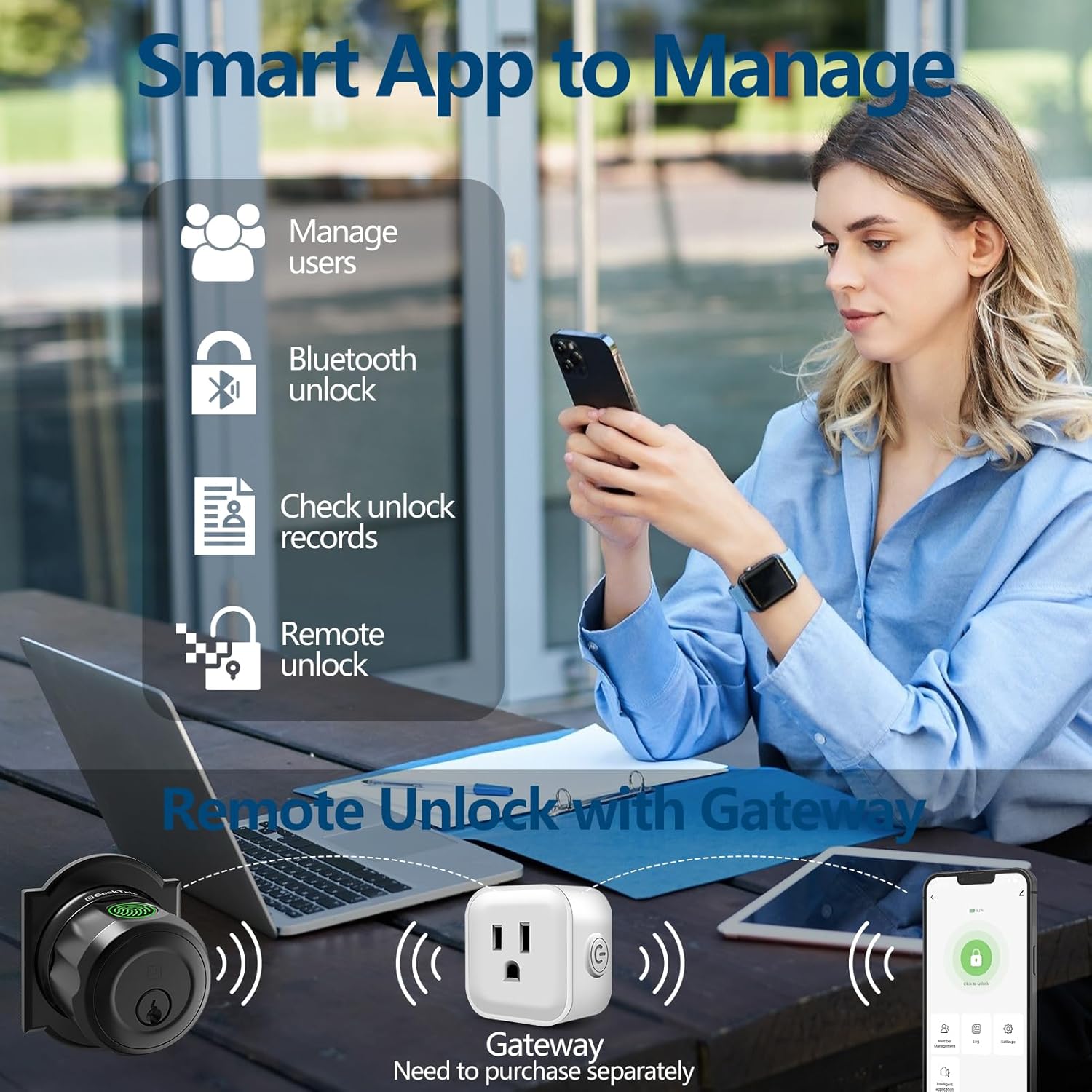
Image: An illustration detailing the smart app's capabilities, including managing users, Bluetooth unlock, checking unlock records, and remote unlock, with a separate gateway device shown for remote functionality.
5. การบำรุงรักษา
5.1. การจัดการแบตเตอรี่
The lock is equipped with a rechargeable Lithium-Ion battery. A full charge takes approximately 2 hours and provides up to 8 months of use.
- การชาร์จ: Use a standard USB cable to charge the lock. The charging port is typically located on the interior assembly.
- การแจ้งเตือนแบตเตอรี่ต่ำ: The lock will provide visual or audible alerts when the battery level is low. The app will also display battery status.
- ไฟฉุกเฉิน: If the battery completely drains, you can use a portable power bank connected via USB to temporarily power the lock for entry, or use the physical key.

Image: A visual representation of the GeekTale F08's built-in rechargeable battery, highlighting a 30-minute full charge time and an 8-month battery life, along with a low battery alert indicator.
5.2. การทำความสะอาดและการดูแลรักษา
- เช็ดพื้นผิวของตัวล็อคด้วยผ้าแห้งเนื้อนุ่ม หลีกเลี่ยงการใช้สารทำความสะอาดที่มีฤทธิ์กัดกร่อนหรือตัวทำละลาย
- While the lock is constructed for durability, for exterior doors, installation under covered entries (e.g., porches) is recommended to protect it from direct rain exposure and extreme weather conditions.

Image: The GeekTale F08 lock shown on a door with rain effects, indicating its IP65 weather resistance and operational temperature range of 23°F to 131°F.
6 การแก้ไขปัญหา
- ไม่รู้จักลายนิ้วมือ:
Ensure your finger is clean and dry. Try repositioning your finger on the sensor. If issues persist, delete and re-register your fingerprint in the app. Ensure the sensor is clean.
- ล็อคไม่ตอบสนอง:
Check the battery level in the app or look for low battery alerts on the lock. Recharge the battery if necessary. If completely drained, use a physical key or emergency USB power.
- App Connectivity Issues (Bluetooth):
Ensure Bluetooth is enabled on your smartphone and you are within 10 meters of the lock. Restart the app or your phone. If using a gateway, ensure the gateway is powered on and connected to Wi-Fi.
- Remote Unlock Not Working:
Verify that the GeekTale G3 Gateway is properly installed, powered, and connected to your home Wi-Fi network. Ensure the lock is paired with the gateway. Check your internet connection.
- Lock Malfunctions / Unlocks Randomly:
This is an uncommon issue. If the lock exhibits unpredictable behavior, try resetting the lock to factory settings (refer to the app or manufacturer's instructions for specific steps) and re-pairing it. If the problem persists, contact customer support.
7. ข้อมูลจำเพาะ
| คุณสมบัติ | รายละเอียด |
|---|---|
| ยี่ห้อ | กี๊กเทล |
| ชื่อรุ่น | เอฟ08 |
| ประเภทล็อค | Keyless Entry Deadbolt |
| วิธีการปลดล็อค | Fingerprint, App (Bluetooth), Physical Key |
| ความจุของลายนิ้วมือ | สูงสุดถึง 50 โปรfiles |
| วัสดุ | โลหะผสมอลูมิเนียม |
| สี | สีดำ |
| ขนาด (กว้าง x ยาว x สูง) | 2.67 x 2.67 x 1.87 นิ้ว |
| น้ำหนักสินค้า | 1.41 ปอนด์ (0.64 กิโลกรัม) |
| แหล่งพลังงาน | แบตเตอรี่ลิเธียมไอออน 1 ก้อน (รวมอยู่ด้วย) |
| อายุการใช้งานแบตเตอรี่ | ใช้งานได้นานสูงสุด 8 เดือน ด้วยการชาร์จเพียง 2 ชั่วโมง |
| การเชื่อมต่อ | บลูทูธ (ควบคุมผ่านแอป) |
| รีโมทคอนโทรล | Requires GeekTale G3 Gateway (sold separately) |
| ข้อแนะนำการใช้ | Residential and commercial front doors, outdoor use (under covered entries) |
8. การรับประกันและการสนับสนุน
8.1. ข้อมูลการรับประกัน
Please refer to the product packaging or the official GeekTale webเข้าชมเว็บไซต์เพื่อดูข้อมูลการรับประกันโดยละเอียด ข้อกำหนดและเงื่อนไข โปรดเก็บหลักฐานการซื้อไว้เพื่อใช้ในการเรียกร้องการรับประกัน
8.2. การสนับสนุนลูกค้า
For further assistance, technical support, or inquiries regarding your GeekTale F08 Smart Deadbolt Lock, please contact GeekTale customer support through their official webไซต์หรือข้อมูลการติดต่อที่ให้ไว้ในบรรจุภัณฑ์ผลิตภัณฑ์ของคุณ


