การแนะนำ
The Monster Mini M2 Electric Scooter is a high-quality, versatile personal mobility device designed for both adults and children. Featuring a robust aluminum alloy frame, powerful motor, and comfortable design, it offers an efficient and enjoyable riding experience. This manual provides essential information for the safe operation, maintenance, and troubleshooting of your scooter.
ข้อมูลด้านความปลอดภัย
Always prioritize safety when operating the scooter. Failure to follow safety guidelines can result in injury or damage to the product.
- ควรสวมหมวกกันน็อคและอุปกรณ์ป้องกันที่เหมาะสม (สนับเข่า สนับศอก สนับข้อมือ) ทุกครั้งเมื่อขี่จักรยาน
- ห้ามขี่ในสภาพถนนเปียก ฝนตกหนัก หรือลุยแอ่งน้ำ
- ตรวจสอบให้แน่ใจว่าได้ขันน็อตและตัวยึดทั้งหมดให้แน่นก่อนการขี่ทุกครั้ง
- ห้ามเกินขีดจำกัดการรับน้ำหนักสูงสุดที่ 100 กก. (220 ปอนด์)
- Avoid riding on uneven surfaces, steep inclines, or slippery terrain.
- โปรดระมัดระวังสิ่งรอบข้าง รวมถึงคนเดินเท้าและยานพาหนะอื่นๆ ด้วย
- Do not allow children to operate the scooter without adult supervision.
- ทำความคุ้นเคยกับกฎหมายและข้อบังคับในท้องถิ่นที่เกี่ยวข้องกับการใช้งานสกู๊ตเตอร์ไฟฟ้า
- ห้ามดัดแปลงสกูตเตอร์ในลักษณะใดๆ ทั้งสิ้น
เนื้อหาแพ็คเกจ
ตรวจสอบว่ามีรายการทั้งหมดอยู่ในแพ็คเกจ:
- Monster Mini M2 Electric Scooter
- Fast Charger (2A)
- คู่มือการใช้งาน
- Tools for assembly (if required, not explicitly mentioned but common)
การตั้งค่า
Follow these steps to prepare your Monster Mini M2 Scooter for its first use:
- การกางสกูตเตอร์:
Carefully remove the scooter from its packaging. Locate the folding mechanism, usually near the base of the steering column. Release the latch and unfold the scooter until it locks securely into place. Ensure the locking mechanism is fully engaged before proceeding.

Image: The Monster Mini M2 Electric Scooter in its fully unfolded state, showing the main body, handlebars, and seat.
- การปรับความสูงของแฮนด์:
The handlebar height is adjustable for rider comfort. Loosen the quick-release clamp on the steering column, extend or retract the handlebar to your desired height, and then securely tighten the clamp. Ensure the handlebar is firm and does not wobble.

ภาพ: ภาพระยะใกล้ view of the front wheel, suspension, and LED headlight of the Monster Mini M2 Electric Scooter. The handlebar stem is visible.
- Attaching/Adjusting the Seat:
The scooter comes with a comfortable leather seat that can be attached or removed. If attaching, insert the seat post into the designated slot and adjust its height for optimal comfort. Secure it with the quick-release lever. If you prefer to ride standing, the seat can be easily removed.

ภาพ: รายละเอียด view of the comfortable leather seat and its adjustable post on the Monster Mini M2 Electric Scooter.
- การชาร์จครั้งแรก:
Before first use, fully charge the scooter's battery. Connect the charger to the charging port on the scooter and then plug it into a power outlet. The charger indicator light will typically change from red to green when fully charged. Refer to the "Charging the Battery" section for more details.
คำแนะนำการใช้งาน
การเปิด/ปิดเครื่อง
Press and hold the power button on the digital display to turn the scooter on or off. The display will illuminate, showing speed, battery level, and other information.
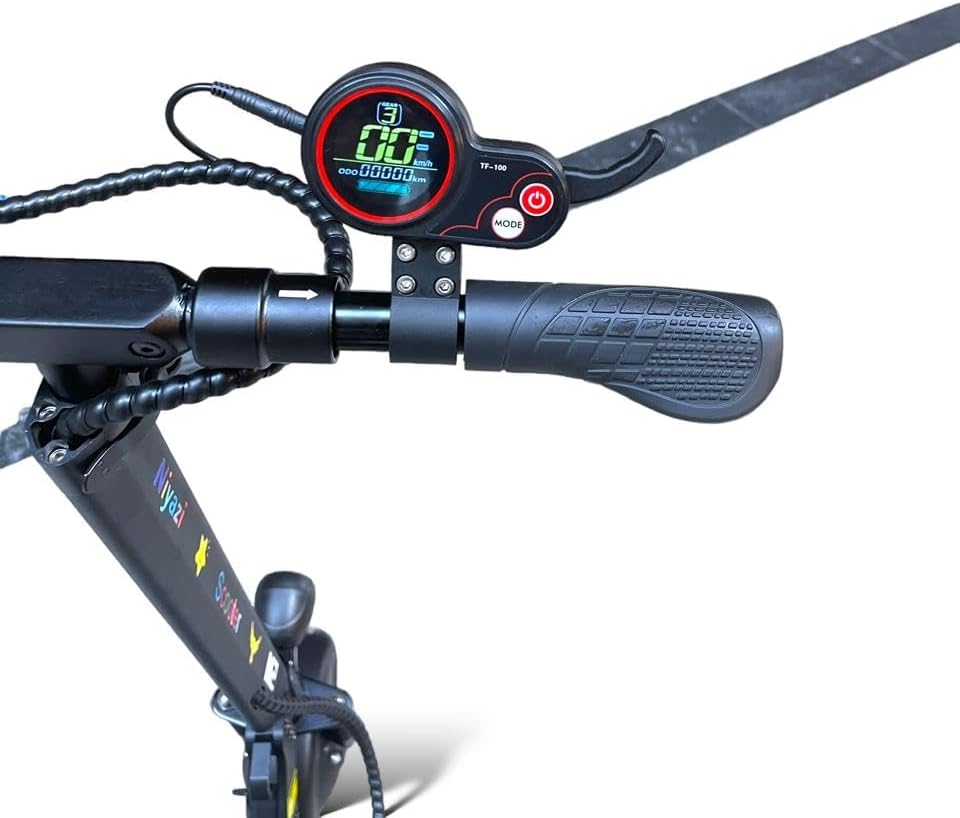
Image: A close-up of the digital display and handlebar controls, including the power button and mode button, on the Monster Mini M2 Electric Scooter.
การขับขี่สกู๊ตเตอร์
- เริ่มต้น: Place one foot on the deck and push off with the other foot to gain some initial momentum. Once moving, gently press the throttle to engage the motor.
- โหมดความเร็ว: The scooter features three speed modes. Use the mode button on the display to cycle through them and select the appropriate speed for your riding conditions. The maximum speed is 40-45 KM/H.
- การเบรก: The scooter is equipped with front and rear disc brakes. Apply the brake levers gently and evenly to slow down or stop. The rear brake light will illuminate when braking.
- การหมุน: Lean into turns and use the handlebars to steer.
- แตรและไฟ: Use the horn for signaling and the powerful front LED headlight for visibility, especially in low-light conditions. Side turn signals are also available.
ฟังก์ชั่นการแสดงผลดิจิตอล
The digital display provides real-time information:
- ตัวบ่งชี้ความเร็ว: แสดงความเร็วปัจจุบันของคุณ
- ระดับแบตเตอรี่: แสดงประจุแบตเตอรี่ที่เหลืออยู่
- มาตรวัดระยะทาง/ระยะทางเดินทาง: ติดตามระยะทางรวมหรือระยะทางการเดินทางปัจจุบัน
- ตัวบ่งชี้โหมดความเร็ว: Shows the currently selected speed mode.
การชาร์จแบตเตอรี่
เพื่อให้แบตเตอรี่ใช้งานได้นานและมีประสิทธิภาพสูงสุด โปรดปฏิบัติตามคำแนะนำในการชาร์จดังต่อไปนี้:
- Only use the provided 2A fast charger.
- ตรวจสอบให้แน่ใจว่าสกู๊ตเตอร์ปิดอยู่ก่อนทำการชาร์จ
- Connect the charger to the scooter's charging port, then plug it into a standard wall outlet.
- The charger indicator light will typically be red during charging and turn green when the battery is fully charged.
- อย่าชาร์จแบตเตอรี่มากเกินไป ถอดปลั๊กเครื่องชาร์จเมื่อชาร์จเสร็จแล้ว
- A single charge can cover a distance of up to 40 km (25 miles), depending on riding conditions and terrain.
การซ่อมบำรุง
Regular maintenance helps prolong the life of your scooter and ensures safe operation.
- การทำความสะอาด: เช็ดทำความสะอาดสกูตเตอร์ด้วยน้ำยาทำความสะอาดamp cloth after each use. Do not use high-pressure water or immerse the scooter in water.
- ยางรถยนต์ : The scooter uses 6.5-inch solid rubber tires, which do not require inflation. Periodically inspect them for wear and tear.
- เบรค : Regularly check the front and rear disc brakes for proper function. Ensure the brake levers engage smoothly and the brakes provide adequate stopping power. Adjust if necessary, or consult a professional.
- ตัวล็อค: ตรวจสอบสกรู น็อต และกลไกปลดเร็วทั้งหมดเป็นระยะ เพื่อให้แน่ใจว่าแน่นและปลอดภัยดี
- พื้นที่จัดเก็บ: When not in use, store the scooter in a cool, dry place, away from direct sunlight and extreme temperatures. The foldable design allows for easy storage.
การแก้ไขปัญหา
ต่อไปนี้คือปัญหาทั่วไปบางประการและแนวทางแก้ไขที่เป็นไปได้:
| ปัญหา | สาเหตุที่เป็นไปได้ | สารละลาย |
|---|---|---|
| สกูตเตอร์สตาร์ทไม่ติด | Low battery; loose connection; power button issue. | Charge the battery fully. Check all connections. Press and hold the power button firmly. |
| มอเตอร์ไม่ทำงาน | Throttle not pressed correctly; low battery; motor fault. | Ensure you push off to gain initial speed before pressing the throttle. Check battery level. If issue persists, contact support. |
| ระบบเบรกใช้งานไม่ได้ผล | Brake pads worn; cable loose; disc dirty. | Inspect brake pads and disc. Adjust brake cable tension. Clean disc. If unsure, seek professional assistance. |
| Reduced range/battery life. | Battery not fully charged; riding conditions (hills, heavy load); battery degradation. | Ensure full charge. Avoid continuous uphill riding or carrying excessive weight. Battery life naturally degrades over time. |
ข้อมูลจำเพาะ
| คุณสมบัติ | รายละเอียด |
|---|---|
| ชื่อรุ่น | Monster Mini M2 Original |
| ยี่ห้อ | General (Niyazi Manufacturer) |
| สี | สีดำ |
| กำลังมอเตอร์ | 500วัตต์ |
| แบตเตอรี่ | 36V 8AH |
| Max Range per Charge | สูงสุด 40 กม. (25 ไมล์) |
| ความเร็วสูงสุด | 40 - 45 KM/H (25 - 28 MPH) |
| ประเภทเบรค | เบรคดิสก์ด้านหน้าและด้านหลัง |
| วัสดุกรอบ | โลหะผสมอลูมิเนียม |
| การระงับ | Front and Rear Shock Absorbers |
| ยางรถยนต์ | 6.5-inch Solid Rubber (Non-inflatable) |
| แสดง | Digital Display (Speed, Battery, etc.) |
| แสงสว่าง | Powerful Front LED Headlight, Rear Brake Light, Side Turn Signals |
| ที่นั่ง | Adjustable Height Leather Seat (Removable) |
| ความจุในการรับน้ำหนักสูงสุด | สูงถึง 100 กก. (220 ปอนด์) |
| ขนาดสินค้า (กว้าง x ยาว x สูง) | 180 x 26 x 140 ซม. (70.9 x 10.2 x 55.1 นิ้ว) |
| น้ำหนักสินค้า | 38 กก. (83.8 ปอนด์) |
| พับได้ | ใช่ เพื่อการจัดเก็บที่ง่ายดาย |
Note: The maximum weight limit for rider capacity is 100 kg, while the item weight of the scooter itself is 38 kg.
การรับประกันและการสนับสนุน
สำหรับข้อมูลการรับประกัน การสนับสนุนทางเทคนิค หรือสอบถามบริการ โปรดติดต่อผู้ผลิตหรือจุดจำหน่ายของคุณ โปรดเก็บใบเสร็จรับเงินไว้เป็นหลักฐานการซื้อ
- Manufacturer: Niyazi
- For assistance, refer to the contact information provided with your product packaging or visit the official Niyazi webเว็บไซต์.


