1. บทนำ
The Gustard H26 is a high-performance, fully balanced discrete Class A headphone amplifier designed to deliver exceptional audio fidelity. It incorporates advanced features and robust construction to provide a superior listening experience for audiophiles.
คุณสมบัติหลัก:
- Fully balanced discrete Class A amplifier with 8 pairs of power tubes for powerful and controlled sound.
- Seamless switching of preamplifier output, allowing the device to function as a pure pre-stagอีเอาท์พุท
- ก่อน-stage utilizes two direct-insert LME49720 dual op-amps.
- Matrix relay volume control for consistent and unbiased 4-way volume accuracy.
- Equipped with two custom 50W audio-specific toroidal transformers, one for each channel, ensuring minimal interference.
- Fully balanced input stage, enhancing clarity and richness for both balanced and single-ended RCA inputs.
2. ข้อมูลด้านความปลอดภัย
Please read and follow these safety guidelines to ensure safe operation and to prevent damage to the device or injury to yourself.
- อย่าให้เครื่องโดนฝน ความชื้น หรืออุณหภูมิที่สูงหรือต่ำเกินไป
- ตรวจสอบให้แน่ใจว่ามีการระบายอากาศที่เหมาะสมรอบ ๆ amplifier เพื่อป้องกันความร้อนสูงเกินไป
- อย่าเปิดcasinง. ส่งต่อการบริการทั้งหมดให้กับบุคลากรที่มีคุณสมบัติ
- ใช้เฉพาะอะแดปเตอร์แปลงไฟและสายเคเบิลที่ระบุไว้เท่านั้น
- Disconnect power before cleaning or moving the unit.
3. เนื้อหาบรรจุภัณฑ์
ตรวจสอบว่ามีรายการทั้งหมดอยู่ในแพ็คเกจ:
- Gustard H26 Headphone Ampชีวิต
- สายไฟ
- รีโมทคอนโทรล
- คู่มือการใช้งาน (เอกสารนี้)
4. สินค้าหมดview
4.1 แผงด้านหน้า
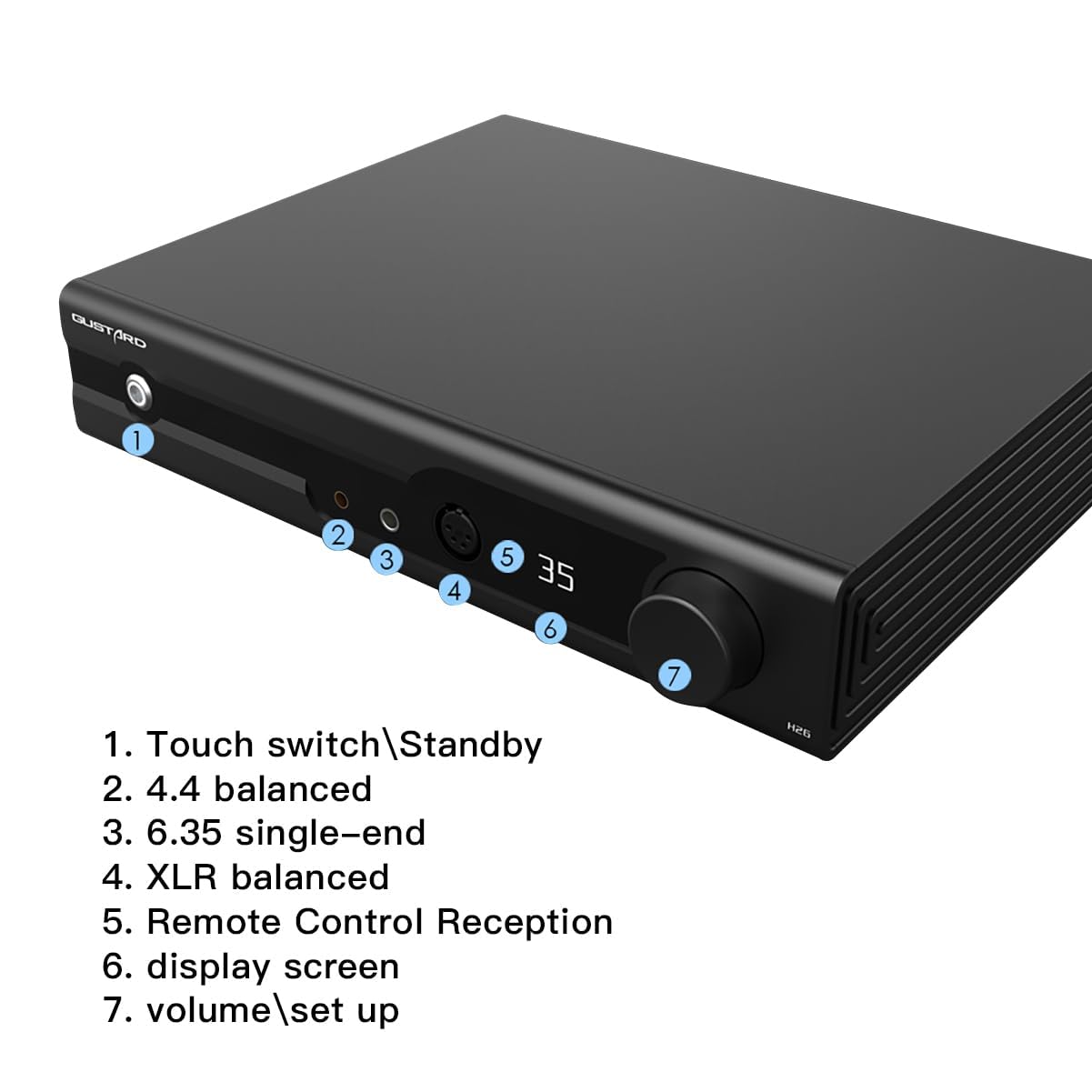
The front panel provides access to essential controls and headphone outputs.
- Touch Switch/Standby: Power on/off or place the unit in standby mode.
- 4.4 Balanced Output: Headphone output for 4.4mm balanced connectors.
- 6.35 Single-End Output: Headphone output for 6.35mm single-ended connectors.
- เอาต์พุต XLR แบบสมดุล: Headphone output for 4-Pin XLR balanced connectors.
- การรับสัญญาณรีโมทคอนโทรล: ตัวรับสัญญาณอินฟราเรดสำหรับรีโมทคอนโทรล
- หน้าจอแสดงผล: Shows current settings such as volume, input, and gain.
- Volume/Setup Knob: Adjusts volume and navigates setup menus.
4.2 แผงด้านหลัง

The rear panel houses all input and output connections, along with power controls.
- Balanced Input XLR 1 & 2 (Left/Right): For balanced audio sources.
- Single Input RCA (Left/Right): For single-ended audio sources.
- พรีamp Output XLR (Left/Right): สมดุลก่อนampเอาท์พุท lifier
- พรีamp Output RCA (Left/Right): ปลายเดี่ยวก่อนampเอาท์พุท lifier
- เล่มที่tagอี การเลือก: Switch to select appropriate input voltage (เช่น 115V/230V)
- อินพุตไฟ AC: Connect the power cord here.
- สวิตช์ไฟ: สวิตช์เปิด/ปิดหลักของตัวเครื่อง
- ฟิวส์: Replaceable fuse for electrical protection.
4.3 ส่วนประกอบภายใน
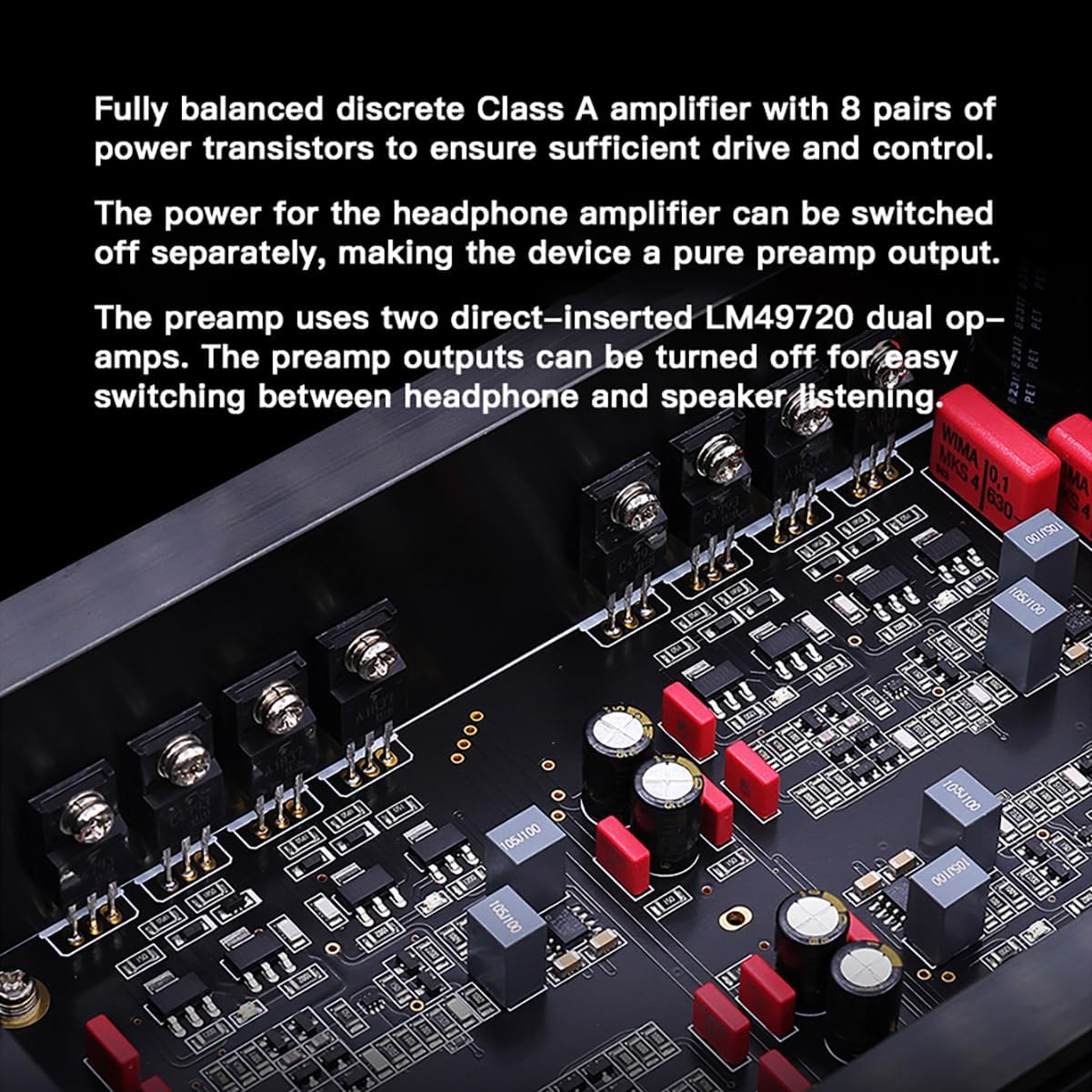
The Gustard H26 features a fully balanced discrete Class A amplifier design, utilizing 8 pairs of power transistors to ensure robust driving capability and precise control. The use of discrete components allows for fine-tuning of each stage, optimizing performance. The pre-stage incorporates two LME49720 dual op-amps.
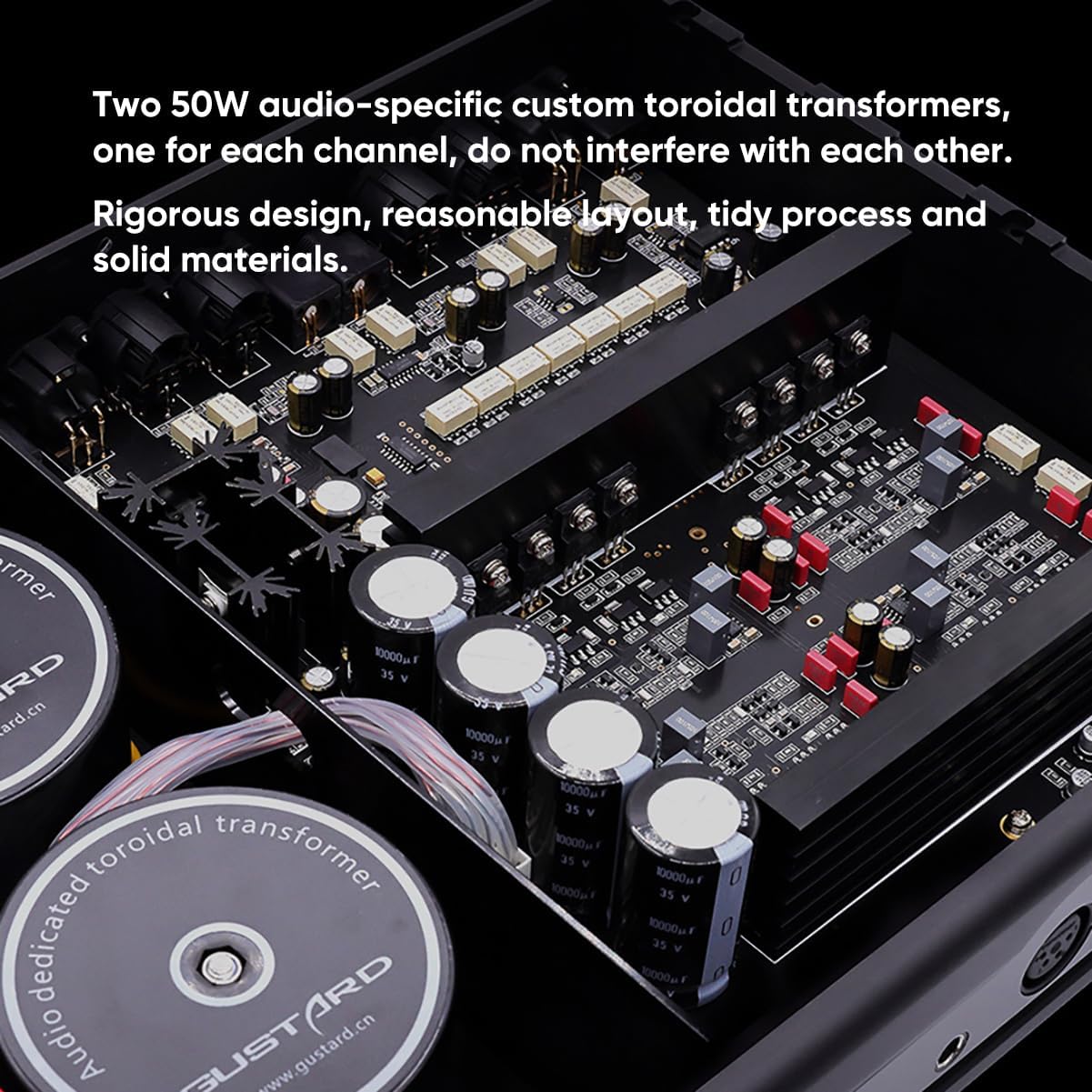
The power supply section is equipped with two custom 50W audio-specific toroidal transformers, one dedicated to each channel. This design minimizes cross-channel interference and ensures stable power delivery. Multiple low-noise regulators and Nichicon capacitors contribute to the unit's clean power and overall audio quality.
4.4 มิติ
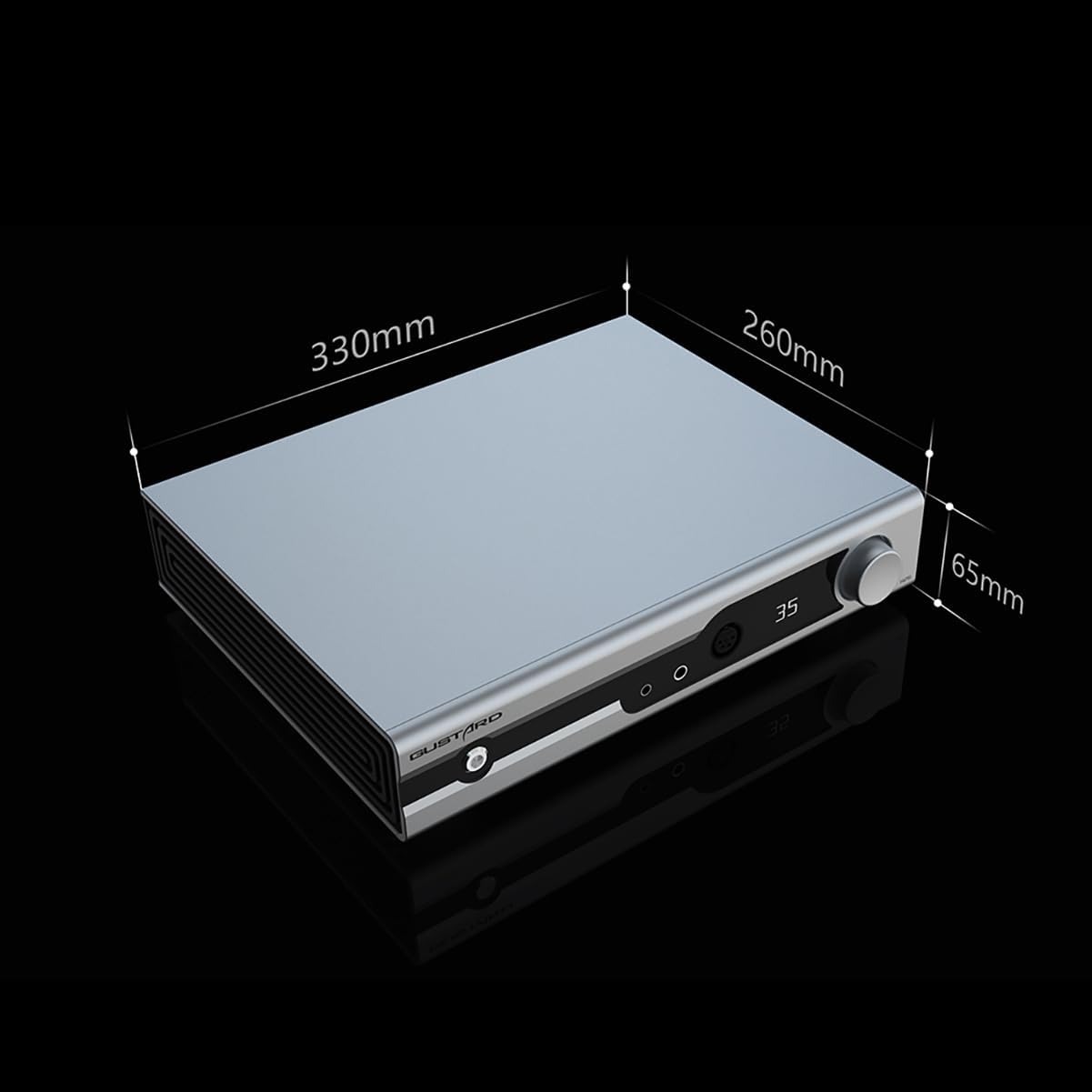
The physical dimensions of the Gustard H26 are approximately 330mm (width) x 260mm (depth) x 65mm (height).
5. การตั้งค่า
5.1 การต่อสายไฟ
- Ensure the main power switch on the rear panel is in the OFF position.
- ตรวจสอบปริมาณtage selection switch on the rear panel matches your local power supply (e.g., 115V or 230V).
- Connect the provided power cord to the AC Power Input on the rear panel and then to a suitable wall outlet.
5.2 การเชื่อมต่อแหล่งเสียง
The H26 supports both balanced (XLR) and single-ended (RCA) audio inputs.
- For Balanced Sources: Connect your audio source's balanced outputs to the XLR 1 or XLR 2 inputs on the rear panel.
- For Single-Ended Sources: Connect your audio source's RCA outputs to the RCA inputs on the rear panel.
5.3 การเชื่อมต่อหูฟัง
The H26 offers multiple headphone output options on the front panel.
- 4.4mm Balanced: สำหรับหูฟังที่มีขั้วต่อแบบบาลานซ์ขนาด 4.4 มม.
- 6.35mm Single-Ended: สำหรับหูฟังที่มีขั้วต่อแบบมาตรฐาน 6.35 มม. (1/4 นิ้ว)
- 4-Pin XLR Balanced: สำหรับหูฟังที่มีขั้วต่อ XLR แบบบาลานซ์ 4 พิน
5.4 ก่อนamplifier เอาท์พุท
The H26 can also function as a preamplifier. Connect the XLR or RCA Preamp Outputs on the rear panel to your power amplifier or active speakers. The headphone amplifier section can be turned off separately when using the preampเอาท์พุท lifier
6. การดำเนินการ
6.1 เปิด/ปิดเครื่อง
- Flip the main power switch on the rear panel to the ON position.
- Press the front panel Touch Switch (1) to power on the unit from standby, or to put it back into standby.
6.2 การควบคุมระดับเสียง
Rotate the Volume/Setup Knob (7) on the front panel clockwise to increase volume and counter-clockwise to decrease volume. The matrix relay volume control ensures precise and balanced adjustments across all channels.
6.3 การเลือกอินพุต
Single press the Volume/Setup Knob (7) to cycle through available input sources (XLR 1, XLR 2, RCA). The selected input will be shown on the Display Screen (6).
6.4 Gain Level Adjustment
Long press the Volume/Setup Knob (7) to switch between low and high gain levels. This allows for optimal matching with various headphones and In-Ear Monitors (IEMs).
6.5 Quiescent Current Adjustment
Double press the Volume/Setup Knob (7) to toggle between 50mA and 100mA quiescent current settings. This feature allows for fine-tuning the Class A operation.
6.6 การใช้รีโมทคอนโทรล

The included remote control provides convenient access to all primary functions from a distance.
6.7 วิดีโอสาธิตการใช้งาน
This video demonstrates the operational controls, including volume adjustment, input selection, gain level, and quiescent current settings. While the video features a similar product (Aune S17 Pro), the control principles and functions are analogous to the Gustard H26.
7. การบำรุงรักษา
7.1 การทำความสะอาด
To clean the unit, disconnect it from the power source. Use a soft, dry cloth to wipe the exterior surfaces. Avoid using abrasive cleaners, solvents, or chemical sprays, as these can damage the finish.
7.2 พื้นที่จัดเก็บ
เมื่อไม่ได้ใช้งานเป็นเวลานาน ให้เก็บ amplifier in a cool, dry place, away from direct sunlight and excessive dust. It is recommended to keep the original packaging for protection during storage or transport.
8 การแก้ไขปัญหา
If you encounter issues with your Gustard H26, refer to the following common problems and solutions:
- ไม่มีไฟฟ้า: Ensure the power cord is securely connected to both the unit and the wall outlet. Check the rear panel power switch and the front panel touch switch. Verify the voltage selection switch is set correctly.
- ไม่มีเสียง: Confirm that the correct input source is selected. Check all audio cable connections (source to ampลิไฟเออร์, amplifier to headphones/speakers). Ensure headphone cables are fully inserted. Adjust the volume level.
- เสียงผิดเพี้ยน: Check audio cable integrity. Ensure the input source is not overdriving the amplifier. Try adjusting the gain level to match your headphones.
- รีโมทคอนโทรลไม่ทำงาน: Check the batteries in the remote control. Ensure there are no obstructions between the remote and the unit's remote reception window.
หากปัญหายังคงมีอยู่หลังจากพยายามแก้ไขปัญหาเหล่านี้แล้ว โปรดติดต่อฝ่ายสนับสนุนลูกค้า
9. ข้อมูลจำเพาะ
- หมายเลขรุ่น:
- H26
- ยี่ห้อ:
- คัสตาร์ด
- ประเภทตัวเชื่อมต่อ:
- อาร์ซีเอ, เอ็กซ์แอลอาร์
- เอาท์พุต วัดtage:
- 50 วัตต์
- แหล่งพลังงาน:
- สายไฟ
- สี:
- สีดำ
- จำนวนวงดนตรี:
- 4
10. การรับประกันและการสนับสนุน
10.1 ข้อมูลการรับประกัน
All Gustard products purchased from authorized retailers are covered by a warranty. The standard warranty period is 1 year or more from the date of purchase, depending on the specific product and regional regulations. Please retain your proof of purchase for warranty claims.
10.2 การสนับสนุนลูกค้า
For technical assistance, troubleshooting, or warranty inquiries, please contact your retailer or the manufacturer's customer service. Support is typically available online, and inquiries are addressed promptly.


