1. บทนำ
This manual provides comprehensive instructions for the setup, operation, maintenance, and troubleshooting of your SUAAT S10 Android 14 Tablet. Please read this manual carefully before using your device to ensure proper functionality and to maximize your user experience.
2. เนื้อหาบรรจุภัณฑ์
Verify that all items listed below are included in your package. If any items are missing or damaged, please contact SUAAT customer support.
- แท็บเล็ต SUAAT S10
- เคสแท็บเล็ต
- แป้นพิมพ์บลูทูธ
- หนู
- อะแดปเตอร์ Type-C เป็น USB
- สายเคเบิลข้อมูล Type-C
- เครื่องชาร์จมาตรฐานยุโรป
- อะแดปเตอร์ OTG
- ฟิล์มกันรอยหน้าจอ
- คู่มือการใช้งาน (เอกสารนี้)

รูปที่ 2.1: เนื้อหาแพ็คเกจที่รวมอยู่
3. สินค้าหมดview
The SUAAT S10 tablet features a 10.1-inch IPS display, an Octa-Core processor, and runs on Android 14. It is designed for versatile use, from entertainment to productivity.
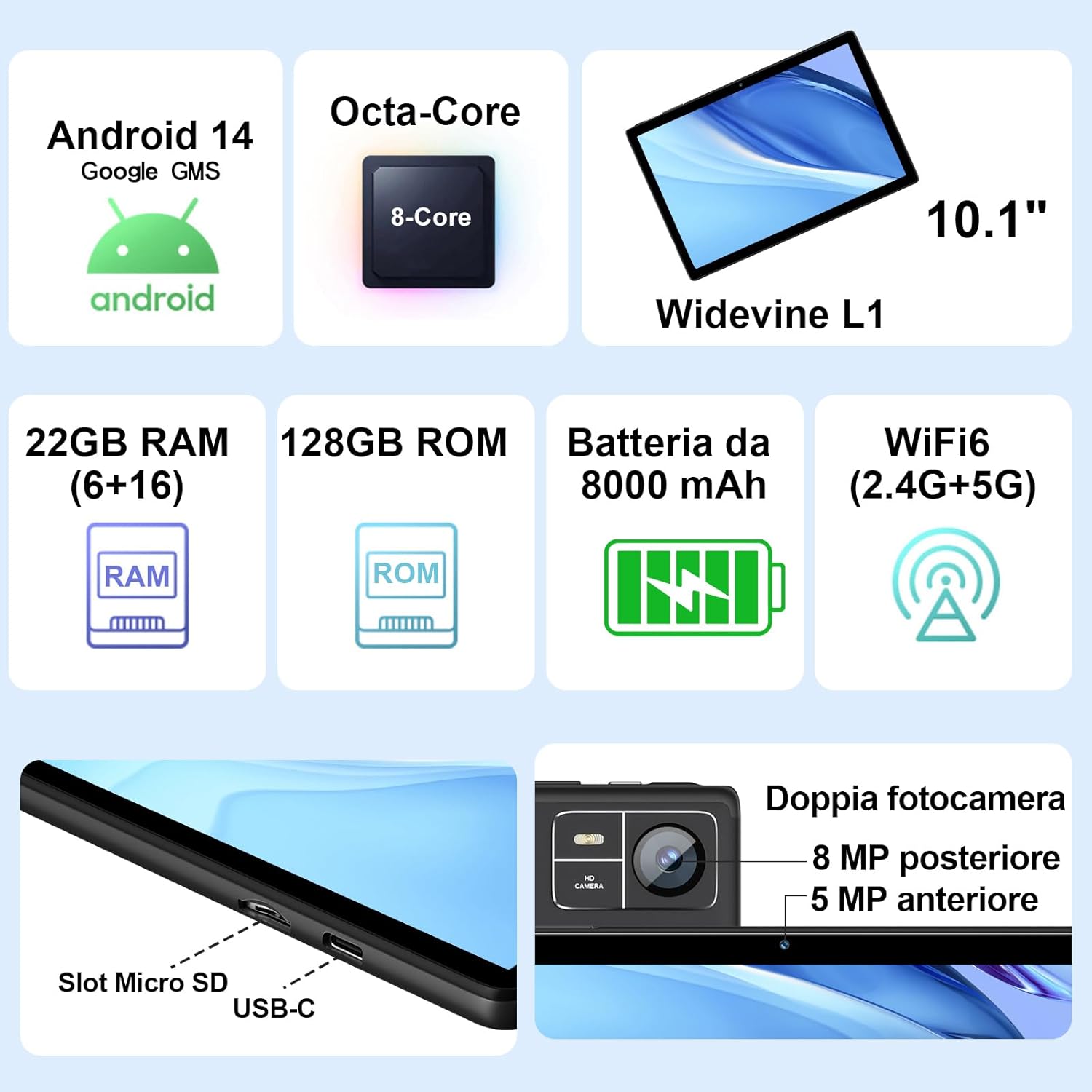
Figure 3.1: Key Features and Ports
3.1 ลักษณะทางกายภาพ
- แสดง: 10.1-inch IPS screen (1280 x 800 resolution)
- กล้องถ่ายรูป: 5 MP Front Camera, 8 MP Rear Camera
- พอร์ต: USB Type-C, MicroSD Card Slot
- ปุ่ม: ปุ่มเปิด/ปิด, ปุ่มเพิ่ม/ลดเสียง
4. การตั้งค่า
4.1 การชาร์จเริ่มต้น
Before first use, fully charge your tablet using the provided Type-C data cable and European standard charger. The battery indicator on the screen will show charging status.
4.2 เปิด/ปิดเครื่อง
- การเปิดเครื่อง: Press and hold the Power button until the SUAAT logo appears.
- วิธีปิดเครื่อง: กดปุ่มเปิด/ปิดค้างไว้จนกว่าตัวเลือกเปิด/ปิดเครื่องจะปรากฏขึ้น จากนั้นเลือก "ปิดเครื่อง"
- ในการรีสตาร์ท: กดปุ่มเปิด/ปิดค้างไว้จนกว่าตัวเลือกการเปิด/ปิดจะปรากฏขึ้น จากนั้นเลือก "รีสตาร์ท"
4.3 ตัวช่วยการตั้งค่าเริ่มต้น
เมื่อเปิดเครื่องครั้งแรก แท็บเล็ตจะแนะนำคุณตลอดกระบวนการตั้งค่าเริ่มต้น:
- เลือกภาษาที่คุณต้องการ
- เชื่อมต่อกับเครือข่าย Wi-Fi
- ลงชื่อเข้าใช้ด้วยบัญชี Google ของคุณ หรือสร้างบัญชีใหม่ ขั้นตอนนี้จำเป็นสำหรับการเข้าถึง Google Play Store และบริการอื่นๆ ของ Google
- ตั้งค่าการล็อคหน้าจอ (PIN, รูปแบบ หรือรหัสผ่าน)
- Review และยอมรับข้อกำหนดในการให้บริการของ Google
4.4 การใส่การ์ด MicroSD
The tablet supports MicroSD cards up to 1TB for expanded storage.
- ค้นหาช่องเสียบการ์ด MicroSD ที่ด้านข้างของแท็บเล็ต
- ค่อยๆ ใส่การ์ด MicroSD เข้าไปในช่องจนกระทั่งล็อคเข้าที่ ตรวจสอบให้แน่ใจว่าการ์ดอยู่ในทิศทางที่ถูกต้อง
- ในการถอด ให้ดันการ์ดเข้าไปเบาๆ จนกระทั่งการ์ดเด้งออกมา
4.5 Connecting Accessories (Keyboard and Mouse)
The included Bluetooth keyboard and mouse can be easily paired with your tablet.
- ไปที่ การตั้งค่า > อุปกรณ์ที่เชื่อมต่อ > บลูทูธ บนแท็บเล็ตของคุณ
- Turn on the Bluetooth keyboard and mouse. Put them into pairing mode (refer to their individual manuals if needed).
- On the tablet, tap "Pair new device" and select the keyboard or mouse from the list of available devices.
- ปฏิบัติตามคำแนะนำบนหน้าจอเพื่อดำเนินการจับคู่ให้เสร็จสมบูรณ์

Figure 4.1: Tablet with Keyboard and Mouse
5. การใช้งานแท็บเล็ต
5.1 คุณสมบัติของ Android 14
Your SUAAT S10 tablet runs on the latest Android 14 operating system, offering enhanced privacy, customizable themes, and improved performance.
- GMS Certified: Pre-installed Google Play Store allows easy download of your favorite apps.
- ความเป็นส่วนตัวและความปลอดภัย: Enhanced privacy controls to manage app permissions and data access.
- การปรับแต่ง: Personalize themes and app icons.
- คุณสมบัติด้านการผลิต: Supports multi-users, multi-windows, and split-screen functionality for efficient multitasking.
- การควบคุมโดยผู้ปกครอง: Tools to manage content and screen time for children.
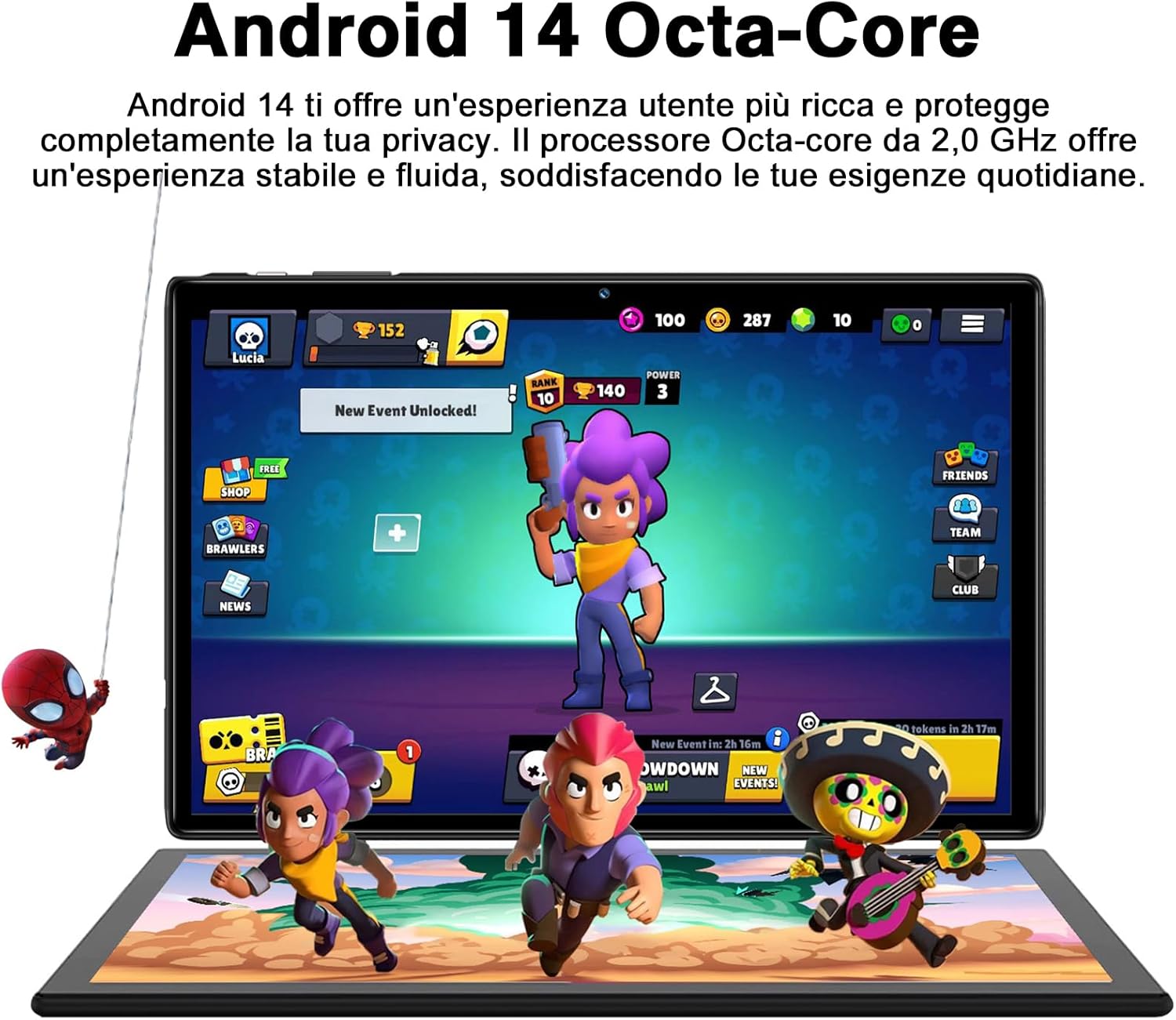
Figure 5.1: Android 14 Interface with Gaming Example
5.2 คุณสมบัติการแสดงผล
The 10.1-inch IPS display provides clear visuals and rich colors.
- เทคโนโลยี IPS: ข้อเสนอกว้าง viewมุมแสงและการสร้างสีที่แม่นยำ
- WideVine L1 Support: Enables high-definition video streaming (up to 1280p) from platforms like YouTube and Netflix.

Figure 5.2: Displaying Apps on the IPS Screen
5.3 การใช้งานกล้อง
The tablet is equipped with a 5 MP front camera and an 8 MP rear camera for photos and video calls.
- เปิดแอปกล้องจากหน้าจอหลักหรือลิ้นชักแอป
- สลับระหว่างกล้องหน้าและกล้องหลังโดยใช้ไอคอนกล้อง
- แตะปุ่มชัตเตอร์เพื่อถ่ายภาพหรือเริ่ม/หยุดการบันทึกวิดีโอ
- Explore various camera modes and editing options within the app.
5.4 การเชื่อมต่อ
- ไวไฟ : Supports 2.4GHz and 5GHz Wi-Fi for fast and stable internet connection. Access Wi-Fi settings via การตั้งค่า > เครือข่ายและอินเตอร์เน็ต > อินเทอร์เน็ต.
- Bluetooth 5.0: Connect to Bluetooth headphones, speakers, printers, and other devices. Manage connections via การตั้งค่า > อุปกรณ์ที่เชื่อมต่อ > บลูทูธ.
- OTG (On-The-Go): Use the included OTG adapter to connect USB flash drives, external hard drives, or other USB peripherals.
- จีพีเอส: Integrated GPS for navigation and location-based services.
- วิทยุ FM: Built-in FM receiver for listening to radio broadcasts.
5.5 คุณสมบัติการเข้าถึง
The tablet includes features to assist users with different needs:
- เลือกที่จะพูด: เมื่อเปิดใช้งาน (การตั้งค่า > การเข้าถึงได้ > เลือกที่จะพูด), you can tap text on the screen, and the tablet will read it aloud.
- พูดคุยกลับ: Provides spoken feedback for all actions and screen elements, allowing navigation without visual input. Supports Braille displays via Bluetooth. Enable via การตั้งค่า > การเข้าถึงได้ > พูดคุยกลับ.
5.6 File โอนย้าย
คุณสามารถโอนได้อย่างง่ายดาย files between your tablet and other devices like computers or mobile phones.
- ผ่านยูเอสบี: Connect the tablet to a computer using the Type-C data cable. On the tablet, select "File transfer" from the USB connection options in the notification panel.
- ผ่านบลูทูธ: Pair with another Bluetooth-enabled device and use the file sharing option.
6. การบำรุงรักษา
6.1 การทำความสะอาด
ในการทำความสะอาดแท็บเล็ต ให้ใช้ผ้านุ่มที่ไม่เป็นขุย สำหรับคราบฝังแน่น ให้เช็ดเบาๆampชุบผ้าด้วยน้ำหรือน้ำยาทำความสะอาดหน้าจอ หลีกเลี่ยงการใช้สารเคมีรุนแรงหรือวัสดุที่มีฤทธิ์กัดกร่อน
6.2 การดูแลแบตเตอรี่
แบตเตอรี่ขนาด 8000mAh ช่วยให้ใช้งานได้ยาวนานขึ้น เพื่อยืดอายุการใช้งานแบตเตอรี่:
- หลีกเลี่ยงอุณหภูมิที่สูงหรือต่ำเกินไป
- อย่าปล่อยให้แบตเตอรี่หมดจนหมดบ่อยๆ
- ใช้ที่ชาร์จและสายชาร์จเดิม
- ปิดแอปที่ไม่ได้ใช้ที่ทำงานอยู่เบื้องหลัง
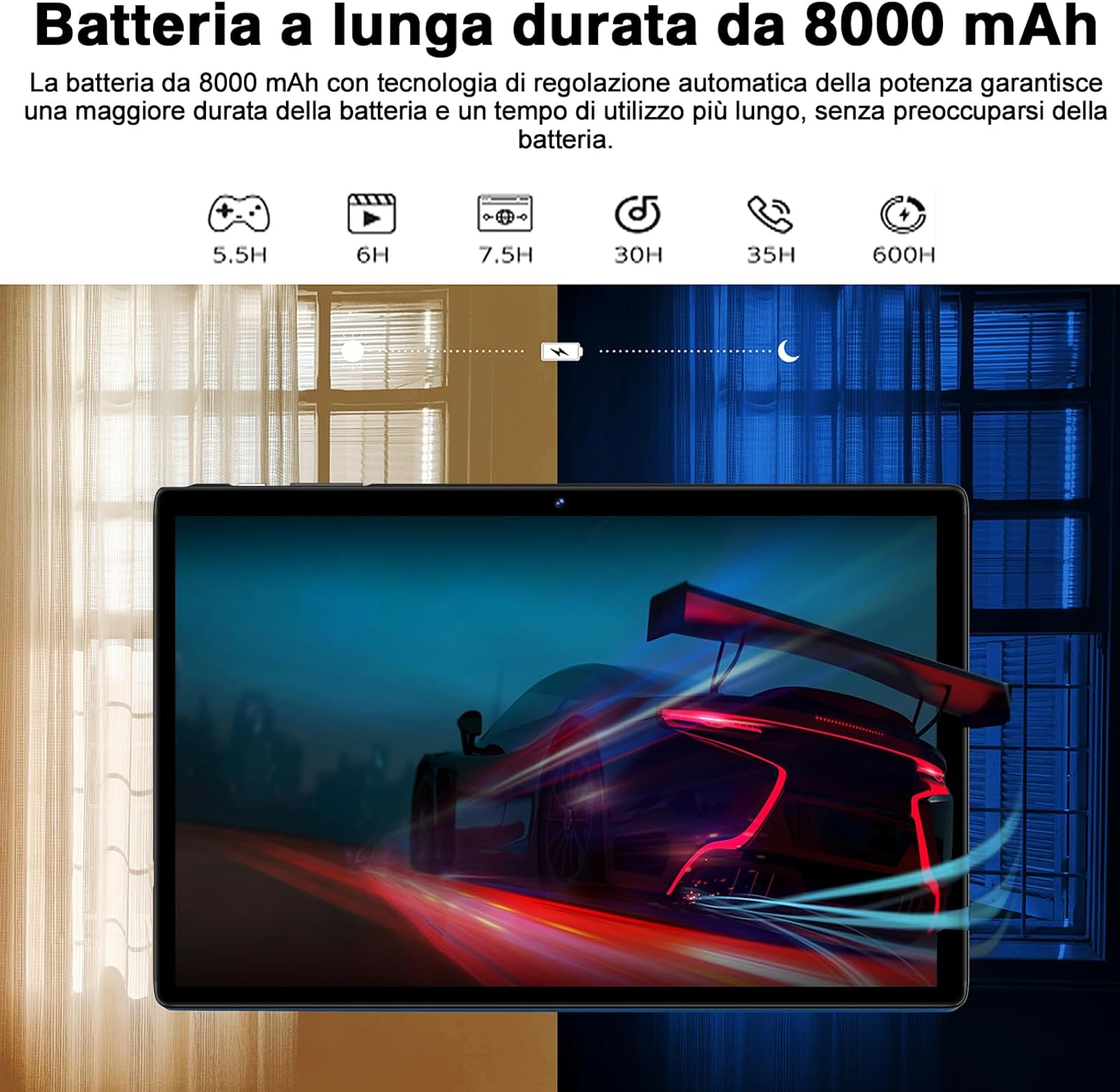
Figure 6.1: 8000mAh Battery Life Overview
6.3 การอัปเดตซอฟต์แวร์
ตรวจสอบการอัปเดตระบบเป็นประจำเพื่อให้มั่นใจได้ถึงประสิทธิภาพและความปลอดภัยสูงสุด ไปที่ การตั้งค่า > ระบบ > การอัพเดทระบบ.
7 การแก้ไขปัญหา
| ปัญหา | สาเหตุที่เป็นไปได้ / วิธีแก้ไข |
|---|---|
| แท็บเล็ตไม่เปิด | Battery might be depleted. Connect the charger and try again after a few minutes. If it still doesn't turn on, press and hold the power button for 10-15 seconds to force a restart. |
| ปัญหาการเชื่อมต่อ Wi-Fi | Ensure Wi-Fi is enabled. Restart your router and the tablet. Forget the network and reconnect. Check if other devices can connect to the same Wi-Fi. |
| แอปขัดข้องหรือค้าง | Close background apps. Clear the app's cache (Settings > Apps > [App Name] > Storage & cache > Clear cache). Update the app to the latest version. Restart the tablet. |
| ประสิทธิภาพการทำงานช้า | ปิดแอปที่ไม่ได้ใช้งาน ล้างแคชและไฟล์ชั่วคราว files. Uninstall unnecessary apps. Ensure sufficient storage space. Restart the tablet regularly. |
| อุปกรณ์บลูทูธไม่จับคู่ | Ensure Bluetooth is enabled on both devices. Put the accessory in pairing mode. Make sure devices are within range. Restart both devices. |
8. ข้อมูลจำเพาะ
| คุณสมบัติ | รายละเอียด |
|---|---|
| ยี่ห้อ | ซัวต |
| แบบอย่าง | S10 |
| ระบบปฏิบัติการ | แอนดรอยด์ 14 |
| โปรเซสเซอร์ | Octa-Core, 2.0 GHz (Unisoc) |
| แรม | 22 GB (6GB physical + 16GB expansion) |
| หน่วยความจำภายใน (ROM) | 128GB |
| พื้นที่เก็บข้อมูลแบบขยายได้ | Up to 1 TB via MicroSD card |
| ความจุของแบตเตอรี่ | 8000 มิลลิแอมป์ |
| ประเภทจอภาพ | ไอพีเอส |
| ขนาดหน้าจอ | 10.1 นิ้ว |
| ความละเอียดการแสดงผล | 1280 x 800 พิกเซล |
| กล้องหน้า | 5 MP |
| กล้องหลัง | 8 MP |
| ไวไฟ | 2.4 GHz + 5 GHz (802.11ax) |
| บลูทูธ | บลูทูธ 5.0 |
| อินเทอร์เฟซ | Type-C, MicroSD Card Slot |
| คุณสมบัติพิเศษ | GMS Certified, WideVine L1, OTG, FM Receiver, GPS |
| ขนาด (กว้าง x ยาว x สูง) | 24.31 x 0.99 x 16.1 ซม. |
| น้ำหนัก | 480 กรัม |
9. การรับประกันและการสนับสนุน
9.1 ข้อมูลการรับประกัน
SUAAT offers a 2-year European standard warranty for each tablet PC. This warranty covers manufacturing defects and ensures your product functions as intended under normal use.
9.2 การสนับสนุนลูกค้า
SUAAT has over 15 years of experience in tablet manufacturing and sales, backed by a professional technical support and assistance team. We are committed to providing excellent pre-sales advice and after-sales service, including product technical support.
If you require any assistance or have questions, please do not hesitate to contact us. We aim to respond within 24 hours and provide satisfactory service.
For support, please refer to the contact information provided on the product packaging or SUAAT's official webเว็บไซต์.
10. ข้อมูลด้านความปลอดภัยที่สำคัญ
- อย่าให้แท็บเล็ตถูกอุณหภูมิที่สูงหรือต่ำเกินไป แสงแดดโดยตรง หรือความชื้นสูง
- ควรหลีกเลี่ยงการทำแท็บเล็ตตกหรือกระแทกอย่างรุนแรง
- ห้ามถอดประกอบหรือซ่อมแซมแท็บเล็ตด้วยตนเอง การกระทำดังกล่าวจะทำให้การรับประกันเป็นโมฆะ
- Use only original or certified compatible chargers and accessories.
- เก็บแท็บเล็ตให้ห่างจากน้ำและของเหลวอื่นๆ
- ทิ้งแท็บเล็ตและแบตเตอรี่อย่างมีความรับผิดชอบตามกฎระเบียบท้องถิ่น


