การแนะนำ
The MARSTEK Piggyback Style Emergency Stop Button Kit is designed to provide a quick and reliable power-off solution for various electrical equipment. This kit features a robust construction with high-strength ABS material, ensuring durability, fire resistance, and IP67 waterproof protection. The cable and plug are UL certified for safe and dependable operation. Its plug-and-play design simplifies installation and use across multiple applications, including industrial equipment, workshops, and household devices.
ข้อมูลด้านความปลอดภัย
- Always ensure the emergency stop button is easily accessible and unobstructed during operation of any connected equipment.
- The socket is in a normally open state. After plugging in your device, you must first turn on the switch of the device itself for it to receive power through the emergency stop button.
- The cable and plug are UL certified. Do not use if the cable or plug shows any signs of damage.
- The emergency stop button is designed for deliberate activation and resetting. Press the red button to stop power; twist to reset.
- This device is rated IP67 waterproof. While it offers protection against dust and water immersion, avoid submerging it for extended periods or exposing it to high-pressure water jets.
เนื้อหาแพ็คเกจ
- 1 x MARSTEK Emergency Stop Push Button Switch
- Mounting Screws and Wall Anchors (as pictured)
การตั้งค่า
The MARSTEK Emergency Stop Button Kit is designed for straightforward installation. Follow these steps:
- เลือกตำแหน่งการติดตั้ง: Select a stable surface near your electrical equipment where the emergency stop button will be easily accessible. Ensure the 10-foot cable can reach both a power outlet and your equipment.
- เมานต์สวิตช์: Use the provided screws and wall anchors to securely mount the emergency stop switch. The switch can be mounted using either the top or bottom fixed ports for stability.

Figure 1: Mounting hardware and the emergency stop button.
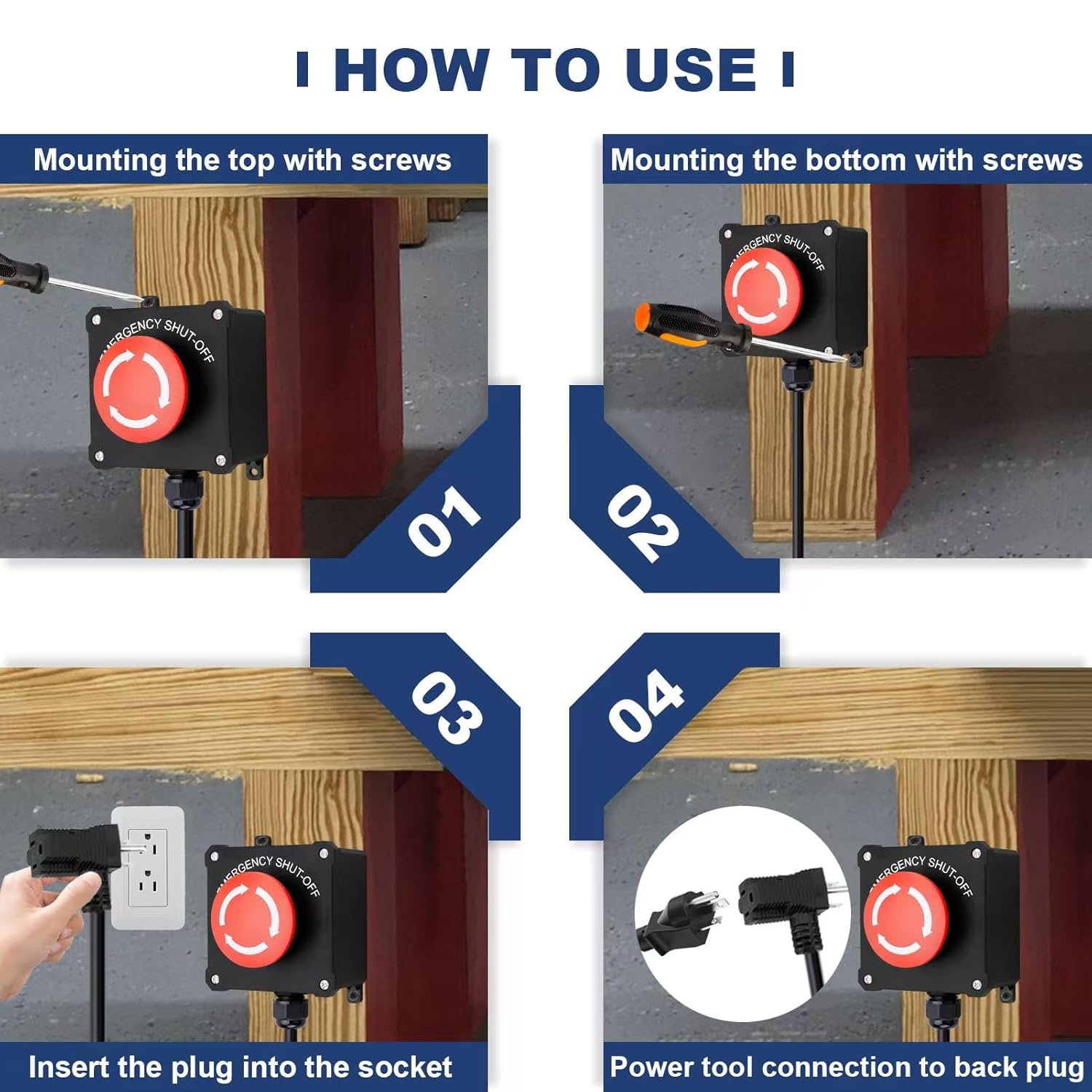
Figure 2: Step-by-step guide for mounting and connection.
- เชื่อมต่อกับพลังงาน: Insert the 3-pin plug of the emergency stop switch into a standard wall power socket.
- เชื่อมต่ออุปกรณ์ของคุณ: Plug your electrical equipment (e.g., table saw, coffee machine) into the back socket of the emergency stop switch.

Figure 3: Proper connection of the emergency stop button and equipment.
คำแนะนำการใช้งาน
Once the emergency stop button is properly set up, follow these steps for operation:
- Power On Equipment: Since the emergency stop switch operates in a normally open state, you must first turn on the power switch of your connected electrical equipment. Power will then flow through the emergency stop button to your device.
- การทำงานปกติ: Your equipment will now operate as usual.
- หยุดฉุกเฉิน: In case of an emergency or when immediate power cut-off is required, firmly press the large red emergency stop button. This will instantly cut power to the connected equipment.
- Resetting the Button: To restore power after an emergency stop, twist the red button clockwise until it pops out to its original position. Then, you may need to cycle the power switch on your equipment to resume operation.

รูปที่ 4: อดีตample application with a table saw.
การซ่อมบำรุง
The MARSTEK Emergency Stop Button Kit requires minimal maintenance due to its durable and sealed design.
- การทำความสะอาด: ควรเช็ดทำความสะอาดภายนอกของสวิตช์เป็นระยะด้วยน้ำยาทำความสะอาดamp ผ้าเช็ดทำความสะอาดฝุ่นและเศษผง ห้ามใช้สารเคมีรุนแรงหรือน้ำยาทำความสะอาดที่มีฤทธิ์กัดกร่อน
- การตรวจสอบ: Regularly inspect the cable, plug, and switch housing for any signs of damage, wear, or loose connections. If any damage is found, discontinue use immediately and replace the unit.
- ความต้านทานน้ำ: The unit is IP67 rated, providing protection against dust ingress and temporary immersion in water. Ensure the cable glands are tight and the housing is not compromised to maintain this rating.
การแก้ไขปัญหา
If you encounter issues with your emergency stop button, consider the following:
- No Power to Equipment:
- Ensure the emergency stop button is in the reset (untwisted) position.
- Verify that your electrical equipment's own power switch is turned ON.
- Check if the emergency stop button's plug is securely inserted into the wall outlet.
- Confirm that the equipment's plug is securely inserted into the back socket of the emergency stop button.
- ทดสอบปลั๊กไฟด้วยอุปกรณ์อื่นเพื่อให้แน่ใจว่ามีกระแสไฟไหลผ่าน
- Emergency Stop Button Not Resetting:
- Ensure you are twisting the button clockwise firmly until it clicks and pops out.
- Check for any obstructions around the button mechanism.
หากปัญหายังคงอยู่ โปรดติดต่อฝ่ายสนับสนุนลูกค้า
ข้อมูลจำเพาะ

รูปที่ 5: ขนาดผลิตภัณฑ์และข้อมูลจำเพาะที่สำคัญ
| คุณสมบัติ | ข้อมูลจำเพาะ |
|---|---|
| ยี่ห้อ | มาร์สเทค |
| หมายเลขรุ่น | 9387f982-bb07-4b68-aa79-6cdb4669a085 |
| ปฏิบัติการฉบับที่tage | 250 Volts (up to 440V as per image) |
| คะแนนปัจจุบัน | 16 Amps |
| วัดtage | 4000 วัตต์ |
| ประเภทสวิตซ์ | ปุ่มกด |
| ประเภทการติดต่อ | ปกติเปิด (NO) |
| โหมดการทำงาน | เปิดปิด |
| ประเภทการติดตั้ง | การติดตั้งบนพื้นผิว |
| วัสดุ | พลาสติก ABS ความแข็งแรงสูง |
| ระดับการป้องกัน | IP67 (กันฝุ่นและกันน้ำ) |
| ความยาวสายเคเบิล | 10 ฟุต |
| เครื่องวัดสายเคเบิล | 16 AWG (High Quality Copper) |
| การรับรอง | UL Certified Cable and Plug, CCC |
| ขนาดสินค้า (กว้าง x ยาว x สูง) | 7.3 x 4.3 x 4 Centimetres (approx. 2.86 x 1.71 x 1.57 inches) |
| น้ำหนักสินค้า | 630 กรัม |
การรับประกันและการสนับสนุน
For warranty information or technical support, please refer to the product packaging or contact MARSTEK customer service directly through their official website or the retailer where the product was purchased. Please have your model number (9387f982-bb07-4b68-aa79-6cdb4669a085) available when contacting support.