การแนะนำ
Welcome to the user manual for your Saiyin TV Soundbar with Subwoofer. This manual provides detailed instructions for setting up, operating, and maintaining your new audio system. Please read this manual thoroughly before using the product to ensure proper function and safety.
ข้อมูลด้านความปลอดภัย
คำแนะนำด้านความปลอดภัยที่สำคัญ
- อ่านคำแนะนำเหล่านี้
- เก็บคำแนะนำเหล่านี้ไว้
- จงใส่ใจคำเตือนทั้งหมด
- ปฏิบัติตามคำแนะนำทั้งหมด
- ห้ามใช้อุปกรณ์นี้ใกล้น้ำ
- ทำความสะอาดด้วยผ้าแห้งเท่านั้น
- อย่าปิดกั้นช่องระบายอากาศใดๆ ติดตั้งตามคำแนะนำของผู้ผลิต
- ห้ามติดตั้งใกล้แหล่งความร้อน เช่น หม้อน้ำ เครื่องทำความร้อน เตา หรืออุปกรณ์อื่น ๆ (รวมถึง ampเครื่องให้ความร้อน) ที่ผลิตความร้อน
- ปกป้องสายไฟไม่ให้ถูกเหยียบหรือถูกหนีบ โดยเฉพาะที่ปลั๊ก เต้ารับไฟฟ้า และจุดที่สายไฟออกจากเครื่อง
- ใช้เฉพาะอุปกรณ์เสริม/สิ่งที่แนบตามที่ผู้ผลิตกำหนดเท่านั้น
- ถอดปลั๊กอุปกรณ์นี้ในระหว่างพายุฝนฟ้าคะนองหรือเมื่อไม่ได้ใช้งานเป็นเวลานาน
เนื้อหาแพ็คเกจ
ตรวจสอบว่ามีสินค้าทั้งหมดที่ระบุไว้ด้านล่างอยู่ในแพ็คเกจของคุณ:
- ซาวด์บาร์
- ซับวูฟเฟอร์
- รีโมทคอนโทรล
- อะแดปเตอร์แปลงไฟ
- สายใยแก้วนำแสง
- สาย AUX 3.5 มม. ถึง 3.5 มม.
- ชุดติดตั้งบนผนัง
- คู่มือการใช้งาน
- คู่มือเริ่มต้นอย่างรวดเร็ว

สินค้าเกินview
Familiarize yourself with the main parts of your soundbar and subwoofer.

แผงด้านหน้าของซาวด์บาร์
The front panel features integrated controls for power, volume, and input selection, along with an LED indicator light that changes color based on the selected input mode.
ซับวูฟเฟอร์
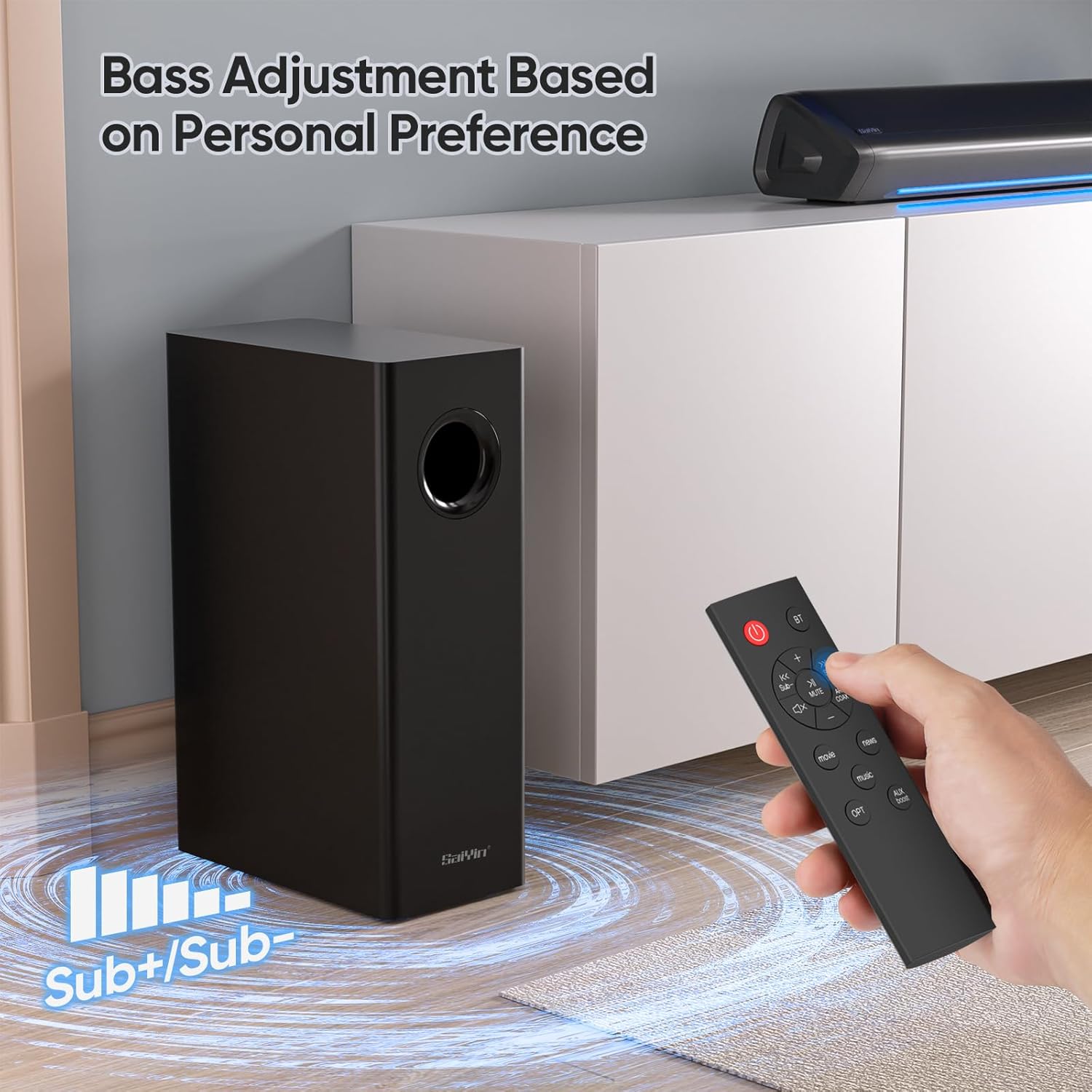
The external subwoofer provides deep, rich bass to enhance your audio experience. It connects wirelessly to the soundbar for flexible placement.
รีโมทคอนโทรล
The remote control allows you to manage power, volume, input modes, and sound equalization settings conveniently from a distance.
การตั้งค่า
การเชื่อมต่อ Soundbar และซับวูฟเฟอร์
The soundbar and subwoofer are designed to connect automatically when both are powered on. Ensure both units are plugged into a power source.
การเชื่อมต่อกับทีวีของคุณ
The Saiyin soundbar offers multiple connection options to suit your TV and preferences.
Optical Connection (Recommended for best audio quality)
- Connect one end of the optical cable to the OPTICAL OUT port on your TV.
- เชื่อมต่อปลายอีกด้านหนึ่งเข้ากับพอร์ต OPTICAL IN บนซาวด์บาร์
- Select "Optical" input on the soundbar using the remote or soundbar controls. The indicator light will turn purple.
การเชื่อมต่อ AUX
- Connect one end of the 3.5mm AUX cable to the AUX OUT port on your TV or audio source.
- เชื่อมต่อปลายอีกด้านหนึ่งเข้ากับพอร์ต AUX IN บนซาวด์บาร์
- Select "AUX" input on the soundbar. The indicator light will turn green.
การเชื่อมต่อบลูทูธ
- เปิดเครื่องซาวด์บาร์
- Press the Bluetooth button on the remote or soundbar. The indicator light will turn blue and flash, indicating pairing mode.
- On your device (smartphone, tablet, PC), enable Bluetooth and search for "Saiyin Soundbar".
- Select the soundbar from the list to pair. Once connected, the blue light will stop flashing.

การเปิดเครื่อง
Connect the power adapter to the soundbar and then to a wall outlet. Press the power button on the soundbar or remote to turn the unit on.
การดำเนินงาน
การเลือกโหมดอินพุต
The soundbar features different indicator light colors for each input mode, allowing for quick identification:
- ออปติคอล: แสงสีม่วง
- บลูทูธ: ไฟสีฟ้า
- ช่องเสริม: ไฟเขียว

การควบคุมระดับเสียง
Adjust the master volume using the Volume Up/Down buttons on the remote control or the integrated controls on the soundbar.
การปรับเสียงเบส
Use the dedicated bass control buttons on the remote to increase or decrease the subwoofer's output, allowing you to customize the bass level to your personal preference.
โหมดเสียง (EQ)
The soundbar offers three equalizer modes optimized for different content types:
- โหมดภาพยนตร์: Enhances cinematic sound effects and dialogue for an immersive viewการสร้างประสบการณ์
- โหมดเพลง: Provides balanced audio for music playback, ensuring clear highs and rich lows.
- โหมดข่าว: Optimizes voice clarity, making dialogue in news broadcasts and talk shows easier to understand.

Fire TV Compatibility
The Saiyin soundbar is compatible with Fire TV remote controls, allowing you to control both your TV and soundbar with a single remote for simplified operation.

การซ่อมบำรุง
การดูแลและทำความสะอาด
- ถอดสายไฟออกก่อนทำความสะอาด
- Use a soft, dry cloth to clean the surfaces of the soundbar and subwoofer.
- ห้ามใช้น้ำยาทำความสะอาดชนิดเหลวหรือสเปรย์ทำความสะอาด เนื่องจากอาจทำให้พื้นผิวหรือชิ้นส่วนภายในเสียหายได้
- ควรทำความสะอาดช่องระบายอากาศให้ปราศจากฝุ่นและเศษสิ่งสกปรก เพื่อให้มั่นใจได้ว่าอากาศจะไหลเวียนได้สะดวก
การแก้ไขปัญหา
ปัญหาทั่วไปและแนวทางแก้ไข
| ปัญหา | สาเหตุที่เป็นไปได้ | สารละลาย |
|---|---|---|
| ไม่มีไฟฟ้า | Power cord not connected or outlet not working. | Ensure power cord is securely plugged into the soundbar and a working electrical outlet. Try a different outlet. |
| ไม่มีเสียง | เลือกโหมดการป้อนข้อมูลไม่ถูกต้อง | Select the correct input mode (Optical, Bluetooth, AUX) matching your connection using the remote or soundbar controls. |
| ไม่มีเสียง | TV audio output settings incorrect. | Check your TV's audio settings to ensure external speakers are selected and the correct audio output format (e.g., PCM for optical) is chosen. |
| การจับคู่บลูทูธล้มเหลว | Soundbar not in pairing mode or device too far. | Ensure the soundbar is in Bluetooth pairing mode (blue light flashing). Move your device closer to the soundbar (within 10 meters). |
| เสียงผิดเพี้ยน | Volume too high or audio source issue. | Lower the volume on both the soundbar and the audio source. Test with a different audio source to rule out source issues. |
ข้อมูลจำเพาะ
ข้อมูลจำเพาะทางเทคนิค
- ชื่อรุ่น : Sound bar DS6345S
- หมายเลขรุ่น: Sound bar DS6345H
- Dimensions (Soundbar): ประมาณ 17 นิ้ว (43.2 ซม.)
- ขนาด (ซับวูฟเฟอร์): ประมาณ 7.8 x 4.7 x 16 นิ้ว (19.8 x 11.9 x 40.6 ซม.)
- เทคโนโลยีการเชื่อมต่อ: อุปกรณ์เสริม, บลูทูธ
- โหมดเอาต์พุตเสียง: ล้อมรอบ
- คุณสมบัติพิเศษ: บลูทูธ
- อุปกรณ์ที่รองรับ: TVs, PCs, Projectors, Smartphones, Tablets, MP3 Players, Fire TV, and similar streaming devices
- ประเภทตัวควบคุม: รีโมทคอนโทรล
- สี: สีดำ
- ผู้ผลิต: Saiyin Electronic Co., Ltd
การรับประกันและการสนับสนุน
ข้อมูลการรับประกัน
Saiyin products are designed for reliability and performance. For specific warranty details and terms, please refer to the warranty card included with your product or visit the official Saiyin webเว็บไซต์สำหรับข้อมูลที่ทันสมัยที่สุด
การสนับสนุนลูกค้า
If you encounter any issues or have questions not covered in this manual, please contact Saiyin customer support for assistance. Our team is ready to help you.
- Webเว็บไซต์: Please refer to product packaging or official Saiyin webเว็บไซต์.
- อีเมล: Please refer to product packaging or official Saiyin webเว็บไซต์.
- โทรศัพท์: Please refer to product packaging or official Saiyin webเว็บไซต์.


