การแนะนำ
Thank you for choosing the CHEREEKI Wireless Gamepad for PS-4. This controller is designed to enhance your gaming experience on PS-4, PS4 Slim, and PS4 Pro consoles, offering precise control, immersive feedback, and comfortable design. This manual provides detailed instructions on setting up, operating, maintaining, and troubleshooting your new gamepad.

Image: The CHEREEKI Wireless Gamepad in white, showcasinก. การออกแบบตามหลักสรีรศาสตร์
สินค้าเกินview
Familiarize yourself with the various components and buttons of your CHEREEKI Wireless Gamepad.
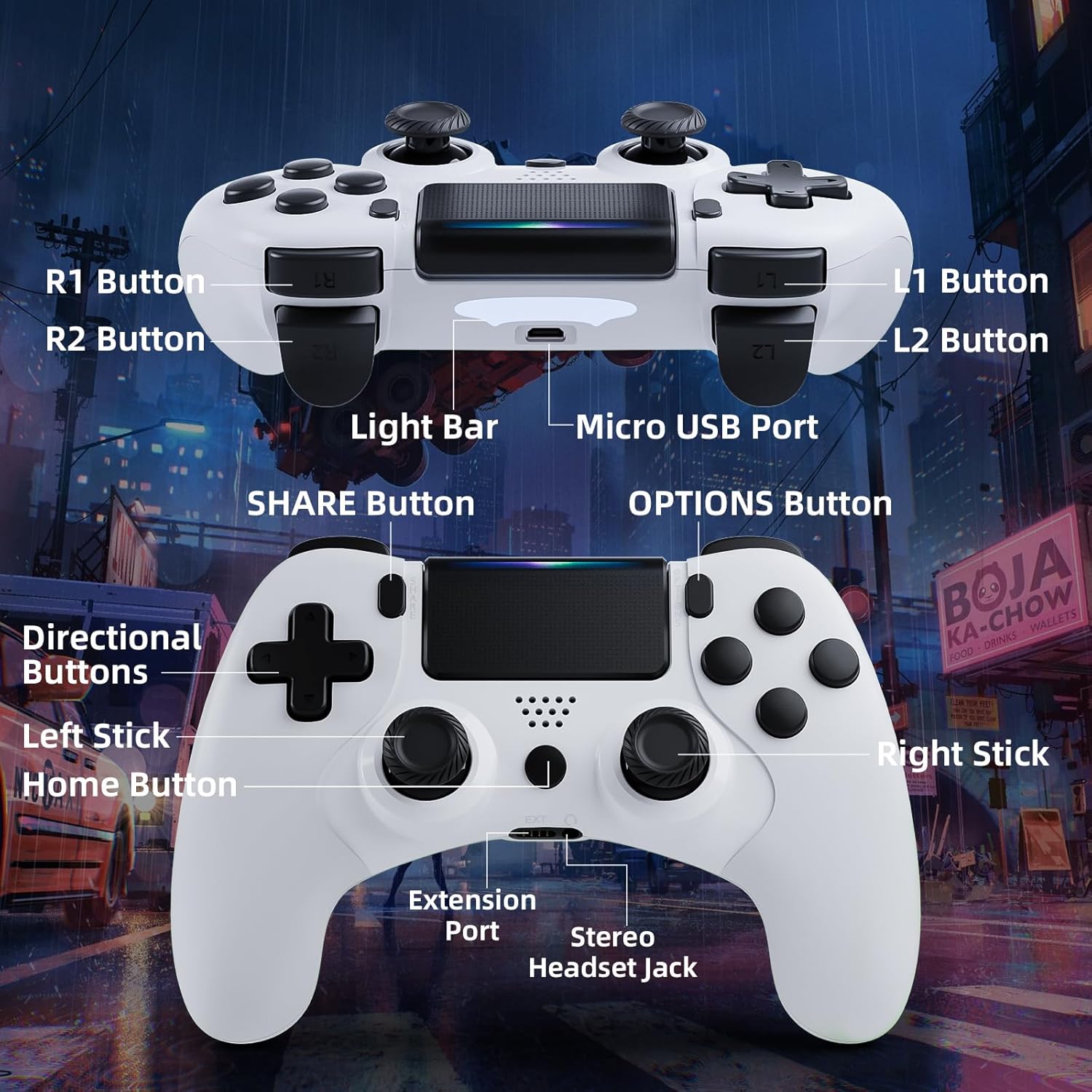
Image: Detailed diagram of the CHEREEKI Wireless Gamepad, highlighting its various buttons and ports for easy identification.
ส่วนประกอบของตัวควบคุม:
- R1 Button: ปุ่มไหล่ขวา
- R2 Button: ปุ่มไกปืนด้านขวา
- L1 Button: ปุ่มไหล่ซ้าย
- L2 Button: ปุ่มไกปืนด้านซ้าย
- แถบแสง: Indicates controller status and player number.
- พอร์ตไมโครยูเอสบี: For charging and initial wired connection.
- ปุ่มแชร์: For sharing gameplay videos and screenshots.
- ปุ่มตัวเลือก: Access in-game menus and options.
- ปุ่มควบคุมทิศทาง (D-Pad): สำหรับการป้อนทิศทาง
- สติ๊กซ้าย: Analog stick for movement.
- ปุ่มโฮม: PS button, for turning on/off the console and accessing the PS menu.
- แท่งขวา: Analog stick for camera control or aiming.
- พอร์ตขยาย: For compatible accessories.
- Stereo Headset Jack: For connecting a headset.
การตั้งค่า
1. การเชื่อมต่อและการจับคู่เบื้องต้น
The controller must be connected via USB cable for the first time to pair with your PS-4 console. This establishes the connection for future wireless use.
- Ensure your PS-4 console is powered on.
- Connect the Micro USB cable to the controller's Micro USB Port and the other end to a USB port on your PS-4 console.
- กดปุ่ม ปุ่มโฮม (PS button) on the controller. The light bar will flash and then glow steadily, indicating successful pairing.
- Once paired, you can disconnect the USB cable to use the controller wirelessly.
2. การชาร์จเกมแพด
The CHEREEKI Wireless Gamepad features a built-in 600 mAh rechargeable battery.
- Connect the controller to your PS-4 console or a standard USB charger using the Micro USB cable.
- The light bar will slowly pulse orange while charging.
- โดยปกติการชาร์จเต็มจะใช้เวลา 2-3 ชั่วโมง
- Once fully charged, the light bar will turn off.
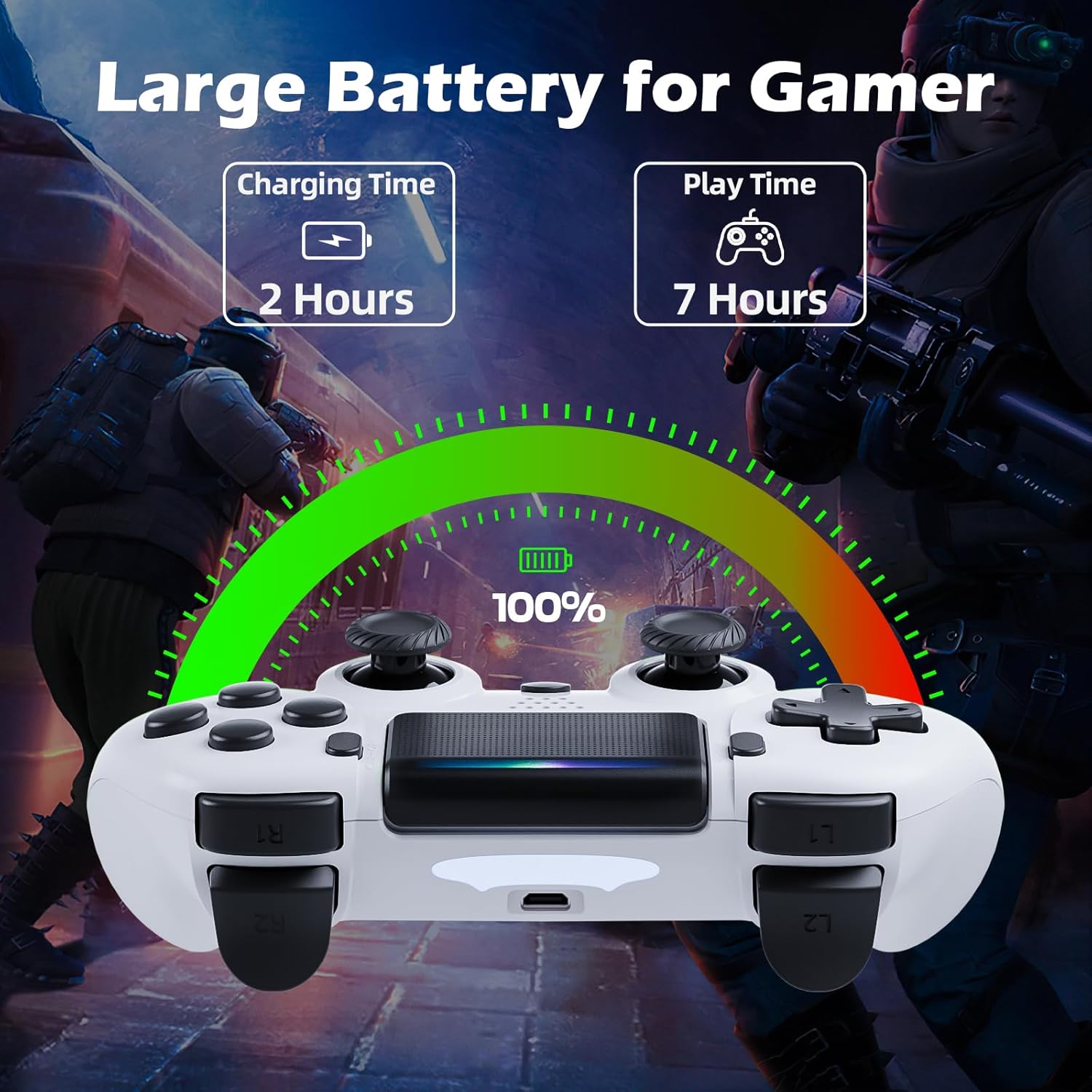
Image: Illustration showing the controller's charging time of 2 hours and play time of 7 hours on a full charge.
3. ความเข้ากันได้
This controller is compatible with PS-4, PS4 Slim, and PS4 Pro consoles.

Image: Visual representation of the controller's wide compatibility with PS4, PS4 Slim, and PS4 Pro consoles.
คำแนะนำการใช้งาน
1. การควบคุมพื้นฐาน
The gamepad features standard PS-4 button layouts for intuitive gameplay.
- แท่งอนาล็อก: Use the Left Stick for character movement and the Right Stick for camera control or aiming.
- ปุ่มควบคุมทิศทาง (D-Pad): For precise directional input in menus or specific game actions.
- ปุ่มควบคุมการทำงาน (สามเหลี่ยม วงกลม กากบาท สี่เหลี่ยม): Perform in-game actions as defined by the game.
- Shoulder and Trigger Buttons (L1, L2, R1, R2): Used for various actions like shooting, aiming, or interacting.
2. Motion Sensor (Gyro) Control
The built-in 6-axis motion sensor allows for intuitive control by tilting and rotating the controller.
- In supported games, you can use motion control for actions like steering, aiming, or adjusting viewมุมการเอียง
- Experiment with tilting the controller to achieve faster turns, adjust viewing angles, or aim more accurately.

Image: Illustration demonstrating the Gyro Motion Control feature, allowing for faster turning, viewing angle adjustment, and accurate aiming.
3. Double Vibration Feedback
Experience immersive gameplay with the dual motor vibration feature, providing tactile feedback for in-game events.
- The controller will vibrate to simulate impacts, explosions, and other in-game sensations.
- Vibration intensity may vary based on game design.

Image: Illustration of the Double Motor Vibration feature, showing the internal motors that provide immersive haptic feedback during gameplay.
4. ฟังก์ชันการทำงานของทัชแพด
The integrated touchpad allows for new ways to interact with games and navigate menus.
- Tap, swipe, or click the touchpad as required by specific games or system functions.
5. ปุ่มแชร์
The SHARE button allows you to easily share your gameplay moments.
- กดปุ่ม ปุ่มแชร์ to access the Share menu, where you can upload screenshots or video clips to social media, or start a broadcast.
6. Stereo Headset Jack
Connect your compatible 3.5mm headset to the Stereo Headset Jack for in-game audio and voice chat.
- Plug your headset into the port located at the bottom of the controller.
- Adjust audio settings via the PS-4 system menu.
7. การออกแบบตามหลักสรีรศาสตร์
The controller is designed for comfort during extended gaming sessions.

Image: Depiction of the controller's ergonomic design, showing how it comfortably fits the shape of the hand for prolonged use.
การซ่อมบำรุง
Proper care will extend the life of your CHEREEKI Wireless Gamepad.
- การทำความสะอาด: ใช้ผ้านุ่มและแห้งเช็ดคอนโทรลเลอร์ สำหรับสิ่งสกปรกฝังแน่น ให้เช็ดเบาๆampชุบผ้าด้วยน้ำ หลีกเลี่ยงสารเคมีรุนแรงหรือน้ำยาทำความสะอาดที่มีฤทธิ์กัดกร่อน
- พื้นที่จัดเก็บ: เก็บตัวควบคุมไว้ในที่แห้งและเย็น ห่างจากแสงแดดโดยตรงและอุณหภูมิที่สูงหรือต่ำมาก
- การดูแลแบตเตอรี่ To maintain battery health, avoid fully discharging the controller frequently. If storing for a long period, charge the battery to about 50% every few months.
- การจัดการ: Avoid dropping the controller or exposing it to excessive force, which can damage internal components.
การแก้ไขปัญหา
หากคุณพบปัญหาเกี่ยวกับจอยเกม โปรดดูปัญหาและวิธีแก้ไขที่พบบ่อยต่อไปนี้
| ปัญหา | สาเหตุที่เป็นไปได้ | สารละลาย |
|---|---|---|
| Controller does not connect wirelessly or connection is unstable. | Not properly paired; too far from console; interference. |
|
| Controller does not charge or holds charge for a short time. | Faulty cable; power source issue; battery degradation. |
|
| ปุ่มไม่ตอบสนองหรือติดขัด | Debris under buttons; physical damage. |
|
| ไม่มีการสั่นสะเทือนตอบสนอง | Vibration disabled in game/system settings; game does not support vibration. |
|
ข้อมูลจำเพาะ
| คุณสมบัติ | รายละเอียด |
|---|---|
| หมายเลขรุ่น | STK-4006L |
| ความเข้ากันได้ | PS-4, PS4 Slim, PS4 Pro |
| การเชื่อมต่อ | Wireless (Bluetooth), Wired (Micro USB) |
| ช่วงสาย | สูงสุด 8 เมตร |
| ประเภทแบตเตอรี่ | ลิเธียมไอออนในตัว |
| ความจุของแบตเตอรี่ | 600 มิลลิแอมป์ |
| เวลาในการชาร์จ | ประมาณ 2-3 ชั่วโมง |
| เวลาเล่น | นานถึง 7 ชั่วโมง |
| ขนาด (กว้าง x ยาว x สูง) | 17.4 x 13 x 7.6 ซม. (ประมาณ 6.85 x 5.12 x 2.99 นิ้ว) |
| น้ำหนัก | 210 กรัม (ประมาณ 0.46 ปอนด์) |
| เซ็นเซอร์ | 6-axis motion sensor (gyroscope, accelerometer) |
| การสั่นสะเทือน | ระบบสั่นแบบมอเตอร์คู่ |
| อินพุต/เอาท์พุต | Touchpad, Stereo Headset Jack, Extension Port |
การรับประกันและการสนับสนุน
For warranty information, please refer to the documentation included with your purchase or visit the official CHEREEKI webไซต์ เงื่อนไขการรับประกันอาจแตกต่างกันไปตามภูมิภาคและผู้ค้าปลีก
If you require technical support or have questions not covered in this manual, please contact the seller or CHEREEKI customer service through their official channels. Provide your model number (STK-4006L) and a detailed description of your issue for faster assistance.


