การแนะนำ
The YUNZII B68 is a versatile 65% compact mechanical keyboard designed for enhanced productivity and gaming. It features tri-mode connectivity, hot-swappable switches, gasket mount design for a comfortable typing experience, and customizable RGB backlighting. This manual provides detailed instructions for setting up, operating, and maintaining your keyboard.

Figure 1: YUNZII B68 Wireless Mechanical Keyboard (Black, Milk V2 Switch)
เนื้อหาแพ็คเกจ
- คีย์บอร์ดไร้สาย YUNZII B68
- สาย USB-C ถึง USB-A
- ตัวรับสัญญาณไร้สาย 2.4G (ดองเกิล USB)
- เครื่องมือดึงปุ่มกด/สวิตช์
- Additional Gradient Rainbow Keycaps
- คู่มือการใช้งาน
คุณสมบัติผลิตภัณฑ์
การเชื่อมต่อสามโหมด
The B68 keyboard offers three connection options: Bluetooth 5.0, 2.4GHz wireless, and wired USB-C. It is compatible with Windows, MacOS, iOS, and Android devices, allowing connection to up to five devices simultaneously.

รูปที่ 2: ตัวเลือกการเชื่อมต่อแบบสามโหมด
แบตเตอรี่ 5000 mAh
Equipped with a large 5000mAh battery, the keyboard ensures extended use for productivity and gaming on the go.

รูปที่ 3: แบตเตอรี่ 5000mAh สำหรับการใช้งานต่อเนื่อง
สวิตช์แบบ Hot-Swappable
The B68 features full-key hot-swappable sockets compatible with 3-pin and 5-pin switches. It comes pre-installed with pre-lubricated linear switches (Milk V2 Switch) for a smooth typing experience. The hot-swappable design allows for easy switch replacement without soldering.

รูปที่ 4: ซ็อกเก็ตสวิตช์แบบ Hot-Swappable
การออกแบบการติดตั้งปะเก็น
Experience quieter and smoother typing with the precision gasket mount structure, featuring five layers of sound-absorbing padding (PE sandwich foam, IXPE switch pad, PET sound foam, switch foam, and a silicone button pad) to reduce noise and vibration.

Figure 5: Gasket Mount Design with Five-Layer Padding
RGB Backlighting & PBT Keycaps
The keyboard features colorful RGB backlighting with south-facing LEDs. It includes durable double-shot PBT keycaps and additional gradient rainbow keycaps for personalization. RGB settings can be customized via software.

Figure 6: Double-Shot PBT Keycaps and RGB Backlighting
65% Compact Layout with Multifunction Knob
The 65% compact layout maximizes desk space while retaining essential keys. A versatile multifunction knob allows effortless switching between multimedia and RGB modes, and adjusts volume and RGB brightness.
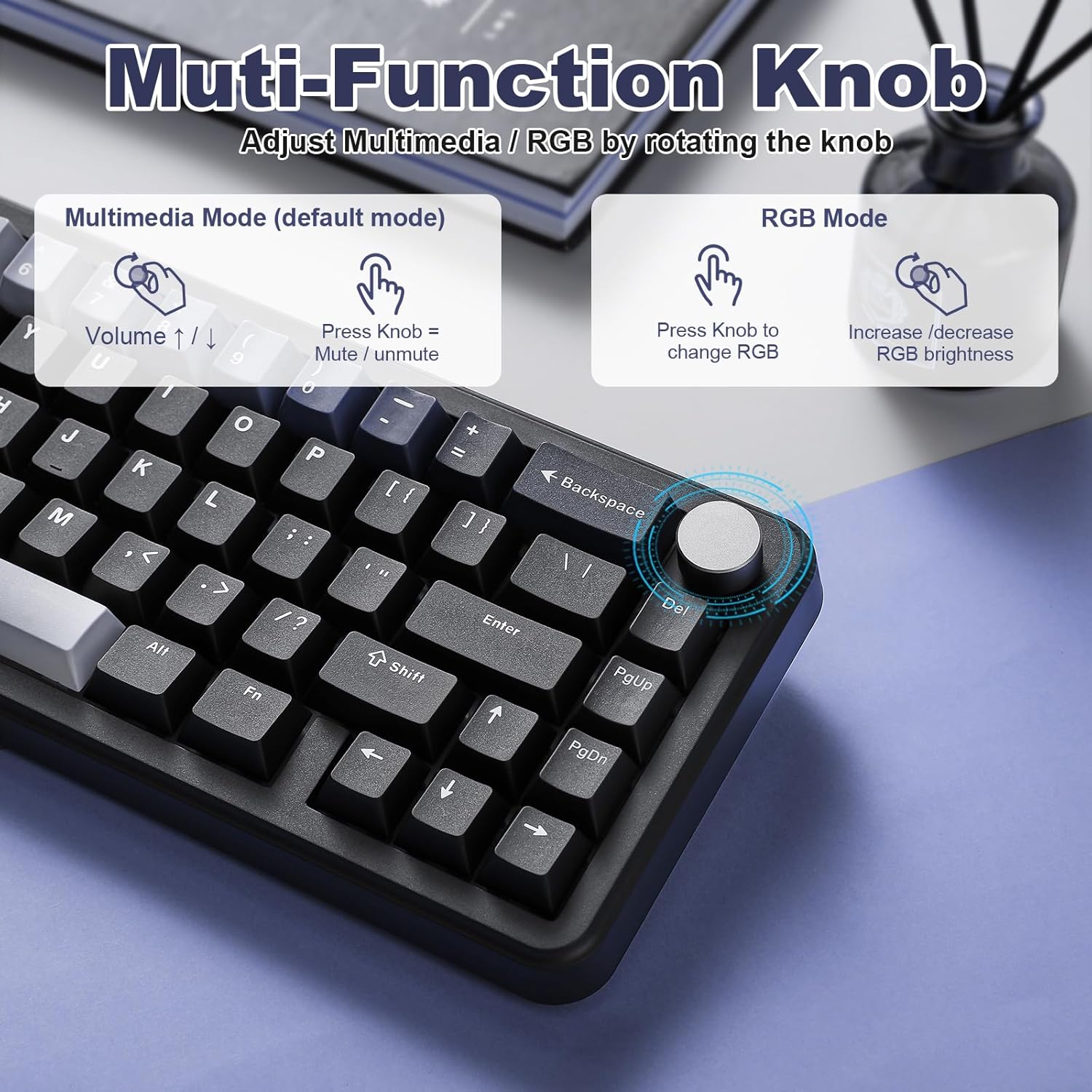
Figure 7: Multifunction Knob Controls
การตั้งค่า
การเชื่อมต่อแบบใช้สาย
- ค้นหาพอร์ต USB-C บนแป้นพิมพ์และพอร์ต USB-A บนคอมพิวเตอร์ของคุณ
- Connect the provided USB-C to USB-A cable between the keyboard and your computer.
- Ensure the mode switch on the keyboard is set to 'Line' or 'USB' mode.
- แป้นพิมพ์พร้อมใช้งานแล้ว
การเชื่อมต่อไร้สาย 2.4GHz
- Locate the 2.4G wireless receiver (USB dongle) in the packaging.
- เสียบตัวรับสัญญาณไร้สาย 2.4G เข้ากับพอร์ต USB ที่ว่างอยู่บนคอมพิวเตอร์ของคุณ
- Set the mode switch on the keyboard to '2.4G' mode.
- แป้นพิมพ์ควรเชื่อมต่อโดยอัตโนมัติ หากไม่เป็นเช่นนั้น ให้กด Fn + ร to enter pairing mode. The R key will flash blue, indicating pairing.
- Once connected, the R key will return to normal backlight mode.
การเชื่อมต่อบลูทูธ
- Set the mode switch on the keyboard to 'BT' mode.
- กดค้างไว้ Fn + Q/W/E to enter Bluetooth pairing mode. The Q, W, or E key will flash in cyan/pink/yellow, indicating pairing for device 1, 2, or 3 respectively.
- On your device (computer, tablet, phone), go to Bluetooth settings and search for 'B68 3.0/5.0'.
- Select the keyboard to connect. Once connected, the corresponding Q/W/E key will return to normal backlight mode.
- หากต้องการสลับระหว่างอุปกรณ์บลูทูธที่จับคู่แล้ว ให้กด เอฟเอ็น+คิว, Fn + ว, หรือ Fn + อี.
คำแนะนำการใช้งาน
ลูกบิด Multifunction
- Default (Multimedia) Mode: Rotate the knob to adjust volume (up/down). Short press the knob to mute/unmute audio.
- โหมด RGB: Long press the knob to switch to RGB mode. Rotate the knob to increase/decrease RGB brightness. Short press the knob to change RGB effects.
การควบคุมไฟแบ็คไลท์ RGB
- Fn + แบ็คสเปซ: เปิด/ปิดเอฟเฟกต์แสงไฟ
- เอฟเอ็น + |: Change Backlight Effect (15 default modes)
- กดปุ่ม Fn + Enter: Change Backlight Color (8 colors)
- Fn + แท็บ: White Light ON/OFF
- Fn + ↑ / ↓: ความสว่างขึ้น/ลง
- Fn + ← / →: Blinking Speed Up/Down
FN Key Shortcuts (Windows)
- Fn + Caps Lock: รีเซ็ตคีย์บอร์ด
- Fn + Win: ล็อค/ปลดล็อคคีย์ Windows
- Fn+F1: ลดความสว่างหน้าจอ
- Fn+F2: เพิ่มความสว่างหน้าจอ
- Fn+F3: เครื่องคิดเลข
- Fn+F4: คอมพิวเตอร์
- Fn+F5: ผู้เล่น
- Fn+F6: เพลงก่อนหน้า
- Fn+F7: เพลงต่อไป
- Fn+F8: เล่น/หยุดชั่วคราว
- Fn+F9: หยุด
- Fn+F10: ปิดเสียง
- Fn+F11: ลดระดับเสียง
- Fn+F12: เพิ่มระดับเสียง
ซอฟต์แวร์ที่ตั้งโปรแกรมได้
The YUNZII B68 supports programmable software for Windows systems only. This software allows for advanced customization of key settings, RGB lighting, and macro functions.

รูปที่ 8: อินเทอร์เฟซซอฟต์แวร์ที่ตั้งโปรแกรมได้
Video 1: YUNZII B68 Wireless Mechanical Keyboard Features Overview
Video 2: YUNZII B68 Wireless Mechanical Keyboard Typing Sound Demo
การซ่อมบำรุง
- การทำความสะอาดคีย์แคป: ใช้ที่ดึงปุ่มกดที่ให้มาเพื่อถอดปุ่มกดออกอย่างระมัดระวัง เช็ดทำความสะอาดด้วยผ้านุ่มๆamp ผ้าและสบู่อ่อนๆ หากจำเป็น ตรวจสอบให้แน่ใจว่าแห้งสนิทก่อนติดกลับเข้าที่
- Cleaning Keyboard Body: เช็ดตัวแป้นพิมพ์ด้วยผ้าแห้งนุ่มๆ หรือผ้าชุบน้ำหมาดๆamp ผ้า. หลีกเลี่ยงการใช้สารเคมีรุนแรงหรือวัสดุกัดกร่อน
- การบำรุงรักษาสวิตช์: If replacing switches, use the switch puller tool to gently remove and insert switches. Avoid excessive force to prevent damage to the PCB.
- การดูแลแบตเตอรี่ To prolong battery life, avoid fully discharging the keyboard frequently. Charge the keyboard using a 5V USB port.
การแก้ไขปัญหา
- แป้นพิมพ์ไม่เชื่อมต่อ: Ensure the mode switch (BT, 2.4G, USB) is set correctly. For wireless modes, ensure the receiver is properly plugged in or Bluetooth is enabled and paired. Try resetting the keyboard (Fn + แคปล็อค).
- ไฟ RGB ไม่ทำงาน/ปรับแต่งไม่ได้: Check if RGB is turned on (Fn + แบ็คสเปซ). Ensure the multifunction knob is in RGB mode for brightness/effect changes. Use the programmable software for advanced customization.
- คีย์ไม่ตอบสนอง: Check if the Windows key is locked (Fn + วิน). If switches are hot-swappable, ensure they are seated correctly. Try resetting the keyboard.
- การระบายแบตเตอรี่: Adjust the sleep time settings via the programmable software to conserve battery. Reduce RGB brightness or turn off backlighting when not needed.
ข้อมูลจำเพาะ
| แบบอย่าง | B68 |
| เค้าโครง | 65% Compact (68 keys + 1 knob) |
| การเชื่อมต่อ | บลูทูธ 5.0, ไร้สาย 2.4GHz, USB-C แบบมีสาย |
| ความจุของแบตเตอรี่ | 5000 มิลลิแอมป์ |
| สวิตซ์ | Hot-swappable (3-pin/5-pin), Milk V2 Linear Switches (pre-lubricated) |
| ปุ่มกด | PBT แบบดับเบิ้ลช็อต |
| การแบ็คไลท์ | RGB LED หันไปทางทิศใต้ |
| ความเข้ากันได้ | วินโดวส์, แมคโอเอส, ไอโอเอส, แอนดรอยด์ |
| ขนาดสินค้า | 12.83 x 12.83 x 1.26 นิ้ว |
| น้ำหนักสินค้า | 2.38 ปอนด์ |
การรับประกันและการสนับสนุน
YUNZII products typically come with a standard manufacturer's warranty. Please refer to the warranty information provided in your product packaging or visit the official YUNZII website for detailed terms and conditions. For technical support or inquiries, please contact YUNZII customer service.


