1. บทนำ
Thank you for choosing the EarFun K3 Kids Headphones. These wired over-ear headphones are designed with children in mind, featuring an 85dBA volume limit for hearing protection, a comfortable fit, and durable construction. This manual provides essential information for setup, operation, and maintenance to ensure optimal use.
2. อะไรอยู่ในกล่อง
- หูฟังสำหรับเด็ก EarFun K3
- คู่มือการใช้งาน

Image: EarFun K3 Kids Headphones (Pink) and included USB-C cable.
3. คุณสมบัติของผลิตภัณฑ์
3.1 Immersive Hi-Fi Stereo Sound
Equipped with 40mm dynamic drivers, the EarFun K3 headphones deliver clear audio with deep bass and stereo sound, enhancing the listening experience for music and movies.

Image: Internal structure of the headphone earcup, highlighting the 40mm dynamic driver for stereo sound.
3.2 Comfortable and Safe Design
The headphones feature soft, cushioned ear pads and an adjustable headband for a comfortable fit during extended use. A built-in 85dBA volume limit protects children's hearing.

Image: A child comfortably wearing the EarFun K3 headphones, demonstrating the soft earcups and adjustable headband.

Image: A child wearing the headphones, with an overlay indicating the 85dBA volume limit for hearing protection.
3.3 Durable and Portable
Constructed from kid-friendly materials, these headphones are designed for durability. The foldable design allows for easy storage and portability.

Image: The headphones being twisted and folded, showcasing their durability and portable design.
3.4 การเชื่อมต่อ USB-C
The USB-C connector provides wide compatibility with various devices, including tablets, Chromebooks, and PCs. Note: Not compatible with USB-C charging ports.

Image: Close-up of the USB-C connector and icons representing compatible devices like mobile phones, laptops, tablets, and PCs.
4. การตั้งค่าและการเชื่อมต่อ
To use your EarFun K3 Kids Headphones, simply connect the USB-C cable to a compatible device.
- Locate the USB-C port on your device (e.g., tablet, laptop, smartphone).
- Insert the USB-C connector of the headphone cable firmly into the device's USB-C port.
- Ensure the connection is secure for uninterrupted audio.
Video: Demonstration of connecting the EarFun K3 Kids Headphones to a device via the USB-C cable. This video shows the unboxing, features, and connection process.
5. คู่มือการใช้งาน
5.1 การควบคุมระดับเสียง
The headphones feature an integrated volume limit of 85dBA to protect young ears. Adjust the volume directly on your connected device.
5.2 การปรับขนาดให้พอดี
The headband is adjustable to fit various head sizes. Gently slide the earcups up or down along the headband until a comfortable and secure fit is achieved. The earcups are also detachable for cleaning or replacement.
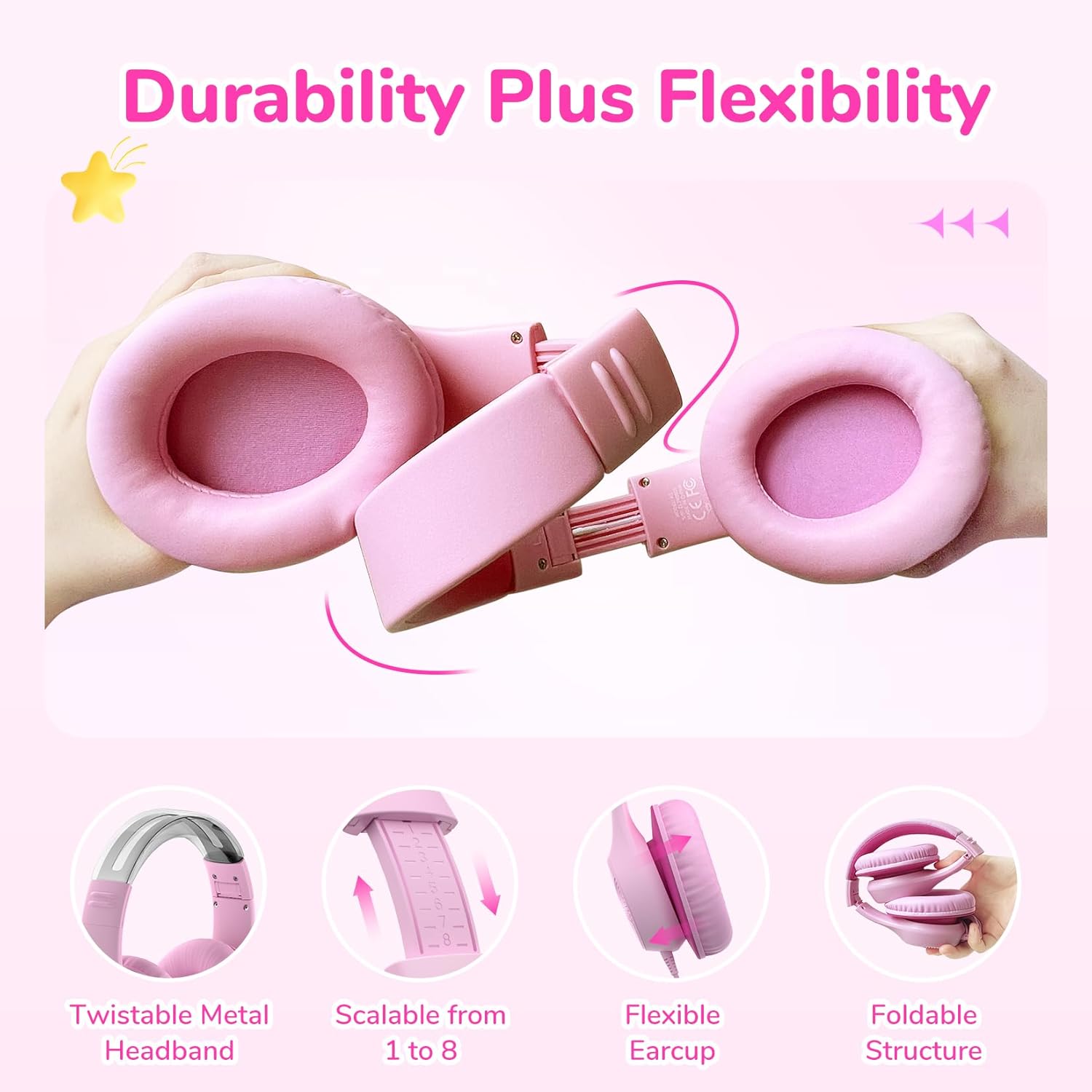
Image: Close-up showing the adjustable headband mechanism and how to detach the earcups for maintenance.
5.3 การพับเพื่อจัดเก็บ
To fold the headphones for compact storage, rotate the earcups inwards towards the headband until they lie flat. This makes them easy to carry in a bag.
6. การบำรุงรักษาและการดูแล
- Clean the ear pads and headband with a soft, dry cloth.
- หลีกเลี่ยงการใช้สารเคมีรุนแรงหรือวัสดุที่มีฤทธิ์กัดกร่อน
- เก็บหูฟังไว้ในที่แห้งและเย็นเมื่อไม่ใช้งาน
- ห้ามสัมผัสกับอุณหภูมิหรือความชื้นที่สูงเกินไป
- The ear pads are detachable for easier cleaning or replacement.
7 การแก้ไขปัญหา
| ปัญหา | สาเหตุที่เป็นไปได้ | สารละลาย |
|---|---|---|
| ไม่มีเสียง | Cable not fully inserted; device volume too low; incorrect audio output selected on device. | Ensure USB-C cable is securely connected. Increase device volume. Check device audio settings to confirm headphones are selected as output. |
| เสียงมีการบิดเบือน | Volume too high on device; faulty cable or port. | Lower the volume on your device. Try connecting to a different device or using a different USB-C cable if available to rule out cable/port issues. |
| หูฟังไม่กระชับพอดี | แถบคาดศีรษะไม่ปรับให้เหมาะสม | ปรับแถบคาดศีรษะโดยเลื่อนที่ครอบหูขึ้นหรือลงจนกว่าจะรู้สึกสบายพอดีกับศีรษะ |
8. ข้อมูลจำเพาะ
| คุณสมบัติ | รายละเอียด |
|---|---|
| ชื่อรุ่น | EaFun K3 |
| เทคโนโลยีการเชื่อมต่อ | มีสาย |
| แจ็คหูฟัง | สาย USB-C |
| ประเภทไดร์เวอร์เสียง | ไดร์เวอร์แบบไดนามิก |
| ขนาดไดร์เวอร์เสียง | 40 มม. |
| การตอบสนองความถี่ | ความถี่ 20 กิโลเฮิรตซ์ |
| ความไวต่อความรู้สึก | 100 เดซิเบล |
| อิมพีแดนซ์ | 32 โอห์ม |
| การควบคุมเสียงรบกวน | ไม่มี |
| ปริมาณ จำกัด | 85dBA |
| ช่วงอายุ (คำอธิบาย) | Kid & Teen |
| วัสดุ | อะคริโลไนไตรล์ บิวทาไดอีน สไตรีน (ABS) |
| น้ำหนักสินค้า | 207.9 กรัม (7.3 ออนซ์) |
| ระดับความต้านทานต่อน้ำ | ไม่ทนน้ำ |
| คุณสมบัติพิเศษ | Adjustable Headband, Foldable |
| อุปกรณ์ที่รองรับ | Tablets, Chromebooks, PCs, Gaming Consoles (USB-C), Telephones (USB-C) |
9. การรับประกันและการสนับสนุน
EarFun products come with an 18-month hassle-free protection. For any questions, technical support, or warranty claims, please contact EarFun customer service. You can find contact information on the official EarFun webเว็บไซต์หรือผ่านแพลตฟอร์มการซื้อของคุณ
Visit the official EarFun store for more information: EarFun Store


