1. บทนำ
Thank you for choosing the Kamon K30 Wireless Earbuds. This manual provides detailed instructions for the proper use, setup, and maintenance of your new earbuds. Please read this manual thoroughly before use to ensure optimal performance and longevity of your device.

Image 1.1: Kamon K30 Wireless Earbuds in their charging case.
The Kamon K30 earbuds feature Bluetooth 5.1 technology for stable connectivity, intuitive touch controls, and a comfortable in-ear design. They are designed to deliver clear stereo sound for various audio activities.
2. เนื้อหาบรรจุภัณฑ์
กรุณาตรวจสอบแพ็คเกจสำหรับรายการต่อไปนี้:
- 2 x Kamon K30 Wireless Earbuds
- 1 x เคสชาร์จไร้สาย
- สายชาร์จ 1 x USB-C
- จุกหูฟัง 4 ชิ้น (ขนาดต่างๆ)
- 1 x คู่มือผู้ใช้
3. สินค้าหมดview
Familiarize yourself with the components of your Kamon K30 Wireless Earbuds.

Image 3.1: The Kamon K30 earbuds removed from their open charging case, showing the charging contacts.
The earbuds are designed for a secure and comfortable fit. The charging case protects the earbuds and provides additional battery life.
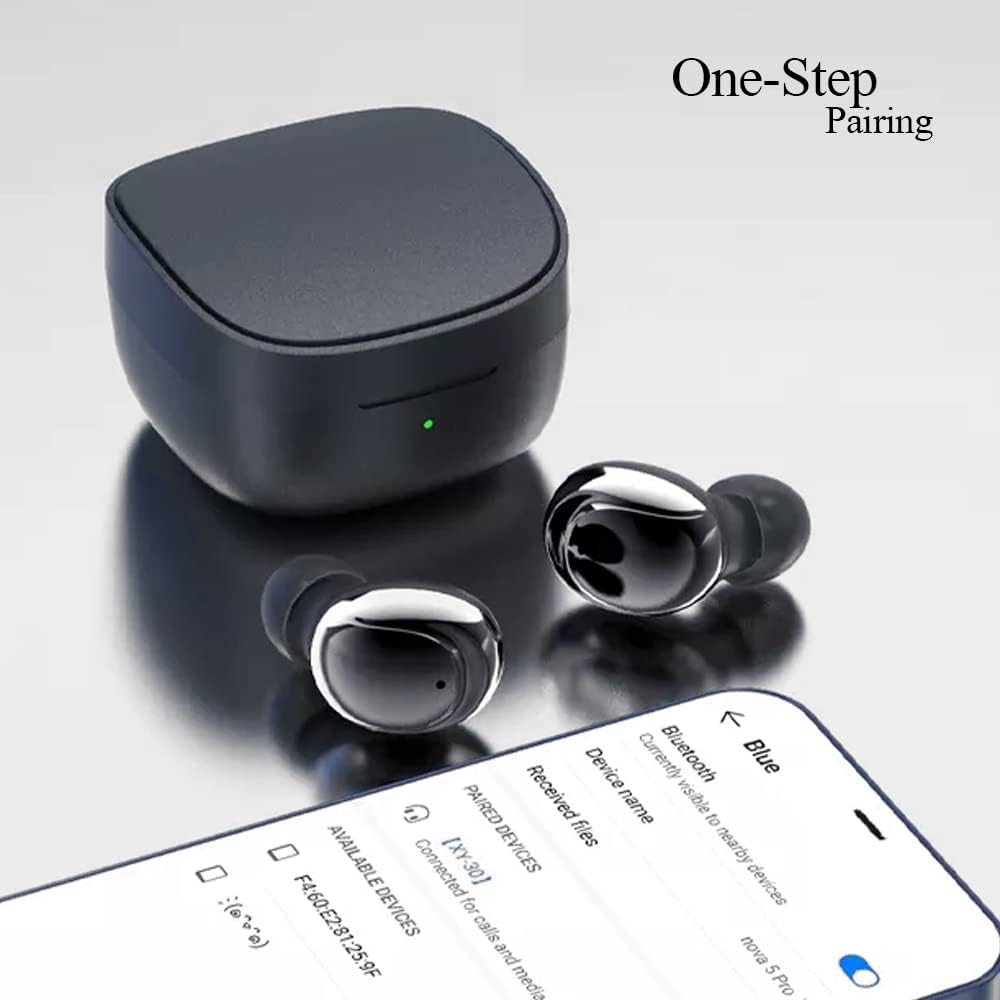
Image 3.2: Internal structure diagram illustrating the components responsible for Hi-Fi stereo sound delivery.
4. การตั้งค่า
4.1 การชาร์จหูฟังและเคส
ก่อนใช้งานครั้งแรก ควรชาร์จหูฟังและเคสชาร์จให้เต็ม
- ใส่หูฟังลงในกล่องชาร์จ ตรวจสอบให้แน่ใจว่าหูฟังอยู่ในตำแหน่งที่ถูกต้องเพื่อให้สัมผัสกับขั้วชาร์จ
- เสียบสายชาร์จ USB-C เข้ากับพอร์ตชาร์จบนเคส และเสียบปลายอีกด้านหนึ่งเข้ากับอะแดปเตอร์แปลงไฟ USB (ไม่ได้รวมอยู่ในชุด) หรือพอร์ต USB ของคอมพิวเตอร์
- The indicator light on the charging case will show charging status. Once fully charged, the light will change or turn off depending on the model.
- Earbud charging time: Approximately 40 minutes.
- Charging box charging time: Approximately 1 hour.

Image 4.1: The charging case and earbuds, illustrating battery life and charging indicators.
4.2 การจับคู่กับอุปกรณ์
The Kamon K30 earbuds feature one-step auto-pairing for convenience.
- ตรวจสอบให้แน่ใจว่าบลูทูธของอุปกรณ์ของคุณเปิดอยู่
- เปิดกล่องชาร์จ หูฟังจะเปิดอัตโนมัติและเข้าสู่โหมดจับคู่
- On your device, search for Bluetooth devices and select "Kamon K30" (or similar name like "XY-30") from the list.
- เมื่อเชื่อมต่อแล้ว คุณจะได้ยินเสียงยืนยัน และหูฟังจะพร้อมใช้งาน

Image 4.2: A smartphone displaying the Bluetooth pairing menu, showing "Kamon K30" as an available device.
The earbuds support Bluetooth 5.1, providing a stable connection up to 33 feet (10 meters) in open outdoor environments.
5. คู่มือการใช้งาน
5.1 ระบบควบคุมแบบสัมผัส
The Kamon K30 earbuds feature intuitive touch controls on each earbud. Refer to the diagram below for specific functions:

Image 5.1: A visual guide to the touch control functions on the Kamon K30 earbuds.
- เล่น/หยุดชั่วคราว: One-click on the left or right earbud.
- รับสาย/วางสาย: One-click on the left or right earbud.
- ปฏิเสธการโทร: Long press on the left or right earbud.
- ปรับระดับเสียงขึ้น: Triple-click the Left earbud.
- ลดเสียงลง: Triple-click the Right earbud.
- เพลงก่อนหน้า: ดับเบิ้ลคลิกที่หูฟังข้างซ้าย
- เพลงถัดไป: ดับเบิ้ลคลิกที่หูฟังข้างขวา
- เรียกใช้งานผู้ช่วยเสียง: Long press on the left or right earbud for 3 seconds.
Note: The touch sensors are sensitive. Apply a light touch for control. Avoid forceful tapping.
5.2 โหมดหูฟังเดี่ยว
You can use either earbud independently:
- ถอดหูฟังเอียร์บัดหนึ่งอันออกจากกล่องชาร์จ
- ปิดฝากล่องชาร์จ
- The single earbud will automatically connect to your paired device.
6. การบำรุงรักษา
การบำรุงรักษาอย่างถูกต้องจะช่วยให้หูฟังของคุณมีอายุการใช้งานยาวนานและมีประสิทธิภาพเหมาะสมที่สุด
- การทำความสะอาด: ทำความสะอาดหูฟังและกล่องชาร์จเป็นประจำด้วยผ้านุ่ม แห้ง และไม่เป็นขุย ห้ามใช้สารเคมีรุนแรงหรือวัสดุที่มีฤทธิ์กัดกร่อน ทำความสะอาดขั้วสัมผัสการชาร์จของหูฟังทั้งสองข้างและกล่องชาร์จเบาๆ เพื่อให้แน่ใจว่าการชาร์จเป็นไปอย่างถูกต้อง
- พื้นที่จัดเก็บ: เมื่อไม่ใช้งาน ให้เก็บหูฟังไว้ในกล่องชาร์จเพื่อป้องกันฝุ่นและความเสียหาย เก็บกล่องไว้ในที่แห้งและเย็น หลีกเลี่ยงแสงแดดโดยตรงและอุณหภูมิที่สูงหรือต่ำเกินไป
- ความต้านทานน้ำ: The earbuds are waterproof (IPX rating not specified, but generally means splash/sweat resistant). Avoid submerging them in water or exposing them to heavy rain. Dry them thoroughly if they get wet.
- การดูแลแบตเตอรี่ เพื่อยืดอายุการใช้งานแบตเตอรี่ ควรหลีกเลี่ยงการปล่อยประจุแบตเตอรี่จนหมดบ่อยเกินไป ควรชาร์จหูฟังและเคสเป็นประจำ แม้จะไม่ได้ใช้งานบ่อยก็ตาม
7 การแก้ไขปัญหา
If you encounter issues with your Kamon K30 Wireless Earbuds, refer to the following common solutions:
| ปัญหา | สารละลาย |
|---|---|
| หูฟังไม่จับคู่กับอุปกรณ์ |
|
| หูฟังเอียร์บัดเดียวเท่านั้นที่ใช้งานได้ |
|
| หูฟังไม่ชาร์จ |
|
| Low sound quality or intermittent connection. |
|
8. ข้อมูลจำเพาะ
Detailed technical specifications for the Kamon K30 Wireless Earbuds:
- ชื่อรุ่น : K30 (XY-30)
- ยี่ห้อ: กามอน
- การเชื่อมต่อ: ไร้สาย (บลูทูธ 5.1)
- บลูทูธ โปรfiles: HSP, HFP, A2DP, AVRCP
- ระยะการส่งข้อมูล: Up to 33 feet (10 meters) in open outdoor environments
- ความจุแบตเตอรี่หูฟัง: 35mAh
- ความจุแบตเตอรี่กรณีชาร์จ: 350mAh
- เวลาฟัง: 3-5 ชั่วโมง
- เวลาในการชาร์จหูฟัง: ประมาณ 40 นาที
- เวลาในการชาร์จกล่องชาร์จ: ประมาณ 1 ชั่วโมง
- วัสดุฮอร์น: Graphene True Copper Ring Horn
- วิธีการควบคุม: สัมผัส
- วัสดุ: ABS, Electronic Component
- น้ำหนักสินค้า: 0.9 ounces (earbuds and case combined)
- ขนาดแพ็คเกจ: 2.53 x 2.5 x 2 นิ้ว
- สี: Purple (as per this variant)
- คุณสมบัติพิเศษ: Lightweight, Microphone Included, Rechargeable Battery, Surround Sound, Sweatproof (Waterproof)

Image 8.1: Dimensional drawing of the Kamon K30 earbuds and their charging case.
9. การรับประกันและการสนับสนุน
For warranty information or technical support, please refer to the contact details provided on the product packaging or the official Kamon webไซต์ โปรดเก็บใบเสร็จรับเงินของคุณไว้เป็นหลักฐานการซื้อสำหรับการเรียกร้องการรับประกันใดๆ

Image 9.1: A user wearing a Kamon K30 earbud, demonstrating its in-ear fit.


