1. สินค้าหมดview
The BESTHERM HESTIA is a fluid-free electric towel dryer designed for efficient heating and towel warming. This manual provides essential information for safe and effective use of your appliance.

รูปที่ 1 : ด้านหน้า view of the BESTHERM HESTIA Electric Towel Dryer.

Figure 2: The BESTHERM HESTIA Electric Towel Dryer installed in a bathroom setting.
2. การตั้งค่าและการติดตั้ง
2.1 ขนาดและตำแหน่ง
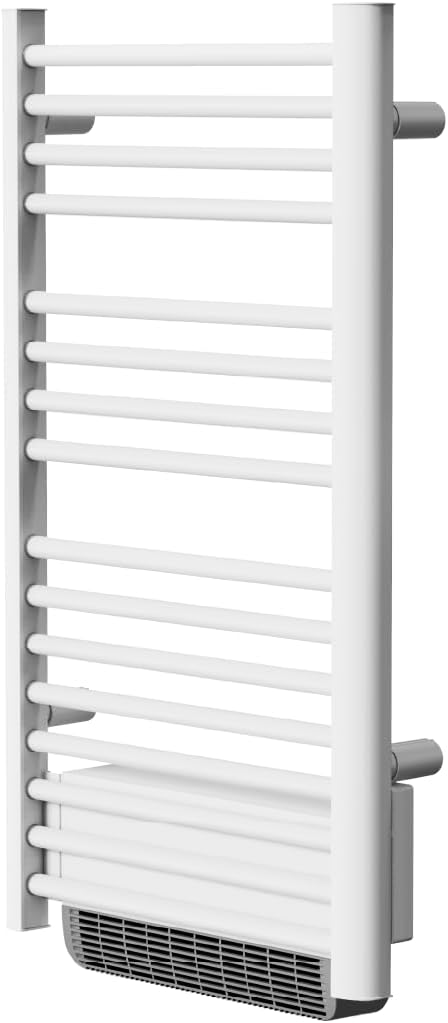
Figure 3: Product dimensions (Height: 100.5 cm, Length: 54 cm, Depth: 15 cm) and recommended heating area (10 to 15 m²).
The towel dryer measures 100.5 cm in height, 54 cm in length, and 15 cm in depth. It weighs 6.9 kg. It is suitable for heating areas between 10 to 15 square meters.
2.2 การเชื่อมต่อไฟฟ้า

Figure 4: Electrical connection diagram. Connect the blue wire (Neutral) and brown/red wire (Phase). The black wire should only be connected for central thermostat control. Do not connect to ground.
This appliance requires a three-phase connection. Always connect the Blue wire (Neutral) and the Brown (or Red) wire (Phase). The Black wire should only be connected if you are using a central thermostat for control. Do not connect the Black wire to the ground.
3. คู่มือการใช้งาน
3.1 แผงควบคุมโอเวอร์view

Figure 5: Illustration of the control panel with buttons for power, temperature adjustment, and mode selection.
The control panel features a digital display and several buttons for operation:
- ปุ่มเปิด/ปิด: To turn the appliance on/off or put it in standby mode.
- OK/Boost Button: Press briefly to select operating modes (Comfort, ECO, Program, Frost Protection). Press and hold for 3 seconds to activate Boost mode (bSt1/bSt2).
- ปุ่ม M: Press and hold to access settings for timer, program mode, window detection, and keypad lock.
- ปุ่ม +/-: Adjust temperature, time, and day settings.
3.2 Thermostat Programming Tutorial
For a detailed guide on programming your thermostat, please watch the official tutorial video:
Video 1: Official tutorial for programming the BESTHERM HESTIA thermostat.
3.3 ล็อคปุ่มกด
To activate the keypad lock, press and hold the 'M' button until the lock icon appears on the display. To deactivate, press and hold the 'M' button again. Note that the keypad lock does not disable the power button.
3.4 Window Detection
The window detection function automatically pauses heating if a sudden drop in temperature is detected, indicating an open window. To activate/deactivate this function, press and hold the 'M' button until the window icon appears/disappears.
4. การบำรุงรักษา
To ensure optimal performance and longevity of your BESTHERM HESTIA towel dryer, regular maintenance is recommended:
- การทำความสะอาด: เช็ดพื้นผิวของเครื่องด้วยความนุ่มนวลงamp ผ้า ห้ามใช้สารทำความสะอาดที่มีฤทธิ์กัดกร่อนหรือตัวทำละลาย
- การกำจัดฝุ่น: Periodically clean the air vents to prevent dust buildup, which can affect heating efficiency.
- การตรวจสอบความปลอดภัย: Ensure all electrical connections are secure and there are no signs of damage to the power cord or appliance.
5 การแก้ไขปัญหา
If you encounter issues with your towel dryer, refer to the following common solutions:
- เครื่องใช้ไฟฟ้าไม่เปิด: Check the power supply and ensure the appliance is correctly plugged in. Verify that the circuit breaker has not tripped.
- Difficulty with thermostat programming: Refer to the official programming tutorial video (Section 3.2) for step-by-step instructions. Some users have reported success by pressing 'OK' and '+' simultaneously *before* powering on the device for initial pairing.
- Window detection too sensitive: Adjust the sensitivity setting if available, or temporarily deactivate the function if it's causing unintended pauses in heating.
- ไม่มีการปล่อยความร้อน: Ensure the desired temperature is set higher than the ambient temperature and that the heating indicator is displayed on the screen.
6. ข้อมูลจำเพาะ
| คุณสมบัติ | ข้อมูลจำเพาะ |
|---|---|
| หมายเลขรุ่น | HJ15-24AEF |
| ขนาด (กว้าง x ยาว x สูง) | 15 x 54 x 100.5 ซม. |
| น้ำหนัก | 6.9 กิโลกรัม |
| กำลังขับ | 500W + 1000W (with blower) |
| พิมพ์ | Fluid-Free Electric Towel Dryer |
7. การรับประกัน
ผลิตภัณฑ์นี้มาพร้อมกับ รับประกัน 2 ปีโปรดเก็บหลักฐานการซื้อไว้เพื่อใช้ในกรณีเรียกร้องการรับประกัน
8. การสนับสนุน
For further assistance, please contact our after-sales service:
- คำถามที่พบบ่อยออนไลน์: เยี่ยม www.bestherm.fr/pages/faq
- Telephone Assistance: 03 20 47 05 37
- ความช่วยเหลือทางอีเมล: sav@hom-y.fr

Figure 6: Contact details for BESTHERM customer support.
You can also find additional video tutorials on our official YouTube channel: BESTHERM YouTube Channel


