การแนะนำ
This manual provides detailed instructions for the setup, operation, and maintenance of your Porodo 4-in-1 Ultimate Gaming Kit. This comprehensive kit includes an RGB membrane gaming keyboard, a high-precision adjustable DPI gaming mouse, a surround sound gaming headset with a microphone, and an XL mouse pad. Please read this manual thoroughly before using the product to ensure optimal performance and longevity.

ภาพ: เหนือview of the Porodo 4-in-1 Ultimate Gaming Kit, showcasing คีย์บอร์ด เมาส์ ชุดหูฟัง และแผ่นรองเมาส์
ส่วนประกอบของผลิตภัณฑ์
1. RGB Membrane Gaming Keyboard
- Membrane Gaming Switches: Designed for durability with a lifespan of up to 10 million keystrokes.
- Arabic Keys: Provides localized support for Arabic language input.
- ปุ่มที่ปรับแต่งได้: Features 8 programmable buttons for personalized control.
- การเชื่อมต่อ: Connects via USB with a 1.5-meter PVC cable.
- ความเข้ากันได้: ใช้งานได้กับระบบปฏิบัติการ Windows และ Linux

ภาพ: รายละเอียด view of the RGB membrane gaming keyboard, highlighting the Arabic key layout and colorful backlighting.
2. High-Precision Adjustable DPI Gaming Mouse
- ช่วง DPI: Adjustable DPI from 800 to 7200 for precise sensitivity control.
- แสงไฟ RGB: Features 13 vibrant RGB lighting modes.
- ปุ่ม: Equipped with 8 programmable buttons.
- ออกแบบ: Ergonomic design for comfortable extended use.
- สายเคเบิล: 1.5-meter cable for flexible movement.
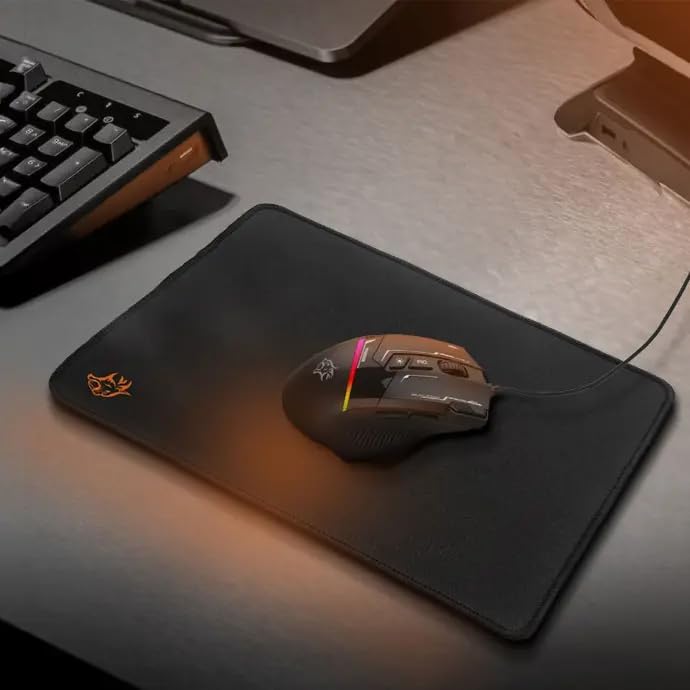
Image: The gaming mouse resting on the mouse pad, showcasing its ergonomic shape and illuminated RGB elements.
3. Surround Sound Gaming Headset with Microphone
- ไดรเวอร์: 40mm drivers for immersive audio experience.
- ไมโครโฟน: Omnidirectional microphone for clear voice communication.
- การเชื่อมต่อ: Dual 3.5mm jacks and a USB connection for RGB lighting.
- สายเคเบิล: 2.1-meter cable for ample movement.
- ปลอบโยน: Combination of fabric and rubber for comfortable long gaming sessions.

Image: A user wearing the Porodo gaming headset, demonstrating its fit and the RGB lighting on the earcups.
4. XL Mouse Pad
- ขนาด : 250 x 350 x 3 mm (XL size).
- วัสดุ: Made from durable fabric and rubber for smooth and precise tracking.
- พื้นผิว: Provides an optimal surface for gaming mouse control.

Image: The XL gaming mouse pad, showing its texture and size, designed for smooth mouse movement.
คำแนะนำการตั้งค่า
- แกะส่วนประกอบ: Carefully remove all items from the packaging: keyboard, mouse, headset, and mouse pad.
- ตำแหน่งการวางแผ่นรองเมาส์: Place the XL mouse pad on a flat, stable surface.
- เชื่อมต่อคีย์บอร์ด: Plug the keyboard's USB cable into an available USB port on your computer. The keyboard is plug-and-play and does not require driver installation.
- เชื่อมต่อเมาส์: Plug the mouse's USB cable into another available USB port on your computer. The mouse is also plug-and-play.
- เชื่อมต่อชุดหูฟัง:
- Plug the two 3.5mm audio jacks (one for audio, one for microphone) into the corresponding audio ports on your computer.
- Plug the headset's USB cable into an available USB port for RGB lighting functionality.
- การตรวจสอบเบื้องต้น: Verify that all devices are recognized by your computer and that their RGB lighting is active.
คำแนะนำการใช้งาน
การทำงานของแป้นพิมพ์
- การพิมพ์: Use the standard QWERTY layout with integrated Arabic keys for text input.
- ปุ่มฟังก์ชัน: Utilize F1-F12 keys for various system functions, often in combination with the 'Fn' key.
- ปุ่มที่ปรับแต่งได้: Refer to your operating system's peripheral settings or third-party software (if applicable) to program the 8 customizable buttons for macros or specific commands.
- แสงไฟ RGB: The keyboard features dynamic RGB lighting. Specific key combinations (e.g., Fn + Scroll Lock) may cycle through lighting modes or adjust brightness. Consult the keyboard's quick start guide for exact controls.
การทำงานของเมาส์
- ความเคลื่อนไหว: Glide the mouse smoothly over the mouse pad for cursor control.
- การปรับ DPI: Use the dedicated DPI button (usually located near the scroll wheel) to cycle through the 6 adjustable DPI levels (800-7200 DPI). Select the sensitivity that best suits your task or game.
- โหมดแสง RGB: Press the RGB lighting button (often near the DPI button or on the underside) to switch between the 13 available RGB lighting modes. There is also an option to turn off the lighting.
- ปุ่มที่สามารถตั้งโปรแกรมได้: The mouse has 8 buttons. Use your computer's mouse settings or dedicated software to assign functions to these buttons.
การใช้งานชุดหูฟัง
- การเล่นเสียง: Ensure the 3.5mm audio jack is correctly connected. Adjust volume using your computer's sound settings or the inline volume control on the headset cable.
- การใช้ไมโครโฟน: Position the omnidirectional microphone appropriately for clear voice capture. Ensure the 3.5mm microphone jack is connected and the microphone is enabled in your computer's sound settings. An inline mute switch may be present on the cable.
- แสงไฟ RGB: The headset's RGB lighting is powered via the USB connection. It will illuminate automatically when connected.
การซ่อมบำรุง
- การทำความสะอาด:
- Use a soft, dry cloth to wipe down the surfaces of the keyboard, mouse, and headset.
- สำหรับแป้นพิมพ์ ให้ใช้ลมเป่าเพื่อกำจัดฝุ่นและเศษสิ่งสกปรกที่อยู่ระหว่างปุ่มต่างๆ
- Do not use harsh chemicals or abrasive cleaners on any component.
- การดูแลสายเคเบิล: หลีกเลี่ยงการดัดงอหรือดึงสายเคเบิลอย่างรุนแรงเพื่อป้องกันความเสียหาย
- พื้นที่จัดเก็บ: เก็บชุดอุปกรณ์ไว้ในที่แห้งและเย็น หลีกเลี่ยงแสงแดดโดยตรงและอุณหภูมิที่สูงหรือต่ำเกินไปเมื่อไม่ได้ใช้งาน
การแก้ไขปัญหา
| ปัญหา | สารละลาย |
|---|---|
| คีย์บอร์ด/เมาส์ไม่ตอบสนอง |
|
| Headset audio not working |
|
| ไมโครโฟนไม่ทำงาน |
|
| ไฟ RGB ไม่ทำงาน |
|
ข้อมูลจำเพาะ
- หมายเลขรุ่น: 6849108443906
- ประเภทคีย์บอร์ด: Membrane Gaming Keyboard with Arabic Keys
- Keyboard Lifespan: รองรับการกดแป้นพิมพ์สูงสุด 10 ล้านครั้ง
- ดีพีไอของเมาส์: 800-7200 DPI (ปรับได้)
- Mouse RGB Modes: 13
- Headset Driver Size: 40มม.
- ไมโครโฟนชุดหูฟัง: รอบทิศทาง
- ความยาวสายคีย์บอร์ด: 1.5m PVC
- ความยาวสายเมาส์: 1.5ม.
- Headset Cable Length: 2.1ม.
- ขนาดแผ่นรองเมาส์: 250 x 350 x 3 mm (XL)
- การเชื่อมต่อ: USB (Keyboard, Mouse, Headset RGB), Dual 3.5mm (Headset Audio/Mic)
- ความเข้ากันได้: วินโดวส์, ลินุกซ์
- ขนาดการจัดส่ง: 48.4 x 19.8 x 13.6 ซม.
- น้ำหนักสินค้า: 1.1 กก.
การรับประกันและการสนับสนุน
Your Porodo 4-in-1 Ultimate Gaming Kit is covered by a manufacturer's warranty against defects in materials and workmanship. For specific warranty details, including duration and terms, please refer to the warranty card included in your product packaging or visit the official Porodo website. For technical support, troubleshooting assistance, or to inquire about replacement parts, please contact Porodo customer service through their official channels. Keep your purchase receipt as proof of purchase for warranty claims.
หากต้องการความช่วยเหลือเพิ่มเติม คุณสามารถเยี่ยมชม ร้าน Porodo บน Amazon.