1. บทนำ
Thank you for choosing the Deli ET530 Digital Safe Box. This manual provides essential information for the proper installation, operation, and maintenance of your safe. Please read these instructions carefully before use to ensure optimal security and functionality.
2. ข้อมูลด้านความปลอดภัย
- Keep override keys in a secure location away from the safe. Do not store them inside the safe.
- Ensure the safe is installed on a stable surface or securely mounted to a wall or floor.
- อย่าให้ตู้เซฟสัมผัสกับอุณหภูมิหรือความชื้นที่สูงเกินไป
- เมื่อไฟแสดงสถานะแบตเตอรี่ต่ำปรากฏขึ้น ให้เปลี่ยนแบตเตอรี่ทันทีเพื่อป้องกันการล็อกเครื่อง
- Avoid sharing your access code with unauthorized individuals.
3. เนื้อหาบรรจุภัณฑ์
ตรวจสอบว่ามีส่วนประกอบทั้งหมดอยู่ในแพ็คเกจ:
- ตู้เซฟดิจิทัล Deli ET530 จำนวน 1 ตู้
- 2 x Security Override Keys
- 4 x AA Batteries (1.5V)
- 2 x Fixing Bolts for mounting
- ชั้นวางแบบถอดได้ 1 ชิ้น
- 1 x Custom Carpet Interior
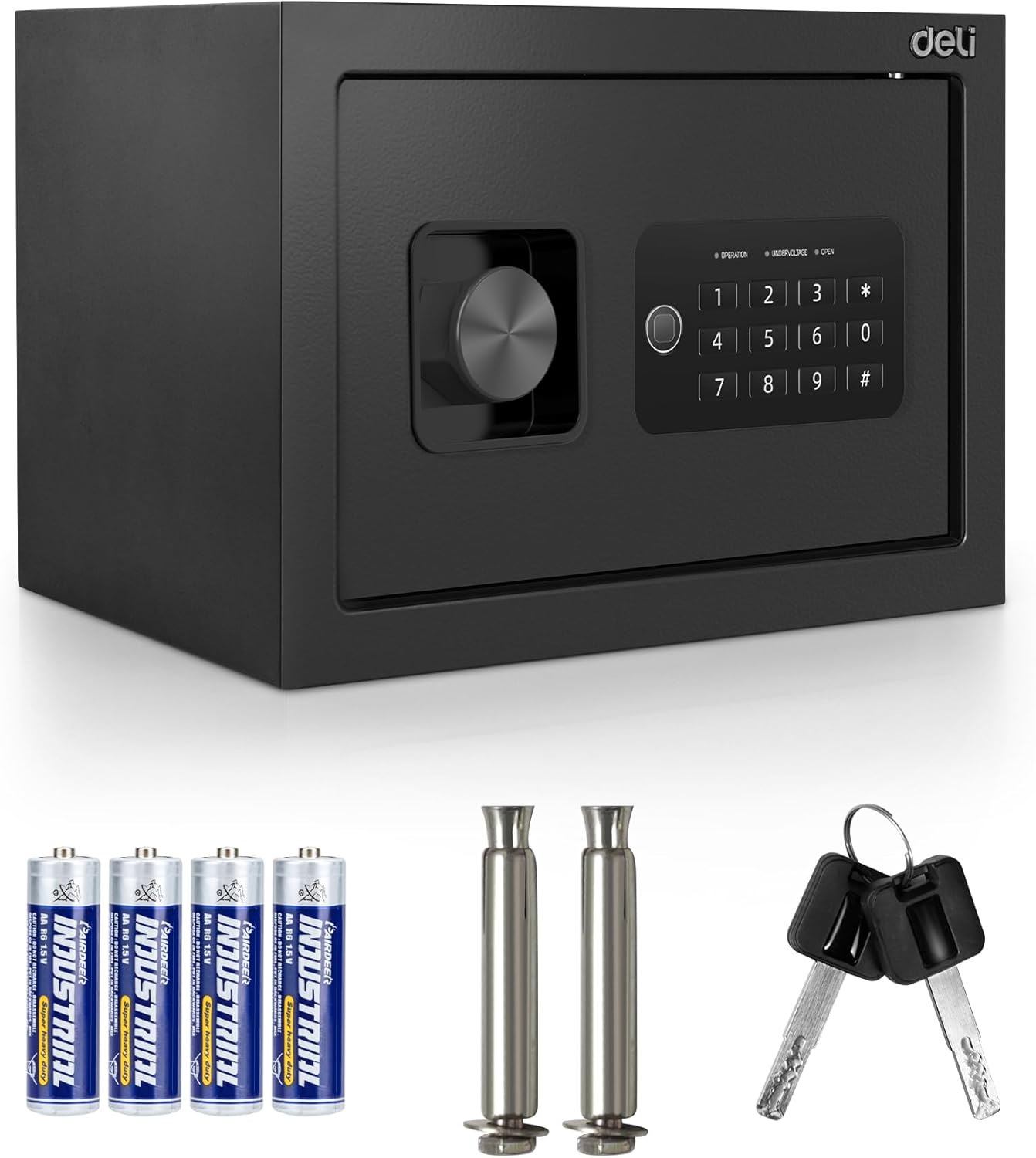
Image 3.1: Deli ET530 Digital Safe Box and its accessories.
4. สินค้าหมดview
The Deli ET530 Digital Safe Box is designed to protect your valuables with a robust steel construction and a dual-key system. It features a digital keypad for electronic access and a manual override key system for emergency entry.
คุณสมบัติหลัก:
- แป้นพิมพ์ดิจิตอล: Allows setting a personal user code for quick access.
- Dual Key System: Provides both electronic and mechanical key access.
- Anti-Saw Locking Bolts: Two 16mm steel locking bolts enhance security against forced entry.
- โครงสร้างเหล็กทนทาน: Offers protection against physical attacks.
- ชั้นวางแบบถอดได้: Allows for flexible storage arrangements inside the safe.
- Carpeted Interior: Protects stored items from scratches and damage.
- รูเจาะล่วงหน้า: Facilitates permanent mounting to floors or walls for added security.

Image 4.1: Internal features of the Deli ET530 Digital Safe Box.

Image 4.2: Anti-drilling and pry-resistant construction details.
5. การตั้งค่า
5.1. การติดตั้งแบตเตอรี่
- หาช่องใส่แบตเตอรี่ที่อยู่ด้านในประตูตู้เซฟ
- Insert 4 AA (1.5V) batteries, ensuring correct polarity (+/-).
- ปิดฝาช่องใส่แบตเตอรี่
5.2. การตั้งค่ารหัสเริ่มต้น
Upon first use, or after a battery change, you will need to set your personal access code.
- With the safe door open, locate the red reset button on the inside of the door (refer to Image 4.1).
- Press the red reset button. The keypad will beep, and the 'OPERATION' light will illuminate.
- ป้อนรหัส 3-8 หลักที่คุณต้องการบนปุ่มกด
- Press the '#' key to confirm. The 'OPERATION' light will flash, indicating the code has been successfully set.
- ทดสอบโค้ดใหม่ด้วยการเปิดประตูก่อนจะปิด
5.3. การติดตั้งตู้เซฟ
For enhanced security, it is recommended to permanently mount the safe to a floor or wall.
- เลือกสถานที่ที่เหมาะสมสำหรับการติดตั้ง
- Use the pre-drilled holes at the back or bottom of the safe as a template to mark drilling points on the wall or floor.
- เจาะรูโดยใช้ดอกสว่านที่เหมาะสมกับวัสดุผนัง/พื้นของคุณ
- วางตู้เซฟให้ตรงกับรูที่เจาะไว้ แล้วยึดให้แน่นโดยใช้สลักเกลียวที่ให้มา

Image 5.1: Pre-drilled anchor holes for mounting.
6. คู่มือการใช้งาน
6.1. Opening the Safe with Digital Keypad
- กรอกรหัสส่วนตัว 3-8 หลักของคุณบนแป้นพิมพ์
- Press the '#' key. The 'OPEN' light will illuminate.
- ภายใน 5 วินาที ให้หมุนปุ่มตามเข็มนาฬิกาเพื่อเปิดประตูตู้เซฟ

Image 6.1: Opening the safe using the electronic keypad.
6.2. Opening the Safe with Override Keys (Emergency Access)
In case of battery failure or forgotten code, the safe can be opened using the override keys.
- ค้นหาฝาครอบรูกุญแจบนแผงแป้นพิมพ์
- ถอดฝาครอบออกเพื่อเผยให้เห็นรูกุญแจ
- Insert one of the override keys and turn it counter-clockwise.
- While holding the key turned, rotate the knob clockwise to open the safe door.
- เมื่อประตูเปิดออกแล้ว ให้ถอดกุญแจออก

Image 6.2: Opening the safe using the override key.
6.3 การปิดตู้เซฟ
- ปิดประตูตู้เซฟให้แน่น
- Turn the knob counter-clockwise to engage the locking bolts.
6.4. Changing the User Code
To change your personal code:
- เปิดประตูตู้นิรภัย
- Press the red reset button on the inside of the door. The 'OPERATION' light will illuminate.
- ป้อนรหัสใหม่ของคุณที่มีตัวเลข 3-8 หลัก
- Press the '#' key to confirm. The 'OPERATION' light will flash.
- ทดสอบโค้ดใหม่ด้วยการเปิดประตูก่อนจะปิด
7. การบำรุงรักษา
- การทำความสะอาด: เช็ดภายนอกตู้เซฟด้วยผ้านุ่มๆamp ผ้า. หลีกเลี่ยงน้ำยาทำความสะอาดที่มีฤทธิ์กัดกร่อน
- การเปลี่ยนแบตเตอรี่: Replace all 4 AA batteries when the 'UNDERVOLTAGE' indicator light illuminates. Always use new, high-quality alkaline batteries.
- การบำรุงรักษาที่สำคัญ: Keep override keys clean and dry. Do not force keys into the lock.

Image 7.1: Soft carpeted interior for item protection.
8 การแก้ไขปัญหา
| ปัญหา | สาเหตุที่เป็นไปได้ | สารละลาย |
|---|---|---|
| ตู้เซฟไม่สามารถเปิดด้วยรหัสได้ | Incorrect code entered. Batteries are low or dead. Keypad is locked. | Re-enter code carefully. Replace batteries. Wait 3 minutes if keypad is locked due to multiple incorrect entries. Use override key. |
| แป้นพิมพ์ไม่ตอบสนอง | แบตเตอรี่หมดหรือติดตั้งไม่ถูกต้อง | เปลี่ยนแบตเตอรี่โดยตรวจสอบให้แน่ใจว่าใส่ขั้วถูกต้อง |
| 'UNDERVOLTAGE' light is on. | แบตเตอรี่เหลือน้อย | เปลี่ยนแบตเตอรี่ AA ทั้ง 4 ก้อนทันที |
| Safe door cannot be closed. | มีสิ่งกีดขวางอยู่ที่กรอบประตู สลักล็อคยื่นออกมา | Remove any obstructions. Ensure the knob is turned to retract bolts before closing. |
9. ข้อมูลจำเพาะ
| คุณสมบัติ | รายละเอียด |
|---|---|
| หมายเลขรุ่น | TM-5-ET530 |
| ขนาดภายนอก (D x W x H) | 25 ซม. x 35 ซม. x 25 ซม. (9.8" x 13.8" x 9.8") |
| ปริมาณภายใน | Approximately 0.8 Cubic Feet |
| น้ำหนัก | 8.7 กิโลกรัม |
| วัสดุ | เหล็กอัลลอยด์ |
| ประเภทล็อค | Digital Keypad and Key |
| แหล่งพลังงาน | แบตเตอรี่ AA จำนวน 4 ก้อน (1.5V) |
| คุณสมบัติพิเศษ | Anti-Theft, Removable Shelf, Carpeted Interior |
| ประเภทการติดตั้ง | Floor Mount / Wall Mount (Pre-drilled holes) |

Image 9.1: Deli ET530 Digital Safe Box dimensions.
10. การรับประกันและการสนับสนุน
For warranty information and customer support, please refer to the documentation provided at the point of purchase or contact your retailer. You may also visit the official Deli webเว็บไซต์เพื่อขอความช่วยเหลือเพิ่มเติม


