1. บทนำ
This manual provides detailed instructions for the safe and effective operation of your JYX T18-T Karaoke Machine. Please read this manual thoroughly before using the product and retain it for future reference. The JYX T18-T is a portable Bluetooth karaoke speaker designed for various audio applications, featuring dual wireless microphones, dynamic lighting, and multiple connectivity options.
2. เนื้อหาบรรจุภัณฑ์
ตรวจสอบให้แน่ใจว่ามีสินค้าทั้งหมดที่ระบุไว้ด้านล่างนี้อยู่ในแพ็คเกจของคุณ:
- 1 x JYX T18-T Karaoke Machine with 6.5" Subwoofer
- 2 x Studio-grade Wireless Microphones
- 1 x สายคล้องไหล่
- สายชาร์จ Type-C 1 เส้น
- สาย 1 x AUX
- 1 x คู่มือผู้ใช้

Figure 2.1: JYX T18-T Karaoke Machine with included wireless microphones, charging cables, and shoulder strap.
3. สินค้าหมดview
Familiarize yourself with the main components and controls of your karaoke machine.

รูปที่ 3.1: รายละเอียด view of the control panel, showing microphone volume, echo, USB/TF card slots, AUX input, master volume, and playback controls.
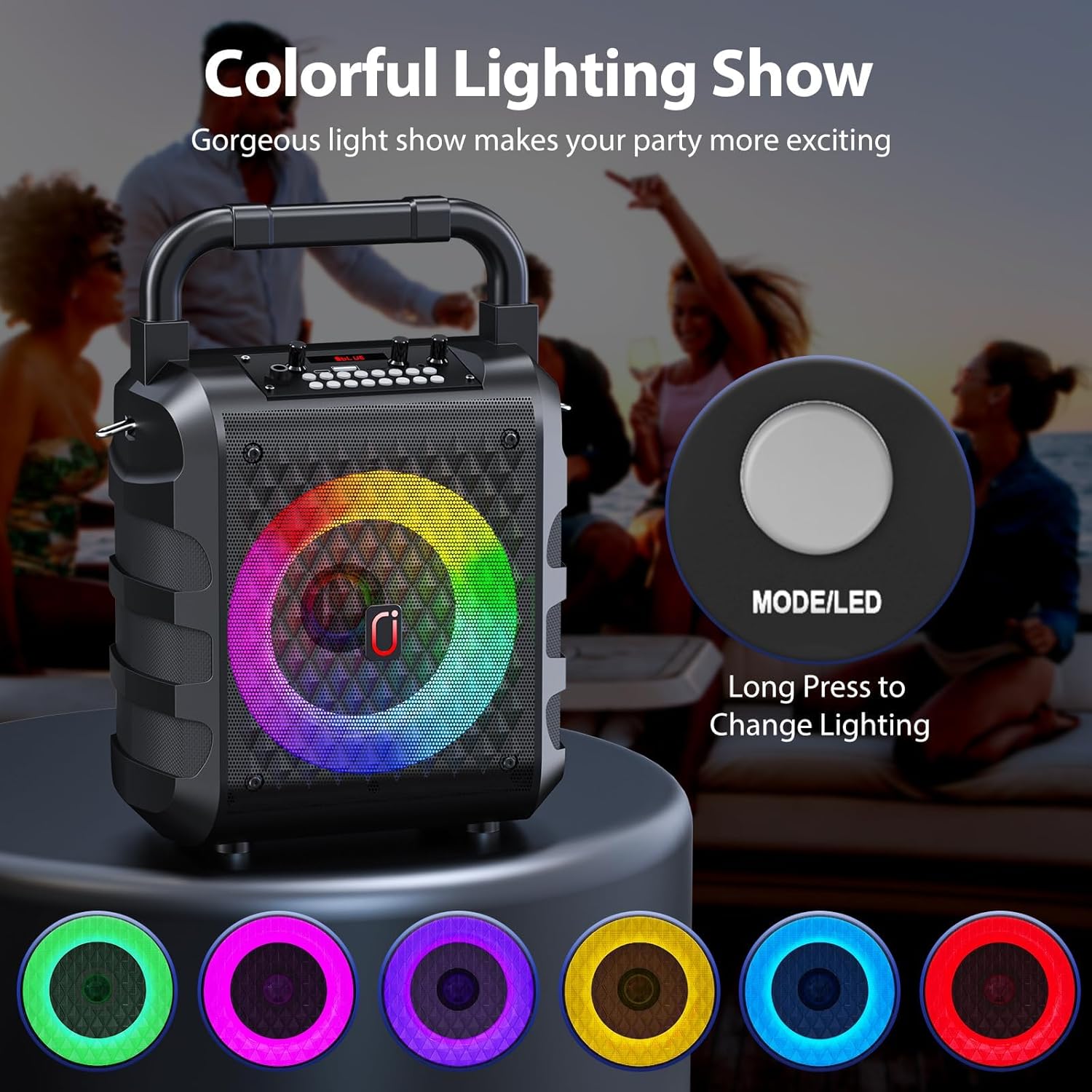
Figure 3.2: Close-up of a wireless microphone, highlighting its integrated volume and echo controls.
4. การตั้งค่า
4.1 การชาร์จอุปกรณ์
Before first use, fully charge the karaoke machine and both wireless microphones. Use the provided Type-C cable to charge the main unit. The charging indicator light will illuminate during charging and turn off when fully charged. Microphones are also rechargeable via their respective Type-C ports.
4.2 การเปิด/ปิดเครื่อง
To power on the karaoke machine, locate the ON/OFF switch on the control panel and slide it to the "ON" position. To power off, slide the switch to "OFF". For the wireless microphones, press and hold the power button on each microphone until the display illuminates.
5. คู่มือการใช้งาน
5.1 การเชื่อมต่อบลูทูธ
- Power on the JYX T18-T Karaoke Machine. It will automatically enter Bluetooth pairing mode, indicated by "BLUE" on the display.
- เปิดใช้งานบลูทูธบนสมาร์ทโฟน แท็บเล็ต หรืออุปกรณ์อื่นๆ ที่รองรับบลูทูธ
- ค้นหา available devices and select "JYX-T18" (or similar, e.g., "T19" for variant) from the list.
- Once connected, you will hear an audible confirmation "Bluetooth connected".
- ตอนนี้คุณสามารถเล่นไฟล์เสียงจากอุปกรณ์ของคุณผ่านเครื่องคาราโอเกะได้แล้ว
Video 5.1: Demonstration of Bluetooth connection and basic operation for a JYX Karaoke Machine (T19-T variant shown, similar functionality to T18-T).
5.2 USB/TF Card/AUX Playback
- การเล่น USB: Insert a USB flash drive into the USB port. The machine will automatically switch to USB mode and begin playing compatible audio files (WAV format supported).
- การเล่นการ์ด TF: Insert a Micro TF card into the TF card slot. The machine will automatically switch to TF card mode and play compatible audio files.
- อินพุต AUX: Connect an external audio device (e.g., TV, PC) using the provided AUX cable to the AUX port. The machine will switch to AUX mode.
- Use the "MODE" button on the control panel to cycle between Bluetooth, USB, TF Card, and AUX modes.

Figure 5.1: The control panel illustrating the various input options for media playback.
5.3 การใช้งานไมโครโฟน
- Power on both wireless microphones. They will automatically pair with the karaoke machine.
- Adjust microphone volume using the "MIC VOL" knob on the main unit or the volume buttons on the microphone itself.
- Adjust echo effect using the "MIC ECHO" knob on the main unit or the echo buttons on the microphone.
- โปรแกรมเปลี่ยนเสียง: Press the "Voice" button on the main unit to cycle through different voice effects (e.g., deep, high-pitched).
- ลำดับความสำคัญของไมโครโฟน: Press the "MIC Priority" button to lower the music volume automatically when speaking into the microphone.
สำคัญ: To avoid feedback, do not hold the microphone too close to the speaker while it is active.
Video 5.2: Demonstration of microphone features, including wireless connectivity and voice effects, demonstrated with a similar portable karaoke speaker.
5.4 Dynamic Lighting Effects
The JYX T18-T features 6 dynamic lighting modes. Press the "LED" button on the control panel to cycle through different light patterns and colors. The lights are designed to sync with the music, enhancing the audio experience.
Figure 5.2: The control panel illustrating the various input options for media playback.
Figure 5.3: Close-up of a wireless microphone, highlighting its integrated volume and echo controls.
Video 5.3: A short demonstration of the dynamic lighting effects on a portable karaoke machine.
5.5 Volume and Sound Adjustment
- ปริมาณหลัก: Use the "VOLUME +" knob on the main unit to adjust the overall sound output.
- การควบคุมเสียงเบส: Use the "BASS" knob to adjust the bass level of the audio.
- ปริมาณตราสาร: If an instrument is connected, use the "Instrument VOL" knob to adjust its volume.
6. การบำรุงรักษา
- Keep the device dry and clean. Avoid exposure to extreme temperatures or direct sunlight.
- เช็ดทำความสะอาดภายนอกด้วยผ้าแห้งเนื้อนุ่ม ห้ามใช้สารทำความสะอาดที่มีฤทธิ์กัดกร่อนหรือตัวทำละลาย
- เก็บอุปกรณ์ไว้ในที่แห้งและเย็นเมื่อไม่ได้ใช้งานเป็นเวลานาน
- อย่าพยายามถอดประกอบหรือซ่อมแซมอุปกรณ์ด้วยตนเอง ติดต่อฝ่ายสนับสนุนลูกค้าเพื่อขอความช่วยเหลือ
7 การแก้ไขปัญหา
| ปัญหา | สาเหตุที่เป็นไปได้ | สารละลาย |
|---|---|---|
| ไม่มีไฟฟ้า | แบตเตอรี่เหลือน้อยหรือหมด | Charge the karaoke machine and microphones fully. |
| ไม่มีเสียงออกจากลำโพง | Volume is too low; incorrect input mode selected; device not connected. | Increase master volume; ensure correct mode (Bluetooth, USB, AUX) is selected; re-pair Bluetooth device. |
| ไมโครโฟนไม่ทำงาน | Microphone is off; low battery; not paired. | Power on microphone; charge microphone; ensure microphone is paired (indicated by display). |
| เสียงฟีดแบ็ก/เสียงแหลม | ไมโครโฟนอยู่ใกล้ผู้พูดมากเกินไป | Move the microphone further away from the speaker. |
8. ข้อมูลจำเพาะ
- แบบอย่าง: T18-ที
- เอาท์พุต วัดtage: 20 วัตต์
- จำนวนช่องสัญญาณ: 2
- ขนาดซับวูฟเฟอร์: 6.5 นิ้ว
- การเชื่อมต่อ: Bluetooth 5.3, Micro TF Card, USB, AUX
- เล่มที่tage: 5 โวลต์
- แบตเตอรี่: Rechargeable Lithium Polymer (8 hours playback)
- ประเภทวัสดุ : พลาสติก
- ขนาด (ยาว x กว้าง x สูง): 15.4 x 24.7 x 35.4 ซม.
- น้ำหนักสินค้า: 2.2 กิโลกรัม
- คุณสมบัติพิเศษ: Digital Tuner, Echo Effect, Light Up Speaker, PA System, Portable, Voice Changer, 6 Lighting Modes.
9. การรับประกันและการสนับสนุน
For warranty information, technical support, or any inquiries regarding your JYX T18-T Karaoke Machine, please refer to the contact details provided on the product packaging or the official JYX webไซต์ โปรดเก็บใบเสร็จรับเงินไว้เป็นหลักฐานการซื้อสำหรับการเรียกร้องการรับประกัน
เอกสารที่เกี่ยวข้อง - T18-ที
 |
คู่มือผู้ใช้เครื่องคาราโอเกะเสียง JYX S1 - คู่มือการติดตั้งและการใช้งาน คู่มือการใช้งานอย่างเป็นทางการสำหรับเครื่องคาราโอเกะ JYX S1 พร้อมการ์ดเสียง ค้นหาคำแนะนำโดยละเอียดเกี่ยวกับการติดตั้ง การเชื่อมต่อ คุณสมบัติของผลิตภัณฑ์ ข้อมูลจำเพาะ และการแก้ไขปัญหาสำหรับระบบคาราโอเกะ JYX S1 ของคุณ |
 |
คู่มือผู้ใช้เครื่องคาราโอเกะบลูทูธ JYX TX05 คู่มือผู้ใช้แบบครอบคลุมสำหรับเครื่องคาราโอเกะบลูทูธ JYX TX05 ซึ่งมีรายละเอียดเกี่ยวกับการตั้งค่า การใช้งาน คุณสมบัติ และการแก้ไขปัญหาสำหรับระบบเสียงพกพาที่มีไมโครโฟนสองตัวนี้ |
 |
คู่มือการใช้งานเครื่องคาราโอเกะ JYX D17-T คู่มือการใช้งานเครื่องคาราโอเกะ JYX D17-T ซึ่งประกอบด้วยรายละเอียดเกี่ยวกับคุณสมบัติของผลิตภัณฑ์ อุปกรณ์เสริม การใช้งานปุ่มต่างๆ ฟังก์ชั่นไมโครโฟน และคำแนะนำการใช้งานสำหรับโหมดบลูทูธ การ์ด TF และ AUX |
 |
คู่มือการใช้งานเครื่องคาราโอเกะ JYX รุ่น T10-T คู่มือการใช้งานเครื่องคาราโอเกะ JYX รุ่น T10-T ซึ่งให้คำแนะนำและข้อมูลจำเพาะสำหรับการใช้งานอุปกรณ์ร่วมกับไมโครโฟนไร้สายสองตัว |
 |
คู่มือการใช้งานเครื่องคาราโอเกะ JYX-TX02: การใช้งาน ข้อมูลจำเพาะ และคำถามที่พบบ่อย คู่มือการใช้งานฉบับสมบูรณ์สำหรับเครื่องคาราโอเกะ JYX-TX02 เรียนรู้เกี่ยวกับการควบคุมอุปกรณ์ ฟังก์ชั่นรีโมท ข้อมูลจำเพาะ รายการบรรจุภัณฑ์ และคำถามที่พบบ่อยเกี่ยวกับการแก้ไขปัญหาสำหรับระบบ PA บลูทูธนี้ |
 |
คู่มือการใช้งานเครื่องคาราโอเกะ JYX T17-T - ลำโพงพกพาพร้อมไมโครโฟนไร้สาย คู่มือการใช้งานฉบับสมบูรณ์สำหรับเครื่องคาราโอเกะพกพา JYX T17-T เรียนรู้เกี่ยวกับคุณสมบัติ การตั้งค่า การใช้งาน และการแก้ไขปัญหาสำหรับไมโครโฟนไร้สาย ไฟ LED บลูทูธ USB TF และการเชื่อมต่อ AUX |