การแนะนำ
The CHERRY MX 2.0S wired keyboard is engineered for gaming, prioritizing functionality and the use of high-quality materials. It integrates the proven CHERRY MX technology within a timeless, minimalist design. This manual provides comprehensive information for the setup, operation, and maintenance of your keyboard, ensuring optimal performance.

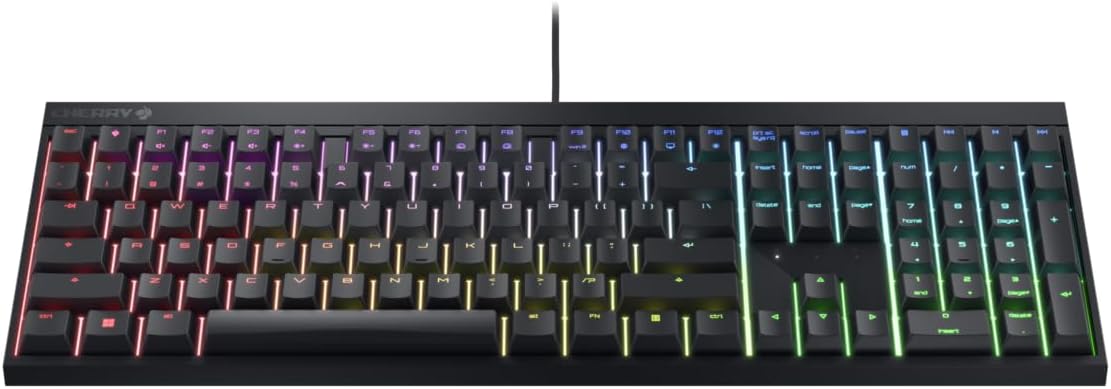
ภาพ: จากบนลงล่าง view of the Cherry Xtfy MX 2.0S wired gaming mechanical keyboard, showcasing its full layout and vibrant RGB backlighting across all keys. The keyboard is black with a subtle CHERRY logo in the top left corner.
คุณสมบัติหลัก
- CHERRY MX2A Switches: Equipped with gold crosspoint precision switches, offering reliable and comfortable typing. This model features MX2A Blue switches, known for their noisy and noticeable tactile feedback with a distinct click. They are designed for a 50 million keystroke lifespan.
- แสงไฟ RGB: Features over 16 million colors with numerous integrated color games and effects. Customization is available via the free CHERRY UTILITY software.
- ปุ่มกดที่ทนทาน: Abrasion-resistant, laser-cut keycaps ensure that key labeling remains clear and readable even after prolonged use.
- การพลิก N-Key เต็มรูปแบบและการป้องกันภาพซ้อน: Guarantees that all keys can be pressed and registered simultaneously, preventing incorrect inputs.
- WIN Key Lock: A useful feature to prevent inadvertently executed Windows commands during gameplay.
- CHERRY Button: Provides one-touch access to the CHERRY website and the CHERRY UTILITY software for convenient settings adjustments.
ภาพ: มุมเอียง view of the Cherry Xtfy MX 2.0S keyboard, highlighting the RGB lighting effects and the sleek profile of the keys. The keyboard is black, and the keycaps are illuminated with a rainbow of colors.
การตั้งค่า
- การแกะกล่อง: Carefully remove the keyboard and any included accessories, such as the wrist rest, from the packaging.
- การเชื่อมต่อ: Connect the USB-A cable from the keyboard to an available USB port on your PC. The keyboard is designed for plug-and-play functionality.
- การติดตั้งไดร์เวอร์และซอฟต์แวร์: For basic functionality, no drivers are required. For advanced customization, including RGB lighting settings and key assignments, download the CHERRY UTILITY software from the official CHERRY webเว็บไซต์.
- การวางตำแหน่ง: Place the keyboard on a stable, flat surface. The tilt angle can be adjusted to your preference using the folding feet located on the underside of the keyboard.

ภาพ: ไซด์โปรfile of the Cherry Xtfy MX 2.0S keyboard, showing its ergonomic angle and the subtle branding on the side. The keyboard is black and appears sturdy.
คำแนะนำการใช้งาน
การใช้งานพื้นฐาน
The CHERRY MX 2.0S functions as a standard mechanical keyboard. Once connected, it is ready for immediate use for typing and general computer navigation.
การควบคุมแสง RGB
The keyboard features extensive RGB lighting customization. You can cycle through various lighting modes and effects directly on the keyboard using specific function key combinations (refer to the keyboard's keycap legends for detailed shortcuts). For comprehensive control, including individual key color assignments, advanced lighting modes, and macro creation, utilize the CHERRY UTILITY software.
ฟังก์ชั่นพิเศษ
- WIN Key Lock: To prevent accidental activation of the Windows Start menu during gaming, press the Function (Fn) key in combination with the Windows key. Repeat this combination to re-enable the Windows key.
- CHERRY Button: A dedicated CHERRY button is provided for quick access to the official CHERRY website and the CHERRY UTILITY software, streamlining access to advanced settings and support.
- N-Key Rollover & Anti-Ghosting: These features are automatically active, ensuring that every keystroke is registered accurately and simultaneously, even when multiple keys are pressed rapidly or concurrently.
Video: An official product video from CHERRY AMERICAS showcasing the features of the Cherry MX 2.0S Mechanical Keyboard, including its RGB lighting, durable keycaps, and N-Key rollover functionality.
การซ่อมบำรุง
การทำความสะอาด
- Always disconnect the keyboard from your PC before performing any cleaning.
- ใช้ผ้านุ่มไม่เป็นขุยค่อยๆ งampened with water or a mild, non-abrasive cleaning solution to wipe down the keycaps and the keyboard chassis.
- For removing dust and debris from between the keys, use compressed air.
- Avoid using harsh chemicals, abrasive materials, or excessive moisture, as these can damage the keyboard's finish or internal components.
พื้นที่จัดเก็บ
When not in use for extended periods, store the keyboard in a cool, dry environment, away from direct sunlight and extreme temperatures, to preserve its condition and longevity.
การแก้ไขปัญหา
- แป้นพิมพ์ไม่ตอบสนอง: Ensure the USB cable is securely connected to both the keyboard and an active USB port on your PC. Try connecting to a different USB port. Restart your computer to refresh the connection.
- กุญแจไม่ลงทะเบียน: Check for any physical obstructions or debris under the affected keycap. If using the CHERRY UTILITY software, ensure that no conflicting profiles or key reassignments are active.
- ปัญหาแสง RGB: Verify that the lighting is enabled and configured correctly via the keyboard's built-in shortcuts or through the CHERRY UTILITY software. Ensure the software is updated to the latest version.
- ซอฟต์แวร์ไม่ตรวจจับแป้นพิมพ์: Try reinstalling the CHERRY UTILITY software. Ensure your operating system is fully updated, as this can sometimes resolve connectivity issues.
ข้อมูลจำเพาะ
| คุณสมบัติ | รายละเอียด |
|---|---|
| ยี่ห้อ | เชอร์รี่ เอ็กซ์เทรฟี่ |
| แบบอย่าง | เอ็มเอ็กซ์ 2.0เอส |
| เทคโนโลยีการเชื่อมต่อ | USB-A (แบบมีสาย) |
| คำอธิบายแป้นพิมพ์ | แป้นพิมพ์สำหรับเล่นเกมแบบเครื่องกล |
| ประเภทสวิตซ์ | CHERRY MX2A Blue Switches (Tactile with click) |
| จำนวนคีย์ | 105 |
| สี | สีดำ |
| น้ำหนักสินค้า | 2.42 ปอนด์ |
| ขนาดแพ็คเกจ | 17.87 x 7.52 x 1.93 นิ้ว |
| อุปกรณ์ที่รองรับ | PC |
| ส่วนประกอบที่รวมอยู่ | Keyboard, Wrist Rest |

Image: The underside of the Cherry Xtfy MX 2.0S keyboard, displaying the product label with model information, serial number, and manufacturing details. The folding feet are also visible.
การรับประกันและการสนับสนุน
For detailed warranty information, technical support, and service inquiries, please refer to the official CHERRY XTRFY webโปรดตรวจสอบเว็บไซต์หรือติดต่อฝ่ายบริการลูกค้าโดยตรง แนะนำให้เก็บหลักฐานการซื้อไว้เพื่อใช้ในการเคลมประกัน
You can also visit the official CHERRY XTRFY Store for additional resources and product information: CHERRY XTRFY Store
สินค้าเพิ่มเติม Views

Image: The Cherry Xtfy MX 2.0S keyboard integrated into a modern gaming setup, showcasing its RGB lighting in a low-light environment.

ภาพ: ภาพระยะใกล้ view of a hand typing on the Cherry MX 2.0S keyboard, emphasizing the mechanical key switches and the subtle RGB glow from beneath the keycaps.


