1. บทนำ
This manual provides essential information for the safe and efficient operation of your VISION VP-621 4K Ultra HD Multimedia Projector. Please read this manual thoroughly before using the projector and retain it for future reference.
The VISION VP-621 is a versatile smart projector featuring 4K Ultra HD support, 11000 lumens brightness, 5G WiFi, Bluetooth 5.0, Auto Focus, Wireless Miracast, and an integrated Android 9.0 operating system. It is designed for various applications including home entertainment, business presentations, and educational purposes.
2. ข้อมูลด้านความปลอดภัย
- อย่าปิดกั้นช่องระบายอากาศ ตรวจสอบให้แน่ใจว่ามีการระบายอากาศรอบ ๆ โปรเจ็กเตอร์อย่างเพียงพอเพื่อป้องกันความร้อนสูงเกินไป
- อย่ามองตรงเข้าไปในเลนส์โปรเจ็กเตอร์เมื่อลamp เปิดอยู่ แสงจ้าอาจทำให้ดวงตาเสียหายได้
- วางโปรเจ็กเตอร์บนพื้นผิวที่มั่นคงและระดับเพื่อป้องกันไม่ให้ตก
- เก็บโปรเจ็กเตอร์ให้ห่างจากน้ำ ความชื้น และอุณหภูมิที่สูงหรือต่ำเกินไป
- ใช้เฉพาะอะแดปเตอร์ไฟฟ้าที่มาพร้อมกับโปรเจ็กเตอร์เท่านั้น
- ห้ามเปิดหรือซ่อมโปรเจคเตอร์ด้วยตนเอง โปรดส่งซ่อมโดยช่างผู้ชำนาญการเท่านั้น
- ถอดปลั๊กโปรเจ็กเตอร์ในระหว่างที่มีพายุฝนฟ้าคะนองหรือเมื่อไม่ได้ใช้งานเป็นเวลานาน
3. เนื้อหาบรรจุภัณฑ์
ตรวจสอบว่ารายการทั้งหมดที่ระบุไว้ด้านล่างนี้รวมอยู่ในแพ็คเกจของคุณ:
- VISION VP-621 Projector
- สายไฟ
- อะแดปเตอร์
- รีโมทคอนโทรล
- เคเบิ้ล AV
- ฝาครอบเลนส์โปรเจคเตอร์
4. สินค้าหมดview
Familiarize yourself with the main components and interfaces of your VISION VP-621 projector.

ภาพ: ด้านหน้าและด้านข้าง view of the VISION VP-621 projector, showcasing การออกแบบที่กะทัดรัดและเลนส์
4.1 แผงด้านหน้าและด้านบน
- เลนส์ฉายภาพ: ปล่อยภาพออกมา
- ตัวรับสัญญาณอินฟราเรด: สำหรับสัญญาณควบคุมระยะไกล
- ปุ่มควบคุม: Power, Navigation (OK, Up, Down, Left, Right), Back.
- ตะแกรงระบายอากาศ: เพื่อระบายความร้อนให้กับชิ้นส่วนภายใน

ภาพ: ด้านบน view of the projector highlighting the integrated control buttons for power and navigation.
4.2 Rear Panel and Connectivity Ports
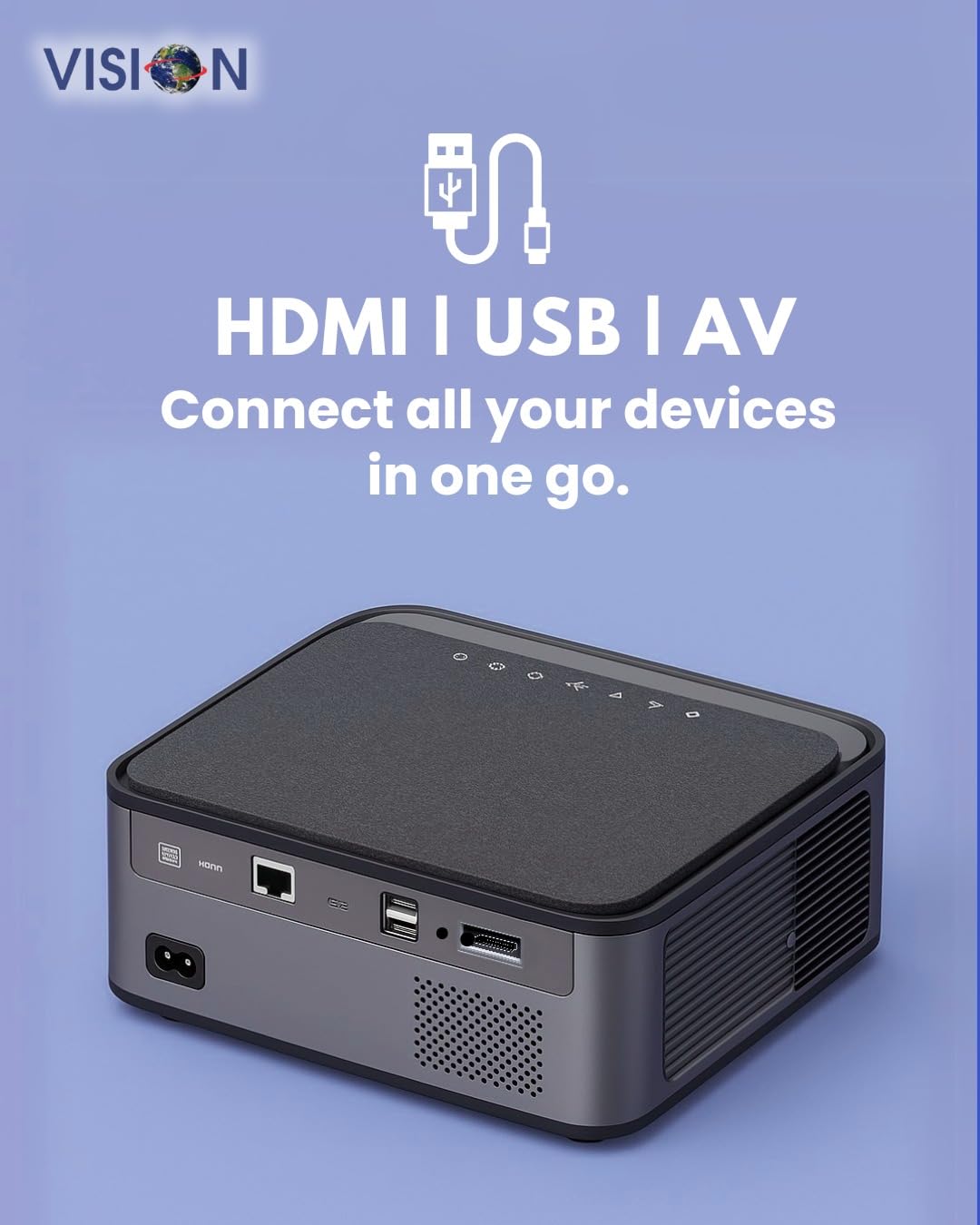
ภาพ: ด้านหลัง view of the projector displaying the various input and output ports, including HDMI, USB, and AV.
- กำลังไฟเข้า: เชื่อมต่ออะแดปเตอร์ไฟฟ้าที่นี่
- พอร์ต HDMI: Connect to HDMI-enabled devices (laptops, gaming consoles, streaming sticks).
- พอร์ต USB (x2): Connect USB drives for media playback or external devices.
- อินพุต AV: Connect to older devices using the provided AV cable.
- ช่องต่อสัญญาณเสียงออก (3.5 มม.): เชื่อมต่อลำโพงภายนอกหรือหูฟัง
- พอร์ต LAN: For wired internet connection (if available).
5. การตั้งค่า
5.1 การจัดวางโปรเจ็กเตอร์
Choose a flat, stable surface for the projector. Ensure there are no obstructions in front of the lens and that the ventilation grilles are clear.

Image: A projector positioned on a desk, illustrating a typical setup environment.
5.2 การเชื่อมต่อสายไฟ
- ต่ออะแดปเตอร์แปลงไฟเข้ากับพอร์ตจ่ายไฟของโปรเจ็กเตอร์
- เสียบสายไฟเข้ากับเต้ารับที่ผนัง
- ไฟแสดงสถานะพลังงานบนโปรเจ็กเตอร์จะสว่างขึ้น
5.3 การเปิดเครื่องครั้งแรก
- กดปุ่มเปิด/ปิดบนโปรเจ็กเตอร์หรือรีโมทคอนโทรลเพื่อเปิดเครื่อง
- โปรเจ็กเตอร์จะเริ่มทำงานและแสดงหน้าจอหลักของ Android 9.0
5.4 การปรับโฟกัสและคีย์สโตน
The VISION VP-621 features automatic focus and 4D keystone correction for a clear and properly aligned image.

Image: Illustrates the projector's automatic focus and keystone correction capabilities, ensuring a sharp and aligned picture.
- โฟกัสอัตโนมัติ: The projector will automatically adjust the focus for a sharp image upon startup or movement.
- การแก้ไขคีย์สโตน 4D: The projector automatically corrects image distortion when placed at an angle. Manual adjustments may be available in the settings menu if needed.
6. คู่มือการใช้งาน
6.1 Android 9.0 Smart OS
The integrated Android 9.0 system allows direct access to streaming services and apps.
- การนำทาง: Use the remote control's directional buttons and "OK" button to navigate the interface.
- การติดตั้งแอป: Access the Google Play Store to download and install applications like YouTube, Netflix, and Prime Video.
- การเชื่อมต่อเครือข่าย: Go to Settings > Network to connect to a 5G WiFi network or a wired LAN connection.
6.2 การเชื่อมต่ออุปกรณ์ภายนอก
การเชื่อมต่อ HDMI
- Connect an HDMI cable from your device (laptop, gaming console, Fire TV Stick) to the HDMI port on the projector.
- บนหน้าจอหลักของโปรเจ็กเตอร์ ให้เลือกแหล่งสัญญาณเข้า HDMI
การเชื่อมต่อ USB
- Insert a USB drive into one of the USB ports on the projector.
- The projector will typically prompt you to open the media player or file browser. If not, navigate to the file manager app on the Android home screen.
การเชื่อมต่อ AV
- Connect the provided AV cable to the AV input port on the projector and to your external device.
- Select the AV input source on the projector.
Bluetooth 5.0 Audio Output
- Go to Settings > Bluetooth on the projector.
- เปิดใช้งาน Bluetooth และค้นหาอุปกรณ์ที่มีอยู่
- Select your Bluetooth speaker or headphones from the list to pair and connect.
Wireless Miracast (Screen Mirroring)
Miracast allows you to wirelessly mirror the screen of your compatible smartphone, tablet, or laptop.
- On the projector's home screen, select the "Miracast" or "Screen Mirroring" application.
- On your mobile device, enable screen mirroring (often found in quick settings or display settings, named "Cast," "Smart View," "Wireless Display," etc.).
- Select the projector from the list of available devices to establish the connection.
7. การบำรุงรักษา
7.1 การทำความสะอาดโปรเจ็กเตอร์
- เลนส์: ใช้ผ้าเนื้อนุ่ม ปราศจากขน ที่ออกแบบมาสำหรับเลนส์แว่นตาโดยเฉพาะ ห้ามใช้สารทำความสะอาดที่มีฤทธิ์กัดกร่อน
- Casing: เช็ดโปรเจคเตอร์asing with a soft, dry cloth. For stubborn dirt, slightly dampชุบน้ำแล้วเช็ดให้แห้ง
- การระบายอากาศ : Regularly check and clean the ventilation grilles to ensure proper airflow and prevent dust buildup. Use a soft brush or compressed air.
7.2 ลิตรamp ชีวิต
The VISION VP-621 utilizes advanced LED technology, providing an estimated lamp life of up to 50,000 hours. This significantly reduces the need for lamp ทดแทนเมื่อเทียบกับโปรเจ็กเตอร์แบบดั้งเดิม
8 การแก้ไขปัญหา
| ปัญหา | สาเหตุที่เป็นไปได้ | สารละลาย |
|---|---|---|
| ไม่มีภาพแสดง |
|
|
| ภาพเบลอ |
|
|
| ไม่มีเสียง |
|
|
| ไม่สามารถเชื่อมต่อ Wi-Fi ได้ |
|
|
9. ข้อมูลจำเพาะ
| ยี่ห้อ | วิสัยทัศน์ |
| ชื่อรุ่น | VP-621 AN |
| เทคโนโลยีการแสดงผล | จอแอลซีดี |
| ประเภทจอภาพ | นำ |
| ความสว่าง | 11000 ลูเมน |
| อัตราส่วนความคมชัดของภาพ | 18000:1 Pixels |
| ความละเอียดดั้งเดิม | 1920 x 1280 (ฟูลเอชดี) |
| ความละเอียดที่รองรับ | สูงสุด 4K Ultra HD |
| อัตราส่วนภาพ | 16:9, 4:3 |
| ระบบปฏิบัติการ | แอนดรอยด์ 9.0 |
| เทคโนโลยีการเชื่อมต่อ | Bluetooth 5.0, HDMI, USB, Wi-Fi (5G) |
| ฮาร์ดแวร์อินเตอร์เฟซ | Bluetooth 5, HDMI, USB 3.0 |
| คุณสมบัติพิเศษ | Built-In 3D, Built-In Cooling System, Built-In Speaker, Electric Focus, Wi-Fi Ready, Auto Focus, 4D Keystone Correction, Wireless Miracast |
| ขนาดสินค้า | 30 x 18 x 7 ซม. |
| น้ำหนักสินค้า | 8 กก. |
| Lamp ชีวิต | นานถึง 50,000 ชั่วโมง |

Image: Illustrates the projector's Full HD (1920x1080) resolution capability for crisp visuals.

Image: Highlights the projector's 11000 lumens brightness, ensuring clear visuals in various lighting conditions.
10. การรับประกันและการสนับสนุน
For warranty information and technical support, please contact the manufacturer:
- ผู้ผลิต: Scorpio Infosolutions
- ที่ตั้ง: Delhi, India
- โทรศัพท์: +91-7982647130
- Webเว็บไซต์: visionsheen.in
Please have your product model (VP-621) and purchase details ready when contacting support.