1. บทนำ
This manual provides instructions for the proper use and care of your Linsoul SIMGOT EW300 In-Ear Monitors. The EW300 features a hybrid driver configuration and a durable metal casing, designed for clear audio reproduction.

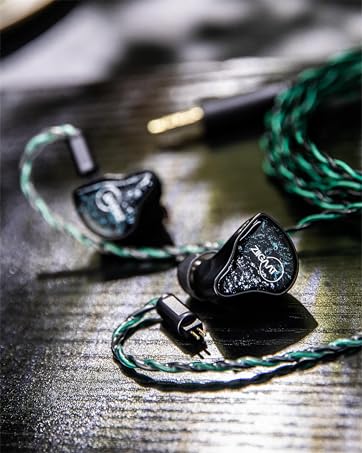
Image 1.1: SIMGOT EW300 In-Ear Monitors with their silver-plated OFC cable.
2. อะไรอยู่ในกล่อง
ตรวจสอบว่ามีส่วนประกอบทั้งหมดอยู่:
- SIMGOT EW300 In-Ear Monitors (Left and Right units)
- Detachable 0.78mm 2-pin High-Purity Silver-Plated Oxygen-Free Copper (OFC) Cable
- Multiple pairs of Silicone Eartips (various sizes)
- Two sets of Tuning Nozzles (Silver Steel Tube and Gold Copper Tube)
- กระเป๋าใส่อุปกรณ์ป้องกัน
- คู่มือการใช้งาน

Image 2.1: All included accessories and components of the SIMGOT EW300 package.
3. คุณสมบัติของผลิตภัณฑ์
3.1. Hybrid Driver Configuration
The SIMGOT EW300 features a sophisticated acoustic design with a 1 dynamic driver, 1 planar driver, and 1 piezoelectric ceramic driver on each side. This tri-matrix acoustic architecture is engineered for balanced sound reproduction across the frequency spectrum.
ภาพที่ 3.1: ระเบิด view illustrating the internal hybrid driver components.
3.2. Detachable Tuning Nozzles
The EW300 includes a replaceable nozzle design, offering two distinct tuning styles. Each set of nozzles incorporates unique tuning systems. The threaded connection allows for easy swapping between nozzles to adjust the sound profile according to preference.
- Silver Steel Tube & Red Silicone Rings: Tuned based on the SIMGOT-Golden2023 target curve for a balanced sound.
- Gold Copper Tube & Purple Silicone Rings: Tuned based on the H-2019 target curve, optimized for gaming scenarios with enhanced sound reproduction for critical in-game audio cues.
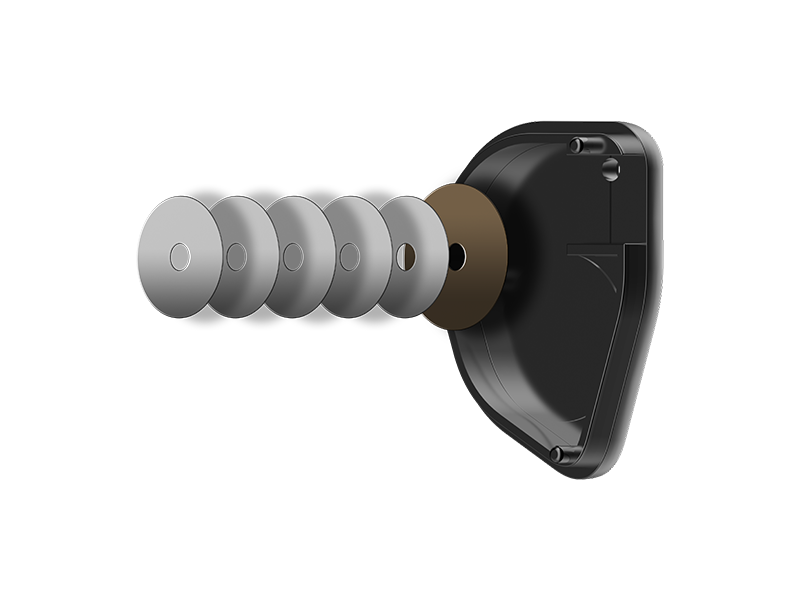
Image 3.2: Frequency response curves demonstrating the effect of different tuning nozzles.
3.3. CNC Alloy Casing and Ergonomic Fit
The robust all-metal body is crafted from high-density alloy using precision CNC technology, providing durability. The ergonomic design is based on extensive 3D ear contour analysis to ensure a comfortable and secure fit.
3.4. High-Purity Silver-Plated OFC Cable
The EW300 comes with a standard 0.78mm 2-pin high-purity silver-plated oxygen-free copper cable. Its multi-strand design aims for precise signal transmission, enhancing sound separation and resolution. The cable is encased in transparent, anti-oxidation PVC for durability.

ภาพที่ 3.3: รายละเอียด view of the detachable silver-plated OFC cable.
4. การตั้งค่า
4.1. การเชื่อมต่อสายเคเบิล
- Identify the left (L) and right (R) earphone units and the corresponding connectors on the cable. The cable connectors are typically marked.
- Align the 2-pin connector on the cable with the receptacle on the earphone unit. Ensure the pins are correctly oriented.
- Gently push the cable connector into the earphone unit until it is securely seated. Do not force the connection.
- ทำซ้ำกับหน่วยหูฟังอีกอัน
4.2. Choosing and Installing Eartips
Selecting the correct eartip size is crucial for sound quality and comfort. Experiment with the included eartips to find the best fit for your ears.
- Gently remove any pre-installed eartips by pulling them off the nozzle.
- Select an eartip size (Small, Medium, Large) that provides a snug seal in your ear canal without causing discomfort.
- Push the chosen eartip onto the earphone nozzle until it is fully seated and secure.

Image 4.1: Selection of silicone eartips in different sizes.
4.3. Replacing Tuning Nozzles
The EW300 allows you to change tuning nozzles to alter the sound profile.
- Gently unscrew the currently installed nozzle from the earphone unit.
- Select the desired tuning nozzle (Silver Steel Tube or Gold Copper Tube).
- Carefully screw the new nozzle onto the earphone unit until it is finger-tight. Do not overtighten.
- Re-attach the eartips to the newly installed nozzles.

Image 4.2: Detachable gold copper tuning nozzle for the EW300.
5. คู่มือการใช้งาน
5.1. การสวมหูฟัง IEM
- Insert the earphone units into your ear canals, ensuring a comfortable and secure fit. The cable should typically loop over the top of your ear.
- Adjust the cable to sit comfortably behind your ears and down your back or front.
5.2. การเล่นเสียง
Connect the 3.5mm jack of the cable to your audio source (e.g., smartphone, digital audio player, computer). Adjust the volume on your audio source to a comfortable listening level before placing the IEMs in your ears.
5.3. การควบคุมสื่อ
If your cable includes an inline remote, refer to its specific instructions for media playback control (e.g., play/pause, track skip) and call management.
6. การบำรุงรักษา
6.1. การทำความสะอาด
- จุกหูฟัง: Remove eartips and clean them with mild soap and water. Rinse thoroughly and allow them to dry completely before reattaching.
- หัวฉีด: Use a small, soft brush or cotton swab to gently remove any earwax or debris from the nozzle filters. Avoid using liquids directly on the nozzles.
- ตัวหูฟัง: Wipe the earphone body with a soft, dry, lint-free cloth. Avoid abrasive materials or harsh chemicals.
6.2. การจัดเก็บ
When not in use, store your SIMGOT EW300 IEMs in the provided protective carrying case to prevent damage from dust, moisture, and physical impact.
6.3. การดูแลรักษาสายเคเบิล
Handle the detachable cable with care. Avoid sharp bends, excessive pulling, or tangling to prolong its lifespan. Disconnect the cable by gripping the connector, not the cable itself.
7 การแก้ไขปัญหา
| ปัญหา | สาเหตุที่เป็นไปได้ | สารละลาย |
|---|---|---|
| ไม่มีเสียงหรือเสียงเบา |
|
|
| Sound imbalance (one side louder/quieter) |
|
|
| ความรู้สึกไม่สบายหรือใส่ไม่พอดี |
|
|
8. ข้อมูลจำเพาะ
| คุณสมบัติ | รายละเอียด |
|---|---|
| ชื่อรุ่น | SIMGOT EW300 |
| การกำหนดค่าไดร์เวอร์ | 1 Dynamic Driver + 1 Planar Magnetic Driver + 1 Piezoelectric Ceramic Driver (per side) |
| ขนาดไดรเวอร์แบบไดนามิก | 10 มม. |
| อิมพีแดนซ์ | 28 โอห์ม |
| ความไวต่อความรู้สึก | 121 dB (Silver Steel Tube), 119 dB (Gold Copper Tube) |
| การตอบสนองความถี่ | 8 เฮิรตซ์ - 40 กิโลเฮิรตซ์ |
| แจ็คหูฟัง | แจ็ค 3.5 มม. |
| เทคโนโลยีการเชื่อมต่อ | มีสาย |
| คุณสมบัติสายเคเบิล | Detachable 0.78mm 2-pin |
| วัสดุ | อลูมิเนียม |
| การควบคุมเสียงรบกวน | การยกเลิกเสียงรบกวนแบบพาสซีฟ |
| น้ำหนักสินค้า | 9.2 ออนซ์ (0.26 กิโลกรัม) |
| ขนาดสินค้า | 0.04 x 0.04 x 0.04 นิ้ว |
9. สินค้าหมดview วีดีโอ
ชมวิดีโอนี้เพื่อดูภาพรวมview of the SIMGOT EW300 In-Ear Monitors, including unboxing and components.
Video 9.1: An official video from Linsoul Audio showcasing the SIMGOT EW300 IEMs and their accessories.
10. การรับประกันและการสนับสนุน
For warranty information or technical support, please contact Linsoul Audio directly through their official webเว็บไซต์หรือร้านค้าที่คุณซื้อสินค้า โปรดเก็บหลักฐานการซื้อไว้เพื่อใช้ในการเคลมประกัน
Linsoul Audio Official Webเว็บไซต์: Visit the Linsoul Store on Amazon


