1. บทนำ
Thank you for choosing the Moukey MPA80 PA System. This manual provides essential information for the safe and efficient operation of your new audio system. Please read it thoroughly before use and retain it for future reference.
คำแนะนำเพื่อความปลอดภัย
- อ่านคำแนะนำทั้งหมดอย่างละเอียดก่อนใช้งานอุปกรณ์
- เก็บผลิตภัณฑ์ให้ห่างจากน้ำ ความชื้น และอุณหภูมิที่สูงเกินไป
- อย่าพยายามถอดประกอบหรือซ่อมแซมเครื่องด้วยตัวเอง แนะนำให้ส่งช่างผู้ชำนาญการไปรับบริการทั้งหมด
- ตรวจสอบให้แน่ใจว่ามีการระบายอากาศที่เหมาะสมเพื่อป้องกันภาวะความร้อนมากเกินไป
- Use only the power adapter and accessories specified by the manufacturer.
- Position the speakers and stands on a stable, level surface to prevent tipping.
2. อะไรอยู่ในกล่อง
ตรวจสอบว่ามีรายการทั้งหมดอยู่ในแพ็คเกจ:
- 1 x 8-inch Active PA Speaker
- 1 x 8-inch Passive PA Speaker
- 2 x Tripod Stands
- 1 x ไมโครโฟนแบบมีสาย
- 1 x รีโมทคอนโทรล
- สายไฟ 1 เส้น
- 1 x Speaker Connection Cable (for active to passive speaker)
- 1 x คู่มือผู้ใช้ (เอกสารนี้)

Image 2.1: Moukey MPA80 PA System components including two speakers, two tripod stands, a wired microphone, and a remote control.
3. สินค้าหมดview
ส่วนประกอบของลำโพง
Each speaker unit features an 8-inch woofer and 1-inch tweeters for balanced audio output.
Control Panel (Active Speaker)
The active speaker houses the main control panel. Refer to the image below for a visual guide to the controls and inputs.
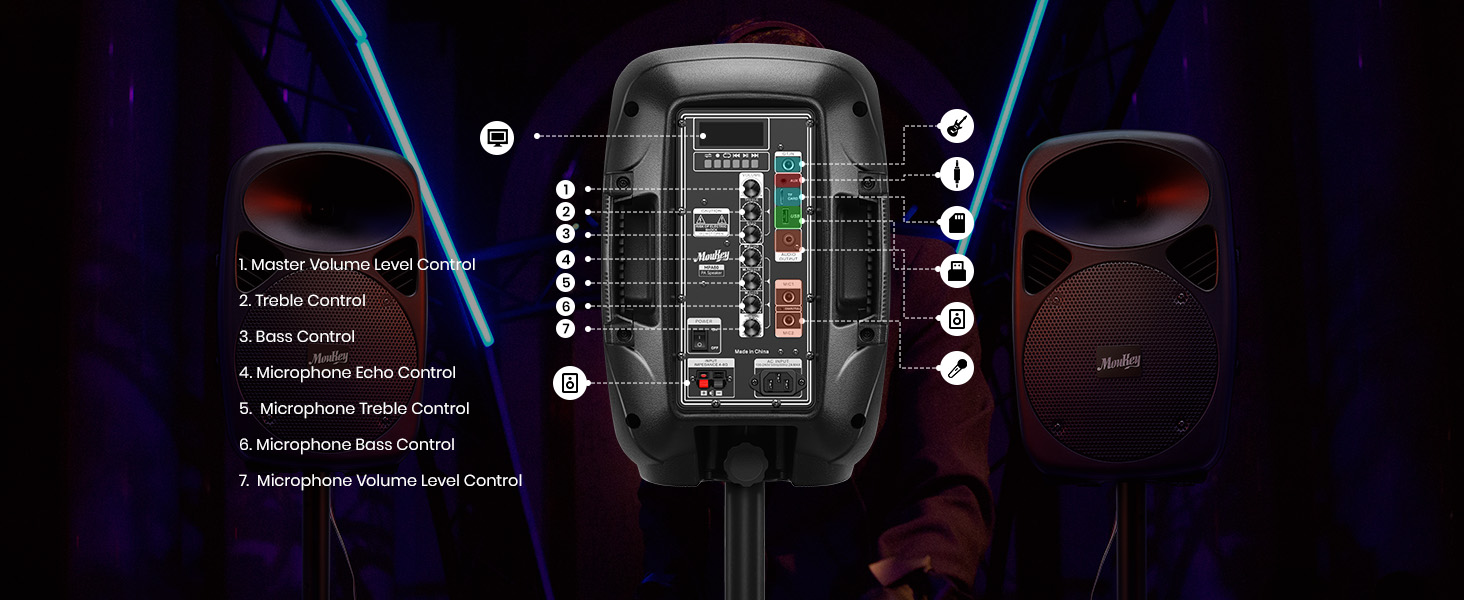
ภาพที่ 3.1: รายละเอียด view of the Moukey MPA80 PA System's active speaker control panel with numbered labels for each function.
- Master Volume Level Control: ปรับระดับเสียงเอาต์พุตโดยรวม
- การควบคุมเสียงแหลม: ปรับระดับเสียงความถี่สูง
- การควบคุมเสียงเบส: ปรับระดับเสียงความถี่ต่ำ
- Microphone Echo Control: Adjusts the echo effect for microphone inputs.
- Microphone Treble Control: Adjusts the high-frequency audio for microphone inputs.
- Microphone Bass Control: Adjusts the low-frequency audio for microphone inputs.
- Microphone Volume Level Control: Adjusts the volume of microphone inputs.
- USB/TF Card Slot: For playing audio from USB drives or TF cards.
- ปุ่มโหมด: Switches between input modes (Bluetooth, USB, TF, FM, AUX).
- ปุ่มเล่น/หยุดชั่วคราว: Controls playback for USB/TF/Bluetooth.
- ปุ่มแทร็กก่อนหน้า/ถัดไป: Navigates tracks for USB/TF/Bluetooth.
- เสาอากาศ FM: เพื่อการรับสัญญาณวิทยุ FM ที่ดีขึ้น
- อินพุต AUX: แจ็คขนาด 3.5 มม. สำหรับเชื่อมต่ออุปกรณ์เสียงภายนอก
- Mic Inputs (x2): 1/4-inch jacks for connecting wired microphones.
- กำลังไฟเข้า: สำหรับเชื่อมต่อสายไฟ AC
- สวิตช์ไฟ: เปิดหรือปิดเครื่อง
- เอาท์พุตลำโพง: Connects to the passive speaker using the provided cable.
4. การตั้งค่า
4.1 Assembling the Tripod Stands
The included tripod stands provide stable support for your speakers. Follow these steps for assembly:
- กางขาตั้งกล้องออกจนสุดและมั่นคง
- Adjust the height of the stand using the locking mechanism. Ensure the locking pin is securely engaged.
- Place a speaker onto the top pole of each stand. Ensure the speaker is seated firmly.
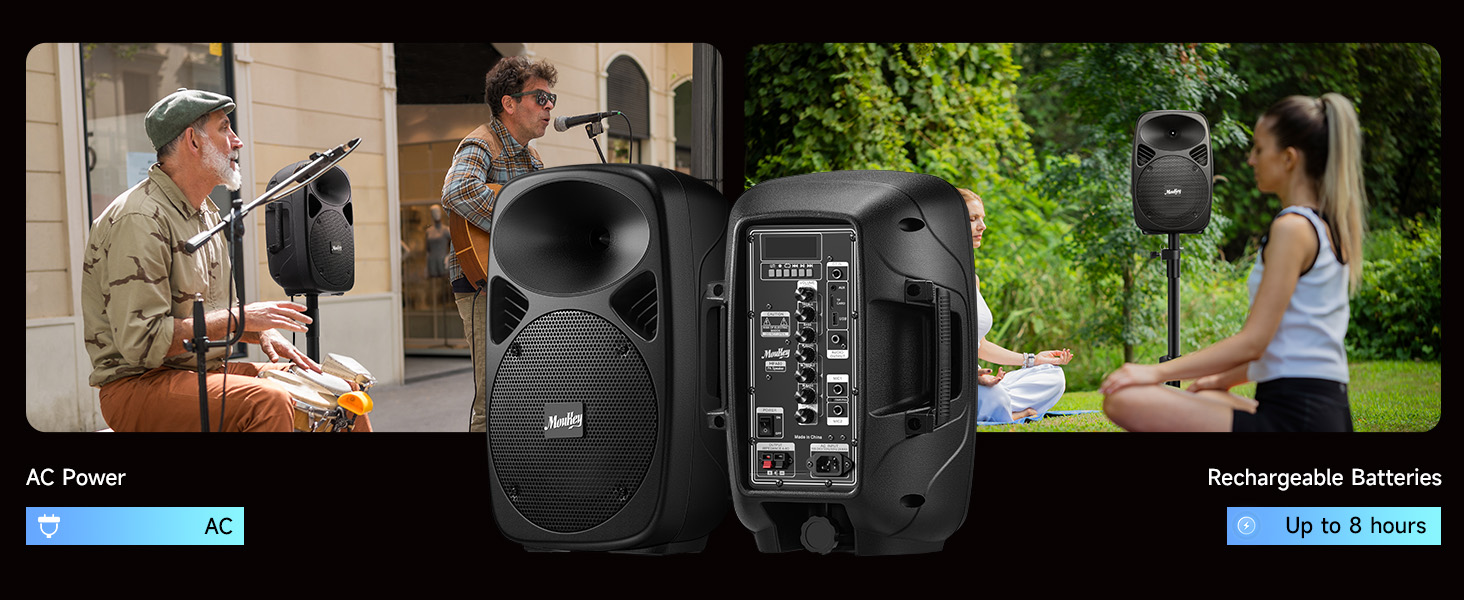
Image 4.1: Diagram showing the steps to assemble the tripod stands and mount the speakers.
4.2 การเชื่อมต่อลำโพง
The Moukey MPA80 system includes one active speaker and one passive speaker. The passive speaker must be connected to the active speaker using the provided speaker cable.
- Locate the speaker output terminals on the active speaker and the input terminals on the passive speaker.
- Connect one end of the speaker cable to the active speaker's output.
- Connect the other end of the speaker cable to the passive speaker's input. Ensure a secure connection.
บันทึก: The passive speaker does not have its own power source and relies on the active speaker for audio signal and power.
4.3 Powering the System
The system can be powered via AC power or its internal rechargeable battery.
Image 4.2: Illustration of the Moukey MPA80 PA System showing both AC power connection and battery operation for up to 8 hours.
- ไฟฟ้ากระแสสลับ: Connect the provided power cable to the power input on the active speaker and then to a standard electrical outlet.
- พลังงานแบตเตอรี่: The system has a built-in rechargeable battery. Ensure the battery is charged before outdoor or portable use. A full charge can provide up to 8 hours of playtime at 50% volume.
- Flip the Power Switch to the 'ON' position to turn on the system.
5. คู่มือการใช้งาน
5.1 การเชื่อมต่อบลูทูธ
Connect your device wirelessly via Bluetooth 5.0.
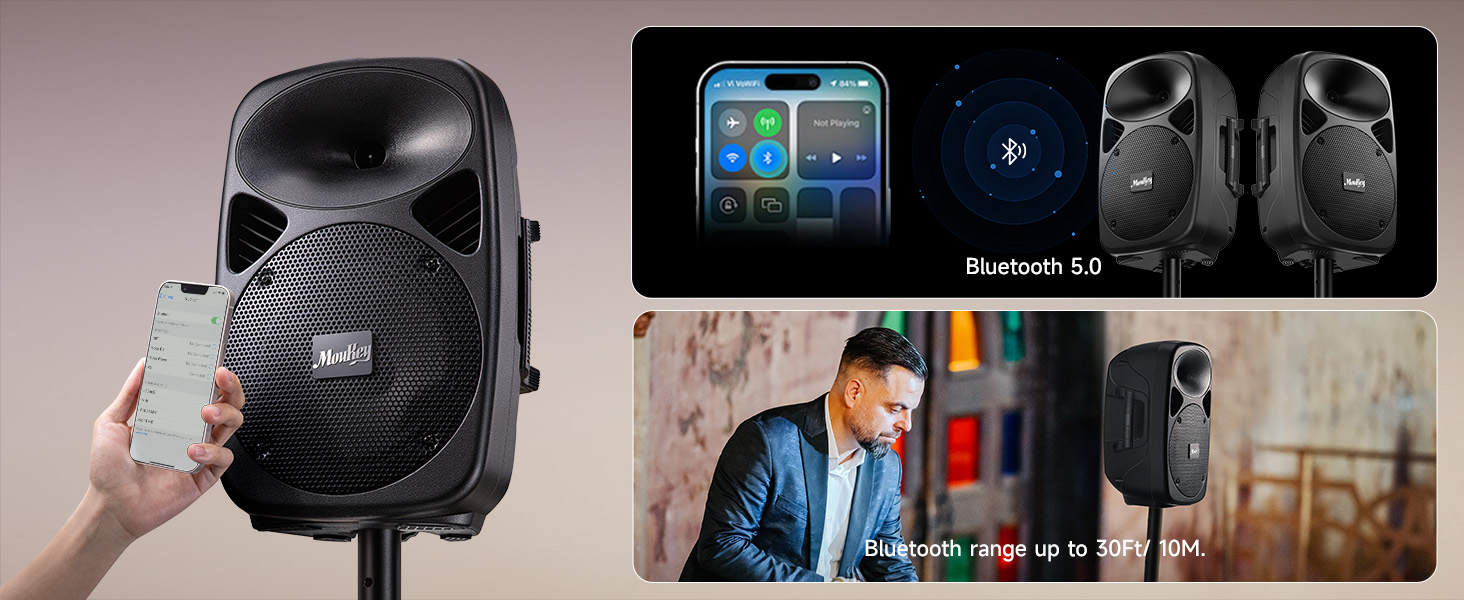
Image 5.1: Image showing a smartphone connecting to the Moukey MPA80 PA System via Bluetooth 5.0, with a Bluetooth range of up to 30 feet.
- Turn on the PA system.
- Press the 'Mode' button on the control panel or remote until 'Bluetooth' mode is selected. The display will show 'BLUE' and a pairing indicator will flash.
- บนสมาร์ทโฟน แท็บเล็ต หรืออุปกรณ์อื่นๆ ที่รองรับบลูทูธ ให้ค้นหาอุปกรณ์บลูทูธที่ใช้งานได้
- Select 'Moukey MPA80' from the list. Once connected, the pairing indicator will stop flashing.
- You can now play audio from your device through the PA system. The effective Bluetooth range is approximately 30 feet (10 meters).
การเล่นการ์ด USB/TF ขนาด 5.2 นิ้ว
เล่นเสียง files directly from a USB flash drive or TF (MicroSD) card.
- Insert a USB flash drive or TF card into the respective slot on the control panel.
- The system should automatically switch to USB/TF mode and begin playback. If not, press the 'Mode' button to select the correct input.
- ใช้ปุ่ม 'เล่น/หยุดชั่วคราว', 'ก่อนหน้า' และ 'ถัดไป' บนแผงควบคุมหรือรีโมทเพื่อควบคุมการเล่น
อินพุต AUX 5.3 ช่อง
Connect external audio sources using a 3.5mm AUX cable.
- Connect one end of a 3.5mm audio cable to the AUX input on the active speaker.
- Connect the other end to the headphone jack or audio output of your external device (e.g., laptop, MP3 player).
- Press the 'Mode' button to select 'AUX' input.
- Adjust the volume on both the PA system and your external device.
5.4 การใช้งานไมโครโฟน
Connect the wired microphone for vocal performances or announcements.
- Plug the wired microphone into one of the 1/4-inch 'Mic In' jacks on the active speaker.
- Adjust the 'Mic Volume Level Control' to set the microphone's volume.
- Use the 'Microphone Echo Control', 'Microphone Treble Control', and 'Microphone Bass Control' to fine-tune the microphone's sound.
5.5 วิทยุ FM
Listen to FM radio stations.
- Press the 'Mode' button until 'FM' mode is selected.
- ขยายเสาอากาศ FM เพื่อการรับสัญญาณที่ดีขึ้น
- Use the 'Previous' and 'Next' buttons to scan for radio stations.
5.6 การควบคุม EQ
Customize the sound output to your preference.
- Use the 'Treble Control' knob to increase or decrease high frequencies.
- Use the 'Bass Control' knob to increase or decrease low frequencies.
6. การบำรุงรักษา
6.1 การทำความสะอาด
To maintain the appearance and longevity of your PA system:
- ถอดปลั๊กไฟก่อนทำความสะอาดทุกครั้ง
- Wipe the surfaces with a soft, dry, or slightly damp ผ้า.
- ห้ามใช้น้ำยาทำความสะอาดที่มีฤทธิ์กัดกร่อน ขี้ผึ้ง หรือตัวทำละลาย
- Keep liquids away from openings and controls.
6.2 การดูแลแบตเตอรี่
The internal lithium-ion battery requires proper care for optimal performance and lifespan:
- การชาร์จ: Charge the battery fully before first use. Recharge the battery regularly, even if the system is not used frequently, to maintain battery health.
- พื้นที่จัดเก็บ: If storing the system for an extended period, charge the battery to approximately 50-70% and store in a cool, dry place. Avoid storing with a completely depleted or fully charged battery for long durations.
- อุณหภูมิ: Avoid exposing the battery to extreme heat or cold, as this can degrade performance and lifespan.
6.3 พื้นที่จัดเก็บ
When not in use, store the PA system in a dry, dust-free environment. If possible, use the original packaging or a protective cover to prevent dust accumulation and damage.
7 การแก้ไขปัญหา
If you encounter issues with your Moukey MPA80 PA System, refer to the following common problems and solutions:
| ปัญหา | สาเหตุที่เป็นไปได้ | สารละลาย |
|---|---|---|
| ไม่มีไฟฟ้า | ไม่ได้ต่อสายไฟ แบตเตอรี่หมด สวิตช์ไฟปิดอยู่ | Ensure power cable is securely connected; Charge the battery; Turn power switch to 'ON' |
| ไม่มีเสียงออก | Volume too low; Incorrect input mode; Speaker cable disconnected; External device issue | Increase Master Volume; Select correct input mode (Bluetooth, AUX, USB/TF); Check speaker connection cable; Verify external device audio output |
| บลูทูธไม่เชื่อมต่อ | PA system not in pairing mode; Device too far; Interference; Device already connected to another unit | Ensure PA system is in Bluetooth pairing mode; Move device closer; Reduce interference; Disconnect from other Bluetooth devices |
| ไมโครโฟนไม่ทำงาน | Microphone not plugged in; Mic volume too low; Microphone faulty | Ensure microphone is securely plugged into 'Mic In' jack; Increase 'Mic Volume Level Control'; Test with another microphone if available |
| การรับสัญญาณวิทยุ FM ไม่ดี | Antenna not extended; Weak signal | Fully extend the FM antenna; Try repositioning the unit for better signal |
If the problem persists after trying these solutions, please contact Moukey customer support for assistance.
8. ข้อมูลจำเพาะ
Key technical specifications for the Moukey MPA80 PA System:
| คุณสมบัติ | ข้อมูลจำเพาะ |
|---|---|
| กำลังขับสูงสุด | 800วัตต์ |
| RMS กำลังขับ | 60วัตต์ |
| ขนาดวูฟเฟอร์ | 8 นิ้ว |
| ขนาดทวีตเตอร์ | 1 นิ้ว |
| เวอร์ชันบลูทูธ | 5.0 |
| เทคโนโลยีการเชื่อมต่อ | AUX, บลูทูธ, USB |
| อินพุตเสียง | USB, TF, 2 Mic-in (1/4"), AUX IN (3.5mm) |
| แหล่งพลังงาน | AC Power, Rechargeable Battery |
| ประเภทแบตเตอรี่ | ลิเธียมไอออน (ต้องใช้ 2 อัน รวมอยู่ด้วย) |
| เวลาเล่นแบตเตอรี่ | สูงสุด 8 ชั่วโมง (ที่ระดับเสียง 50%) |
| การตอบสนองความถี่ | ความถี่ 18 กิโลเฮิรตซ์ |
| อิมพีแดนซ์ | 8 โอห์ม |
| ขนาดผลิตภัณฑ์ (แต่ละลำโพง) | 10.2 x 7.9 x 15.4 นิ้ว |
| น้ำหนักสินค้า | 26 pounds (total for system) |
| Tripod Stand Height (max) | 37 นิ้ว |
| Tripod Stand Load Capacity | สูงสุด 132 ปอนด์ |
9. การรับประกันและการสนับสนุน
Moukey products are designed and manufactured to high-quality standards. For information regarding warranty coverage, please refer to the warranty card included with your product or visit the official Moukey webเว็บไซต์.
For technical support, troubleshooting assistance, or inquiries about replacement parts, please contact Moukey customer service through the contact information provided on the official webไซต์หรือแพลตฟอร์มการซื้อของคุณ


