1. บทนำ
This manual provides detailed instructions for the setup, operation, and maintenance of your AOCHUAN 3-Axis Gimbal Stabilizer Smart X Complete Combo1. Please read this manual thoroughly before using the product to ensure proper functionality and to maximize your user experience.

Image 1: AOCHUAN Smart X Gimbal Stabilizer with included accessories.
2. อะไรอยู่ในกล่อง
ตรวจสอบว่ารายการทั้งหมดที่ระบุไว้ด้านล่างนี้รวมอยู่ในแพ็คเกจของคุณ:
- 1x Smart X Gimbal (Black)
- 1x Multifunctional Tripod
- 1x RGB Magnetic Light
- คู่มือผู้ใช้ 3 เล่ม
- สายชาร์จ 2 เส้น
- 1x All-in Storage Bag
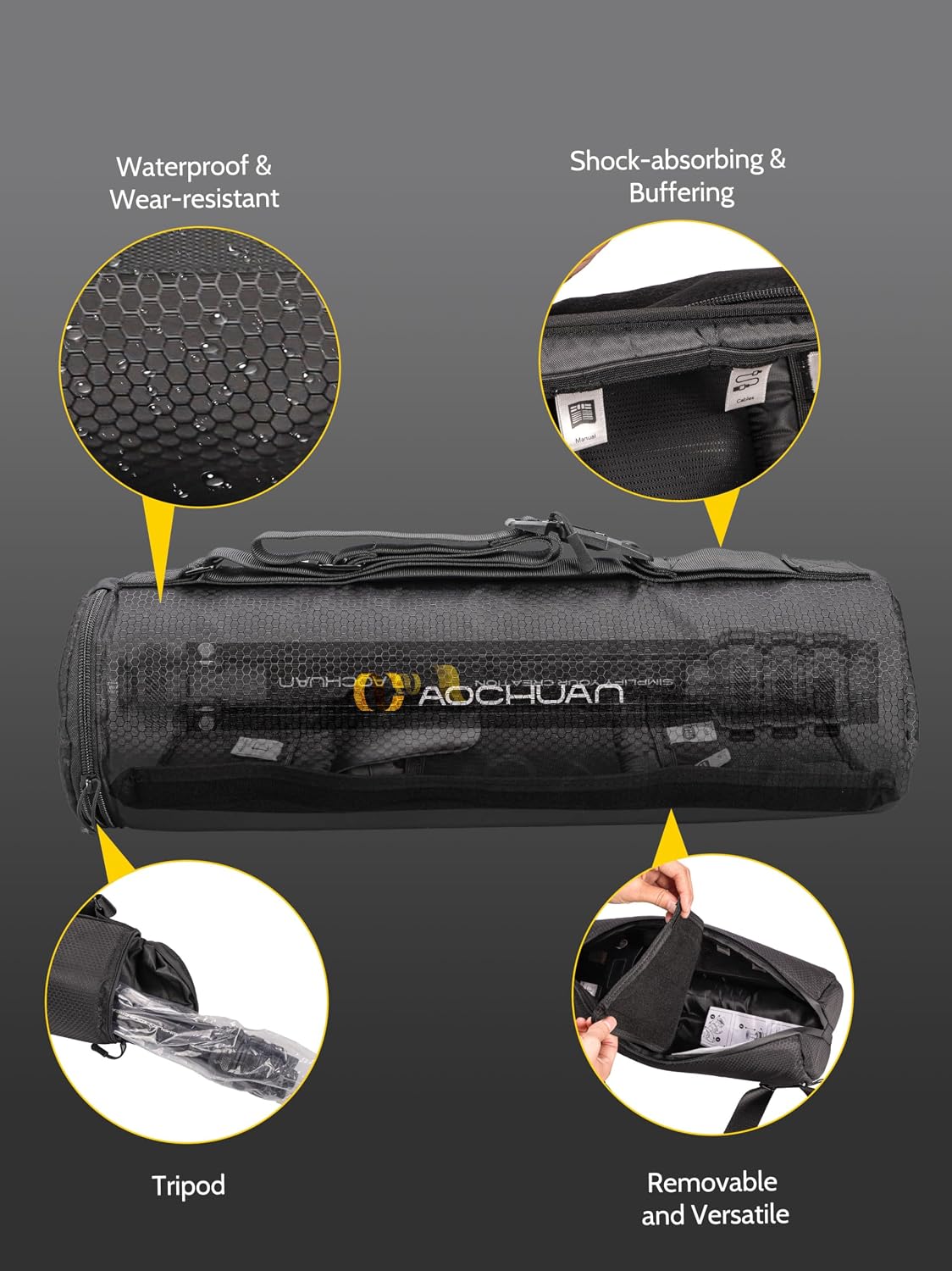
Image 2: The cylindrical padded carry bag, designed for organized storage of all components.
3. คุณสมบัติของผลิตภัณฑ์
3.1. SMART 7.0 Anti-Shake Algorithm
The Smart X Gimbal incorporates an enhanced brushless motor and the SMART 7.0 anti-shake algorithm. This technology ensures stable and smooth video footage, even during movement, making it suitable for dynamic content creation.

Image 3: Visual representation of improved stability with the gimbal's anti-shake algorithm.
3.2. การติดตาม AI และการควบคุมท่าทาง
The AOCHUAN APP features Smart 4.0 AI tracking capabilities, including face tracking, object tracking, and body tracking. This allows the gimbal to automatically follow subjects, keeping them centered in the frame. Additionally, the gimbal supports AI gesture control for convenient operation.

Image 4: The gimbal's AI tracking feature in action, following a subject.

ภาพที่ 5: อดีตamples of AI gesture controls for operating the gimbal.
3.3. Integrated Lighting Equipment
The gimbal includes a built-in ring light with three adjustable brightness levels to adapt to various environmental conditions. The complete combo also includes a long-lasting 7-color magnetic RGB light, which can be adjusted to add specific atmospheric effects to your video content.
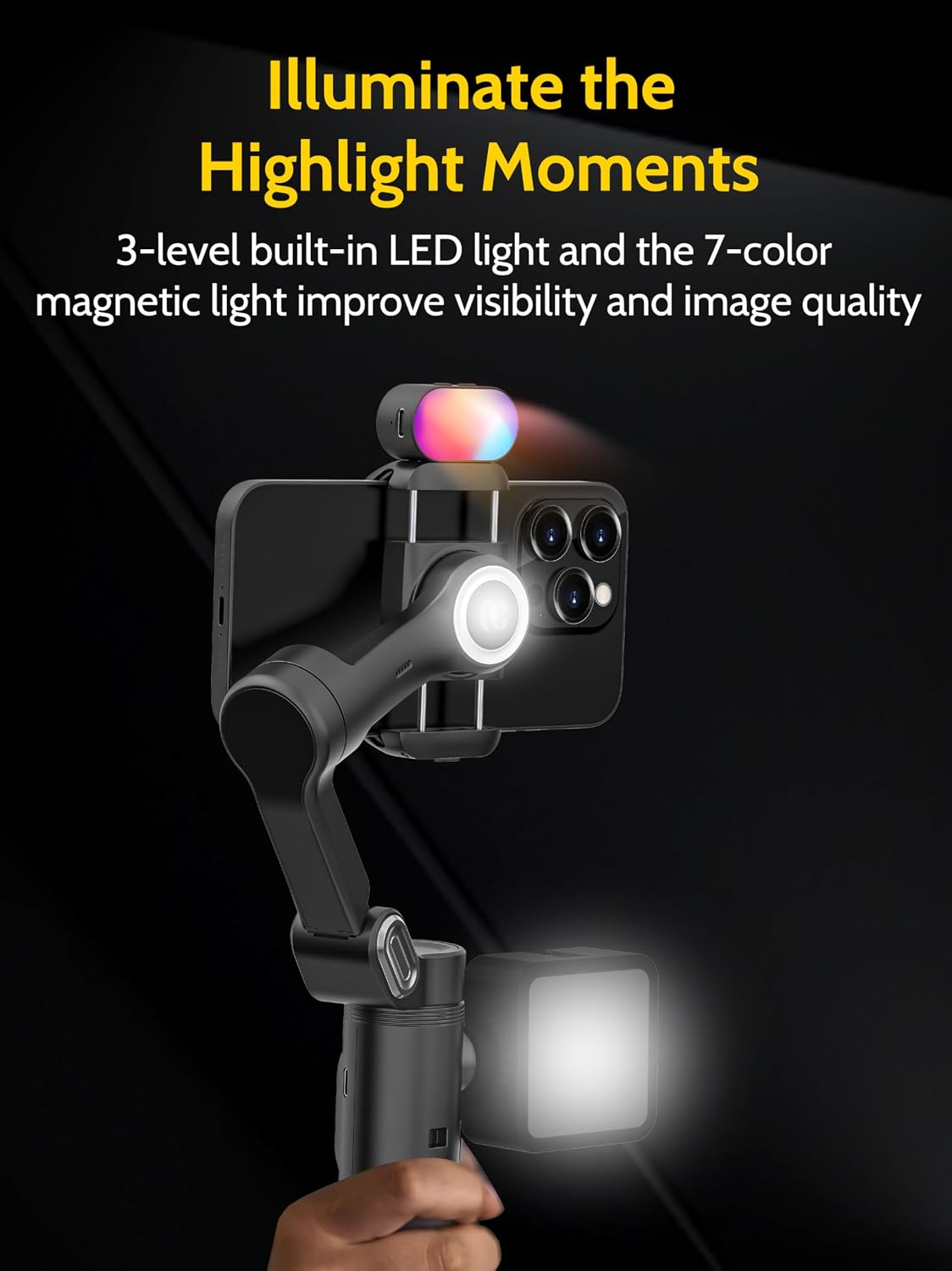
Image 6: The gimbal's built-in ring light and magnetic RGB light providing illumination.
3.4. Universal 1/4" Thread Design
A 1/4-inch standard thread is located on the left side of the gimbal, allowing for the attachment of various accessories such as external lights or microphones. An additional 1/4" thread at the bottom enables connection to the extendable tripod for ground-level shooting.

Image 7: The 1/4" universal thread for attaching additional accessories.
3.5. 3-สtage Extendable Tripod
The included versatile tripod is compatible with a range of devices, including the gimbal, smartphones, and compact cameras. Its lightweight design features three adjustable levels, extending from 14.76 inches to 50 inches, to accommodate various shooting heights.

ภาพที่ 8: 3-stage extendable tripod in use, demonstrating its adjustable height.
4. คู่มือการติดตั้ง
4.1. การแกะกล่องและการตรวจสอบเบื้องต้น
Carefully remove all components from the storage bag. Inspect each item for any signs of damage. Ensure all listed accessories are present.
4.2. การชาร์จกิมบอล
Connect the gimbal to a power source using one of the provided USB-C charging cables. The indicator lights on the gimbal will show the charging status. A full charge is recommended before first use.
4.3. การติดตั้งขาตั้งกล้อง
The small tripod can be screwed directly into the 1/4" thread at the bottom of the gimbal. For the extendable tripod, ensure it is securely attached to the gimbal's base.
4.4. การติดตั้งสมาร์ทโฟนของคุณ
ขยายโทรศัพท์ cl เบาๆamp on the gimbal and insert your smartphone. Ensure the phone is balanced as centrally as possible within the clamp to optimize gimbal performance.
4.5. การติดตั้งและการเชื่อมต่อแอป
Download the official AOCHUAN APP from your smartphone's app store. Power on the gimbal. Open the app and follow the on-screen instructions to connect your gimbal via Bluetooth. This connection is essential for accessing advanced features like AI tracking and specific shooting modes.
วิดีโอ 1: จบแล้วview of the AOCHUAN Smart X Complete Combo1, demonstrating its components and basic setup.
5. คู่มือการใช้งาน
5.1. เปิด/ปิดเครื่อง
Press and hold the power button on the gimbal for a few seconds to turn it on or off.
5.2. การเลือกโหมด
The gimbal offers various modes (e.g., Pan Follow, Lock, POV). Refer to the gimbal's display or the app interface to select the desired mode for your shooting scenario.
5.3. Using the AI Tracking Features
Within the AOCHUAN APP, select your preferred tracking mode (Face, Body, or Object). Frame your subject, and the gimbal will automatically adjust to keep it in focus and centered.
5.4. Adjusting Lighting
The built-in ring light can be activated and adjusted for brightness directly on the gimbal. The magnetic RGB light can be attached to the gimbal and its color and mode adjusted to suit your creative needs.
5.5. การควบคุมการซูมและการโฟกัส
The AOCHUAN APP includes an innovative focus switch and zoom slider, allowing for precise control over your camera's focus and zoom, including effects like the Hitchcock-style zoom.
Video 2: A demonstration of the 3-Axis Gimbal Stabilizer's features, including AI tracking and lighting options.
6. ข้อมูลจำเพาะ
| คุณสมบัติ | รายละเอียด |
|---|---|
| แบบอย่าง | สมาร์ทเอ็กซ์ |
| ยี่ห้อ | อ่าวชวน |
| ขนาดแพ็คเกจ | 17.28 x 6.02 x 5.98 นิ้ว |
| น้ำหนักสินค้า | 2.86 ปอนด์ (1.3 กิโลกรัม) |
| แบตเตอรี่ | ต้องใช้แบตเตอรี่ลิเธียมไอออน 1 ก้อน (รวมอยู่ด้วย) |
| อุปกรณ์ที่รองรับ | โทรศัพท์มือถือ |
| Folded Size (Tripod) | 14.76 inches (or less) |
| Extendable Tripod Height | สูงถึง 50 นิ้ว |
7. Supported Mobile Phone Functions
The following table outlines the functions supported by various iPhone and Samsung models. For a comprehensive compatibility list, please refer to the official AOCHUAN webไซต์หรือแอป
| ผู้ผลิต | ประเภทเครื่องจักร | Supporting Lens | ซูม | การบันทึกวิดีโอ | สโลว์โมชั่น | ฮิทช์ค็อก | การถ่ายภาพแบบไทม์แลปส์ | Trajectory delay |
|---|---|---|---|---|---|---|---|---|
| ไอโฟน | ไอโฟน 15 โปร/โปร แม็กซ์ | Super wide angle + wide angle + telephoto | 1.0x~5.0x | 4k 60fps | 1080p 240เฟรมต่อวินาที | 4k 60fps | 4k 30fps | 4k 30fps |
| ไอโฟน15 | Super wide angle + wide angle + telephoto | 1.0x~5.0x | 4k 60fps | 1080p 240เฟรมต่อวินาที | 4k 60fps | 4k 30fps | 4k 30fps | |
| ไอโฟน 14 โปร/โปร แม็กซ์ | Super wide angle + wide angle + telephoto | 1.0x~5.0x | 4k 60fps | 1080p 240เฟรมต่อวินาที | 4k 60fps | 4k 30fps | 4k 30fps | |
| ไอโฟน14 | Super wide angle + wide angle + telephoto | 1.0x~5.0x | 4k 60fps | 1080p 240เฟรมต่อวินาที | 4k 60fps | 4k 30fps | 4k 30fps | |
| ไอโฟน | ไอโฟน 13 โปร/โปร แม็กซ์ | 1.0x~5.0x | 4k 60fps | 1080p 240เฟรมต่อวินาที | 4k 60fps | 4k 30fps | 4k 30fps | |
| ไอโฟน13 | 1.0x~5.0x | 4k 60fps | 1080p 240เฟรมต่อวินาที | 4k 60fps | 4k 30fps | 4k 30fps | ||
| ซัมซุง | กาแล็คซี่ S23 อุลตร้า | Main lens + an unknown lens | 1.0x~9.0x | 4k 30fps | NA | 4k 30fps | 1080p 30เฟรมต่อวินาที | 1080p 30เฟรมต่อวินาที |
| กาแล็คซี่ S23 | Main lens + an unknown lens | 1.0x~9.0x | 4k 30fps | NA | 4k 30fps | 1080p 30เฟรมต่อวินาที | 1080p 30เฟรมต่อวินาที | |
| Galaxy S22/21 Ultra | Main lens + an unknown lens | 1.0x~9.0x | 4k 30fps | NA | 4k 30fps | 1080p 30เฟรมต่อวินาที | 1080p 30เฟรมต่อวินาที | |
| Pixel 7/6/5 | Main lens + an unknown lens | 1.0x~8.0x | 4k 30fps | NA | 4k 30fps | 1080p 30เฟรมต่อวินาที | 1080p 30เฟรมต่อวินาที |
Note: The above list is not exhaustive. Compatibility may vary based on phone model and software updates. Always refer to the latest information in the AOCHUAN APP.
8. การบำรุงรักษา
8.1. การทำความสะอาด
Wipe the gimbal and accessories with a soft, dry cloth. Avoid using harsh chemicals or abrasive materials that could damage the finish. Do not immerse the gimbal in water.
8.2. การจัดเก็บ
When not in use, store the gimbal and its accessories in the provided padded carry bag to protect them from dust and physical damage. Store in a cool, dry place away from direct sunlight.
8.3. การดูแลแบตเตอรี่
To prolong battery life, avoid fully discharging the gimbal's battery frequently. If storing for an extended period, charge the battery to approximately 50-60% and recharge every three months.
9 การแก้ไขปัญหา
9.1. ระบบกันสั่นไม่เปิดใช้งาน
- ตรวจสอบให้แน่ใจว่าแบตเตอรี่มีประจุเพียงพอ
- ตรวจสอบให้แน่ใจว่าได้กดปุ่มเปิด/ปิดค้างไว้ตามระยะเวลาที่กำหนดแล้ว
9.2. Foo ที่ไม่เสถียรtage
- Check if the smartphone is properly balanced in the clamp.
- ตรวจสอบให้แน่ใจว่ากิมบอลชาร์จเต็มแล้ว
- Recalibrate the gimbal via the AOCHUAN APP if necessary.
9.3 ปัญหาการเชื่อมต่อแอป
- ตรวจสอบให้แน่ใจว่าได้เปิดใช้งาน Bluetooth บนสมาร์ทโฟนของคุณแล้ว
- Restart both the gimbal and the AOCHUAN APP.
- ตรวจสอบการอัปเดตแอปในแอปสโตร์ของสมาร์ทโฟนของคุณ
10. การรับประกันและการสนับสนุน
For warranty information, technical support, or service inquiries, please refer to the official AOCHUAN webหรือติดต่อฝ่ายบริการลูกค้าโดยตรง โปรดเก็บใบเสร็จรับเงินไว้เป็นหลักฐานการซื้อสำหรับการเรียกร้องการรับประกัน


