1. บทนำ
The APC Smart-UPS SMT750C is an Uninterruptible Power Supply (UPS) designed to provide reliable power and surge protection for critical electronic equipment. This unit offers 750VA/500W of line-interactive pure sine wave power, making it suitable for servers, storage systems, network closets, business VoIP setups, desktop computers, and retail POS systems. It features Automatic Voltage Regulation (AVR) to correct voltage fluctuations and a SmartConnect Ethernet Port for cloud-based remote monitoring. This manual provides essential information for the safe and efficient installation, operation, and maintenance of your SMT750C UPS.
2. ข้อมูลด้านความปลอดภัย
WARNING: Risk of electric shock. Refer to bottom of unit for warnings.
- อ่านคำแนะนำทั้งหมดอย่างละเอียดก่อนการติดตั้งและใช้งาน
- This UPS contains internal batteries and may present a shock hazard even when disconnected from the AC power source.
- ห้ามเปิดหรือถอดชิ้นส่วน UPS ไม่มีชิ้นส่วนใดที่ผู้ใช้สามารถซ่อมแซมได้เอง ยกเว้นแบตเตอรี่
- เชื่อมต่อ UPS กับเต้ารับที่มีสายดินเท่านั้น
- ห้ามใช้เครื่องสำรองไฟ (UPS) ในที่ที่มีแสงแดดส่องโดยตรง ใกล้แหล่งความร้อน หรือในบริเวณที่มีความชื้นสูงเกินไป
- Ensure proper ventilation around the UPS. Do not block any ventilation openings.
3. เนื้อหาบรรจุภัณฑ์
ตรวจสอบว่ามีสิ่งของทั้งหมดอยู่ครบเมื่อแกะกล่อง:
- เครื่องสำรองไฟอัจฉริยะ APC Smart-UPS SMT750C
- 16GB USB 3.0 Drive
- คู่มือการใช้งาน (เอกสารนี้)
- สายสื่อสาร USB
- สายไฟ

Image: Included 16GB USB 3.0 Drive. This USB drive provides additional storage or file ความสามารถในการถ่ายโอน
4. สินค้าหมดview
แผงด้านหน้า
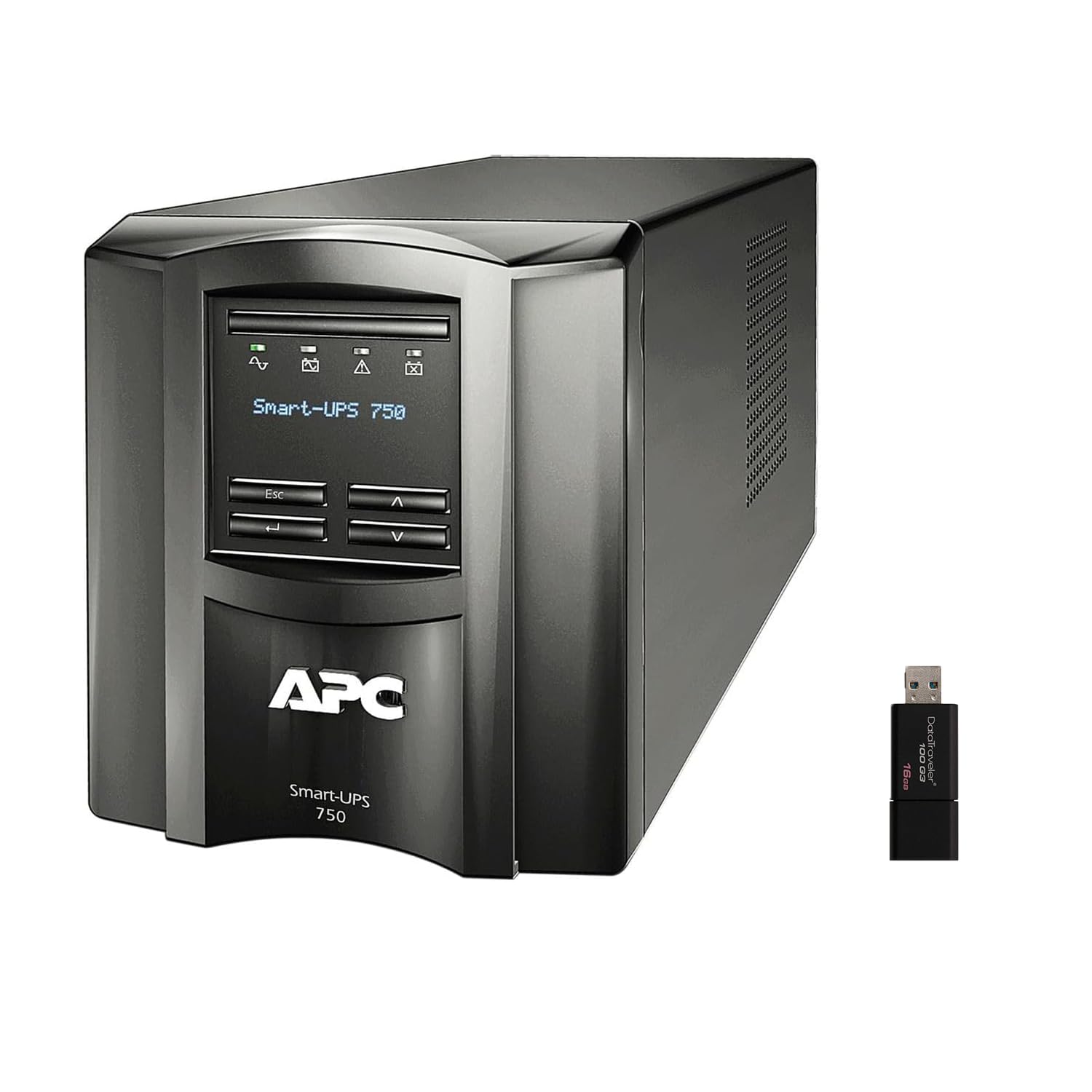
ภาพ: ด้านหน้าและด้านข้าง view of the APC Smart-UPS SMT750C. This image displays the compact tower design of the UPS unit.
- ปุ่มเปิด/ปิด: ควบคุมการจ่ายไฟหลักไปยังเครื่องสำรองไฟ (UPS)
- จอแสดงผล LCD: Provides real-time status information, load levels, battery charge, and estimated runtime.
- ปุ่มนำทาง: Used to scroll through display menus and adjust settings.
แผงด้านหลัง
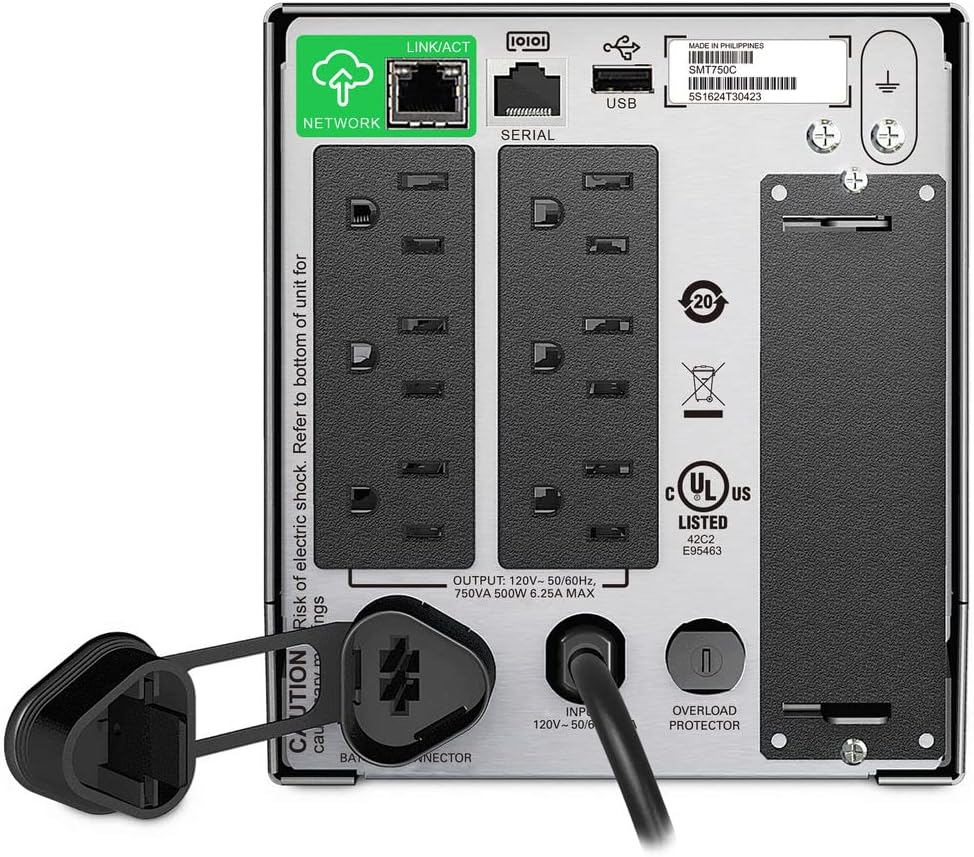
Image: Rear panel of the APC Smart-UPS SMT750C. This view highlights the various input/output ports, including NEMA 5-15R outlets, SmartConnect port, USB, and serial ports.
- NEMA 5-15R Outlets: Six outlets for connecting protected equipment.
- SmartConnect Ethernet Port: For cloud-based remote monitoring and management.
- พอร์ต USB: For communication with a computer for graceful shutdown via PowerChute Serial Shutdown software.
- พอร์ตอนุกรม: Alternative communication port for graceful shutdown.
- SmartSlot: For optional Network Management Card (sold separately).
- สายไฟเข้า: Connects the UPS to the utility power.
- ตัวป้องกันการโอเวอร์โหลด: Resettable circuit breaker.
5. การตั้งค่า
5.1 การเชื่อมต่อแบตเตอรี่ครั้งแรก
ก่อนใช้งานครั้งแรก ต้องต่อแบตเตอรี่ภายในก่อน ตัวเครื่องจะถูกจัดส่งโดยไม่ได้ต่อแบตเตอรี่เพื่อความปลอดภัยระหว่างการขนส่ง
- วาง UPS บนพื้นผิวที่มั่นคง
- Locate the battery compartment cover, typically on the bottom or rear of the unit.
- Remove the cover to access the battery.
- Connect the red battery cable to the positive (+) terminal and the black battery cable to the negative (-) terminal. Ensure a secure connection.
- เปลี่ยนฝาครอบช่องใส่แบตเตอรี่
5.2 การเชื่อมต่อกับระบบไฟฟ้าสาธารณะ
- Plug the UPS power cord into a grounded 3-prong AC outlet.
- ควรปล่อยให้เครื่องสำรองไฟ (UPS) ชาร์จไฟอย่างน้อย 24 ชั่วโมงก่อนเชื่อมต่ออุปกรณ์สำคัญ เพื่อให้แน่ใจว่าแบตเตอรี่มีพลังงานเต็มประสิทธิภาพ
5.3 อุปกรณ์เชื่อมต่อ
- Connect your critical equipment (e.g., computer, monitor, network devices) to the NEMA 5-15R outlets on the rear panel.
- For graceful shutdown capabilities, connect the provided USB cable from the UPS to your computer and install the PowerChute Serial Shutdown software (available for download from APC's webเว็บไซต์).
- For remote monitoring, connect an Ethernet cable to the SmartConnect port and follow the instructions for cloud-based setup.
6. การดำเนินการ
6.1 การเปิด/ปิดเครื่อง
- To power on the UPS, press and hold the power button on the front panel until the unit beeps and the display illuminates.
- To power off the UPS, press and hold the power button until the unit beeps and the display turns off.
6.2 ปริมาตรอัตโนมัติtage ระเบียบ (AVR)
The SMT750C features AVR, which automatically corrects minor voltagป้องกันความผันผวนของแรงดันไฟฟ้า (ไฟตกและไฟเกิน) โดยไม่ต้องเปลี่ยนไปใช้พลังงานจากแบตเตอรี่ ซึ่งจะช่วยปกป้องอุปกรณ์ที่เชื่อมต่อจากแรงดันไฟฟ้าเกินtage irregularities and extends battery life.
6.3 การทำงานสำรองด้วยแบตเตอรี่
ระหว่างที่ไฟฟ้าดับtage, the UPS will automatically switch to battery power, providing continuous power to connected equipment. The LCD display will show the estimated remaining runtime. When utility power returns, the UPS will automatically switch back to utility power and recharge its battery.
6.4 Remote Monitoring (SmartConnect)
The SmartConnect port allows for cloud-based remote monitoring of your UPS. This feature enables IT professionals and network administrators to:
- Monitor UPS status and performance.
- ดำเนินการอัพเกรดเฟิร์มแวร์
- Conduct remote diagnostics.
- Receive proactive email notifications with recommended actions.
7. การบำรุงรักษา
7.1 การเปลี่ยนแบตเตอรี่
The internal battery is a user-replaceable component. When the battery reaches the end of its service life, the UPS will indicate a battery fault. To replace the battery:
- Ensure the UPS is powered off and disconnected from utility power.
- ถอดฝาช่องใส่แบตเตอรี่ออก
- Disconnect the battery cables (red and black).
- Carefully slide out the old battery.
- Insert a genuine APC replacement battery (model RBC154, sold separately).
- เชื่อมต่อสายแบตเตอรี่ โดยตรวจสอบให้แน่ใจว่าขั้วถูกต้อง (สีแดงต่อกับขั้วบวก สีดำต่อกับขั้วลบ)
- เปลี่ยนฝาครอบช่องใส่แบตเตอรี่
- Recycle the old battery responsibly.
7.2 การทำความสะอาด
ควรทำความสะอาดภายนอกเครื่องสำรองไฟ (UPS) เป็นระยะด้วยผ้าแห้งเนื้อนุ่ม ห้ามใช้น้ำยาทำความสะอาดหรือสเปรย์ ตรวจสอบให้แน่ใจว่าช่องระบายอากาศปราศจากฝุ่นและสิ่งสกปรก
8 การแก้ไขปัญหา
| ปัญหา | สาเหตุที่เป็นไปได้ | สารละลาย |
|---|---|---|
| เครื่องสำรองไฟ (UPS) ไม่ทำงาน | Battery not connected or low charge | Ensure battery cables are connected. Plug UPS into AC outlet and allow to charge. |
| เครื่องสำรองไฟ (UPS) ส่งเสียงบี๊บอย่างต่อเนื่อง | Overload or on battery power | Reduce connected load. Check utility power. |
| Battery symbol blinking | Battery needs to be flipped (initial setup) or is failing | For new units, ensure battery is correctly oriented and connected. For older units, consider battery replacement. |
| ไม่มีไฟฟ้าเข้าร้าน | UPS is off, circuit breaker tripped, or utility power lost | Turn on UPS. Reset circuit breaker. Check utility power. |
9. ข้อมูลจำเพาะ
- แบบอย่าง: SMT750C
- กำลังการผลิตไฟฟ้าขาออก: 500 วัตต์ / 750 VA
- การเชื่อมต่อขาออก: 6x NEMA5-15R ต่อ
- การเชื่อมต่ออินพุต: NEMA 5-15 ป
- ระบุอินพุตVoltage: 120โวลต์
- เอาท์พุทที่กำหนดVoltage: 120โวลต์
- ประเภทแบตเตอรี่: กรดตะกั่ว
- ฟอร์มแฟกเตอร์: หอคอย
- ขนาด (สูง x กว้าง x ลึก): 6.34 นิ้ว (16.1 ซม.) x 5.43 นิ้ว (13.8 ซม.) x 14.53 นิ้ว (36.9 ซม.)
- น้ำหนักสุทธิ: 27.56 ปอนด์ (12.5 กก.)
- สี: สีดำ
- วัสดุ: โลหะ
- อุปกรณ์เสริมที่รวมอยู่: 16GB USB 3.0 Drive
10. การรับประกันและการสนับสนุน
APC ให้การรับประกันมาตรฐานสำหรับผลิตภัณฑ์นี้ สำหรับเงื่อนไขและข้อกำหนดการรับประกันเฉพาะ โปรดดูบัตรรับประกันที่แนบมากับผลิตภัณฑ์ของคุณ หรือเยี่ยมชมเว็บไซต์อย่างเป็นทางการของ APC website. For technical support, product registration, or to purchase replacement parts, please visit www.apc.com หรือติดต่อฝ่ายบริการลูกค้าของ APC
Protection plans are available for extended coverage. For example, a 3-Year Protection Plan is available.