1. บทนำ
This manual provides essential instructions for setting up, operating, and maintaining your Qubo Flip Phone for Seniors. Designed for ease of use, this phone features a large screen, big buttons, and an SOS function for enhanced safety. Please read this manual carefully to ensure proper use and to maximize the phone's capabilities.

Figure 1: The Qubo Flip Phone for Seniors, open and ready for use.
2. เนื้อหาบรรจุภัณฑ์
กรุณาทำเครื่องหมายในช่องสำหรับรายการต่อไปนี้:
- Qubo Flip Phone
- Rechargeable Battery (1000 mAh)
- สายชาร์จ
- แท่นชาร์จ (หากรวมอยู่กับรุ่นของคุณ)
- คู่มือการใช้งาน
หากมีสินค้าใดขาดหายหรือเสียหาย โปรดติดต่อผู้ค้าปลีกของคุณ
3. การตั้งค่า
3.1. การใส่ซิมการ์ด
The Qubo Flip Phone supports dual SIM cards. Ensure the phone is powered off before inserting or removing SIM cards.
- ค่อยๆ ถอดฝาหลังของโทรศัพท์ออก
- Locate the SIM card slot(s).
- Insert the SIM card(s) into the designated slot(s) with the gold contacts facing down, ensuring they are correctly seated.
- เปลี่ยนฝาหลัง
3.2. การใส่แบตเตอรี่
Ensure the phone is powered off before inserting the battery.
- With the back cover removed, align the battery contacts with the contacts in the phone's battery compartment.
- กดแบตเตอรี่ลงไปในตำแหน่งที่ถูกต้องอย่างเบามือ
- เปลี่ยนฝาหลัง
3.3. การชาร์จโทรศัพท์
ก่อนใช้งานครั้งแรก ควรชาร์จแบตเตอรี่โทรศัพท์ให้เต็ม
- Connect the charging cable to the phone's charging port or place the phone in the charging dock.
- Connect the other end of the charging cable to a power adapter and plug it into a wall outlet.
- ตัวแสดงสถานะแบตเตอรี่บนหน้าจอจะแสดงสถานะการชาร์จ
- เมื่อชาร์จเต็มแล้ว ให้ถอดเครื่องชาร์จออก
3.4. การเปิด/ปิดเครื่อง
- เพื่อเปิดเครื่อง: กดปุ่มค้างไว้ เปิด/ปิดการโทร ปุ่มจนกว่าหน้าจอจะสว่างขึ้น
- วิธีปิดเครื่อง: กดปุ่มค้างไว้ เปิด/ปิดการโทร ปุ่ม จากนั้นเลือก "ปิดเครื่อง" จากตัวเลือก
4. คู่มือการใช้งาน
4.1. ฟังก์ชันการโทรพื้นฐาน
- การโทร: Dial the number using the keypad and press the กรีนคอล ปุ่ม.
- รับสาย: When the phone rings, open the flip (if enabled in settings) or press the กรีนคอล ปุ่ม.
- การวางสาย: กดปุ่ม สายแดงจบ กดปุ่มหรือปิดฝาพับ
- การควบคุมระดับเสียง: Use the dedicated volume buttons on the side of the phone during a call.
4.2. การส่งและรับข้อความ
- นำทางไปที่ ข้อความ เมนู.
- เลือก เขียนข้อความ to compose a new SMS.
- Enter the recipient's number or select from the phonebook.
- พิมพ์ข้อความของคุณโดยใช้ปุ่มกด
- กด ส่ง.
- New messages will appear in the กล่องข้อความ.
4.3. ฟังก์ชันฉุกเฉิน SOS
The SOS button provides quick access to help in emergencies. It can be configured to call and send messages to up to 5 pre-set family numbers.

Figure 2: Location and function of the SOS button.
- Setting up SOS Numbers: ไปที่ การตั้งค่า > การตั้งค่า SOS สามารถเพิ่มรายชื่อผู้ติดต่อฉุกเฉินได้สูงสุด 5 รายชื่อ
- การเปิดใช้งาน SOS: ในกรณีฉุกเฉิน ให้กดปุ่มค้างไว้ ปุ่ม SOS on the back of the phone. The phone will automatically call the pre-set numbers in sequence and send an emergency SMS.
4.4. สมุดโทรศัพท์
Store frequently used contacts for easy dialing.
- นำทางไปที่ สมุดโทรศัพท์ เมนู.
- เลือก เพิ่มผู้ติดต่อใหม่.
- Enter the name and phone number, then บันทึก.
- You can assign direct dial numbers to M1 and M2 buttons for quick access.
4.5. คุณสมบัติอื่น ๆ
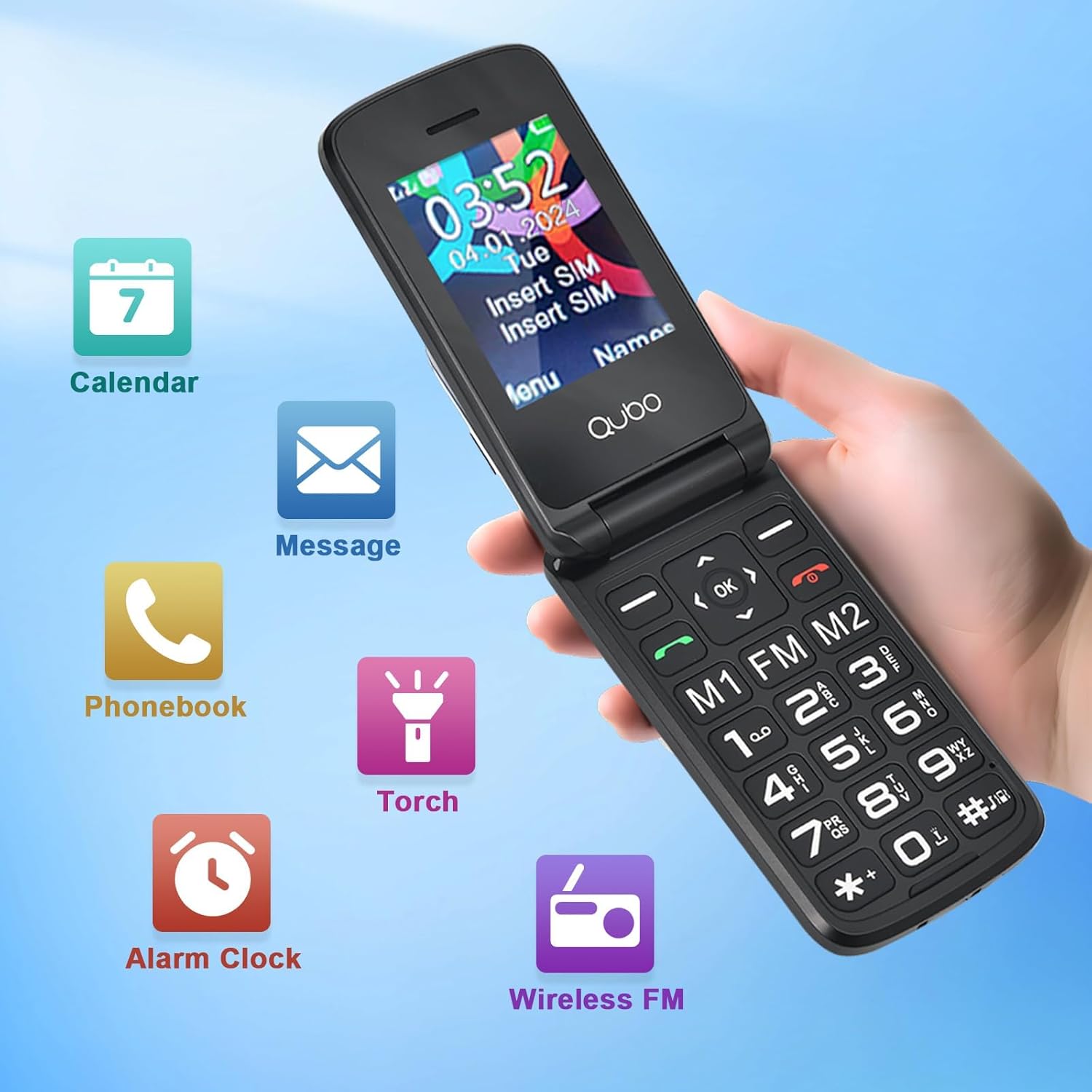
รูปที่ 3: เกินview of phone features including Calendar, Messages, Phonebook, Flashlight, Alarm Clock, and FM Radio.
- วิทยุ FM: Access the FM Radio from the main menu. A headset may be required for optimal reception (not included).
- ไฟฉาย: Activate the flashlight from the menu or via a dedicated shortcut button (if available).
- นาฬิกาปลุก: ตั้งนาฬิกาปลุกเพื่อการเตือนความจำหรือการโทรปลุก
- ปฏิทิน: View dates and add simple reminders.
- การตั้งค่าการแสดงผล: Adjust font size and brightness for better readability.

Figure 4: The Qubo Flip Phone features large buttons, big fonts, and a loud ringtone for enhanced usability.
5. การบำรุงรักษา
- การทำความสะอาด: ใช้ผ้าแห้งนุ่มๆ เช็ดทำความสะอาดหน้าจอและตัวเครื่องโทรศัพท์ หลีกเลี่ยงการใช้น้ำยาทำความสะอาด
- การดูแลแบตเตอรี่ Do not expose the battery to extreme temperatures. Charge regularly, but avoid overcharging or letting the battery completely drain for extended periods.
- พื้นที่จัดเก็บ: เก็บโทรศัพท์ไว้ในที่แห้งและเย็น ห่างจากแสงแดดโดยตรงและความชื้น
- ความต้านทานน้ำ: โทรศัพท์รุ่นนี้ไม่กันน้ำ โปรดหลีกเลี่ยงการสัมผัสกับของเหลว
6 การแก้ไขปัญหา
| ปัญหา | สาเหตุที่เป็นไปได้ | สารละลาย |
|---|---|---|
| โทรศัพท์ไม่เปิดเครื่อง | แบตเตอรี่อ่อน; ใส่แบตเตอรี่ไม่ถูกต้อง | ชาร์จแบตเตอรี่; ใส่แบตเตอรี่กลับเข้าไปให้ถูกต้อง |
| ไม่สามารถโทรออก/รับสายได้ | ไม่มีซิมการ์ด; ซิมการ์ดไม่ได้เปิดใช้งาน; อยู่นอกพื้นที่ให้บริการเครือข่าย | Insert SIM card; Contact your service provider; Move to an area with better reception. |
| Poor call quality/noise | สัญญาณอ่อน; สัญญาณรบกวน | ย้ายไปยังบริเวณที่มีสัญญาณดีกว่า หลีกเลี่ยงแหล่งที่มาของการรบกวน |
| "Memory Full" message (for photos/messages) | หน่วยความจำภายในเต็ม | Delete old messages or photos. Consider adding an external memory card (MicroSD, not included) if the phone supports it for additional storage. |
| ปุ่ม SOS ใช้งานไม่ได้ | SOS numbers not set up; Feature disabled | Ensure SOS numbers are configured in settings; Verify the feature is enabled. |
หากปัญหายังคงมีอยู่ โปรดติดต่อฝ่ายสนับสนุนลูกค้า
7. ข้อมูลจำเพาะ
| คุณสมบัติ | รายละเอียด |
|---|---|
| ยี่ห้อ | คูโบ |
| หมายเลขรุ่น | 48f44b3a-d6eb-48d1-a82b-391cc9bc3008 |
| สี | สีดำ |
| ประเภทสินค้า | โทรศัพท์ฝาพับ |
| ระบบปฏิบัติการ | ระบบปฏิบัติการที่เป็นกรรมสิทธิ์ |
| ขนาดหน้าจอ | 2.4 นิ้ว |
| การเชื่อมต่อ | 2จี (จีเอสเอ็ม) |
| คุณสมบัติพิเศษ | Wireless, SOS Button, Large Buttons, FM Radio, Flashlight |
| องค์ประกอบของแบตเตอรี่ | ลิเธียม |
| ความจุของแบตเตอรี่ | 1000 mAh (approximate, inferred from feature bullet) |
| รุ่นซีพียู | Mediatek Dimensity 900 (Note: This might be a generic entry, as 2G phones typically have simpler CPUs) |
| ปณิธาน | 320 x 240 |
| ผู้ให้บริการไร้สาย | ทุกเครือข่าย (ปลดล็อคแล้ว) |
8. ข้อมูลการรับประกัน
Warranty details for your Qubo Flip Phone are typically provided with the product packaging or can be obtained from the point of purchase. Please retain your proof of purchase for warranty claims. For specific warranty terms and conditions, refer to the documentation included in your product box or contact the seller directly.
9. การสนับสนุน
For further assistance, technical support, or inquiries regarding your Qubo Flip Phone, please contact the seller or manufacturer through the contact information provided at the time of purchase. You may also refer to the official Qubo webไซต์สำหรับแหล่งข้อมูลเพิ่มเติม


