1. สินค้าหมดview
The LiNKFOR 6-Channel Audio Mixer is an ultra-compact device designed to combine up to six line-level signal sources into a single output channel. It is suitable for connecting various electronic instruments and audio equipment such as microphones, guitars, basses, keyboards, and phones, making it ideal for small clubs, bars, or personal stage setups. This mixer features individual volume controls for each input and the main output, along with mono/stereo switching capabilities. Its robust all-metal shell ensures durability and reduces electromagnetic interference for a purer sound experience.

Figure 1: LiNKFOR 6-Channel Audio Mixer, showcasing การออกแบบและรูปแบบการควบคุมที่กะทัดรัด
2. ข้อมูลด้านความปลอดภัย
- ตรวจสอบแหล่งจ่ายไฟ voltage matches the device's requirements (5V DC).
- อย่าให้เครื่องสัมผัสกับน้ำ ความชื้น หรืออุณหภูมิที่สูงหรือต่ำเกินไป
- Avoid disassembling or modifying the device, as this may void the warranty and cause damage.
- เก็บอุปกรณ์ให้ห่างจากสนามแม่เหล็กแรงสูง
- Use only the provided or recommended power adapter and cables.
3. เนื้อหาบรรจุภัณฑ์

รูปที่ 2: สิ่งของที่รวมอยู่ในแพ็คเกจผลิตภัณฑ์
ตรวจสอบว่ามีรายการทั้งหมดอยู่ในแพ็คเกจของคุณ:
- LiNKFOR 6-Channel Audio Mixer (Model 6-IN-1-OUT)
- แหล่งจ่ายไฟ 5V
- USB Type-C Power Cable with Magnetic Ring
- สายสัญญาณเสียงขนาด 6.35 มม.
- คู่มือการใช้งาน
4. คุณสมบัติของผลิตภัณฑ์
- การออกแบบที่กะทัดรัดเป็นพิเศษ: Mixes up to 6 line signal sources into 1 channel for headphones or speakers.
- ความเข้ากันได้ที่หลากหลาย: Suitable for microphones, guitars, basses, keyboards, phones, and other stagอุปกรณ์อี
- การควบคุมอิสระ: Each input and the main output feature independent volume control.
- การสลับโหมดสเตอริโอ/โมโน: Supports switching between stereo and mono modes with a single key.
- Ultra-Low Noise Performance: Designed for impressive audio experience without interference.
- แหล่งจ่ายไฟที่เสถียร: Certified 5V power supply and power cable with magnetic ring ensure stable performance.
- Specific Power Switch: Easy to operate on/off switch, eliminating frequent unplugging.
- โครงสร้างทนทาน: All-metal shell reduces electromagnetic interference and provides a purer sound. Non-slip pads prevent movement during use.
วิดีโอ 1: จบview of a 6-channel stereo audio mixer, highlighting its inputs and controls. This video demonstrates the compact design, 6.35mm input interfaces, independent volume adjustments, and mono/stereo switching capabilities.
5. การตั้งค่า
Follow these steps to set up your LiNKFOR 6-Channel Audio Mixer:
- การเชื่อมต่อไฟฟ้า: Connect the provided USB Type-C power cable to the mixer's 5V DC input port. Plug the other end into a compatible 5V USB power source (e.g., wall adapter, computer USB port, power bank).
- เปิด: Press the power switch located on the mixer. The power indicator light will illuminate.
- การเชื่อมต่ออินพุต: Connect your audio sources (microphones, instruments, phones, etc.) to the INPUT 1-6 jacks using 6.35mm TRS/TS cables.
- การเชื่อมต่อเอาท์พุต: Connect your headphones or amplifier to the OUTPUT jack using a 6.35mm TRS/TS cable.
- การปรับระดับเสียงเบื้องต้น: Set all LEVEL knobs (1-6) and the main OUTPUT knob to their minimum position before playing any audio to avoid sudden loud sounds.

Figure 3: Connecting the Type-C power supply.
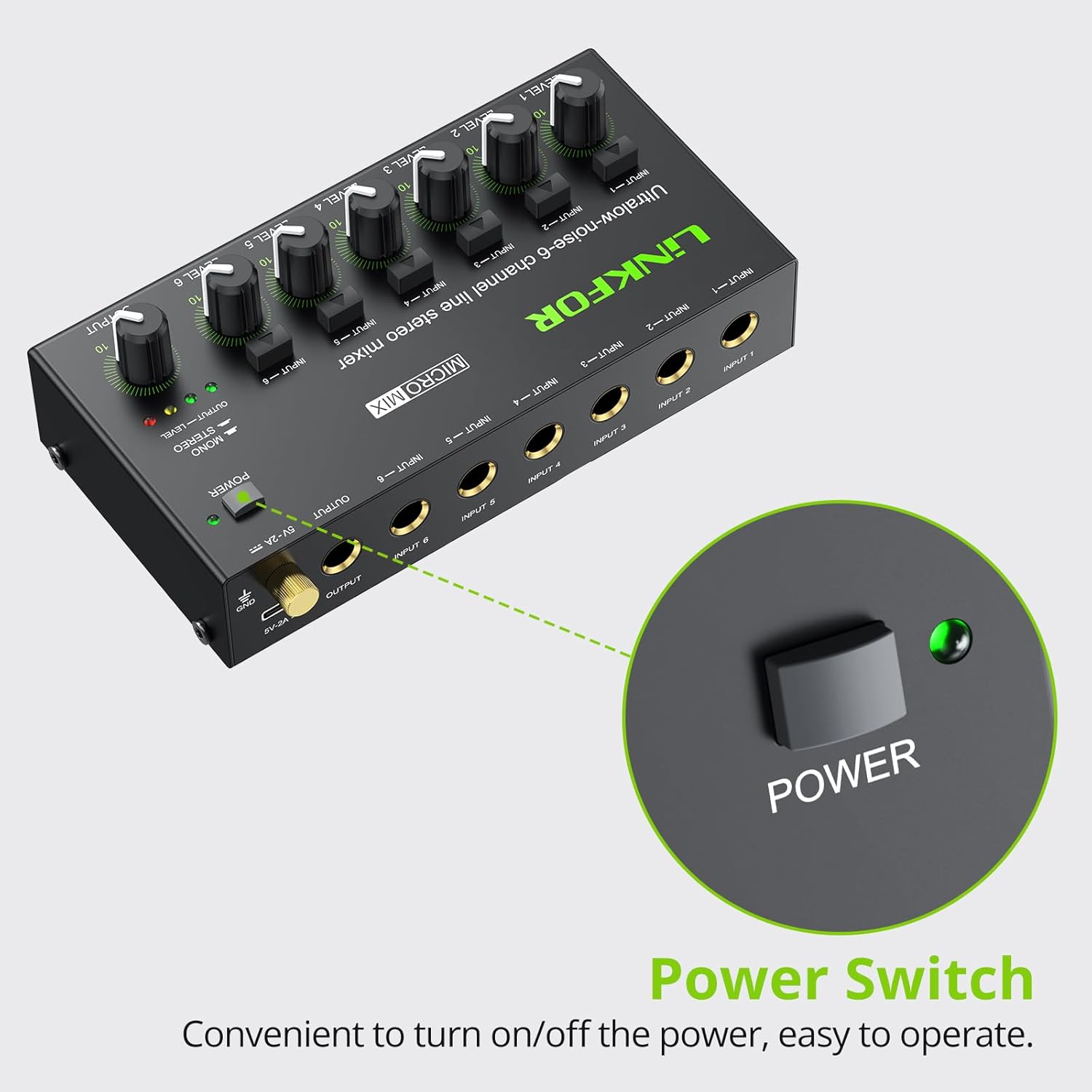
Figure 4: Power switch location.
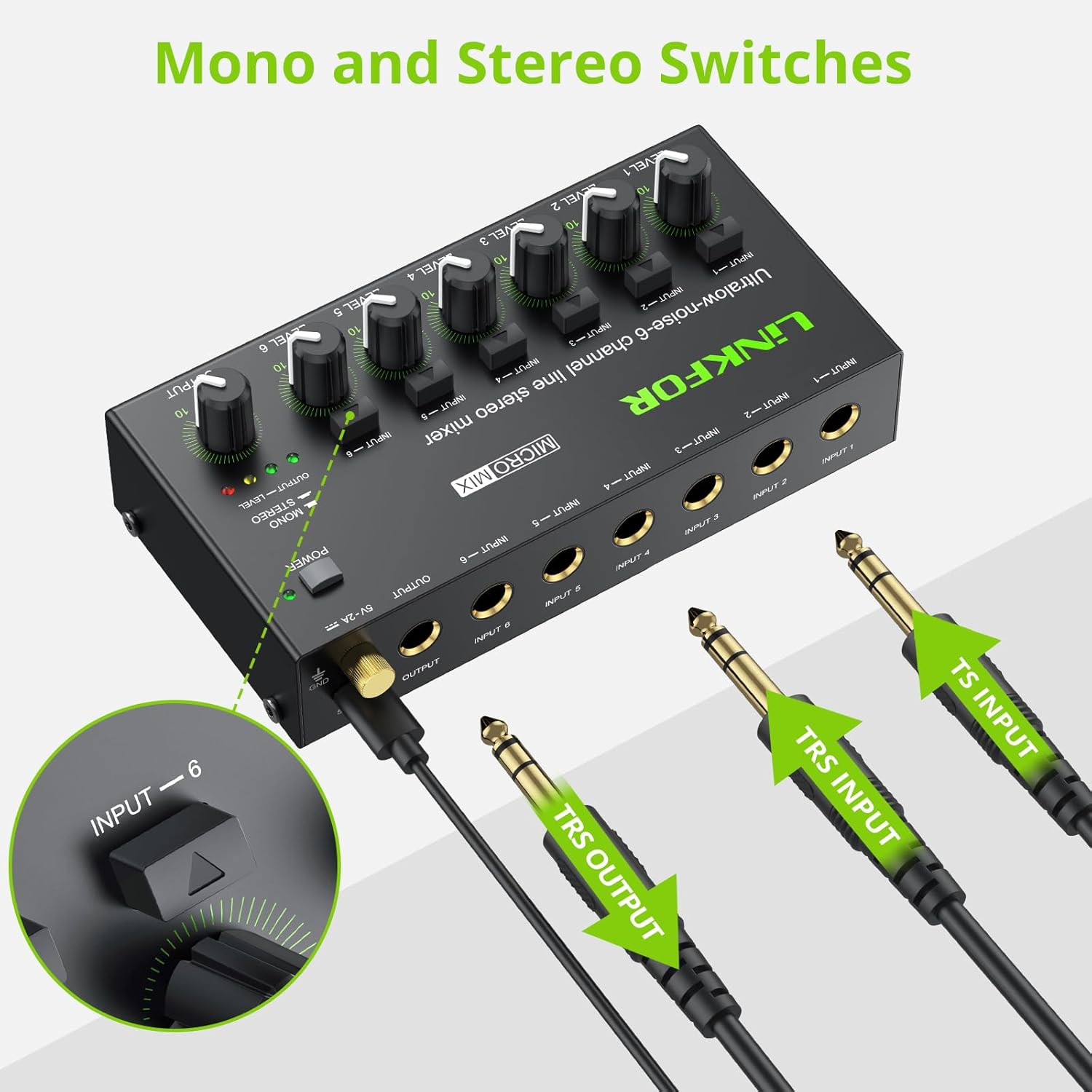
Figure 5: Input and output interfaces.

Figure 6: Connection diagram for inputs and outputs.
6. คู่มือการใช้งาน
Once your mixer is set up, follow these instructions for operation:
- การปรับระดับสัญญาณอินพุต: Gradually turn up the LEVEL knob for each active input channel (LEVEL 1-6) until the desired volume is achieved for that specific source.
- การปรับระดับเอาท์พุต: Slowly increase the main OUTPUT knob to control the overall volume of the mixed audio sent to your headphones or amplifier. Monitor the OUTPUT LEVEL indicator lights (green, yellow, red) to prevent clipping (red light indicates signal is too high).
- Mono/Stereo Switching: Each input channel has a dedicated button to switch between mono and stereo modes. Press the button above the respective input to toggle between modes as needed for your audio source.
- Mixing Multiple Sources: Adjust the individual LEVEL knobs for each input to create a balanced mix of all connected audio sources.
Video 2: Official LiNKFOR video demonstrating the 6-Channel Audio Mixer's features. This video highlights the specific power switch, separate volume controls for each channel, stereo/mono switching, and ultra-low noise performance during operation.

รูปที่ 7: อดีตample of mixer in use with guitar and laptop.
7. การบำรุงรักษา
- การทำความสะอาด: ใช้ผ้านุ่มและแห้งเช็ดทำความสะอาดภายนอกของเครื่องผสม ห้ามใช้น้ำยาทำความสะอาดหรือตัวทำละลาย
- พื้นที่จัดเก็บ: เก็บอุปกรณ์ไว้ในที่แห้งและเย็น หลีกเลี่ยงแสงแดดโดยตรงและอุณหภูมิที่สูงหรือต่ำเกินไปเมื่อไม่ได้ใช้งาน
- การดูแลสายเคเบิล: Ensure all cables are connected securely and are not bent or kinked excessively to prevent damage.
8 การแก้ไขปัญหา
| ปัญหา | สาเหตุที่เป็นไปได้ | สารละลาย |
|---|---|---|
| ไม่มีเสียงออก | Power not connected or turned on; Volume knobs too low; Incorrect cable connections. | Check power supply and switch; Increase LEVEL and OUTPUT knobs; Verify all audio cables are correctly and securely connected. |
| เสียงเพี้ยน | Volume levels too high (clipping); Faulty cables or audio sources. | Reduce LEVEL and/or OUTPUT knobs until red indicator light disappears; Test with different cables or audio sources. |
| Hissing/Buzzing noise | Ground loop interference; Poor quality cables; Nearby electronic interference. | Ensure proper grounding; Use high-quality shielded cables; Move the mixer away from other electronic devices. |
| ช่องหนึ่งไม่ทำงาน | Faulty input cable or source; Input level too low. | Test the input with a different cable and source; Increase the specific channel's LEVEL knob. |
9. ข้อมูลจำเพาะ

รูปที่ 8: ขนาดผลิตภัณฑ์
| คุณสมบัติ | รายละเอียด |
|---|---|
| ยี่ห้อ | ลิงค์ฟอร์ |
| หมายเลขรุ่น | 6-เข้า-1-ออก |
| จำนวนช่องสัญญาณ | 6 |
| เทคโนโลยีการเชื่อมต่อ | 6.35มม. |
| แหล่งพลังงาน | สายไฟ |
| เล่มที่tage | 5 โวลต์ |
| ขนาดสินค้า | ลึก 1.26 นิ้ว x กว้าง 2.95 นิ้ว x สูง 1.26 นิ้ว (ลึก 32 มม. x กว้าง 75 มม. x สูง 32 มม.) |
| น้ำหนักสินค้า | 8.5 ออนซ์ (240 กรัม) |
10. การรับประกันและการสนับสนุน
For warranty information and technical support, please refer to the documentation included with your purchase or visit the official LiNKFOR webไซต์ เงื่อนไขการรับประกันเฉพาะอาจแตกต่างกันไปตามภูมิภาคและผู้ค้าปลีก


