1. บทนำ
This user manual provides detailed instructions for the installation, operation, and maintenance of your XIBANY Electric Scooter Dual Drive Brushless Controller Kit. Please read this manual thoroughly before attempting any installation or operation to ensure proper function and safety. This kit is designed for electric scooters requiring 48V, 52V, or 60V power with 25A or 50A dual drive brushless controllers.
1.1 ข้อมูลด้านความปลอดภัย
- Always disconnect power before installing or servicing the controller kit.
- Ensure all connections are secure and correctly matched to prevent damage to components or the scooter.
- Avoid exposing the controllers to water or extreme temperatures.
- หากคุณไม่แน่ใจเกี่ยวกับขั้นตอนการติดตั้งใดๆ โปรดปรึกษาช่างเทคนิคที่มีคุณสมบัติเหมาะสม
- ตรวจสอบปริมาณtage compatibility of your scooter with the controller kit (48V, 52V, or 60V).
2. เนื้อหาบรรจุภัณฑ์
เมื่อเปิดกล่อง โปรดตรวจสอบว่ามีส่วนประกอบต่อไปนี้ครบถ้วน:
- 2 x Brushless Motor Controllers (A and B units)
- 1 x Instrumentation Display Unit
- 1 x Main Wiring Harness (No Hall wire included, if applicable to your setup)
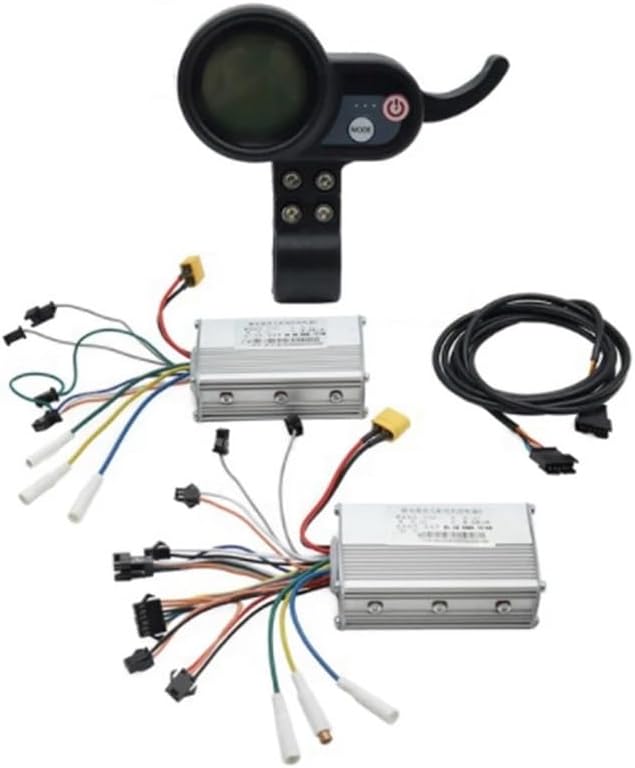
รูปที่ 2.1: เกินview of the XIBANY Dual Drive Brushless Controller Kit, including two controllers, an instrumentation display, and a wiring harness.
3. สินค้าหมดview
The XIBANY controller kit is designed to provide efficient and reliable control for dual-motor electric scooters. It features two independent brushless motor controllers and a central instrumentation display for monitoring and control.
3.1 Controller Units
The kit includes two identical brushless motor controllers, typically labeled 'A' and 'B' for front and rear drive distinction. These units manage power delivery to the scooter's motors.
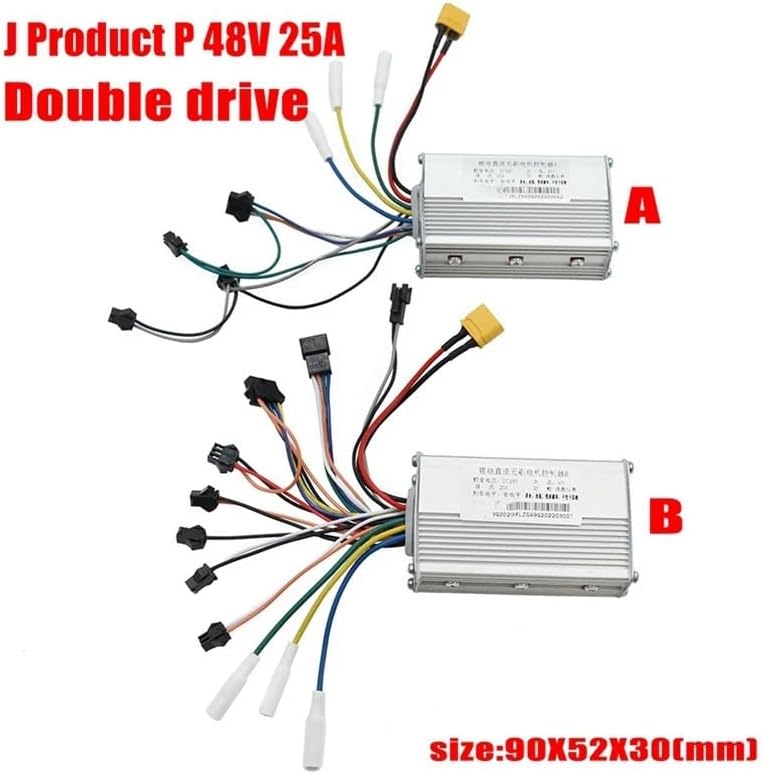
Figure 3.1: Two brushless motor controllers (A and B) with their respective wiring harnesses. Dimensions are approximately 90x52x30mm.
3.2 Instrumentation Display Unit
The display unit provides real-time information and control over the scooter's functions. It typically shows speed, battery level, and mode settings.

รูปที่ 3.2 : ด้านหน้า view of the instrumentation display, featuring a circular screen and control buttons.

Figure 3.3: The display unit indicating its adjustable voltage range, compatible with 36V to 60V systems.

รูปที่ 3.4: ด้านหลัง view of the instrumentation display, revealing the internal circuit board and connector for the main wiring harness.
3.3 สายไฟหลัก
The main wiring harness connects the display unit to the controllers and other scooter components. It is crucial to ensure correct connections for proper functionality.
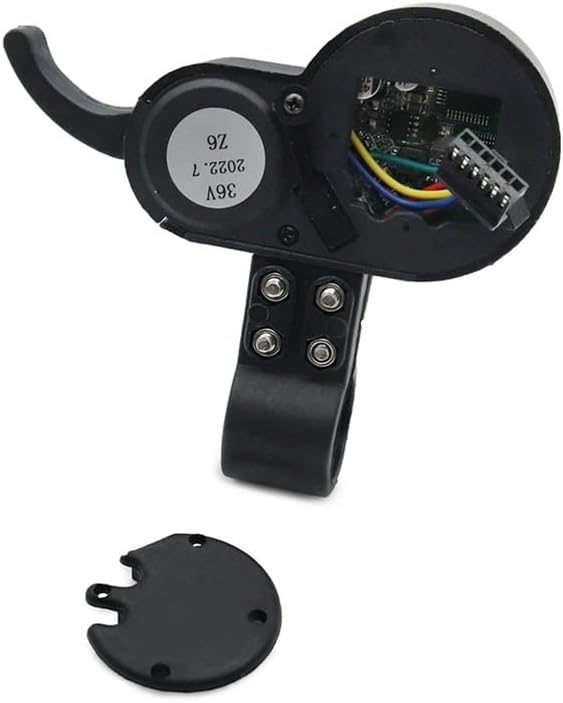
Figure 3.5: The main wiring harness, featuring various connectors for integration with the controllers and scooter's electrical system.
4. การตั้งค่าและการติดตั้ง
Careful installation is essential for the optimal performance and safety of your electric scooter. Follow these steps for proper setup.
- การตระเตรียม: Ensure the scooter's power is completely off and the battery is disconnected. Gather necessary tools (e.g., screwdrivers, wire cutters/strippers, electrical tape).
- Mounting Controllers: Securely mount the two brushless controllers (A and B) in a protected area on your scooter, ensuring good ventilation. Refer to Figure 3.1 for controller appearance.
- Connecting Motors: Connect the motor phase wires (usually three thicker wires) from each motor to the corresponding connectors on controllers A and B. Ensure correct phase matching.
- การเชื่อมต่อแบตเตอรี่: Connect the main power wires from the scooter's battery to the power input terminals on both controllers. Pay close attention to polarity (positive to positive, negative to negative).
- Installing Display Unit: Mount the instrumentation display unit on the handlebar in a position that is easily visible and accessible. Refer to Figure 3.2 for display unit appearance.
- Connecting Display to Controllers: Use the main wiring harness (Figure 3.5) to connect the display unit to the controllers. Ensure all multi-pin connectors are firmly seated.
- Connecting Other Components: Connect any other necessary components such as throttle, brake levers, lights, etc., to the appropriate connectors on the controllers or wiring harness.
- การตรวจสอบขั้นสุดท้าย: Double-check all connections for security and correctness. Ensure no bare wires are exposed.
- การเพิ่มพลังเริ่มต้น: Reconnect the battery and power on the scooter. Observe the display for proper function and check for any error codes.
Note: Specific wiring configurations may vary depending on your scooter model. Always refer to your scooter's wiring diagram if available.
5. คู่มือการใช้งาน
Once installed, operating the XIBANY controller kit is straightforward via the instrumentation display.
- เปิด/ปิดเครื่อง: Press and hold the power button (usually marked with a power symbol) on the display unit to turn the scooter's electrical system on or off.
- การเลือกโหมด: Press the 'MODE' button to cycle through different riding modes or display information (e.g., speed, odometer, trip distance).
- ควบคุมคันเร่ง: Use the scooter's throttle to control acceleration. The controllers will regulate motor speed based on throttle input.
- การเบรก: Engage the scooter's brake levers. The controllers are designed to cut power to the motors when brakes are applied.
Refer to your scooter's specific operating manual for detailed riding instructions.
6. การบำรุงรักษา
Regular maintenance helps ensure the longevity and reliable performance of your controller kit.
- รักษาความสะอาด: Periodically clean the controllers and display unit with a dry, soft cloth. Avoid using harsh chemicals or excessive moisture.
- ตรวจสอบการเชื่อมต่อ: Regularly inspect all wiring connections for tightness and signs of wear or corrosion. Re-secure any loose connections.
- ตรวจสอบความเสียหาย: Check the controller casings and wiring for any physical damage, cracks, or frayed insulation. Replace damaged components immediately.
- หลีกเลี่ยงความร้อนมากเกินไป: Ensure controllers are not covered or obstructed, allowing for proper heat dissipation.
7 การแก้ไขปัญหา
If you encounter issues with your XIBANY controller kit, refer to the following table for common problems and solutions.
| ปัญหา | สาเหตุที่เป็นไปได้ | สารละลาย |
|---|---|---|
| สกูตเตอร์เปิดไม่ติด | Loose battery connection, discharged battery, faulty power button. | Check battery connections, charge battery, inspect display unit wiring. |
| Motors not responding to throttle. | Loose throttle connection, motor phase wire issue, controller fault. | Verify throttle and motor phase wire connections. Check for error codes on display. |
| Inconsistent power or jerky operation. | Loose wiring, poor motor phase connection, sensor issue (if applicable). | Inspect all wiring, especially motor phase connections. Ensure secure fit. |
| Display unit not showing information. | Loose display connection, power issue to display. | Check the main wiring harness connection to the display unit. |
หากปัญหายังคงมีอยู่หลังจากพยายามแก้ไขปัญหาเหล่านี้แล้ว โปรดติดต่อฝ่ายสนับสนุนลูกค้า
8. ข้อมูลจำเพาะ
Key technical specifications for the XIBANY XIBANY001 Dual Drive Brushless Controller Kit:
| คุณสมบัติ | รายละเอียด |
|---|---|
| ยี่ห้อ | ซีบานี |
| ชื่อรุ่น | XIBANY001 |
| ประเภทตัวควบคุม | Dual Drive Brushless |
| เล่มที่tagความเข้ากันได้ | 48V, 52V, 60V (Adjustable via display) |
| คะแนนปัจจุบัน | 25A / 50A (per controller, depending on variant) |
| วัสดุ | ABS + โลหะ |
| Controller Dimensions (approx.) | 90 x 52 x 30 มม. |
| น้ำหนักสินค้า | Approx. 50 Grams (per controller) / 1.76 ounces (total package) |
| เนื้อหาแพ็คเกจ | 2 Controllers, 1 Instrumentation, 1 Main Wiring Harness |
9. การรับประกันและการสนับสนุน
XIBANY products are manufactured to high-quality standards. For warranty information or technical support, please refer to the retailer where you purchased this product or visit the official XIBANY website. Please have your product model number (XIBANY001) and purchase details ready when contacting support.
หากต้องการความช่วยเหลือเพิ่มเติมโปรดติดต่อ:
- บริการลูกค้า: [Insert Customer Service Contact Information Here, e.g., email, phone number, webงาน]