การแนะนำ
ขอบคุณสำหรับการซื้อasing the WIITHINK WTB-777 Portable Cassette Player and Recorder. This versatile device combines the classic charm of a cassette player and recorder with modern features such as Bluetooth connectivity, USB playback, and AM/FM radio. Designed for ease of use and portability, it allows you to enjoy your favorite audio content wherever you go. Please read this manual thoroughly before operating the device to ensure proper use and to maximize its lifespan.

Figure 1: WIITHINK WTB-777 Portable Cassette Player and Recorder
สินค้าเกินview
The WIITHINK WTB-777 is an all-in-one audio solution, offering multiple playback and recording options. Its compact design and dual power capabilities make it ideal for both home and portable use.
- Classical Tape Radio Player: Enjoy music, radio, and cassette tapes with this all-in-one portable player featuring AM/FM radio, Bluetooth connectivity, USB port, and recording from radio to cassette.
- Retro Nostalgia: Relive the nostalgia of cassette tapes while enjoying modern features like Bluetooth. Built-in cassette player and recorder to record radio to blank tapes.
- AM/FM Radio Stereo: Equipped with a long antenna and upgraded chip for great reception of AM/FM stations. Features a big speaker for clear stereo sound. Frequency range: FM 87 - 108 MHz, AM 520 - 1710 kHz.
- บลูทูธสตรีมมิ่ง: Stream your favorite music wirelessly from your smartphone, tablet, or other Bluetooth-enabled devices.
- การออกแบบพกพา: Compact and lightweight for easy portability, perfect for on-the-go listening or use at home. Includes an earphone jack and DC/AC power options.

Figure 2: Key Features of the WTB-777
มีอะไรอยู่ในกล่อง
เมื่อแกะกล่องแล้ว โปรดตรวจสอบให้แน่ใจว่าสินค้าทั้งหมดที่ระบุไว้ด้านล่างนี้มีอยู่และอยู่ในสภาพดี:
- เครื่องเล่นเทปคาสเซ็ตต์แบบบูมบ็อกซ์ WTB-777
- สายไฟ
- คู่มือการใช้งาน (เอกสารนี้)
การตั้งค่า
การจ่ายไฟให้กับอุปกรณ์
The WIITHINK WTB-777 can be powered by either AC power or batteries.
- ไฟฟ้ากระแสสลับ: Connect the included power cord to the AC input jack on the back of the unit and plug the other end into a standard wall outlet (AC 120V/60Hz).
- พลังงานแบตเตอรี่: For portable use, open the battery compartment on the bottom of the unit and insert 4 x 'C' size batteries (not included), ensuring correct polarity (+/-). Close the battery compartment securely.
บันทึก: When using AC power, batteries are automatically disconnected. Remove batteries if the unit will not be used for an extended period to prevent leakage.
คำแนะนำการใช้งาน
Familiarize yourself with the control panel before operation. Refer to Figure 3 for a detailed diagram of the controls.
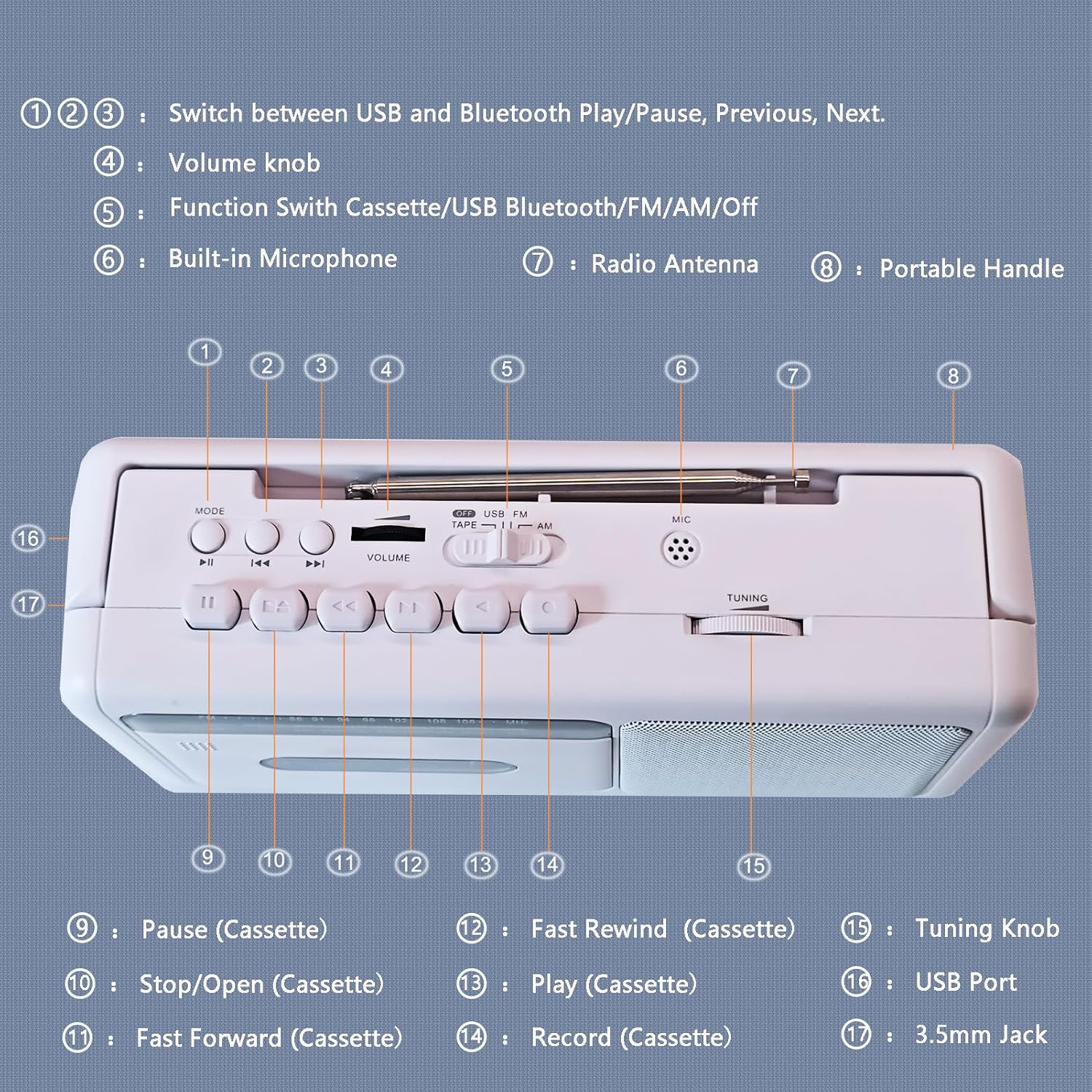
รูปที่ 3: แผนภาพแผงควบคุม
- พ.ศ. 1, 2, 3: Mode/Playback Control Buttons (USB/Bluetooth Play/Pause, Previous, Next)
- 4: ปุ่มปรับระดับเสียง
- 5: Function Switch (Cassette/USB/Bluetooth/FM/AM/Off)
- 6: ไมโครโฟนในตัว
- 7: เสาอากาศวิทยุ
- 8: ด้ามจับแบบพกพา
- 9: Pause (Cassette)
- 10: Stop/Open (Cassette)
- 11: Fast Forward (Cassette)
- 12: Fast Rewind (Cassette)
- 13: Play (Cassette)
- 14: Record (Cassette)
- 15: ลูกบิดปรับแต่ง
- 16: พอร์ต USB
- 17: 3.5mm Jack (Earphone/Aux-in)
การทำงานของเครื่องเล่นเทปคาสเซ็ท
- Set the Function Switch (5) to "TAPE".
- Press the Stop/Open button (10) to open the cassette compartment door.
- Insert a cassette tape with the open edge facing upwards. Close the compartment door firmly.
- Press the Play button (13) to begin playback.
- Adjust the Volume Knob (4) to your desired listening level.
- To pause playback, press the Pause button (9). Press again to resume.
- To fast forward, press the Fast Forward button (11). To fast rewind, press the Fast Rewind button (12). Press Play (13) or Stop/Open (10) to stop winding.
- To stop playback and eject the tape, press the Stop/Open button (10).

Figure 4: Inserting a Cassette Tape
การทำงานของวิทยุ AM/FM
- Set the Function Switch (5) to "FM" or "AM".
- Extend the telescopic antenna (7) for optimal FM reception. For AM reception, rotate the unit for best signal.
- Rotate the Tuning Knob (15) to select your desired radio station.
- Adjust the Volume Knob (4) to your desired listening level.

Figure 5: Enjoying AM/FM Radio
การสตรีมบลูทูธ
- Set the Function Switch (5) to "BT" (Bluetooth). The unit will enter pairing mode, indicated by an audible prompt.
- บนอุปกรณ์ที่รองรับ Bluetooth ของคุณ (เช่น สมาร์ทโฟน แท็บเล็ต) ให้เปิดใช้งาน Bluetooth และค้นหาอุปกรณ์ที่มีอยู่
- Select "WTB-777" from the list of devices to pair. Once paired, you will hear a confirmation sound.
- Begin playing audio on your connected device. The sound will be streamed wirelessly to the WTB-777.
- Use the Volume Knob (4) on the unit or the volume controls on your connected device to adjust the volume.
- Use buttons (1, 2, 3) to control playback (Play/Pause, Previous/Next track) directly from the unit.

รูปที่ 6: การเชื่อมต่อบลูทูธ
การเล่นผ่าน USB
- Set the Function Switch (5) to "USB".
- ใส่แฟลชไดรฟ์ USB ที่มีไฟล์เสียง MP3 files into the USB Port (16).
- The unit will automatically begin playing the audio fileจากไดรฟ์ USB
- Use buttons (1, 2, 3) to control playback (Play/Pause, Previous/Next track).
- Adjust the Volume Knob (4) to your desired listening level.
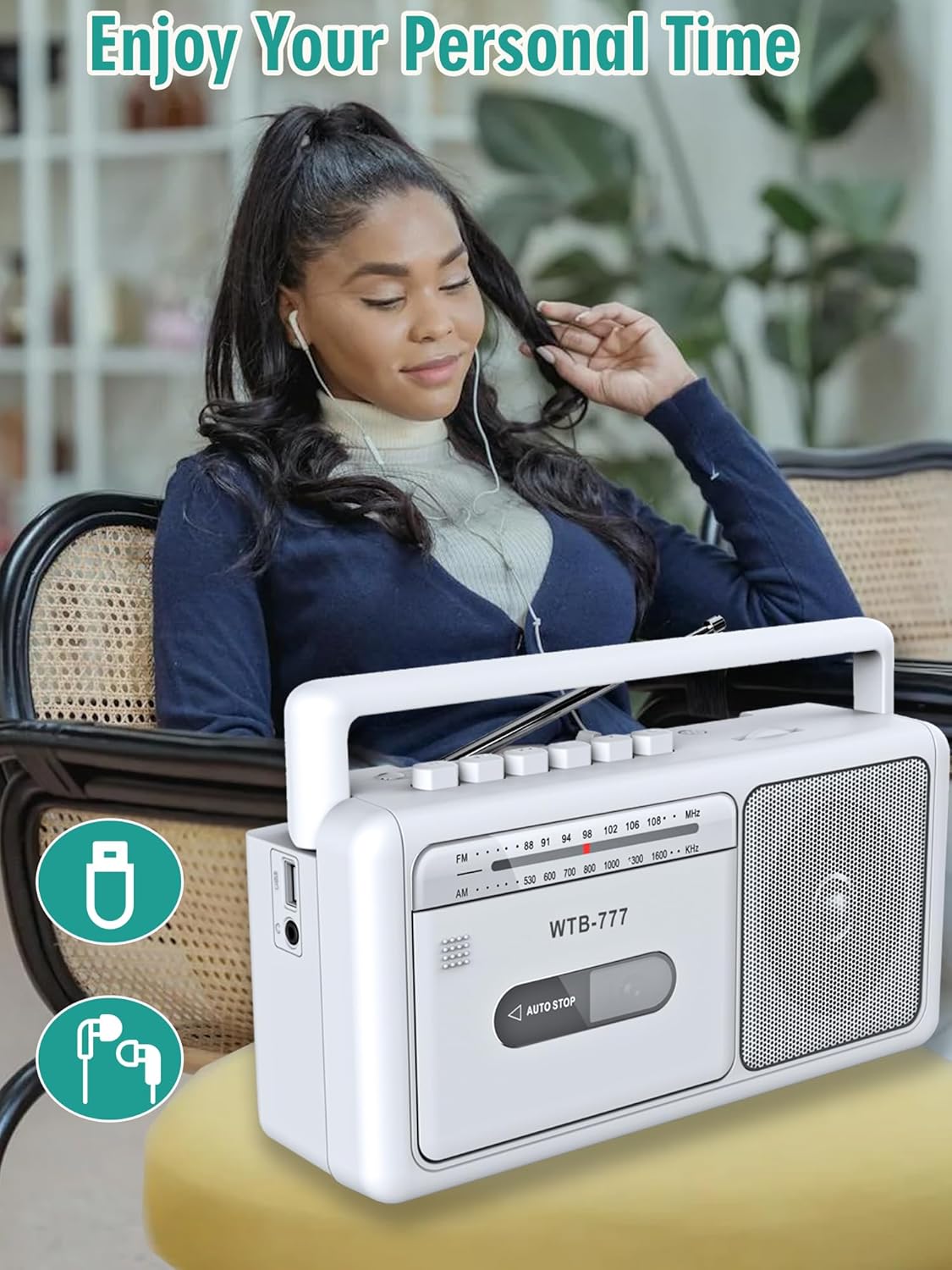
Figure 7: USB Playback and Earphone Jack
Recording to Cassette
The WTB-777 allows you to record audio from the radio onto a blank cassette tape.
- Insert a blank cassette tape into the cassette compartment (refer to Cassette Player Operation).
- Set the Function Switch (5) to "FM" or "AM" and tune to your desired radio station.
- Press the Record button (14) and the Play button (13) simultaneously to begin recording. The unit will automatically start recording the radio broadcast onto the tape.
- To stop recording, press the Stop/Open button (10).
บันทึก: The built-in microphone (6) can also be used for voice recording directly to tape when the function switch is set to "TAPE" and the Record button (14) is pressed.
การซ่อมบำรุง
- การทำความสะอาด: Use a soft, dry cloth to clean the exterior of the unit. Do not use abrasive cleaners or solvents. For the cassette head and pinch roller, use a specialized cassette head cleaner periodically to ensure optimal sound quality and prevent tape damage.
- พื้นที่จัดเก็บ: When not in use for extended periods, store the unit in a cool, dry place away from direct sunlight and extreme temperatures. Remove batteries if storing for a long time.
- การดูแลรักษาเทป: Store cassette tapes in their cases to protect them from dust and damage. Avoid exposing tapes to strong magnetic fields.
การแก้ไขปัญหา
If you experience issues with your WIITHINK WTB-777, please consult the following table before seeking professional service.
| ปัญหา | สาเหตุที่เป็นไปได้ | สารละลาย |
|---|---|---|
| เครื่องไม่เปิด |
|
|
| ไม่มีเสียงจากลำโพง |
|
|
| Cassette tape does not play or sounds distorted. |
|
|
| การรับสัญญาณวิทยุไม่ดี |
|
|
| อุปกรณ์บลูทูธไม่จับคู่ |
|
|
ข้อมูลจำเพาะ
Detailed technical specifications for the WIITHINK WTB-777.
| ยี่ห้อ | WITHINK |
| แบบอย่าง | WTB-777 |
| ขนาดสินค้า (กว้าง x ยาว x สูง) | 9.8 x 3 x 5.1 นิ้ว (24.9 x 7.6 x 13 ซม.) |
| น้ำหนักสินค้า | 2.75 ปอนด์ (1.25 กก.) |
| สี | สีขาว |
| เทคโนโลยีการเชื่อมต่อ | Bluetooth, Built-in Microphone, Earphone Jack, USB |
| ประเภทลำโพง | พกพาได้ |
| ช่วงความถี่ AM | 520 - 1710 kHz |
| ช่วงความถี่ FM | 87 - 108 เมกะเฮิรตซ์ |
| แหล่งพลังงาน | AC (Power Cord included), 4 x 'C' Batteries (not included) |
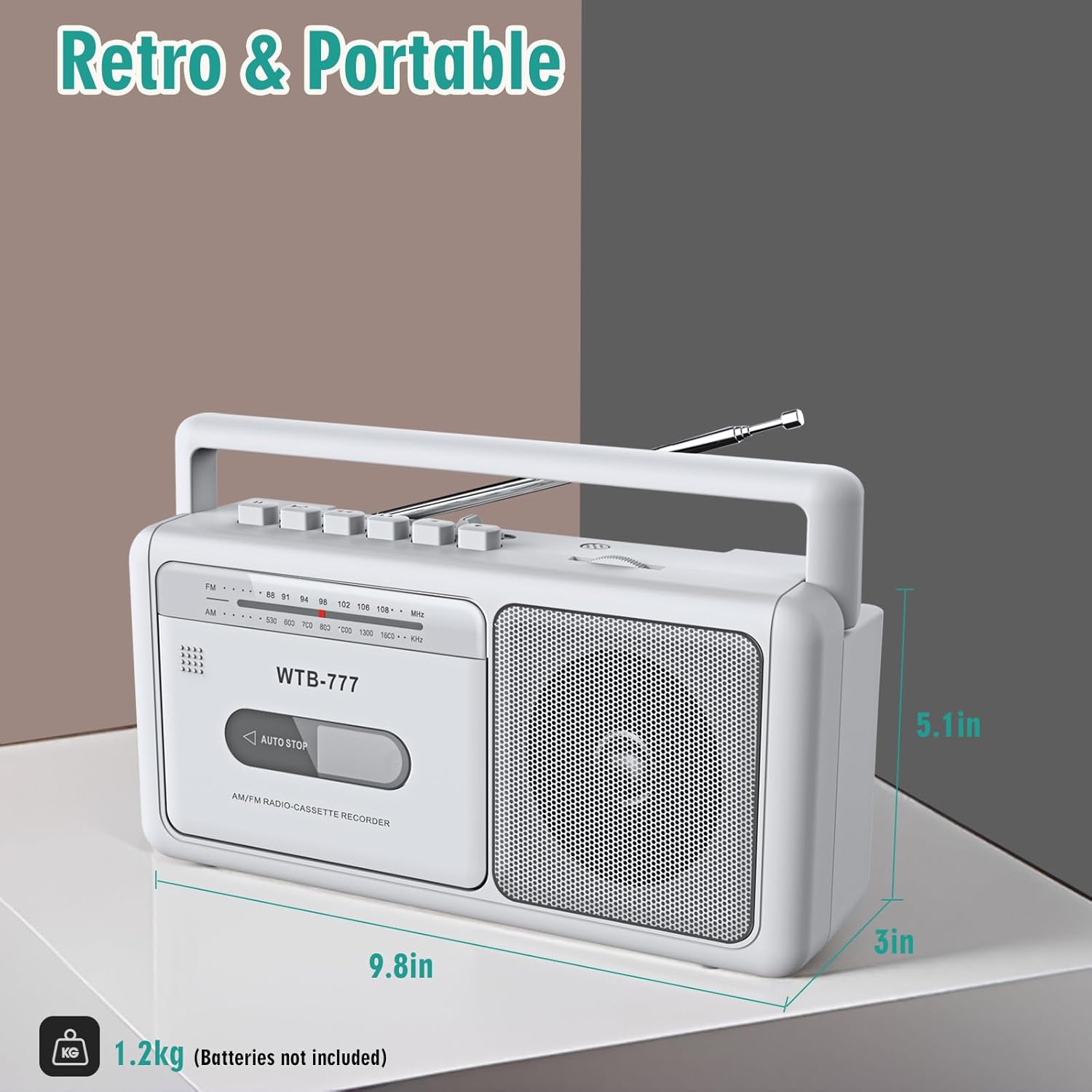
รูปที่ 8: ขนาดผลิตภัณฑ์
การรับประกันและการสนับสนุน
Specific warranty information for the WIITHINK WTB-777 is typically provided with the product packaging or on the manufacturer's official website. Please refer to the documentation included with your purchase for detailed warranty terms and conditions.
For technical support, troubleshooting assistance beyond this manual, or inquiries regarding parts and service, please contact WIITHINK customer support through their official channels. Contact information can usually be found on the product packaging, the manufacturer's website, or the retailer's product page.


