1. บทนำ
The Daakro ZK-1001B is a 100W mono channel Bluetooth amplifier board designed for DIY audio projects, including wireless speakers. It features TWS (True Wireless Stereo) pairing, multiple audio input options (Bluetooth, AUX, USB), and intuitive knob controls for volume, treble, and bass. This manual provides detailed instructions for setting up, operating, and maintaining your ampกระดานลิเนียร์
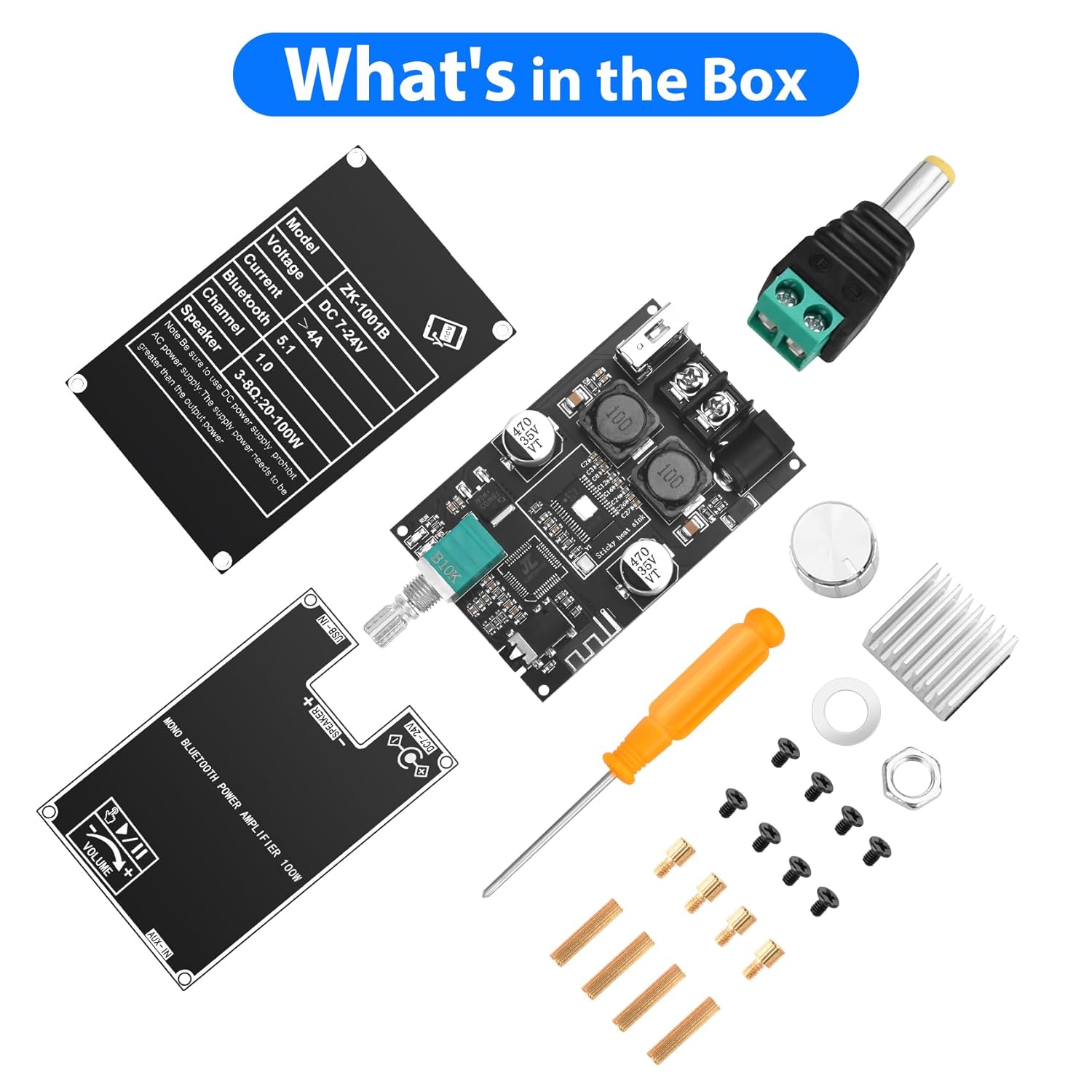
2. อะไรอยู่ในกล่อง
เมื่อเปิดบรรจุภัณฑ์ คุณจะพบส่วนประกอบดังต่อไปนี้:
- Amplifier คณะกรรมการ
- Knob caps (for volume, treble, bass)
- ไขควง
- สายไฟเข้า
- Mounting hardware (spacers, screws)
- Protective plates
3. สินค้าหมดview
The ZK-1001B amplifier board integrates a TPA3116D2 HiFi chip and Bluetooth 5.1 for high-fidelity audio. It includes controls for treble, bass, and volume, along with multiple input ports.
การควบคุม
- ปุ่มปรับระดับเสียง: Adjusts overall sound level. Also functions as a multi-function button (single click for play/pause, double click for next track, triple click for TWS mode, long press for power ON/OFF).
- ปุ่มเบส: Adjusts low-frequency audio.
- ปุ่มเสียงแหลม: Adjusts high-frequency audio.

อินพุตและเอาต์พุต
- แหล่งจ่ายไฟ DC 7-24V: สำหรับเชื่อมต่อแหล่งจ่ายไฟ
- เอาท์พุตลำโพง: Connects to a single speaker (mono channel).
- พอร์ต USB-IN: For USB flash drive audio playback or as a USB sound card.
- ช่องต่อสัญญาณเข้า: 3.5mm audio jack for wired audio input.
ตัวบ่งชี้
- ตัวบ่งชี้การทำงาน: แสดงสถานะการทำงาน
- ตัวบ่งชี้ TWS: Shows TWS pairing status.

4. คำแนะนำในการตั้งค่า
- แกะส่วนประกอบ: นำรายการทั้งหมดออกจากบรรจุภัณฑ์อย่างระมัดระวัง
- ติดตั้งแผ่นระบายความร้อน: If not pre-attached, remove the backing adhesive from the heat sink and firmly press it onto the TPA3116D2 chip on the ampกระดานลิเนียร์
- Install Knobs: Place the silver knob caps onto the volume, bass, and treble shafts.
- Mount Protective Plates: Use the provided spacers and screws to attach the top and bottom protective plates to the amplifier board. Ensure all ports and controls are accessible.
- เชื่อมต่อลำโพง: Connect your speaker (3-8Ω, 20-100W) to the "SPEAKER +" and "SPEAKER -" terminals.
- เชื่อมต่อพลังงาน: Connect a DC 7-24V power supply to the DC power input jack. Ensure correct polarity. A 12V or 24V adapter is suitable. For portable use, a 12V battery can be used.

5. คู่มือการใช้งาน
- เปิดเครื่อง: Long press the volume knob to power on the amplifier board. The WORK indicator light will illuminate.
- เลือกโหมดการป้อนข้อมูล:
- โหมดบลูทู ธ : The board will automatically enter Bluetooth pairing mode. ค้นหา "ZK-1001B" on your device and connect.
- โหมด AUX: Connect an audio source (e.g., TV, computer, phone) to the 3.5mm AUX-IN jack. The board will automatically switch to AUX input.
- โหมด USB: ใส่แฟลชไดรฟ์ USB พร้อมเสียง files into the USB-IN port. The board will play audio from the USB drive. It can also function as a USB sound card when connected to a computer.
- Adjust Audio:
- ปริมาณ: หมุนปุ่มปรับระดับเสียงเพื่อเพิ่มหรือลดระดับเสียง
- เล่น/หยุดชั่วคราว: Single click the volume knob to play or pause audio.
- เพลงถัดไป: Double click the volume knob to skip to the next track (in Bluetooth or USB mode).
- เสียงแหลม/เบส: Rotate the respective knobs to adjust high and low frequencies.
- หมดแรง: Long press the volume knob to power off the ampกระดานลิเนียร์

6. TWS Pairing Function (True Wireless Stereo)
The ZK-1001B supports TWS pairing, allowing two ZK-1001B boards to function as left and right stereo channels for a wider soundstage.
- Prepare Two Boards: Ensure both ZK-1001B amplifier boards are powered on and not connected to any Bluetooth device.
- เข้าสู่โหมด TWS: On one of the boards, triple click the volume knob. The TWS indicator light will flash, indicating it's searching for another board.
- การจับคู่: The two boards will automatically pair. Once paired, one board will act as the left channel and the other as the right channel. The TWS indicator lights on both boards will show a steady state (e.g., solid light or a different flashing pattern).
- เชื่อมต่อบลูทู ธ : Connect your Bluetooth device to the primary amplifier board (the one you initiated TWS pairing on).
- ออกจากโหมด TWS: Triple click the volume knob again on either board to exit TWS mode.

7 โหมดการรับสัญญาณเสียง
The Daakro ZK-1001B offers versatile audio input options:
- Bluetooth 5.1: Wireless connection for smartphones, tablets, and other Bluetooth-enabled devices. Provides a stable connection up to 16.4 feet (5 meters).
- อินพุต AUX 3.5 มม.: For wired connection to devices like TVs, computers, MP3 players, or other audio sources.
- ยูเอสบีแฟลชไดรฟ์: Directly play audio fileจากแฟลชไดรฟ์ USB
- การ์ดเสียง USB: Connect the board to a computer via USB to use it as an external sound card, enhancing audio output quality.

8. ข้อมูลจำเพาะ
| คุณสมบัติ | รายละเอียด |
|---|---|
| หมายเลขรุ่น | ZK-1001B |
| ยี่ห้อ | ดาโคโร |
| ประเภทการติดตั้ง | Board/Module |
| อินพุต Voltage | กระแสตรง 7-24 โวลต์ |
| จำนวนช่องสัญญาณ | 1 (ขาวดำ) |
| กำลังขับ | Up to 100W (depending on input voltage and speaker impedance) |
| ความต้านทานของลำโพง | 3-8Ω (recommended 4Ω) |
| เวอร์ชันบลูทูธ | 5.1 |
| ช่วงบลูทูธ | สูงถึง 16.4 ฟุต (5 เมตร) |
| อินพุตเสียง | Bluetooth, AUX (3.5mm), USB Flash Drive, USB Sound Card |
| ขนาดแพ็คเกจ | 4.41 x 2.64 x 2.05 นิ้ว |
| น้ำหนักสินค้า | 3.53 ออนซ์ |
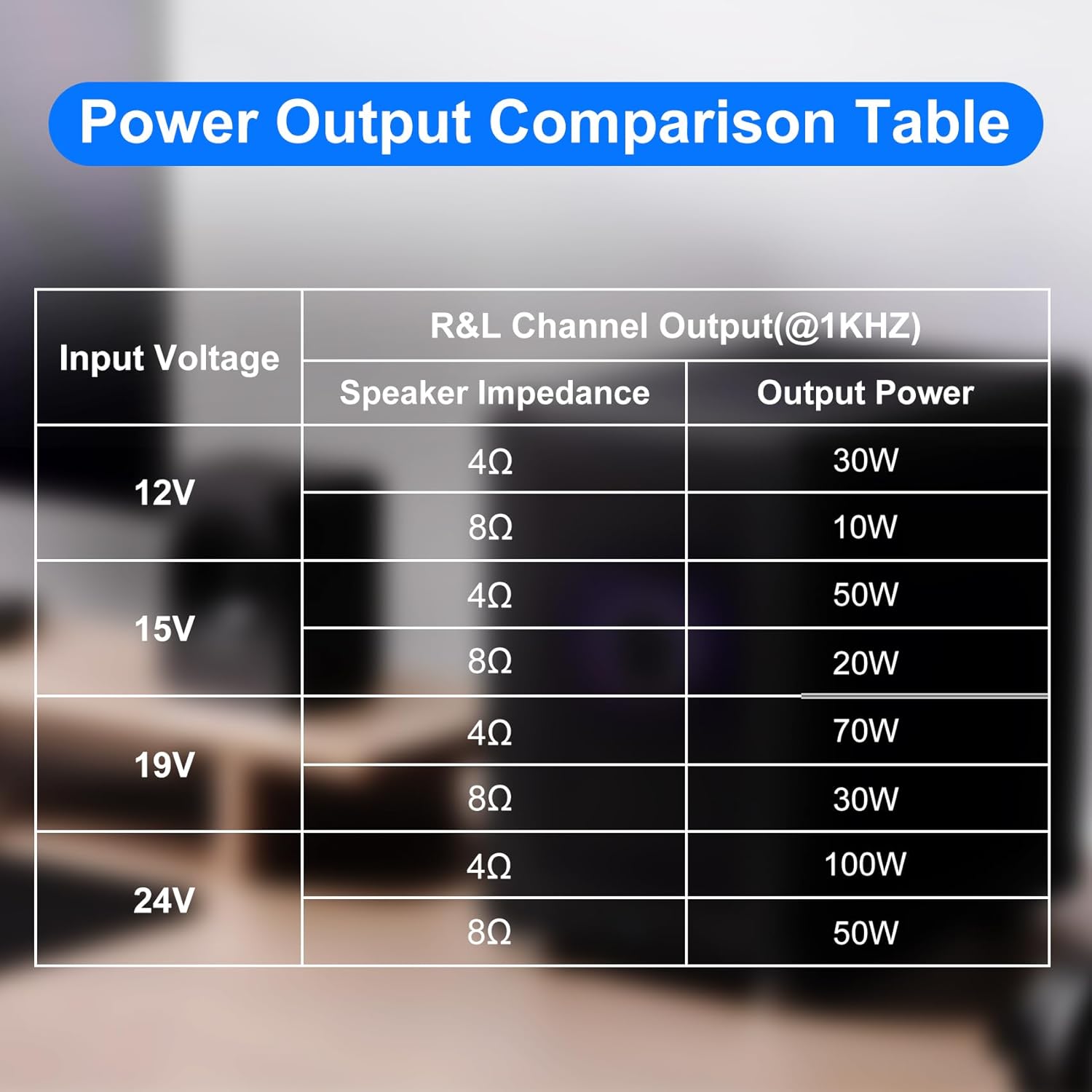
Power Output Comparison Table
| อินพุต Voltage | ความต้านทานของลำโพง | กำลังขับ |
|---|---|---|
| 12โวลต์ | 4Ω | 30วัตต์ |
| 8Ω | 10วัตต์ | |
| 15โวลต์ | 4Ω | 50วัตต์ |
| 8Ω | 20วัตต์ | |
| 19โวลต์ | 4Ω | 70วัตต์ |
| 8Ω | 30วัตต์ | |
| 24โวลต์ | 4Ω | 100วัตต์ |
| 8Ω | 50วัตต์ |
บันทึก: ให้มีปริมาณเพียงพอtage and current input for optimal power output. Higher voltage and current generally result in higher power. For the same conditions, a smaller speaker impedance yields greater power.
9. การบำรุงรักษา
- เก็บรักษาไว้ ampแผงวงจรขยายเสียงสะอาดและปราศจากฝุ่น ใช้ผ้าแห้งนุ่มๆ ในการทำความสะอาด
- Avoid exposing the board to moisture, extreme temperatures, or direct sunlight.
- Ensure proper ventilation to prevent overheating, especially during prolonged use at high volumes.
- Do not attempt to modify the circuit board, as this may void the warranty and cause damage.
10 การแก้ไขปัญหา
ไม่มีไฟฟ้า
- Check if the power supply is correctly connected and providing the specified DC 7-24V.
- Ensure the power adapter is functional.
- Verify the volume knob is long-pressed to turn on the device.
ไม่มีเสียง
- ตรวจสอบการเชื่อมต่อลำโพงว่าขั้วถูกต้องและแน่นสนิทดีหรือไม่
- Ensure the volume is turned up on both the amplifier board and the audio source.
- Verify the correct audio input mode is selected (Bluetooth, AUX, USB).
- หากใช้บลูทูธ โปรดตรวจสอบให้แน่ใจว่าอุปกรณ์ได้จับคู่และเชื่อมต่ออย่างถูกต้องแล้ว
- If using AUX, check the audio cable for damage and ensure it's fully inserted.
- If using USB, ensure the USB drive is formatted correctly and contains compatible audio files.
เสียงผิดเพี้ยน
- ลดระดับเสียงทั้งสองฝั่งลง amplifier board and the audio source.
- ตรวจสอบความเข้ากันได้ของค่าความต้านทานลำโพง (3-8 โอห์ม)
- Ensure the power supply provides adequate current for the desired output power.
- ตรวจสอบสายลำโพงว่ามีไฟฟ้าลัดวงจรหรือชำรุดหรือไม่
การตัดการเชื่อมต่อบลูทู ธ
- Ensure the Bluetooth device is within the 16.4 feet (5 meters) range.
- ตรวจสอบสัญญาณรบกวนจากอุปกรณ์ไร้สายอื่นๆ
- ลองเชื่อมต่ออุปกรณ์บลูทูธอีกครั้ง
ปัญหาการจับคู่ TWS
- Ensure both ZK-1001B boards are the same model and are not already connected to another Bluetooth device.
- Follow the triple-click procedure carefully on one board to initiate pairing.
- Ensure both boards are within close proximity during pairing.
11. การรับประกันและการสนับสนุน
Daakro is committed to providing high-quality audio equipment.
- การรับประกัน: The product typically comes with a 30-day warranty. Please refer to your purchase documentation for specific terms.
- บริการลูกค้า: Online customer service is available for support.
- ติดต่อ: For any issues or inquiries, please contact Daakro customer support through the platform of purchase or visit the official Daakro store for more information.


