1. บทนำ
The iVANKY FusionFinder Smart Tag is a compact item finder designed to help you locate your valuable belongings using the Apple Find My network. This device offers reliable tracking, audible alerts, and long-lasting battery performance, ensuring your items are always within reach or easily locatable.

Image: Two iVANKY FusionFinder Smart Tags, one with a keyring attached, showcasinก. การออกแบบที่กะทัดรัด
2. เนื้อหาบรรจุภัณฑ์
- iVANKY FusionFinder Smart Tag(ส)
- คู่มือการใช้งาน
- Keyrings (quantity may vary based on pack size)
- CR2032 Battery (pre-installed or included as spare)
3. การตั้งค่า
3.1 การเปิด/ปิดเครื่อง
To power on the iVANKY FusionFinder Smart Tag, press and hold the button on the device for approximately 5 seconds until you hear a beep sound. To power off, press and hold the button again for approximately 3 seconds until you hear a different series of beeps, indicating it has powered down. Powering off the device can help conserve battery life when not in active use.
3.2 การเชื่อมต่อกับ Apple Find My
The iVANKY FusionFinder Smart Tag is designed to work exclusively with Apple iOS devices via the Apple Find My app. Follow these steps to pair your device:
- Ensure your iVANKY FusionFinder Smart Tag เปิดเครื่องอยู่
- เปิด ค้นหาของฉัน แอปบน iPhone ของคุณ
- แตะที่ รายการ แท็บที่ด้านล่างของหน้าจอ
- แตะ เพิ่มรายการแล้วเลือก Other Supported Items.
- The app will search for nearby compatible devices. Once 'LocatePro' or a similar name appears, tap เชื่อมต่อ.
- Follow the on-screen prompts to name your tag and select an emoji to represent it.
- แตะ เห็นด้วย to link the item to your Apple ID and then เสร็จ.
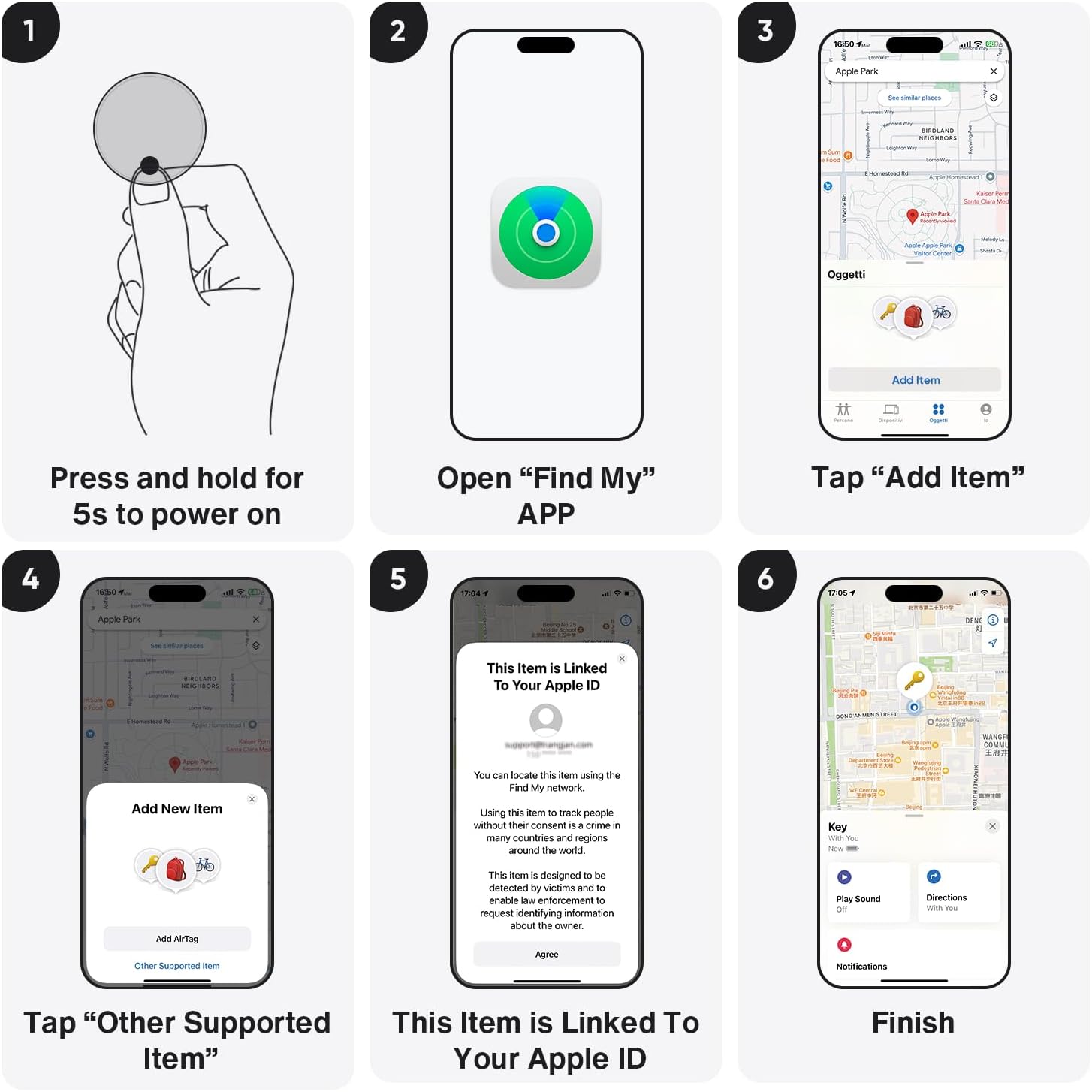
Image: Visual guide demonstrating the pairing process with the Apple Find My app.
Video: A seller-provided video demonstrating the pairing process of the Air tracking Tags with a mobile phone.
4. คู่มือการใช้งาน
4.1 Locating Items Nearby (Sound Alarm)
When your iVANKY FusionFinder is within Bluetooth range (up to 20 meters), you can use the Find My app to play a loud 85-decibel alarm. This audible alert helps you pinpoint the exact location of your lost item, even if it's hidden from view.

Image: The FusionFinder emitting an 85dB+ sound, with a smartphone displaying its proximity on the Find My app.
4.2 Locating Items Far Away (Map Navigation)
If your item is outside of Bluetooth range, the Apple Find My network can still help you locate it. The network anonymously uses millions of Apple devices worldwide to detect your FusionFinder and report its location to you. You can view its last known location on a map within the Find My app and get directions to it.

Image: A smartphone screen showing map directions to a FusionFinder that has been left behind.
4.3 การแจ้งเตือนเมื่อถูกทิ้งไว้ข้างหลัง
Enable 'Notify When Left Behind' in the Find My app to receive instant alerts on your iPhone if your iVANKY FusionFinder moves out of the connected Bluetooth range. This feature helps prevent you from forgetting your valuables.
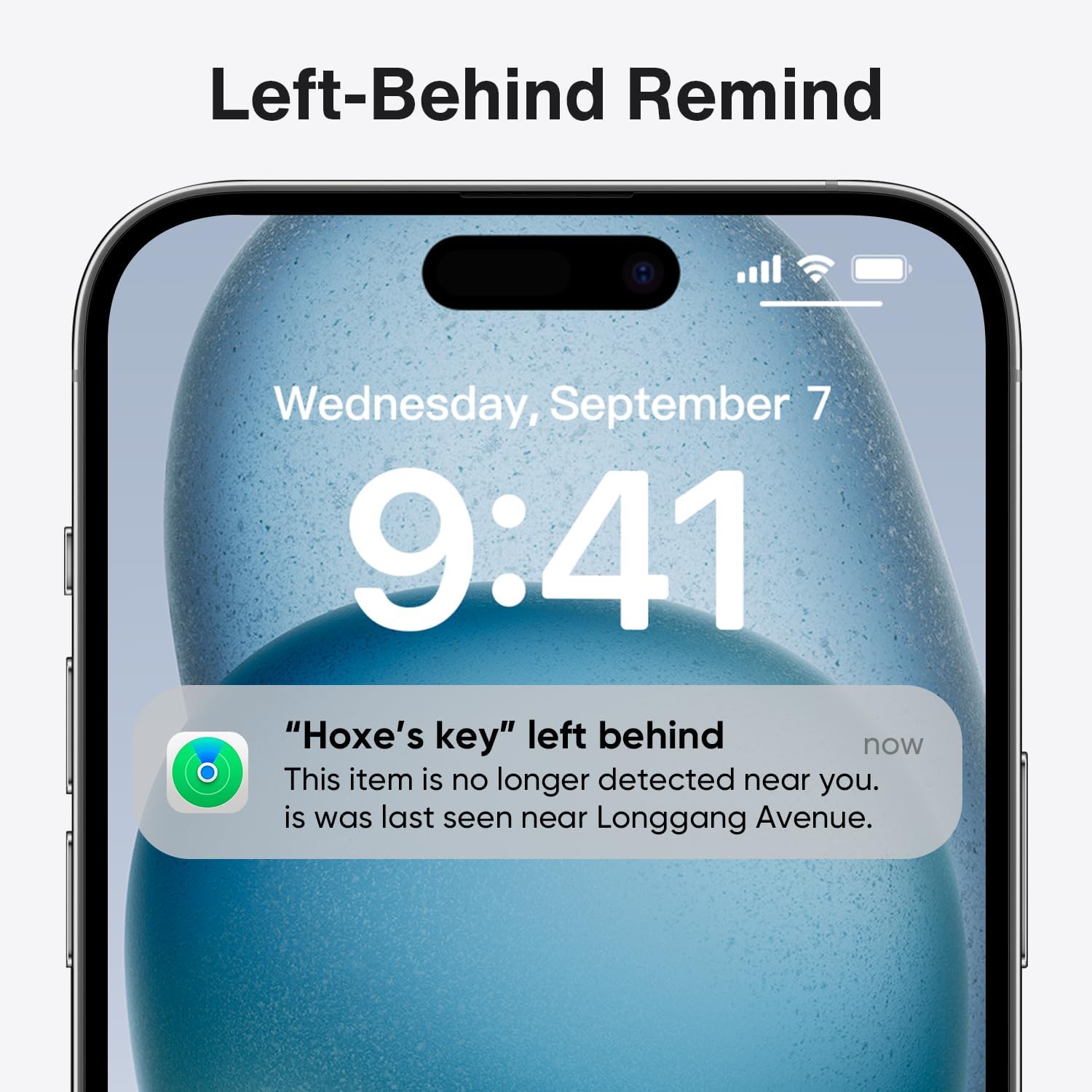
Image: A smartphone displaying a notification indicating that an item with a FusionFinder has been left behind.
5. การจัดการแบตเตอรี่
5.1 อายุการใช้งานแบตเตอรี่
The iVANKY FusionFinder is powered by a replaceable CR2032 coin cell battery, offering up to one full year of battery life under typical usage conditions. This ensures long-term reliability without frequent battery changes.
5.2 การเปลี่ยนแบตเตอรี่
When the battery needs replacement, gently open the device casing (refer to the user manual for specific instructions) and replace the old CR2032 battery with a new one. Ensure correct polarity during installation.

Image: Features of the FusionFinder, highlighting its 365-day battery life and replaceable battery design.
6. คุณสมบัติของผลิตภัณฑ์
- บลูทูธขั้นสูง 5.2: Provides a robust and stable connection for tracking within a 20-meter range.
- 85dB+ Audible Alarm: A loud alarm helps locate items quickly when nearby.
- ระดับการกันน้ำ IP67: Offers protection against dust and temporary immersion in water, making it suitable for various environments.
- แบตเตอรี่ CR2032 แบบถอดเปลี่ยนได้: Ensures extended use with easy battery changes.
- การผสานรวม Apple Find My Network: Utilizes the extensive Find My network for global positioning and tracking.
7. สถานการณ์การใช้งาน
The iVANKY FusionFinder is versatile and can be attached to a variety of items to prevent loss and aid in recovery:
- คีย์: ติดไว้กับกุญแจบ้านหรือกุญแจรถของคุณ
- กระเป๋าสตางค์: ใส่ลงในกระเป๋าสตางค์หรือกระเป๋าถือของคุณ
- กระเป๋าเดินทาง: Secure to suitcases or travel bags.
- Backpacks: Ideal for school bags or hiking packs.
- สิ่งของมีค่าอื่นๆ: Use for any item you wish to keep track of.

ภาพ: อดีตamples of FusionFinder usage, showing tags attached to luggage, keys, and a wallet for anti-loss protection.
8. ข้อมูลจำเพาะ
| คุณลักษณะ | รายละเอียด |
|---|---|
| หมายเลขรุ่น | วีเอฟเอ01 |
| เทคโนโลยีการเชื่อมต่อ | บลูทูธ 5.2 |
| ประเภทแบตเตอรี่ | 1 x CR2032 (รวมอยู่ด้วย) |
| อายุการใช้งานแบตเตอรี่ | นานถึง 1 ปี |
| ระดับสัญญาณเตือนภัย | 85เดซิเบล+ |
| ความต้านทานต่อน้ำ | IP67 |
| อุปกรณ์ที่รองรับ | iPhone (iOS Only) |
| วัสดุ | พลาสติก |
| น้ำหนักสินค้า | 2.11 ออนซ์ |
| ขนาดแพ็คเกจ | 3.58 x 3.5 x 0.55 นิ้ว |
9 การแก้ไขปัญหา
- อุปกรณ์ไม่เปิดเครื่อง: Ensure the CR2032 battery is correctly installed and has sufficient charge. Replace the battery if necessary.
- Unable to pair with Find My app: Make sure Bluetooth is enabled on your iPhone and the FusionFinder is powered on and within range. Restart both devices and try again.
- No sound from the alarm: Check the volume settings on your iPhone and ensure the FusionFinder is within Bluetooth range.
- ตำแหน่งที่ตั้งไม่ถูกต้อง: Location accuracy can be affected by environmental factors and the density of the Find My network in your area. Ensure your iPhone has a stable internet connection.
10. การรับประกันและการสนับสนุน
For warranty information, technical support, or any inquiries regarding your iVANKY FusionFinder Smart Tag, please refer to the contact details provided in the product packaging or visit the official iVANKY webไซต์นี้ โปรดเก็บใบเสร็จรับเงินที่ซื้อไว้เพื่อใช้เรียกร้องการรับประกัน


