ยินดีต้อนรับ
Thank you for choosing the BYTECH BICONIC True Wireless Earbuds. This manual provides essential information on how to set up, operate, maintain, and troubleshoot your new earbuds. Please read this manual thoroughly before use to ensure optimal performance and longevity of your device.
คำแนะนำด้านความปลอดภัยที่สำคัญ
- ห้ามให้หูฟังหรือกล่องชาร์จสัมผัสกับอุณหภูมิที่สูงหรือความชื้นสูงหรือของเหลว
- หลีกเลี่ยงการทำตก กระแทก หรือถอดประกอบอุปกรณ์
- Do not use abrasive cleaners or harsh chemicals to clean the earbuds or case.
- ควรฟังในระดับเสียงที่พอเหมาะเพื่อป้องกันความเสียหายต่อการได้ยิน การสัมผัสกับเสียงดังเป็นเวลานานอาจทำให้สูญเสียการได้ยินอย่างถาวร
- เก็บให้พ้นจากมือเด็กและสัตว์เลี้ยง
- Dispose of the device responsibly according to local regulations. Do not dispose of with household waste.
สิ่งที่รวมอยู่
กรุณาตรวจสอบเนื้อหาในแพ็คเกจเพื่อให้แน่ใจว่ามีสินค้าครบทั้งหมด:
- BYTECH BICONIC True Wireless Earbuds (Left and Right)
- เคสชาร์จไฟ
- สายชาร์จ
- คู่มือการใช้งาน
สินค้าเกินview
Familiarize yourself with the components of your BYTECH BICONIC True Wireless Earbuds.

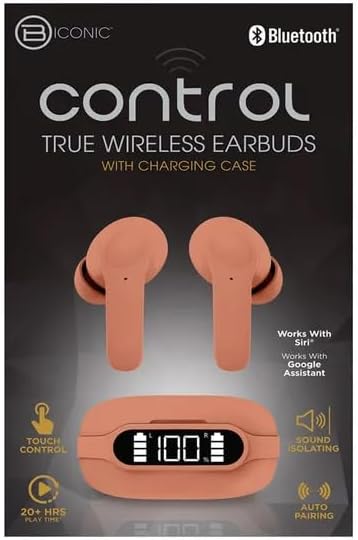
การเริ่มต้น
การชาร์จหูฟังเอียร์บัดและเคส
The BYTECH BICONIC earbuds come with a rechargeable battery in both the earbuds and the charging case. Ensure both are fully charged before first use.
- วางหูฟังลงในกล่องชาร์จ ตรวจสอบให้แน่ใจว่าได้วางหูฟังลงในช่องที่ถูกต้อง (L สำหรับข้างซ้าย, R สำหรับข้างขวา)
- Connect the provided charging cable to the charging port on the case and the other end to a USB power source (e.g., computer USB port, wall adapter).
- The digital display on the charging case will show the battery level. Allow sufficient time for a full charge.
- เมื่อชาร์จเต็มแล้ว ให้ถอดสายชาร์จออก
จับคู่บลูทู ธ
Follow these steps to pair your earbuds with your Bluetooth-enabled device:
- ตรวจสอบให้แน่ใจว่าหูฟังได้รับการชาร์จและอยู่ในกล่องชาร์จ
- เปิดกล่องชาร์จ หูฟังจะเข้าสู่โหมดจับคู่โดยอัตโนมัติ และไฟแสดงสถานะบนหูฟังจะกะพริบ
- บนอุปกรณ์ของคุณ (สมาร์ทโฟน แท็บเล็ต ฯลฯ) ไปที่การตั้งค่าบลูทูธ แล้วเปิดใช้งานบลูทูธ
- ค้นหา available devices. You should see "BYTECH BICONIC" or a similar name appear in the list.
- Select "BYTECH BICONIC" to connect. Once connected, a voice prompt will confirm the successful pairing, and the indicator lights on the earbuds will stop flashing.
- หูฟังจะเชื่อมต่อกับอุปกรณ์ที่จับคู่ล่าสุดโดยอัตโนมัติเมื่อนำออกจากเคส โดยมีเงื่อนไขว่าอุปกรณ์นั้นต้องเปิดใช้งานบลูทูธไว้
คำแนะนำการใช้งาน
การควบคุมแบบสัมผัส
The BYTECH BICONIC earbuds feature intuitive touch controls for easy management of your audio and calls.
| การกระทำ | การทำงาน |
|---|---|
| แตะครั้งเดียว (หูฟังซ้าย/ขวา) | เล่น/หยุดเพลง, รับสาย/วางสาย |
| แตะสองครั้ง (หูฟังข้างขวา) | เพลงถัดไป |
| แตะสองครั้ง (หูฟังข้างซ้าย) | เพลงก่อนหน้า |
| แตะสามครั้ง (หูฟังซ้าย/ขวา) | เปิดใช้งานผู้ช่วยเสียง (Siri/Google Assistant) |
| กดยาว (หูฟังซ้าย/ขวา) | ปฏิเสธการรับสาย |
การเปิดและปิดเครื่อง
- เปิดเครื่อง: หูฟังจะเปิดโดยอัตโนมัติเมื่อถอดออกจากกล่องชาร์จ
- หมดแรง: ใส่หูฟังกลับเข้าไปในกล่องชาร์จและปิดฝา หูฟังจะปิดโดยอัตโนมัติและเริ่มชาร์จ
การบำรุงรักษาและการดูแล
Proper care will extend the life of your BYTECH BICONIC True Wireless Earbuds.
- การทำความสะอาด: Use a soft, dry, lint-free cloth to clean the earbuds and charging case. Do not use liquids or aerosol cleaners.
- พื้นที่จัดเก็บ: เมื่อไม่ได้ใช้งาน ควรเก็บหูฟังไว้ในกล่องชาร์จเสมอ เพื่อปกป้องหูฟังและให้หูฟังชาร์จไฟอยู่เสมอ
- หลีกเลี่ยงเงื่อนไขที่รุนแรง: Do not expose the device to extreme heat, cold, or direct sunlight.
- ความต้านทานน้ำ: หูฟังเหล่านี้ไม่กันน้ำ โปรดหลีกเลี่ยงการสัมผัสกับน้ำหรือความชื้นมากเกินไป
การแก้ไขปัญหา
หากคุณพบปัญหาใดๆ กับหูฟัง โปรดดูวิธีแก้ไขปัญหาทั่วไปต่อไปนี้:
| ปัญหา | สารละลาย |
|---|---|
| หูฟังเอียร์บัดไม่จับคู่ | ตรวจสอบให้แน่ใจว่าหูฟังชาร์จเต็มแล้ว ปิดและเปิดบลูทูธบนอุปกรณ์ของคุณ ลืมอุปกรณ์ในการตั้งค่าบลูทูธ แล้วจับคู่ใหม่อีกครั้ง |
| เอียร์บัดตัวเดียวเท่านั้นที่ใช้งานได้ | ใส่หูฟังทั้งสองข้างกลับเข้าไปในกล่องชาร์จ ปิดฝา รอสักครู่ แล้วจึงนำออกมาอีกครั้ง ตรวจสอบให้แน่ใจว่าหูฟังทั้งสองข้างชาร์จเต็มแล้ว |
| ไม่มีเสียง | ตรวจสอบระดับเสียงทั้งบนอุปกรณ์ของคุณและหูฟัง ตรวจสอบให้แน่ใจว่าหูฟังเชื่อมต่ออย่างถูกต้อง ลองเล่นไฟล์เสียงอื่นๆ ดู |
| เคสชาร์จไม่ชาร์จ | Ensure the charging cable is securely connected to both the case and the power source. Try a different USB port or power adapter. |
ข้อมูลจำเพาะทางเทคนิค
Detailed specifications for your BYTECH BICONIC True Wireless Earbuds:
| คุณสมบัติ | รายละเอียด |
|---|---|
| หมายเลขรุ่น | BC-AU-BE-144-TN |
| เทคโนโลยีการเชื่อมต่อ | ไร้สาย (Bluetooth) |
| ฟอร์มแฟกเตอร์ | หูฟังแบบใส่ในหู (Intraurales) |
| สี | คาเฟ่ |
| คุณสมบัติพิเศษ | Rechargeable Battery, Touch Control, Sound Isolating, Auto Pairing |
| ส่วนประกอบที่รวมอยู่ | สายเคเบิล |
| Estimated Play Time | 20+ Hours (with charging case) |
ข้อมูลการรับประกันและการบริการลูกค้า
BYTECH products are designed and manufactured to the highest quality standards. For information regarding warranty coverage, please refer to the warranty card included with your purchase or visit the official BYTECH webเว็บไซต์.
If you require further assistance or have questions not covered in this manual, please contact BYTECH customer support through their official channels. Please have your model number (BC-AU-BE-144-TN) and purchase details ready when contacting support.


