1. บทนำ
ขอบคุณสำหรับการซื้อasing the Timex TW14 Alarm Clock with Wireless Charger. This compact device combines a digital alarm clock with a convenient 15W wireless charging pad, suitable for various smartphones and earbuds. This manual provides essential information for setting up, operating, and maintaining your new alarm clock.
2. เนื้อหาบรรจุภัณฑ์
โปรดตรวจสอบให้แน่ใจว่ามีสินค้าทั้งหมดอยู่ในแพ็คเกจ:
- Timex TW14 Alarm Clock with Wireless Charger
- สายไฟ USB-A เป็น USB-C
- คู่มือการใช้งาน (เอกสารนี้)
บันทึก: A 18W QC3.0 adapter and 2 AAA batteries for backup are ไม่รวมอยู่ และต้องซื้อแยกต่างหาก
3. สินค้าหมดview
Familiarize yourself with the components and controls of your Timex TW14 alarm clock.

ภาพที่ 3.1: สูงสุด view of the Timex TW14 alarm clock, highlighting the control buttons and the wireless charging pad. The display shows "10:09". A USB power cable is also shown.
แผงด้านหน้า:
- จอแสดงผล LED: Shows time, alarm status, and PM indicator.
แผงด้านบน:
- แผ่นชาร์จไร้สาย: สำหรับชาร์จอุปกรณ์ที่รองรับ
- ปุ่ม "M" : Mode/Set button for time and alarm settings, also functions as snooze.
- "-" ปุ่ม: Decrease value, navigate backward, also functions as snooze.
- ปุ่ม "+": Increase value, navigate forward, also functions as snooze.
แผงด้านหลัง:
- กำลังไฟเข้า USB-C: เชื่อมต่อกับสายไฟ
แผงด้านล่าง:
- ช่องใส่แบตเตอรี่: For 2 AAA backup batteries.
4. การตั้งค่า
4.1 การเชื่อมต่อสายไฟ
- Connect the supplied USB-A to USB-C power cable to the USB-C input port on the rear of the alarm clock.
- Connect the USB-A end of the cable to a compatible 18W QC3.0 USB power adapter (not included).
- Plug the power adapter into a standard wall outlet. The clock display will illuminate.
4.2 การติดตั้งระบบสำรองไฟด้วยแบตเตอรี่
The battery backup system maintains time and alarm settings during a temporary power outage. It does not power the clock display or wireless charging function.
- หาช่องใส่แบตเตอรี่ที่อยู่ด้านล่างของตัวเครื่อง
- เปิดฝาช่องใส่แบตเตอรี่
- Insert 2 new AAA batteries (not included), observing the correct polarity (+ and -) as indicated inside the compartment.
- ปิดฝาช่องใส่แบตเตอรี่ให้แน่น
5. คู่มือการใช้งาน
5.1 การตั้งเวลา
- กดปุ่มค้างไว้ M กดปุ่มค้างไว้จนกว่าตัวเลขชั่วโมงจะเริ่มกะพริบ
- ใช้ - or + buttons to adjust the hour. Pay attention to the PM indicator if using 12-hour format.
- กดปุ่ม M button again to confirm the hour, and the minute digits will flash.
- ใช้ - or + ปุ่มปรับนาที
- กดปุ่ม M button once more to confirm the minutes and exit time setting mode.
5.2 การตั้งปลุก
- กดปุ่ม M button once (do not hold) to enter alarm setting mode. The alarm time will be displayed, and the alarm icon will flash.
- กดปุ่มค้างไว้ M กดปุ่มค้างไว้จนกว่าตัวเลขชั่วโมงของนาฬิกาปลุกจะเริ่มกะพริบ
- ใช้ - or + ปุ่มเพื่อปรับชั่วโมงการปลุก
- กดปุ่ม M button again to confirm the alarm hour, and the alarm minute digits will flash.
- ใช้ - or + ปุ่มสำหรับปรับนาทีปลุก
- กดปุ่ม M button once more to confirm the alarm minutes and exit alarm setting mode. The alarm icon will remain lit, indicating the alarm is active.
- หากต้องการเปิด/ปิดนาฬิกาปลุก ให้กดปุ่ม M button briefly when the current time is displayed. The alarm icon will appear or disappear.
5.3 ฟังก์ชั่นเลื่อนซ้ำ
When the alarm sounds, press any of the M, -, หรือ + buttons to activate the snooze function. The alarm will temporarily stop and sound again after approximately 9 minutes.
To turn off the alarm completely, allow the alarm to ring for its full duration or turn off the alarm via the M button when not ringing.
5.4 ตัวหรี่แสงหน้าจอ
ในการปรับความสว่างของจอแสดงผล LED ให้กดปุ่มซ้ำๆ M button (when not in setting mode) to cycle through High, Low, and Off brightness levels.
5.5 การชาร์จแบบไร้สาย
The Timex TW14 features a 15W wireless charging pad compatible with Qi-enabled devices such as iPhone, Android smartphones, and AirPods.

ภาพที่ 5.1: An iPhone placed on the wireless charging pad of the Timex TW14 alarm clock, indicating active charging.
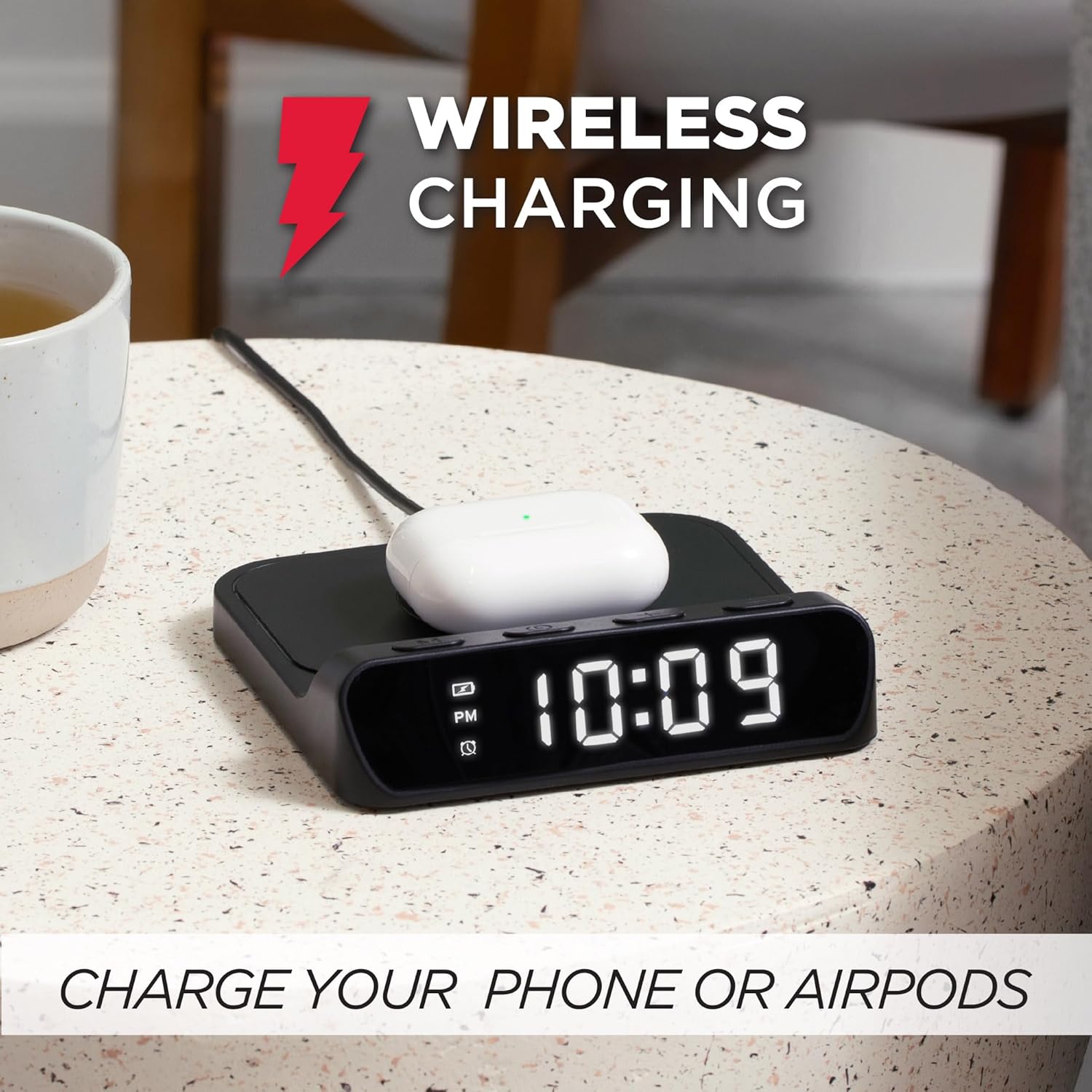
ภาพที่ 5.2: AirPods case placed on the wireless charging pad of the Timex TW14 alarm clock, indicating active charging.
- Place your Qi-enabled device (e.g., smartphone, AirPods case) directly onto the center of the wireless charging pad on the top of the alarm clock.
- Ensure the device is properly aligned with the charging coil. A charging indicator (if available on your device) will confirm charging has begun.
- If charging does not start, slightly reposition your device on the pad.
ข้อควรพิจารณาที่สำคัญ:
- For optimal charging performance, use an 18W QC3.0 power adapter.
- Thick phone cases or cases containing metal may interfere with wireless charging. Remove such cases if charging issues occur.
- Charging speed may vary depending on the device, its battery level, and environmental factors.
6. การบำรุงรักษา
6.1 การทำความสะอาด
To clean the unit, gently wipe the surfaces with a soft, dry cloth. Do not use liquid cleaners, abrasive materials, or chemical sprays, as these may damage the finish or internal components.
6.2 การเปลี่ยนแบตเตอรี่
Replace the 2 AAA backup batteries annually or if you notice settings are not retained during power outages. Always use new batteries and dispose of old batteries responsibly.
7 การแก้ไขปัญหา
If you experience issues with your Timex TW14 alarm clock, please refer to the following common problems and solutions:
| ปัญหา | สาเหตุที่เป็นไปได้ | สารละลาย |
|---|---|---|
| การแสดงนาฬิกาปิดหรือไม่ทำงาน | No power, loose connection, or display dimmer set to "Off". | Ensure the USB-C power cable is securely connected to the clock and a functional power adapter. Check if the adapter is plugged into a live outlet. Press the M button to cycle through display brightness settings (High/Low/Off). |
| การชาร์จแบบไร้สายไม่ทำงาน | Device not Qi-compatible, improper alignment, phone case interference, insufficient power adapter. | Verify your device supports Qi wireless charging. Reposition the device on the center of the charging pad. Remove thick or metallic phone cases. Ensure you are using an 18W QC3.0 power adapter. |
| การชาร์จแบบไร้สายจะช้า | Power adapter not powerful enough, device alignment, background apps on device. | Use an 18W QC3.0 power adapter for optimal speed. Ensure perfect alignment of the device on the charging pad. Close unnecessary apps on your device. |
| Alarm settings are lost after power outage. | แบตเตอรี่สำรองหมดหรือไม่ได้ติดตั้ง | Install 2 new AAA batteries in the battery compartment, ensuring correct polarity. Replace old batteries if necessary. |
| มีปัญหาในการตั้งเวลา/นาฬิกาปลุก | ลำดับการกดปุ่มไม่ถูกต้อง | Refer to sections 5.1 and 5.2 for detailed instructions on setting the time and alarm. Ensure you press and hold the M button at the correct steps. |
8. ข้อมูลจำเพาะ
| ยี่ห้อ | ไทม์เม็กซ์ |
| หมายเลขรุ่น | ทีดับบลิว14 |
| สี | สีดำ |
| ประเภทจอภาพ | Digital LED (0.8" white) |
| คุณสมบัติพิเศษ | Alarm, 15W Wireless Charging, Display Dimmer, Battery Backup |
| ขนาดสินค้า | 5" (Width) x 5" (Depth) x 1.2" (Height) |
| แหล่งพลังงาน | USB-A to USB-C power cable (included), requires 18W QC3.0 adapter (not included) |
| แบตเตอรี่สำรอง | แบตเตอรี่ AAA 2 ก้อน (ไม่รวม) |
| วัสดุกรอบ | พลาสติก |
| น้ำหนักสินค้า | 0.2 กิโลกรัม (7 ออนซ์) |

ภาพที่ 8.1: Timex TW14 alarm clock with its dimensions (5"W x 5"D x 1.2"H) clearly indicated.
9. การรับประกันและการสนับสนุน
Timex products are manufactured to high quality standards. For information regarding warranty coverage, technical support, or customer service, please refer to the warranty card included with your purchase or visit the official Timex webไซต์ โปรดเก็บหลักฐานการซื้อไว้เพื่อใช้ในการเรียกร้องการรับประกัน