1. บทนำ
This manual provides comprehensive instructions for the setup, operation, and maintenance of your Flashforge Guider 3 Ultra Professional Level 3D Printer. Please read this manual thoroughly before operating the device to ensure safe and efficient use.

Image 1.1: The Flashforge Guider 3 Ultra 3D Printer, showcasing its large build volume and enclosed design.
2. สินค้าหมดview
The Flashforge Guider 3 Ultra is a professional-grade 3D printer designed for high-speed and high-accuracy printing. It features a dual extruder system, a large build volume, and advanced functionalities for diverse applications.
2.1 คุณสมบัติหลัก
- Dual Extruder Design: Supports printing with two different materials or colors, including soluble support materials for complex geometries.
- Large Build Volume: Single Extruder: 330x330x600 mm; Dual Extruder: 300x330x600 mm.
- การพิมพ์ความเร็วสูง: Maximum speed of 500mm/s and acceleration of 20000mm/s².
- ระบบระบายความร้อนขั้นสูง: Dual-fan air-blowing system for improved molding accuracy.
- Wide Filament Compatibility: Supports PLA, ABS, PETG, HIPS, PP, TPU, PLA-GF, PPS-CF, ASA, PC, Nylon, and more with a maximum extruder temperature of 350°C.
- คุณสมบัติที่เป็นมิตรต่อผู้ใช้: Auto One-click Leveling, Quick-release Nozzle, Flexible Steel Plate, HEPA 13 Air Filtration System, Filament Drying Chamber, Remote Video Monitoring, Filament Run-out Reminder, and Power Loss Recovery.

Image 2.1: Illustration of the large build volume capabilities for both single and dual extruder configurations.
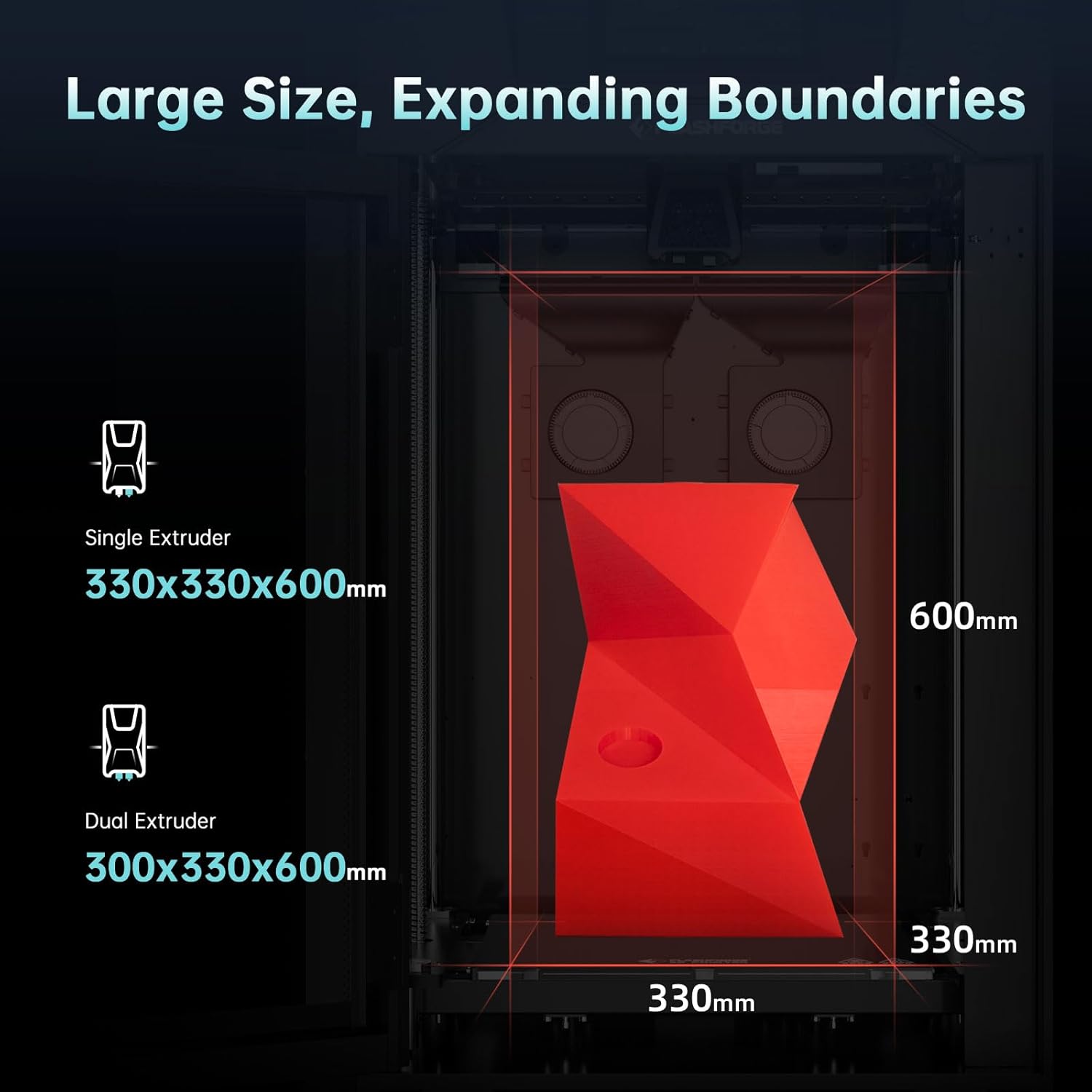
Image 2.2: Depiction of various filament types compatible with the Guider 3 Ultra, highlighting the 350°C maximum extruder temperature.

Image 2.3: Visual representation of the dual-fan air-blowing cooling system and the printer's high speed and acceleration capabilities.

Image 2.4: Diagram illustrating various advanced features such as automatic leveling, quick-release extruder, HEPA 13 filter, filament drying chamber, remote monitoring, and power loss recovery.
3. อะไรอยู่ในกล่อง
เมื่อแกะกล่อง โปรดตรวจสอบว่าสิ่งของทั้งหมดที่ระบุไว้ด้านล่างครบถ้วนและอยู่ในสภาพดี
- G3U 3D Printer
- สายไฟ
- จาระบี (2)
- กาว
- แปรง
- มีดโกน
- คีมปากแหลม
- คีมปากเฉียง
- ไขควงตรง
- เครื่องมือคลายการอุดตันของพิน
- ชุดประแจอัลเลน
- Elbow Tweezers
- Nozzle Assembly (x2)
- ถุงมือทนความร้อน
- Filament (x2)
- USB Disk (containing User Manual)
- บัตรบริการหลังการขาย
- คู่มือเริ่มต้นอย่างรวดเร็ว
- Fuse (x2)
- Desiccant (x12)
- Flexible Steel Build Plate

Image 3.1: Visual representation of all components included in the Flashforge Guider 3 Ultra package.
4. การตั้งค่า
Follow these steps to set up your Flashforge Guider 3 Ultra 3D Printer for the first time.
4.1 การแกะและการจัดวาง
- นำเครื่องพิมพ์และอุปกรณ์เสริมทั้งหมดออกจากบรรจุภัณฑ์อย่างระมัดระวัง
- วางเครื่องพิมพ์บนพื้นผิวที่มั่นคงและเรียบในบริเวณที่มีอากาศถ่ายเทสะดวก ตรวจสอบให้แน่ใจว่ามีพื้นที่รอบเครื่องพิมพ์เพียงพอสำหรับการใช้งานและการบำรุงรักษา
- Remove all protective packaging materials, including tape and foam inserts, from inside and outside the printer.
4.2 การเชื่อมต่อสายไฟ
- Connect the power cable to the printer's power input port.
- เสียบปลายสายไฟอีกด้านหนึ่งเข้ากับเต้ารับไฟฟ้าที่มีสายดิน
- Turn on the printer using the power switch, typically located at the rear or side of the unit.
4.3 Initial Configuration and Leveling
- Upon first power-on, the printer's smart LCD touch screen will guide you through the initial setup process.
- Follow the on-screen prompts for language selection and network configuration (Wi-Fi or Ethernet).
- Utilize the "Auto One-click Leveling" function as prompted. This automated process will calibrate the print bed for optimal adhesion and print quality.
5. การดำเนินการ
This section details the steps for operating your Flashforge Guider 3 Ultra 3D Printer.
5.1 การโหลดเส้นใย
- Ensure the printer is powered on and the extruder is at room temperature or preheated to the filament's loading temperature.
- Open the filament drying chamber and place the filament spool inside.
- Feed the filament through the designated path to the extruder. Follow the on-screen instructions for loading, which may involve automatic feeding.
- Confirm that the filament is properly loaded and extruding smoothly from the nozzle.
5.2 Preparing a Print Job
- Prepare your 3D model using compatible slicing software (e.g., FlashPrint, Slic3r, Cura). Configure print settings such as layer height, infill, and support structures.
- บันทึก G-code ที่แบ่งส่วนแล้ว file to a USB disk or transfer it to the printer via Ethernet or Wi-Fi.
- Insert the USB disk into the printer's USB port or access the file through the network connection on the touch screen.
5.3 การเริ่มการพิมพ์
- On the touch screen, navigate to the print file และเลือกมัน
- Confirm the print settings and initiate the print job. The printer will begin heating the nozzle and build plate.
- Monitor the first few layers to ensure proper adhesion and extrusion. Adjust settings if necessary.
5.4 Monitoring and Remote Control
The Guider 3 Ultra supports remote video monitoring, allowing you to check print progress from a connected device. Refer to the detailed user manual on the USB disk for instructions on setting up remote monitoring.

ภาพที่ 5.1: อดีตamples of applications for the Guider 3 Ultra, including rapid development, manufacturing assistive devices, end-use parts, architecture, art, and teaching aids.

Image 5.2: Explanation of raft support, showing how it aids in easy removal and saves printing time.
6. การบำรุงรักษา
การบำรุงรักษาตามปกติจะช่วยให้เครื่องพิมพ์ 3 มิติของคุณมีอายุการใช้งานยาวนานและมีประสิทธิภาพเหมาะสมที่สุด
6.1 การทำความสะอาดแผ่นสร้าง
- After each print, allow the build plate to cool down.
- Carefully remove the printed object.
- Clean the flexible steel build plate with isopropyl alcohol and a lint-free cloth to remove any residue.
6.2 การบำรุงรักษาหัวฉีด
- Periodically inspect the nozzle for clogs or wear.
- Use the provided unclogging pin tool to clear any blockages.
- The quick-release nozzle design allows for easy replacement when necessary. Refer to the full manual for replacement instructions.
6.3 การหล่อลื่น
- Apply a small amount of the provided grease to the guide rods and lead screws every few months, or as recommended in the full user manual, to ensure smooth movement.
6.4 ระบบกรองอากาศ
- The HEPA 13 air filtration system helps maintain air quality. Check and replace the filter net periodically according to usage.
7 การแก้ไขปัญหา
หัวข้อนี้จะกล่าวถึงปัญหาทั่วไปที่คุณอาจพบเจอและแนวทางแก้ไขที่อาจเกิดขึ้น
| ปัญหา | สาเหตุที่เป็นไปได้ | สารละลาย |
|---|---|---|
| เส้นใยไม่ไหลออกมา | Clogged nozzle, incorrect temperature, tangled filament. | Clear nozzle with pin tool, verify temperature settings, check filament path. |
| การยึดเกาะชั้นแรกไม่ดี | Unleveled build plate, dirty build plate, incorrect Z-offset. | Perform auto-leveling, clean build plate, adjust Z-offset in software. |
| Print quality issues (e.g., layer shifting) | Loose belts, excessive print speed, unstable printer. | Check and tighten belts, reduce print speed, ensure printer is on a stable surface. |
| Printer not connecting to network | Incorrect Wi-Fi password, network interference, cable issue. | Re-enter Wi-Fi credentials, try Ethernet connection, restart router. |
| Power loss during print | พลังแห่งโอtage. | The printer has power loss recovery; it should resume printing automatically once power is restored. |
For more detailed troubleshooting, refer to the full user manual on the provided USB disk or contact Flashforge support.
8. ข้อมูลจำเพาะ
Detailed technical specifications for the Flashforge Guider 3 Ultra 3D Printer.
| หมวดหมู่ | ข้อมูลจำเพาะ |
|---|---|
| พิมพ์เทคโนโลยี | การสร้างแบบจำลองการสะสมแบบหลอมรวม (FDM) |
| ปริมาณเครื่องอัดรีด | 2 |
| ความแม่นยำในการพิมพ์ | ±0.15mm or ±0.002mm/mm (The larger values shall prevail) |
| ความแม่นยำในการวางตำแหน่ง | X/Y-axis 0.011mm; Z-axis 0.0025mm |
| ความเร็วในการพิมพ์ | แม็กซ์ 500mm / s |
| Printing Acceleration | 20000มม./วินาที² |
| ความหนาของชั้น | 0.05 - 0.4 มม. |
| Build Volume (Single Extruder) | 330 x 330 x 600 มม. |
| Build Volume (Dual Extruder) | 300 x 330 x 600 มม. |
| ประเภทหัวฉีด | High-strength nozzle |
| เส้นผ่านศูนย์กลางหัวฉีด | 0.4mm (Default), (0.6/0.8mm) (Optional) |
| อุณหภูมิเครื่องอัดรีดสูงสุด | 350 องศาเซลเซียส |
| อุณหภูมิแพลตฟอร์มสูงสุด | 120 องศาเซลเซียส |
| Printing Bed | Flexible steel plate |
| เส้นใยที่รองรับ | PLA/PETG/ASA/ABS/PC/PA/PLA-CF/PETG-CF/PA-CF/PA-GF |
| ขนาดอุปกรณ์ | 635(ยาว) * 550(กว้าง) * 1070(สูง)มม. |
| น้ำหนักสินค้า | 154 ปอนด์ (70 กิโลกรัม) |
| แหล่งจ่ายไฟ | AC100-240V, 50-60Hz, 850W MAX |
| การใช้พลังงานในโหมดเปิด | 850 วัตต์ |
| การเชื่อมต่อการพิมพ์ | U Disk/Ethernet/WiFi |
| Smart LCD Touch Screen | 7 นิ้ว |
| Fully-enclosed Design | ใช่ |
| การปรับระดับอัตโนมัติ | ใช่ |
| ตัวเตือนการหมดเส้นใย | ใช่ |
| Replaceable Build Plate | ใช่ |
| Ultra-silent Design | ใช่ |
| การกู้คืนการสูญเสียพลังงาน | ใช่ |
| การตรวจสอบวิดีโอระยะไกล | ใช่ |
| HEPA 13 Air Filter Net | ใช่ |
| แพลตฟอร์มคลาวด์ | ใช่ |
| ระบบปฏิบัติการที่รองรับ | Windows XP/Vista/7/8/10/Mac OS |
| ป้อนข้อมูล File รูปแบบ | 3MF/STL/OBJ/FPP/BMP/PNG/JPG/JPEG File |
| เอาท์พุต File รูปแบบ | GX/G/Gcode |

Image 8.1: A detailed table summarizing the print, mechanical, electrical, and other specifications of the printer.
9. การรับประกันและการสนับสนุน
Flashforge is committed to providing excellent customer service and support for your Guider 3 Ultra 3D Printer.
9.1 ข้อมูลการรับประกัน
Please refer to the After-sales Service Card included in your package for specific warranty terms and conditions. Generally, Flashforge products come with a manufacturer's warranty covering defects in materials and workmanship.
9.2 การสนับสนุนด้านเทคนิค
If you encounter any issues not covered in this manual or require further assistance, Flashforge's professional technical team is available 24/7. You can contact them via email for support.
- แหล่งข้อมูลออนไลน์: Visit the official Flashforge webเว็บไซต์สำหรับคำถามที่พบบ่อย คู่มือที่อัปเดต และดาวน์โหลดซอฟต์แวร์
- การสนับสนุนทางอีเมล์: Refer to your After-sales Service Card or the Flashforge webค้นหาที่อยู่อีเมลฝ่ายสนับสนุนที่เหมาะสมได้ที่เว็บไซต์นี้