1. บทนำ
Thank you for choosing the CHERRY XTRFY MX 3.1 Mechanical Wired Gaming Keyboard. This manual provides comprehensive instructions for setting up, operating, and maintaining your new keyboard to ensure optimal performance and longevity. Designed for gamers and professionals alike, the MX 3.1 features high-quality components and customizable options to enhance your computing experience.

Figure 1.1: CHERRY XTRFY MX 3.1 Keyboard - Top View
The MX 3.1 keyboard combines stunning visuals with a robust aluminum housing and vibrant RGB lighting. It features new CHERRY MX2A switches and a noise-damping structure, elevating your gaming and typing experience. The keyboard is built for durability and precision, offering a comfortable and responsive interface.
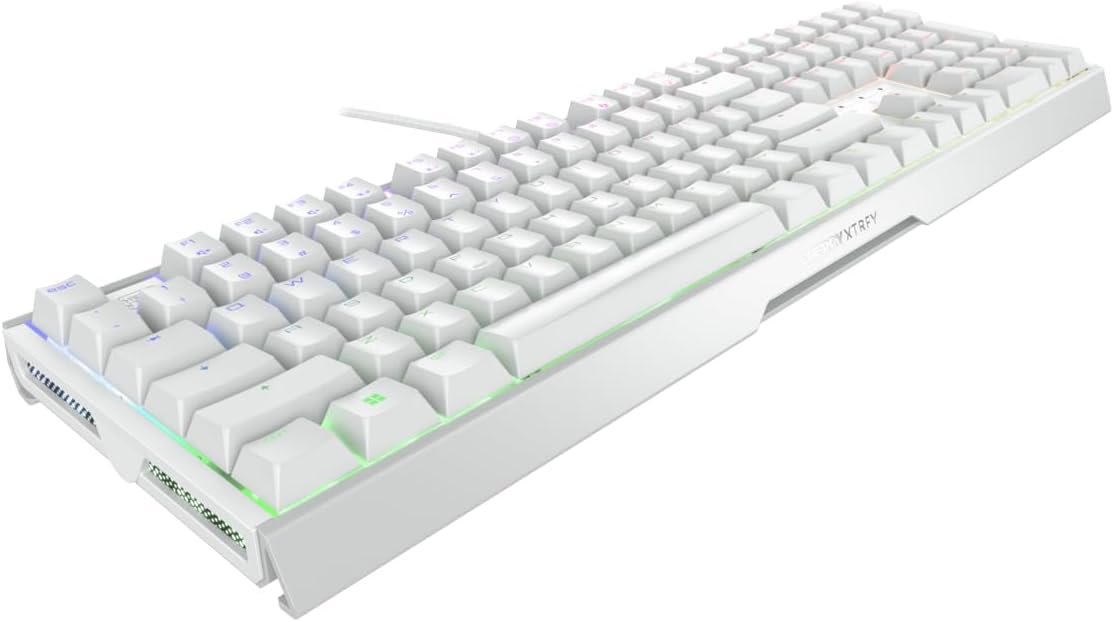
Figure 1.2: CHERRY XTRFY MX 3.1 Keyboard - Angled View
2. คู่มือการติดตั้ง
2.1 เนื้อหาบรรจุภัณฑ์
- CHERRY XTRFY MX 3.1 Mechanical Wired Gaming Keyboard
- Detachable USB-A Cable
- Screwable Detachable Metal Feet (pre-installed or included separately)
- คู่มือการเริ่มต้นฉบับย่อ (คู่มือนี้)
2.2 การเชื่อมต่อคีย์บอร์ด
- แกะคีย์บอร์ดและอุปกรณ์เสริมทั้งหมดออกจากบรรจุภัณฑ์
- Locate the detachable USB-A cable. Connect one end of the cable to the USB-C port on the keyboard.
- เชื่อมต่อปลายอีกด้านหนึ่งของสาย USB-A เข้ากับพอร์ต USB ที่ว่างอยู่บนคอมพิวเตอร์ของคุณ
- ระบบปฏิบัติการของคุณจะตรวจจับแป้นพิมพ์โดยอัตโนมัติ โดยปกติแล้วไม่จำเป็นต้องติดตั้งไดรเวอร์เพิ่มเติมสำหรับการใช้งานพื้นฐาน
2.3 การปรับความสูงของแป้นพิมพ์
The MX 3.1 keyboard includes screwable detachable metal feet for individual positioning and ergonomic comfort. These feet can be adjusted or removed based on your preferred typing angle.

Figure 2.1: Detachable Metal Feet for Height Adjustment
3. คู่มือการใช้งาน
3.1 CHERRY MX2A Switches
The CHERRY XTRFY MX 3.1 keyboard features new CHERRY MX2A switches, engineered in Germany for reliable and comfortable typing. These switches incorporate gold crosspoint precision, premium lubricant, and an innovative spring design for smoother actuation, improved acoustics, and a lifespan of 100 million keystrokes.

Figure 3.1: CHERRY MX2A Switch Options
The MX 3.1 is available with different MX2A switch types, allowing you to choose based on your preferred tactile feedback and sound:
- CHERRY MX2A Red Switch: Offers a linear, smooth, and direct keystroke without a noticeable click. Ideal for fast-paced gaming.
- CHERRY MX2A Brown Switch: Provides a targeted and noticeable tactile bump without an audible click, offering a balance between typing and gaming.

Figure 3.2: Detail of a CHERRY MX2A Switch
3.2 Customizable RGB Illumination
The MX 3.1 features 16.8 million color LED illumination, which can be customized to your preference. You can choose from integrated color schemes or create your own unique lighting effects.

รูปที่ 3.3: แสงไฟ RGB ที่ปรับแต่งได้
To fully customize the RGB illumination, multimedia controls, shortcuts, text modules, and macros, download and install the official CHERRY software from the CHERRY XTRFY website. The software provides an intuitive interface for advanced personalization.

Figure 3.4: Side RGB Illumination
3.3 Noise Damping Structure
The keyboard incorporates a damping structure designed to reduce noise during fast typing and intense gaming sessions. This feature helps maintain focus and provides a more pleasant acoustic environment.

Figure 3.5: Noise Damping Feature
Integrated mechanisms further improve acoustics and contribute to ergonomic comfort, reducing strain on fingers and wrists during long periods of use.
4. การบำรุงรักษา
4.1 การทำความสะอาดแป้นพิมพ์
- ถอดแป้นพิมพ์ออกจากคอมพิวเตอร์ของคุณก่อนทำความสะอาด
- ใช้ผ้านุ่มไม่เป็นขุยเช็ดเล็กน้อยampชุบน้ำหรือน้ำยาทำความสะอาดอ่อนๆ เพื่อเช็ดปุ่มและตัวเครื่อง
- สำหรับฝุ่นละอองและเศษต่างๆ ระหว่างคีย์ ให้ใช้ลมอัด
- Avoid using harsh chemicals, abrasive cleaners, or excessive moisture, as these can damage the keyboard's finish or internal components.
- ตรวจสอบให้แน่ใจว่าแป้นพิมพ์แห้งสนิทก่อนจะเสียบเข้ากับคอมพิวเตอร์อีกครั้ง
5 การแก้ไขปัญหา
5.1 ปัญหาทั่วไปและแนวทางแก้ไข
| ปัญหา | สาเหตุที่เป็นไปได้ | สารละลาย |
|---|---|---|
| แป้นพิมพ์ไม่ตอบสนอง | Loose cable connection, incorrect USB port, driver issue | ตรวจสอบให้แน่ใจว่าสาย USB เชื่อมต่อแน่นดีแล้ว ลองเปลี่ยนพอร์ต USB รีสตาร์ทคอมพิวเตอร์ |
| แสง RGB ไม่ทำงานหรือไม่ถูกต้อง | Software settings, keyboard mode | Check CHERRY software settings. Ensure keyboard is not in a mode that disables lighting. Reinstall software if necessary. |
| กุญแจไม่ลงทะเบียนหรือพิมพ์ซ้ำ | Debris under keycap, switch malfunction | Use compressed air to clear debris. If issue persists, contact support. |
| Function (FN) keys not working | Function lock enabled | Press CTRL + FN to toggle function lock. The FN key will glow red when engaged. |
6. ข้อมูลจำเพาะ
| คุณสมบัติ | รายละเอียด |
|---|---|
| ยี่ห้อ | เชอร์รี่ เอ็กซ์เทรฟี่ |
| หมายเลขรุ่น | G80-3890HJAUS-0 |
| ขนาดสินค้า | ยาว 17.1 นิ้ว x กว้าง 5.4 นิ้ว x สูง 1.3 นิ้ว (17.1 x 5.4 x 1.3 นิ้ว) |
| น้ำหนักสินค้า | 3.21 ปอนด์ |
| ผู้ผลิต | เชอร์รี่ เอ็กซ์เทรฟี่ |
| อุปกรณ์ที่รองรับ | PC |
| เทคโนโลยีการเชื่อมต่อ | ยูเอสบี-เอ |
| คำอธิบายแป้นพิมพ์ | เกมเมอร์เชิงกล |
| การใช้ที่แนะนำ | การเล่นเกม |
| คุณสมบัติพิเศษ | Adjustable RGB, Aluminum Build, Cherry MX2A Switches |
| สี | สีขาว |
| จำนวนคีย์ | 110 |
| วัสดุ | อลูมิเนียม |
7. ข้อมูลการรับประกัน
Specific warranty details for the CHERRY XTRFY MX 3.1 Mechanical Wired Gaming Keyboard are not provided in this manual. For comprehensive warranty terms and conditions, please refer to the official CHERRY XTRFY webโปรดเยี่ยมชมเว็บไซต์หรือติดต่อฝ่ายบริการลูกค้าโดยตรง โปรดเก็บหลักฐานการซื้อไว้เพื่อใช้ในการเรียกร้องการรับประกัน
8. การสนับสนุนลูกค้า
If you encounter any issues or have questions regarding your CHERRY XTRFY MX 3.1 keyboard that are not covered in this manual, please visit the official CHERRY XTRFY support page or contact their customer service team. Support resources typically include FAQs, driver downloads, and contact information for technical assistance.
Official CHERRY XTRFY Webเว็บไซต์: www.cherryxtrfy.com


