1. คำแนะนำด้านความปลอดภัย
Please read and understand all safety instructions before operating the Moukey MTs10-2 Karaoke Machine. Retain this manual for future reference.
- ห้ามให้อุปกรณ์โดนฝน ความชื้น หรืออุณหภูมิที่สูงหรือต่ำเกินไป
- หลีกเลี่ยงการวางเครื่องไว้ใกล้แหล่งความร้อนหรือโดนแสงแดดโดยตรง
- อย่าเปิดcasinง. ส่งต่อการบริการทั้งหมดให้กับบุคลากรที่มีคุณสมบัติ
- ตรวจสอบให้แน่ใจว่ามีการระบายอากาศที่เหมาะสมเพื่อป้องกันภาวะความร้อนมากเกินไป
- ใช้เฉพาะอะแดปเตอร์ที่ให้มาเท่านั้น
- เก็บให้พ้นจากมือเด็ก
- กำจัดแบตเตอรี่อย่างมีความรับผิดชอบตามกฎระเบียบท้องถิ่น
2. เนื้อหาบรรจุภัณฑ์
ตรวจสอบว่ารายการทั้งหมดที่ระบุไว้ด้านล่างนี้รวมอยู่ในแพ็คเกจของคุณ:
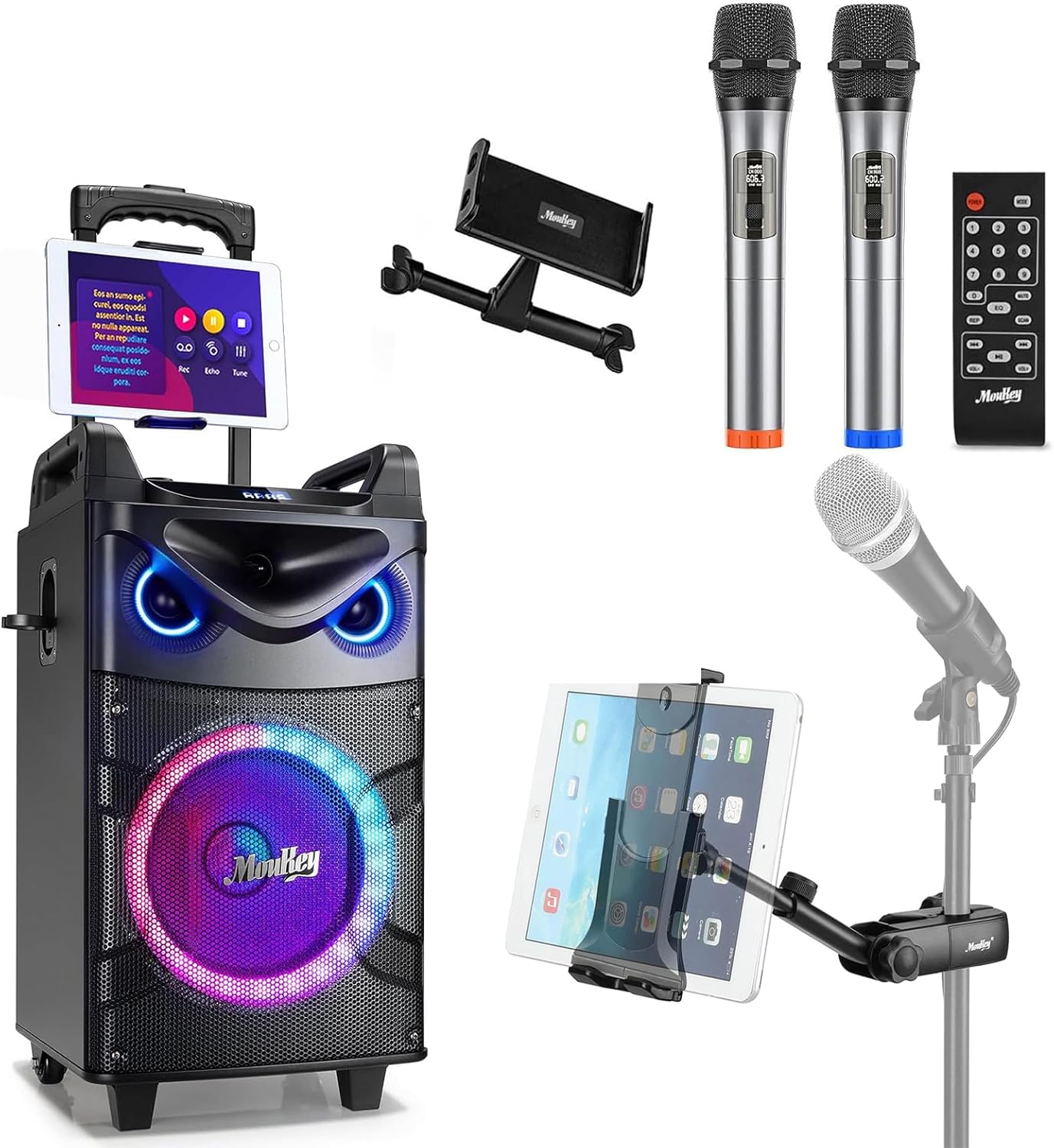
- Moukey MTs10-2 Karaoke Machine
- ไมโครโฟนไร้สาย (2 ตัว)
- Adjustable Tablet Holder
- รีโมทคอนโทรล
- อะแดปเตอร์แปลงไฟ
- สาย AUX 3.5 มม
- TV Cable (RCA to 3.5mm)
- คู่มือการใช้งาน (เอกสารนี้)

3. สินค้าหมดview
3.1 ส่วนประกอบหลัก
The Moukey MTs10-2 Karaoke Machine features a robust design with integrated audio components and versatile connectivity options.
- 10-inch Woofer: Provides powerful bass and full-range sound reproduction.
- ทวีตเตอร์ขนาด 3 นิ้ว: Delivers clear high-frequency audio.
- UHF Wireless Microphones: Two high-fidelity microphones for vocal performance.
- Adjustable Tablet Holder: Securely holds smartphones and tablets for lyric display or video playback.
- ไฟ LED แบบบูรณาการ: Dynamic colorful lights that synchronize with music.

3.2 แผงควบคุม
The control panel located on the top of the unit provides access to all functions and adjustments.
- ปุ่มปรับระดับเสียง: ปรับระดับเสียงหลัก
- การปรับเสียงเบส: Controls the low-frequency output.
- การปรับเสียงแหลม: Controls the high-frequency output.
- ปุ่มโหมด: Switches between input sources (Bluetooth, AUX, USB, TF Card, FM Radio).
- Light FX Button: Cycles through LED light modes.
- พอร์ต USB: สำหรับการเล่นไดรฟ์ USB
- ช่องเสียบการ์ด TF: สำหรับการเล่นไฟล์จากการ์ด TF
- AUX ใน: อินพุต 3.5 มม. สำหรับอุปกรณ์เสียงภายนอก
- 6.35mm Mic Jacks: Two additional inputs for wired microphones.
- INST/TWS Button: Initiates True Wireless System pairing or instrument input.

4. การตั้งค่า
4.1 Charging the Karaoke Machine
- Connect the provided power adapter to the DC IN port on the back of the karaoke machine.
- เสียบอะแดปเตอร์เข้ากับเต้ารับที่ผนังมาตรฐาน
- ไฟแสดงสถานะการชาร์จจะสว่างขึ้น โดยทั่วไปการชาร์จจนเต็มจะใช้เวลาประมาณ 6 ชั่วโมง
- The machine offers up to 14 hours of playing time on a full charge, depending on usage.

4.2 Installing Microphone Batteries
Each wireless microphone requires two AA batteries (not included).
- Unscrew the bottom cap of each microphone.
- ใส่แบตเตอรี่ AA สองก้อน โดยตรวจสอบให้แน่ใจว่าขั้วถูกต้อง (+/-)
- ขันฝาปิดด้านล่างให้แน่นสนิท

4.3 Attaching the Tablet Holder
The adjustable tablet holder can be attached to the karaoke machine or a separate microphone stand.
- To the Karaoke Machine: Slide the tablet holder's base into the designated slot on top of the MTs10-2 unit until it clicks into place.
- To a Mic Stand: ใช้ clamp mechanism on the tablet holder to secure it to a standard microphone stand pole.
- Adjust the flexible ball joint and the 360° rotatable clamp เพื่อให้บรรลุผลตามที่ต้องการ viewปรับมุมให้เหมาะสมกับอุปกรณ์ของคุณ


5. คู่มือการใช้งาน
5.1 เปิด/ปิดเครื่อง
Press and hold the Power button on the control panel to turn the karaoke machine on or off.
5.2 การเชื่อมต่อบลูทูธ
- Turn on the karaoke machine. It will automatically enter Bluetooth pairing mode, indicated by a flashing 'BLUE' on the display.
- บนสมาร์ทโฟนหรือแท็บเล็ตของคุณ ให้เปิดใช้งาน Bluetooth และค้นหาอุปกรณ์ที่มีอยู่
- Select 'Moukey MTs10-2' from the list to pair. A confirmation tone will sound upon successful connection.
5.3 การใช้งานไมโครโฟน
- Turn on the wireless microphones using their respective power switches. They will automatically connect to the karaoke machine.
- Adjust the microphone volume using the dedicated controls on the machine.
- For wired microphones, plug them into the 6.35mm Mic Jacks on the control panel.
5.4 True Wireless System (TWS) Pairing
The TWS function allows you to connect two MTs10-2 units for a stereo sound experience (second unit sold separately).
- Ensure both MTs10-2 units are powered on and not connected to any Bluetooth device.
- On one unit (the master), press and hold the 'INST/TWS' button until you hear a pairing tone.
- The two units will automatically connect. Once paired, connect your Bluetooth device to the master unit as described in Section 5.2.

5.5 โหมดไฟ LED
Press the 'Light FX' button on the control panel or remote control to cycle through various colorful LED light modes. The lights can change color with the beat of the music, creating a dynamic atmosphere.

5.6 ตัวเลือกอินพุตเสียง
The MTs10-2 supports multiple audio input methods:
- บลูทูธ: Wireless connection to smartphones, tablets, and other Bluetooth-enabled devices.
- AUX ใน: Connect external audio players using the provided 3.5mm AUX cable.
- USB/การ์ด TF: Insert a USB drive or TF card into the respective slots for direct audio playback.
- วิทยุ FM: Switch to FM radio mode to listen to local stations.

5.7 การปรับเสียง
Use the dedicated knobs on the control panel to fine-tune your audio output:
- ปุ่มปรับระดับเสียง: หมุนตามเข็มนาฬิกาเพื่อเพิ่มระดับเสียง หมุนทวนเข็มนาฬิกาเพื่อลดระดับเสียง
- การปรับเสียงเบส: Adjust to enhance or reduce low frequencies.
- การปรับเสียงแหลม: Adjust to enhance or reduce high frequencies.
6. การบำรุงรักษา
Proper maintenance ensures the longevity and optimal performance of your karaoke machine.
- การทำความสะอาด: ใช้ผ้านุ่มและแห้งเช็ดทำความสะอาดภายนอกตัวเครื่อง ห้ามใช้น้ำยาทำความสะอาดหรือวัสดุขัดถู
- พื้นที่จัดเก็บ: Store the machine in a cool, dry place away from direct sunlight and extreme temperatures when not in use.
- การดูแลแบตเตอรี่ If storing for an extended period, fully charge the internal battery every 3-6 months to maintain its health. Remove AA batteries from microphones if not used for a long time.
- การระบายอากาศ : Ensure the speaker grilles and vents are free from dust and obstructions.
7 การแก้ไขปัญหา
โปรดดูตารางด้านล่างเพื่อดูปัญหาทั่วไปและวิธีแก้ไข
| ปัญหา | สาเหตุที่เป็นไปได้ | สารละลาย |
|---|---|---|
| ไม่มีไฟฟ้า | Battery depleted; Power adapter not connected. | Charge the machine; Ensure power adapter is securely connected to both the unit and a working outlet. |
| ไม่มีเสียงออก | ระดับเสียงต่ำเกินไป; โหมดป้อนข้อมูลไม่ถูกต้อง; อุปกรณ์ไม่ได้เชื่อมต่อ | Increase master volume; Press 'Mode' button to select correct input; Re-pair Bluetooth device or check AUX/USB connection. |
| ไมโครโฟนไม่ทำงาน | Microphone off; Batteries depleted; Out of range. | Turn on microphone; Replace AA batteries; Ensure microphone is within operating range of the machine. |
| การเชื่อมต่อบลูทูธไม่เสถียร | Device too far; Interference; Other Bluetooth devices connected. | Move device closer to the machine; Avoid obstacles; Disconnect other Bluetooth devices. |
| การจับคู่ TWS ล้มเหลว | One or both units already connected to Bluetooth; Incorrect pairing procedure. | Ensure both units are disconnected from other Bluetooth devices; Follow TWS pairing steps in Section 5.4 carefully. |
8. ข้อมูลจำเพาะ
| คุณสมบัติ | ข้อมูลจำเพาะ |
|---|---|
| ยี่ห้อ | มูกี้ |
| แบบอย่าง | เอ็มทีเอส10-2 |
| ขนาดวูฟเฟอร์ | 10 นิ้ว |
| ขนาดทวีตเตอร์ | 3 นิ้ว |
| กำลังขับสูงสุด | 160 วัตต์ |
| แหล่งพลังงาน | ใช้พลังงานจากแบตเตอรี่ |
| เทคโนโลยีการเชื่อมต่อ | บลูทูธ |
| จำนวนช่องสัญญาณ | 4 |
| อินพุตเสียง | Wired microphones, wireless microphones, musical instruments, audio players |
| Microphone Connector Type | 6.35mm Jack (for wired mics) |
| ความเข้ากันได้ของที่วางแท็บเล็ต | 4.7 to 12.9 inches phones & tablets (horizontal placement) |
| ประเภทการติดตั้ง | ชั้นยืน |
| สี | สีดำ |
9. การรับประกันและการสนับสนุน
Moukey products are designed and manufactured to the highest quality standards. For warranty information, technical support, or service inquiries, please refer to the warranty card included in your package or visit the official Moukey webเว็บไซต์. คุณยังสามารถเยี่ยมชม ร้าน Moukey บน Amazon สำหรับข้อมูลผลิตภัณฑ์เพิ่มเติมและทรัพยากรสนับสนุน


