การแนะนำ
The Caliber RMD035DAB-FBA is a versatile 1DIN car radio designed to enhance your in-car audio experience. It features an integrated DAB+/FM tuner for crystal clear radio reception, Bluetooth for hands-free calling and audio streaming, and multiple media playback options including USB and Micro SD cards. This manual provides detailed instructions for installation, operation, and maintenance to ensure optimal performance and longevity of your device.

Figure 1: Caliber RMD035DAB-FBA Car Radio Front View
คุณสมบัติหลัก
- เครื่องรับสัญญาณวิทยุ DAB+: Enjoy crystal clear and interference-free digital radio reception.
- เครื่องรับสัญญาณวิทยุ FM พร้อมระบบ RDS-EON: Standard FM radio reception with enhanced data services.
- การเชื่อมต่อบลูทูธ: สำหรับการโทรแบบแฮนด์ฟรีและการสตรีมเสียงแบบไร้สาย
- USB & Micro SD Playback: Supports music playback from USB drives and Micro SD cards up to 32GB.
- 2.1A USB Charging: Conveniently charge your smartphone or other devices.
- สัญญาณเข้า: เชื่อมต่ออุปกรณ์เสียงภายนอกผ่านแจ็ค 3.5 มม.
- อาร์ซีเอเอาท์พุต: สำหรับการเชื่อมต่อภายนอก ampลิตเตอร์
- การสนับสนุนรูปแบบเสียง: Compatible with MP3, WMA, APE, FLAC, and AAC audio formats.
- ขนาดมาตรฐาน 1 DIN: ติดตั้งง่ายในรถยนต์ส่วนใหญ่

รูปที่ 2: เกินview of Product Features and Connectivity Options
การติดตั้งและการตั้งค่า
This unit is designed for standard 1 DIN installation. Professional installation is recommended to ensure proper wiring and functionality.
1. การตรวจสอบก่อนการติดตั้ง
- Ensure your vehicle has a standard 1 DIN opening.
- Verify that your vehicle's wiring harness is compatible with the ISO connection provided.
- Disconnect the vehicle's negative battery terminal before starting installation to prevent electrical shorts.
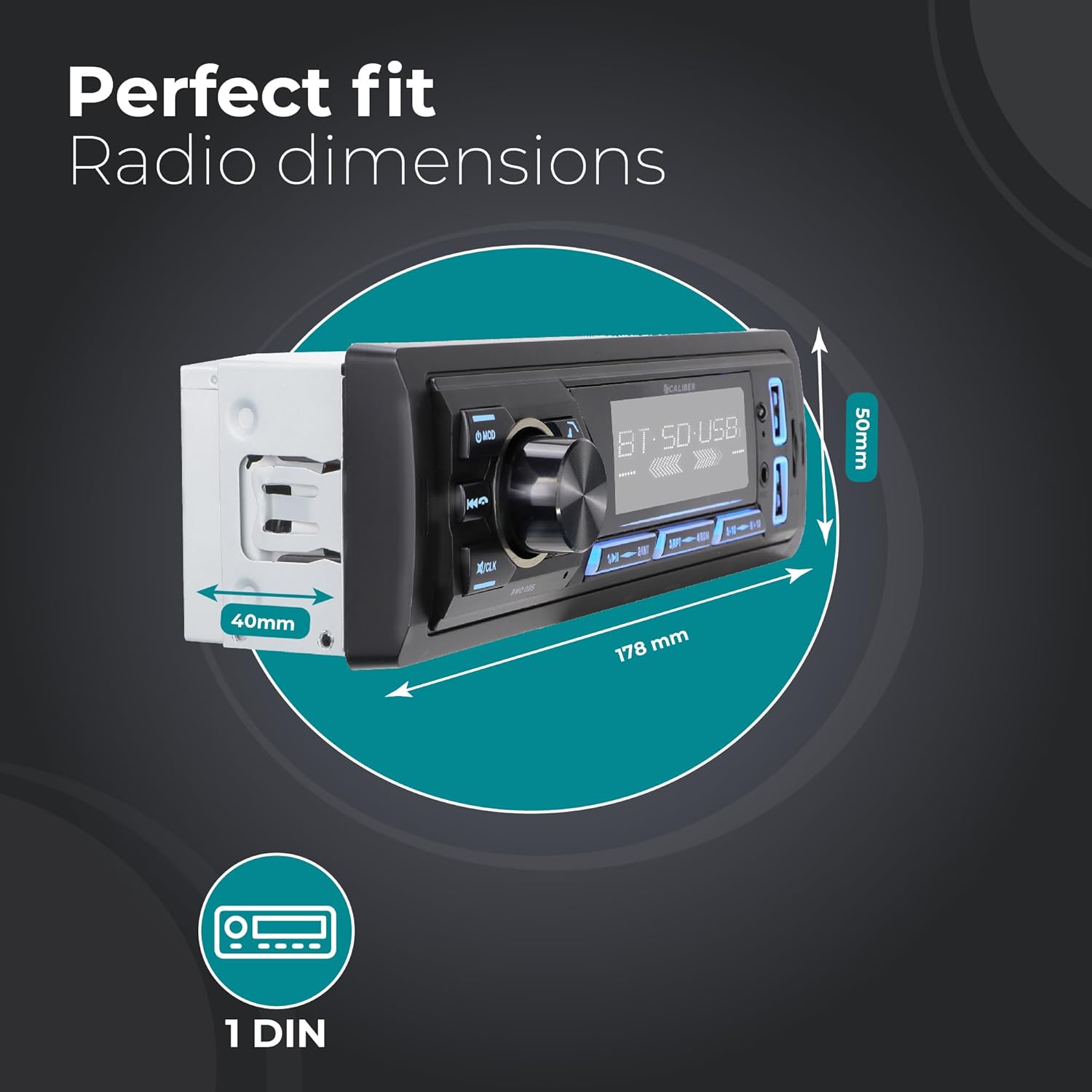
Figure 3: Car Radio Dimensions for Installation
2. การเชื่อมต่อสายไฟ
Connect the following wires according to the ISO standard and your vehicle's wiring diagram:
- สีเหลือง (กำลังคงที่): Connect to a constant 12V supply.
- สีแดง (อุปกรณ์เสริม): Connect to a switched 12V supply (ignition).
- สีดำ (พื้น): เชื่อมต่อกับจุดต่อสายดินของตัวถังรถที่ดี
- สีน้ำเงิน (เสาอากาศ/Ampเครื่องขยายเสียง (รีโมท): Connect to power antenna or external ampรีโมทเปิดเครื่องไฟร์เออร์
- สายลำโพง: Connect to your vehicle's speakers (e.g., White/White-Black for Front Left, Grey/Grey-Black for Front Right, Green/Green-Black for Rear Left, Purple/Purple-Black for Rear Right).
- เสาอากาศ DAB+: Connect the included DAB+ antenna to the dedicated DAB antenna input on the rear of the unit. Position the antenna for optimal reception.
- อาร์ซีเอเอาท์พุท: หากใช้อุปกรณ์ภายนอก amplifier, connect RCA cables from the unit's RCA outputs to the ampอินพุตของ lifier
3. การติดตั้งตัวเครื่อง
- Slide the metal mounting sleeve into the vehicle's dashboard opening until it locks into place.
- Carefully slide the car radio unit into the mounting sleeve until it clicks securely.
- ต่อขั้วแบตเตอรี่ลบของรถกลับเข้าที่
คำแนะนำการใช้งาน
1. การควบคุมพื้นฐาน
- เปิด/ปิดเครื่อง: กดปุ่ม ม็อด กดปุ่มสั้นๆ เพื่อเปิดเครื่อง กดค้างไว้เพื่อปิดเครื่อง
- การควบคุมระดับเสียง: หมุนปุ่มตรงกลางขนาดใหญ่เพื่อปรับระดับเสียง
- การเลือกโหมด: กดปุ่ม ม็อด button repeatedly to cycle through available modes (DAB+, FM, Bluetooth, USB, SD, AUX).
- ปิดเสียง: Briefly press the volume knob to mute/unmute audio.
- การตั้งค่านาฬิกา: กดปุ่มค้างไว้ /ซีแอลเค กดปุ่มเพื่อเข้าสู่โหมดตั้งค่านาฬิกา ใช้ปุ่มปรับระดับเสียงเพื่อปรับชั่วโมง/นาที และกดปุ่มเพื่อยืนยัน
2. การใช้งานวิทยุ (DAB+/FM)
- การเลือกแบนด์: ในโหมดวิทยุให้กดปุ่ม บีเอ็นดี button to switch between FM1, FM2, FM3, DAB1, DAB2, DAB3.
- การสแกนอัตโนมัติ: กดปุ่มค้างไว้ บีเอ็นดี button to perform an automatic scan and store strong stations.
- การปรับด้วยตนเอง: ใช้ ◀◀ (เพลงก่อนหน้า) และ ▶▶ (next track) buttons for manual tuning.
- สถานีที่ตั้งไว้ล่วงหน้า: กดปุ่ม 1 ถึง 6 to select a stored preset station. To store a station, tune to the desired frequency, then press and hold one of the preset buttons (1-6) until you hear a beep.

Figure 4: DAB+ Digital Radio Experience
3. การทำงานของบลูทูธ
- การจับคู่:
- เลือกโหมดบลูทูธโดยใช้ ม็อด button. The display will show "BT".
- บนอุปกรณ์มือถือของคุณ เปิดใช้งาน Bluetooth และค้นหาอุปกรณ์ที่มีอยู่
- Select "Caliber RMD035DAB" (or similar name) from the list. If prompted for a PIN, enter "0000".
- เมื่อจับคู่แล้ว จอภาพจะแสดง "เชื่อมต่อแล้ว"
- การโทรแบบแฮนด์ฟรี:
- รับสาย: กดปุ่ม ☎ (phone) button.
- วางสาย: กดปุ่ม ☎ (phone) button again.
- ปฏิเสธสาย: กดปุ่มค้างไว้ ☎ (phone) button.
- โทรซ้ำ: ในโหมด Bluetooth ให้กดปุ่ม ☎ (phone) button twice to redial the last number.
- การสตรีมเสียงบลูทูธ (A2DP):
- Once paired, audio from your device will stream to the car radio.
- ใช้ ◀◀ และ ▶▶ ปุ่มสำหรับข้ามเพลง
- Use the volume knob to adjust playback volume.

Figure 5: Bluetooth Audio Streaming Interface
4. การเล่นไฟล์ผ่าน USB และ Micro SD
- Insert a USB drive into the USB port or a Micro SD card into the SD card slot. The unit will automatically switch to USB/SD mode and begin playback.
- ใช้ ◀◀ และ ▶▶ ปุ่มสำหรับข้ามเพลง
- กดปุ่ม 1/▶▶ ปุ่มเพื่อเล่น / หยุดชั่วคราว
- The unit supports MP3, WMA, APE, FLAC, and AAC audio formats.
5. การใช้งาน AUX-in
- Connect an external audio device (e.g., MP3 player) to the AUX-in port on the front panel using a 3.5mm audio cable.
- เลือกโหมด AUX โดยใช้ ม็อด ปุ่ม.
- Control playback and volume from the connected external device.
6. ฟังก์ชั่นการชาร์จผ่าน USB
- The dedicated USB charging port (2.1A) allows you to charge your smartphone or other USB-powered devices.
- Simply connect your device's USB charging cable to the charging port.

Figure 6: USB Charging Port Location
การซ่อมบำรุง
- การทำความสะอาด: ใช้ผ้าแห้งนุ่มๆ เช็ดทำความสะอาดแผงด้านหน้าของเครื่อง สำหรับคราบสกปรกที่ติดแน่น ให้ใช้ผ้าชนิดอื่นเช็ดทำความสะอาดampชุบผ้าให้เปียกหมาดๆ อย่าใช้สารทำความสะอาดที่มีฤทธิ์กัดกร่อนหรือตัวทำละลาย
- อุณหภูมิ: หลีกเลี่ยงการวางเครื่องไว้ในอุณหภูมิที่สูงหรือต่ำเกินไป แสงแดดโดยตรงเป็นเวลานาน หรือความชื้นสูง
- การระบายอากาศ : Ensure the unit has adequate ventilation to prevent overheating. Do not block ventilation openings.
- การเปลี่ยนฟิวส์: If the unit does not power on, check the fuse located on the rear of the unit. Replace with a fuse of the same rating (typically 10A).
การแก้ไขปัญหา
| ปัญหา | สาเหตุที่เป็นไปได้ | สารละลาย |
|---|---|---|
| ไม่มีไฟฟ้า | สายไฟไม่ถูกต้อง ฟิวส์ขาด แบตเตอรี่รถยนต์อ่อน | ตรวจสอบสายไฟและสายดิน เปลี่ยนฟิวส์หากขาด ตรวจสอบแบตเตอรี่รถยนต์ |
| ไม่มีเสียง | ระดับเสียงต่ำเกินไป ปิดเสียงแล้ว สายลำโพงหลุด/ลัดวงจร | เพิ่มระดับเสียง ปิดเสียง ตรวจสอบสายลำโพง |
| Poor radio reception (FM) | ไม่ได้เชื่อมต่อเสาอากาศ พื้นที่สัญญาณอ่อน เสาอากาศเสียหาย | Ensure antenna is properly connected. Try tuning to a stronger station. Inspect antenna for damage. |
| Poor radio reception (DAB+) | DAB+ antenna not connected/positioned correctly; Out of DAB+ service area. | Ensure DAB+ antenna is connected and positioned optimally (e.g., on windshield). Check DAB+ coverage in your area. |
| บลูทูธไม่จับคู่ | Unit not in pairing mode; Device Bluetooth off; Incorrect PIN. | Ensure unit is in Bluetooth mode. Turn Bluetooth on/off on device. Enter "0000" if prompted for PIN. |
| USB/SD เล่นไม่ได้ | ไม่ได้รับการสนับสนุน file รูปแบบ; เสียหาย files; เสียบ USB/SD การ์ดไม่ถูกต้อง; ความจุของการ์ดมากเกินไป | ทำให้มั่นใจ files are supported (MP3/WMA/APE/FLAC/AAC). Reinsert USB/SD. Use cards up to 32GB. |
ข้อมูลจำเพาะ
| คุณสมบัติ | รายละเอียด |
|---|---|
| ยี่ห้อ | ขนาดเส้นผ่าศูนย์กลาง |
| แบบอย่าง | RMD035DAB-FBA |
| พิมพ์ | 1 DIN Car Radio |
| เทคโนโลยีการเชื่อมต่อ | บลูทูธ, ยูเอสบี |
| คุณสมบัติพิเศษ | Built-In Bluetooth, RCA Output, FM Tuner, DAB+, Hands-Free Calling, USB Charging (2.1A) |
| อุปกรณ์ที่รองรับ | สมาร์ทโฟน แท็บเล็ต คอมพิวเตอร์ส่วนบุคคล |
| โหมดเอาต์พุตเสียง | สเตอริโอ |
| การกำหนดค่าช่องเสียงรอบทิศทางของลำโพง | 4.0 |
| เอาท์พุต วัดtage | 4 x 55 วัตต์ |
| รูปแบบเสียงที่รองรับ | MP3, WMA, APE, FLAC, AAC |
| USB/Micro SD Capacity | สูงสุด 32GB |
| ขนาดสินค้า (กว้าง x ยาว x สูง) | 17.8 x 4 x 5 ซม. (7.01 x 1.57 x 1.97 นิ้ว) |
| น้ำหนักสินค้า | 500 กรัม (1.1 ปอนด์) |
การรับประกันและการสนับสนุน
Specific warranty details for the Caliber RMD035DAB-FBA are not provided in this manual. Please refer to the warranty card included with your product packaging or visit the official Caliber webเว็บไซต์นี้มีข้อมูลการรับประกันล่าสุดและช่องทางการติดต่อฝ่ายบริการลูกค้า
For technical assistance or service inquiries, please contact Caliber customer support through their official channels.


