1. บทนำ
This manual provides detailed instructions for the installation, operation, and maintenance of your CAMECHO RM 4K Mirror Dash Cam. This device integrates a high-resolution dash camera with a 10.99-inch full touch screen, offering advanced features such as wireless CarPlay, Android Auto, Wi-Fi connectivity, voice control, and night vision for an enhanced driving experience.

รูปที่ 1.1: CAMECHO RM 4K Mirror Dash Cam overview, showing the screen interface with various app icons and connectivity features.
2. เนื้อหาบรรจุภัณฑ์
โปรดตรวจสอบว่าสินค้าทั้งหมดที่ระบุไว้ด้านล่างนี้รวมอยู่ในแพ็คเกจของคุณแล้ว หากมีสินค้าใดสูญหายหรือเสียหาย โปรดติดต่อฝ่ายสนับสนุนลูกค้า
- CAMECHO RM Mirror Dash Cam (Front unit)
- สายไฟสำหรับที่จุดบุหรี่
- คู่มือการใช้งาน
- สาย AUX 3 เมตร
- Bandages (for cable management)
- Note: The rear view camera is sold separately and is not included in the standard package.
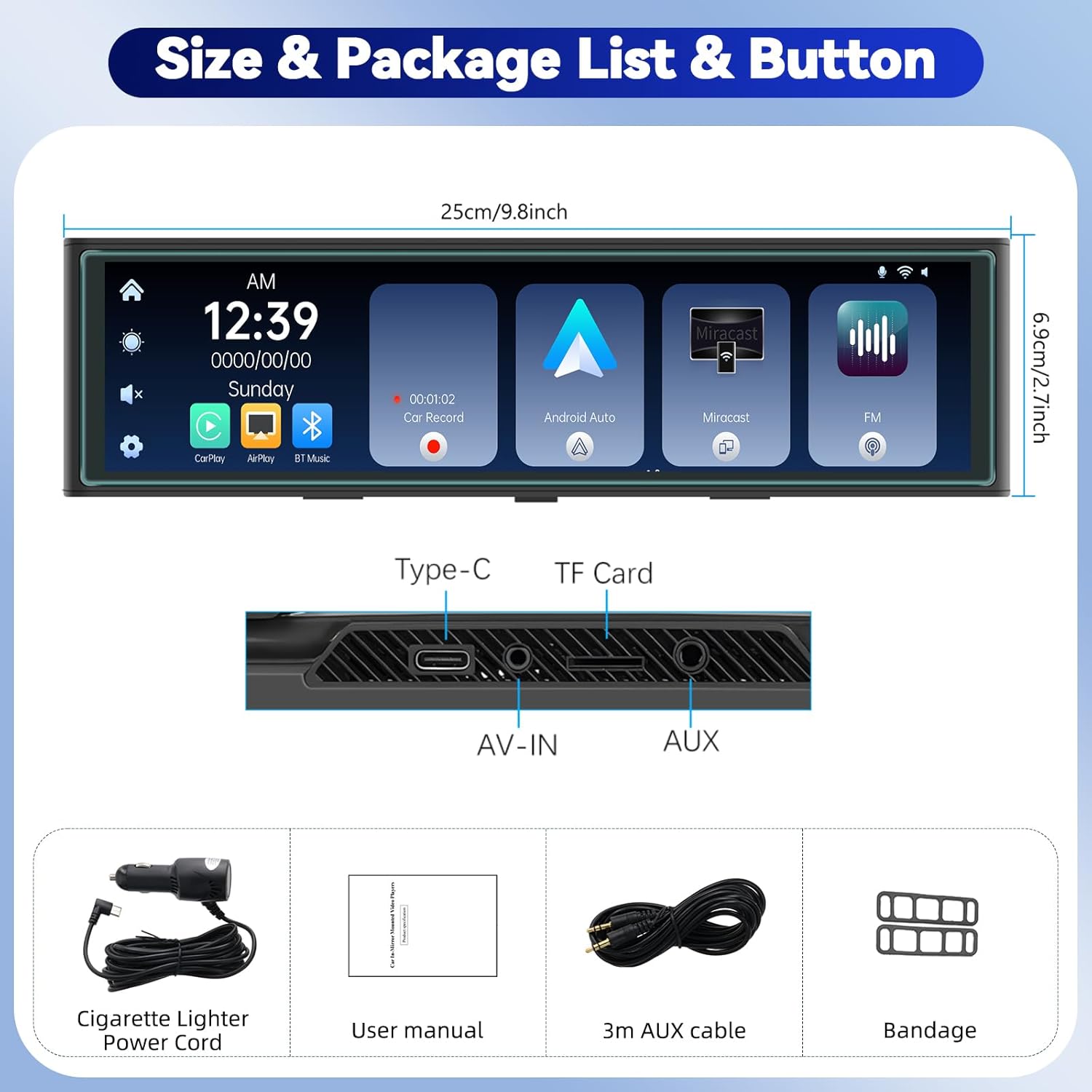
รูปที่ 2.1: Illustration of the CAMECHO RM Mirror Dash Cam and its included accessories.
3. การติดตั้ง
3.1 การติดตั้ง Dash Cam
- Securely attach the CAMECHO RM Mirror Dash Cam over your vehicle's existing rearview mirror using the provided straps or clips. Ensure it is centered and stable.
- ปรับมุมของเลนส์กล้องหน้าเพื่อถ่ายภาพตามที่ต้องการ view ของถนนข้างหน้า
3.2 การเชื่อมต่อสายไฟ
- Connect the cigarette lighter power cord to the Type-C port on the top of the dash cam.
- Route the power cable neatly along the windshield trim and dashboard to the vehicle's cigarette lighter socket. Use the provided bandages to secure the cable.
- Insert the cigarette lighter adapter into the vehicle's 12V power outlet.
3.3 การติดตั้งกล้องมองหลัง (ไม่บังคับ)
If you have purchased a separate rear view camera, connect it to the AV-IN port on the dash cam. Route the cable to the rear of your vehicle and mount the camera according to its specific instructions, typically near the license plate or rear window. Ensure proper wiring for reverse trigger if desired.

รูปที่ 3.1: Visual guide for routing the power cable and installing the dash cam.
4. คู่มือการใช้งาน
4.1 การทำงานพื้นฐาน
- เปิด/ปิดเครื่อง: The device will automatically power on when the vehicle starts and power off when the engine is turned off. You can also manually power it on/off using the power button (location not specified, assume side/top).
- การนำทางหน้าจอ:
- ปรับ Viewอิงมุม: Slide your finger up or down on the screen to adjust the vertical viewมุมของกล้อง
- สวิตช์ Views: ปัดหน้าจอไปทางซ้ายหรือขวาเพื่อสลับระหว่างกล้องหน้าและกล้องหลัง view,กล้องหลัง view (if connected), or a split-screen display of both.
- การบันทึกวิดีโอ: The dash cam automatically begins recording when powered on. The front camera records in 4K resolution, with options for 1080P/2K/4K. If a rear camera is connected, it records in 1080P.
- การบันทึกแบบวนซ้ำ: Videos are recorded in segments of 1, 3, or 5 minutes. When the memory card is full, the oldest unlocked files will be overwritten by new recordings to ensure continuous operation.
- การมองเห็นตอนกลางคืน: The device features enhanced night vision for clear recording in low-light conditions.
4.2 CarPlay ไร้สายและ Android Auto
The CAMECHO RM supports wireless CarPlay for iPhone and Android Auto for Android phones, allowing seamless integration of your smartphone's features onto the dash cam screen.
- ตรวจสอบให้แน่ใจว่าเปิดใช้งาน Bluetooth และ Wi-Fi บนสมาร์ทโฟนของคุณแล้ว
- On the dash cam, navigate to the CarPlay or Android Auto interface.
- Pair your phone via Bluetooth with the dash cam.
- Once paired, the device will establish a Wi-Fi connection for CarPlay or Android Auto functionality.
- You can now use voice control for navigation, music playback, making calls, and accessing other compatible applications.

รูปที่ 4.1: Wireless CarPlay and Android Auto functionality demonstration.
4.3 Airplay & Android Cast (Screen Mirroring)
Mirror your smartphone's screen directly onto the dash cam display.
- For iOS devices (Airplay): Connect your iPhone to the dash cam via Wi-Fi and select the Airplay option on the dash cam.
- For Android devices (Android Cast): Connect your Android phone to the dash cam via Wi-Fi and select the Android Cast option.

รูปที่ 4.2: Screen mirroring feature for both Android and iOS devices.
4.4 FM Transmitter & Bluetooth Music
Transmit audio from the dash cam to your car's speakers or play music via Bluetooth.
- FM Transmitter:
- On the dash cam, select the FM Transmitter option and choose an unoccupied FM frequency.
- Tune your vehicle's FM radio to the same frequency.
- Audio from the dash cam will now play through your car's speakers.
- เพลงบลูทูธ:
- เปิดใช้งาน Bluetooth บนโทรศัพท์มือถือของคุณ
- On the dash cam, select the [Bluetooth Music] ตัวเลือก.
- ไปที่ [BT Manage] on the dash cam interface to connect to your phone.
- Once connected, you can play music from your phone and make hands-free calls.
- การเชื่อมต่อ AUX: Connect the provided 3m AUX cable from the dash cam's AUX output to your car's AUX input for direct audio transmission.
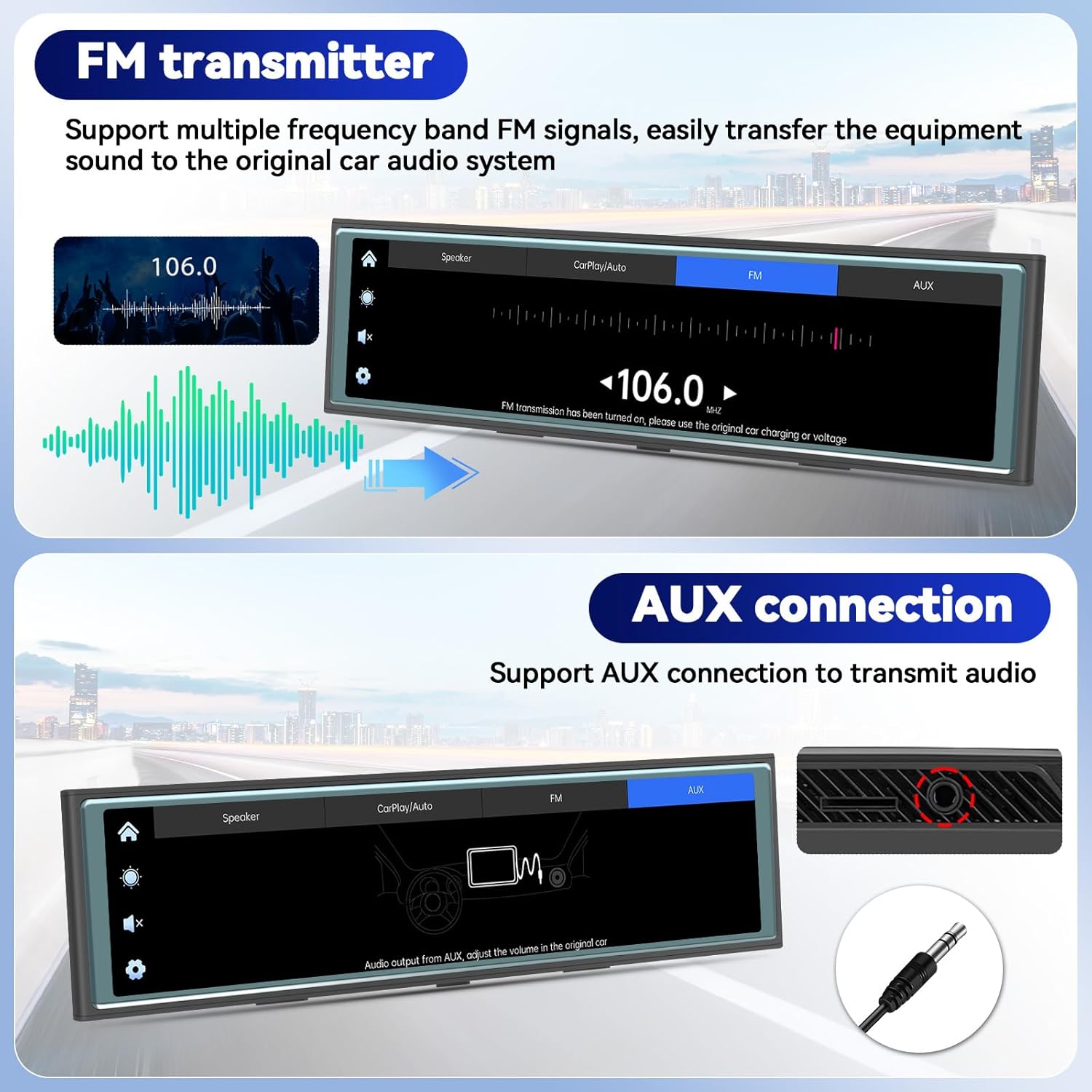
รูปที่ 4.3: FM Transmitter and AUX connection options.
4.5 Wi-Fi & App Control (Viidure App)
Manage your dash cam recordings and settings using the "Viidure" app on your smartphone.
- ดาวน์โหลดแอป: Scan the QR code displayed on the dash cam screen or visit https://www.6zhentan.com/app/d0001/index.html to download the "Viidure" app for iOS or Android.
- เชื่อมต่อผ่าน Wi-Fi:
- On the dash cam, navigate to the Wi-Fi settings.
- On your smartphone, connect to the dash cam's Wi-Fi network (SSID and password will be displayed on the dash cam screen, e.g., "LongGoWiFiHome", password "12345678").
- ฟังก์ชั่นแอพ: เมื่อเชื่อมต่อแล้ว คุณสามารถ view อยู่ footage, play back recorded videos, download videos to your phone, edit clips, and share them.

รูปที่ 4.4: Wi-Fi connectivity and Viidure app download/usage guide.
5. การบำรุงรักษา
- การทำความสะอาด: ใช้ผ้าแห้งเนื้อนุ่มเช็ดทำความสะอาดหน้าจอและเลนส์กล้อง หลีกเลี่ยงการใช้สารทำความสะอาดที่มีฤทธิ์กัดกร่อนหรือตัวทำละลาย
- การ์ดหน่วยความจำ: Regularly format the TF card (TransFlash card) within the dash cam's settings to ensure optimal performance and prevent data corruption. Replace the memory card if it shows signs of degradation or error.
- อัพเดตเฟิร์มแวร์: Check the official CAMECHO website or the Viidure app periodically for available firmware updates to ensure your device has the latest features and bug fixes.
6 การแก้ไขปัญหา
| ปัญหา | สาเหตุที่เป็นไปได้ | สารละลาย |
|---|---|---|
| อุปกรณ์ไม่เปิดเครื่อง | ไม่มีไฟเลี้ยง; การเชื่อมต่อหลวม; สายไฟชำรุด | Check cigarette lighter connection; ensure vehicle's 12V outlet is functional; try a different power source if available. |
| การบันทึกหยุดหรือหยุดนิ่ง | Memory card full or corrupted; incompatible memory card; faulty memory card. | Format the memory card; replace with a high-speed, reputable brand memory card. |
| CarPlay/Android Auto ไม่สามารถเชื่อมต่อได้ | ปิดบลูทูธ/ไวไฟในโทรศัพท์; การจับคู่ไม่ถูกต้อง; สัญญาณรบกวน | Ensure phone's Bluetooth and Wi-Fi are on; re-pair the devices; try restarting both the phone and dash cam. |
| No audio from car speakers via FM. | Incorrect FM frequency; car radio not tuned correctly. | Verify dash cam and car radio are on the exact same, clear FM frequency. |
7. ข้อมูลจำเพาะ
| คุณสมบัติ | รายละเอียด |
|---|---|
| ชื่อรุ่น | RM |
| ขนาดหน้าจอ | 10.99 นิ้ว |
| ประเภทหน้าจอ | 2.5D Full Touch Screen |
| ความละเอียดของกล้องหน้า | 4K (selectable 1080P/2K/4K) |
| ความละเอียดกล้องหลัง | 1080P (requires separate purchase) |
| การเชื่อมต่อ | บลูทู ธ Wi-Fi |
| คุณสมบัติพิเศษ | CarPlay, Android Auto, Airplay, Android Cast, FM Transmitter, Loop Recording, Night Vision, App Control |
| กำลังไฟเข้า | Cigarette Lighter Power Cord (12V) |
| พื้นที่จัดเก็บ | TF Card Slot (card not included, capacity not specified) |
| ขนาดสินค้า | 1 x 1 x 1 นิ้ว |
| น้ำหนักสินค้า | 2.16 ปอนด์ |
| ผู้ผลิต | คาเมโช |
Note: Product dimensions from specifications (1x1x1 inches) appear to be generic. Actual dimensions from product images are approximately 9.8 inches (25cm) length and 2.7 inches (6.9cm) height.
8. การรับประกันและการสนับสนุน
8.1 ข้อมูลการรับประกัน
For detailed warranty information regarding your CAMECHO RM Mirror Dash Cam, please refer to the warranty card included in your product packaging or consult your purchase documentation. Warranty terms and conditions may vary by region and retailer.
8.2 การสนับสนุนลูกค้า
If you encounter any issues or have questions about your CAMECHO product, please contact our customer support team:
- อีเมล: camechovip@126.com
- For additional resources and FAQs, please visit the official CAMECHO webเว็บไซต์.

รูปที่ 8.1: CAMECHO customer support contact information.


